
 我要评论
我要评论什么是websocket?
websocket是一种在单个tcp连接上进行全双工通信的协议。websocket通信协议于2011年被ietf定为标准rfc 6455,并由rfc7936补充规范。websocket api也被w3c定为标准。
websocket使得客户端和服务器之间的数据交换变得更加简单,允许服务端主动向客户端推送数据。在websocket api中,浏览器和服务器只需要完成一次握手,两者之间就直接可以创建持久性的连接,并进行双向数据传输。
为什么有了http协议还要websocket
http协议采用的是客户端(浏览器)轮询的方式,即客户端发送请求,服务端做出响应,为了获取最新的数据,需要不断的轮询发出http请求,占用大量带宽。
websocket采用了一些特殊的报头,使得浏览器和服务器只需要通过“握手”建立一条连接通道后,此链接保持活跃状态,之后的客户端和服务器的通信都使用这个连接,解决了web实时性的问题,相比于http有一下好处:
一个web客户端只建立一个tcp连接
websocket服务端可以主动推送(push)数据到web客户端
有更加轻量级的头,减少了数据传输量
特点
建立在tcp协议只上,服务端比较容易实现
于http协议有良好的兼容性,默认端口也是80和443,握手阶段使用http协议,因此握手时不容易屏蔽,能通过各种http代理服务器
数据格式轻量,通信高效且节省带宽
支持传输文本数据和二进制数据
没有同源限制,客户端可以与任意服务器通信
也支持加密传输,ws+ssl,url形如
wss://
技术
jdk8
maven
springboot2.6.11
websocket
fastjosn
实现
pom.xml
<?xml version="1.0" encoding="utf-8"?>
<project xmlns="http://maven.apache.org/pom/4.0.0" xmlns:xsi="http://www.w3.org/2001/xmlschema-instance"
         xsi:schemalocation="http://maven.apache.org/pom/4.0.0 https://maven.apache.org/xsd/maven-4.0.0.xsd">
    <modelversion>4.0.0</modelversion>
    <parent>
        <groupid>org.springframework.boot</groupid>
        <artifactid>spring-boot-starter-parent</artifactid>
        <version>2.6.11</version>
        <relativepath/> <!-- lookup parent from repository -->
    </parent>
    <groupid>com.websocket</groupid>
    <artifactid>springboot_websocket</artifactid>
    <version>0.0.1-snapshot</version>
    <name>springboot_websocket</name>
    <description>springboot_websocket</description>
    <properties>
        <java.version>1.8</java.version>
    </properties>
    <dependencies>
        <dependency>
            <groupid>org.springframework.boot</groupid>
            <artifactid>spring-boot-starter-web</artifactid>
        </dependency>
        <dependency>
            <groupid>org.springframework.boot</groupid>
            <artifactid>spring-boot-starter-websocket</artifactid>
        </dependency>
        <dependency>
            <groupid>com.alibaba</groupid>
            <artifactid>fastjson</artifactid>
            <version>1.2.3</version>
        </dependency>
        <dependency>
            <groupid>org.springframework.boot</groupid>
            <artifactid>spring-boot-devtools</artifactid>
            <scope>runtime</scope>
            <optional>true</optional>
        </dependency>
        <dependency>
            <groupid>org.projectlombok</groupid>
            <artifactid>lombok</artifactid>
            <optional>true</optional>
        </dependency>
        <dependency>
            <groupid>org.springframework.boot</groupid>
            <artifactid>spring-boot-starter-test</artifactid>
            <scope>test</scope>
        </dependency>
    </dependencies>

    <build>
        <plugins>
            <plugin>
                <groupid>org.springframework.boot</groupid>
                <artifactid>spring-boot-maven-plugin</artifactid>
                <configuration>
                    <excludes>
                        <exclude>
                            <groupid>org.projectlombok</groupid>
                            <artifactid>lombok</artifactid>
                        </exclude>
                    </excludes>
                </configuration>
            </plugin>
        </plugins>
    </build>

</project>
websocket核心配置
package com.websocket.springboot_websocket.config;

import org.springframework.context.annotation.bean;
import org.springframework.context.annotation.configuration;
import org.springframework.web.socket.server.standard.serverendpointexporter;

/**
 * @program: springboot_websocket
 * @classname websocketconfig
 * @author: liutao
 * @description: websocket配置类
 * @create: 2022-08-19 18:42
 * @version 1.0
 **/
@configuration
public class websocketconfig {
    @bean
    public serverendpointexporter serverendpointexporter() {
        return new serverendpointexporter();
    }
}
配置websocket服务
package com.websocket.springboot_websocket.websocket;

import lombok.extern.slf4j.slf4j;
import org.springframework.stereotype.component;

import javax.websocket.*;
import javax.websocket.server.pathparam;
import javax.websocket.server.serverendpoint;
import java.util.arraylist;
import java.util.collections;
import java.util.list;
import java.util.concurrent.concurrenthashmap;
import java.util.concurrent.copyonwritearrayset;

/**
 * @program: springboot_websocket
 * @classname websocketserver
 * @author: liutao
 * @description: websocket服务
 * @create: 2022-08-19 18:52
 * @version 1.0
 **/
@slf4j
@component
@serverendpoint("/websocket/{userid}")
public class websocketserver {
//    在线人数
    private static int onlinecount;
//    当前会话
    private session session;
//    用户唯一标识
    private string userid;

    private static copyonwritearrayset<websocketserver> websocketset = new copyonwritearrayset<>();

    /**
     * concurrent包的线程安全set,用来存放每个客户端对应的mywebsocket对象
     */
    private static concurrenthashmap<string,websocketserver> websocketmap = new concurrenthashmap();

    /**
     * 为了保存在线用户信息,在方法中新建一个list存储一下【实际项目依据复杂度,可以存储到数据库或者缓存】
     */
    private final static list<session> sessions = collections.synchronizedlist(new arraylist<>());

 /**
  * @methodname: onopen
  * @description: 建立连接
  * @author liutao
  * @param  [session, userid]
  * @updatetime 2022/8/19 19:31
  * @return void
  * @throws
  **/
 @onopen
    public void onopen(session session, @pathparam("userid") string userid) {
        this.session = session;
        this.userid = userid;
        websocketset.add(this);
        sessions.add(session);
        if (websocketmap.containskey(userid)) {
            websocketmap.remove(userid);
            websocketmap.put(userid,this);
        } else {
            websocketmap.put(userid,this);
            addonlinecount();
        }
        log.info("[连接id:{}] 建立连接, 当前连接数:{}", this.userid, getonlinecount());
    }

   /**
    * @methodname: onclose
    * @description: 断开连接
    * @author liutao
    * @param  []
    * @updatetime 2022/8/19 19:31
    * @return void
    * @throws
    **/
   @onclose
    public void onclose() {
        websocketset.remove(this);
        if (websocketmap.containskey(userid)) {
            websocketmap.remove(userid);
            subonlinecount();
        }
        log.info("[连接id:{}] 断开连接, 当前连接数:{}", userid, getonlinecount());
    }

    /**
     * @methodname: onerror
     * @description: 发送错误
     * @author liutao
     * @param  [session, error]
     * @updatetime 2022/8/19 19:32
     * @return void
     * @throws
     **/
    @onerror
    public void onerror(session session, throwable error) {
        log.info("[连接id:{}] 错误原因:{}", this.userid, error.getmessage());
        error.printstacktrace();
    }

   /**
    * @methodname: onmessage
    * @description: 收到消息
    * @author liutao
    * @param  [message]
    * @updatetime 2022/8/19 19:32
    * @return void
    * @throws
    **/
   @onmessage
    public void onmessage(string message) {
        log.info("[连接id:{}] 收到消息:{}", this.userid, message);
    }

    /**
     * @methodname: sendmessage
     * @description: 发送消息
     * @author liutao
     * @param  [message, userid]
     * @updatetime 2022/8/19 19:32
     * @return void
     * @throws
     **/
    public void sendmessage(string message,long userid) {
        websocketserver websocketserver = websocketmap.get(string.valueof(userid));
        if (websocketserver!=null){
            log.info("【websocket消息】推送消息,[touser]userid={},message={}", userid,message);
            try {
                websocketserver.session.getbasicremote().sendtext(message);
            } catch (exception e) {
                e.printstacktrace();
                log.error("[连接id:{}] 发送消息失败, 消息:{}", this.userid, message, e);
            }
        }
    }

    /**
     * @methodname: sendmassmessage
     * @description: 群发消息
     * @author liutao
     * @param  [message]
     * @updatetime 2022/8/19 19:33
     * @return void
     * @throws
     **/
    public void sendmassmessage(string message) {
        try {
            for (session session : sessions) {
                if (session.isopen()) {
                    session.getbasicremote().sendtext(message);
                    log.info("[连接id:{}] 发送消息:{}",session.getrequestparametermap().get("userid"),message);
                }
            }
        } catch (exception e) {
            e.printstacktrace();
        }
    }

    /**
     * 获取当前连接数
     * @return
     */
    public static synchronized int getonlinecount() {
        return onlinecount;
    }

    /**
     * 当前连接数加一
     */
    public static synchronized void addonlinecount() {
        websocketserver.onlinecount++;
    }

    /**
     * 当前连接数减一
     */
    public static synchronized void subonlinecount() {
        websocketserver.onlinecount--;
    }

}
web接口
package com.websocket.springboot_websocket.web;


import com.alibaba.fastjson.jsonobject;
import com.websocket.springboot_websocket.websocket.websocketserver;
import lombok.data;
import lombok.experimental.accessors;
import org.springframework.beans.factory.annotation.autowired;
import org.springframework.web.bind.annotation.getmapping;
import org.springframework.web.bind.annotation.pathvariable;
import org.springframework.web.bind.annotation.requestmapping;
import org.springframework.web.bind.annotation.restcontroller;

/**
 * @program: springboot_websocket
 * @classname websocketcontroller
 * @author: liutao
 * @description: websocket web层
 * @create: 2022-08-19 19:01
 * @version 1.0
 **/
@restcontroller
@requestmapping("/ws")
public class websocketcontroller {
    @autowired
    private websocketserver websocketserver;

    /**
     * 消息发送
     */
    @getmapping("/send/{userid}/{msg}")
    public void send(@pathvariable string msg, @pathvariable string userid){
            websocketserver.sendmessage(jsonobject.tojsonstring(msg), long.valueof(string.valueof(userid)));
    }

    /**
     * 群发消息测试(给当前连接用户发送)
     */
    @getmapping("/sendmassmessage")
    public void sendmassmessage(){
        websocketresponse response = new websocketresponse();
        response.settitle("群发主题");
        websocketserver.sendmassmessage(jsonobject.tojsonstring(response));
    }

    @data
    @accessors(chain = true)
    public static class websocketresponse {
        private string title;
        private string userid;
        private string username;
        private int age;
    }

}
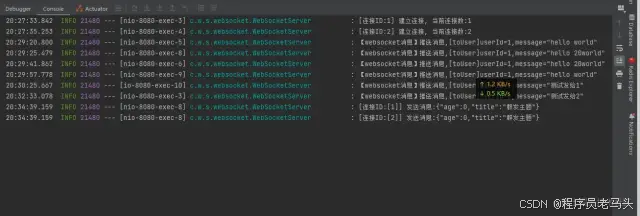
测试效果图
进入websocket在线调式工具 wstool.jackxiang.com/
先cmd - ipconfig 查看ipv4地址
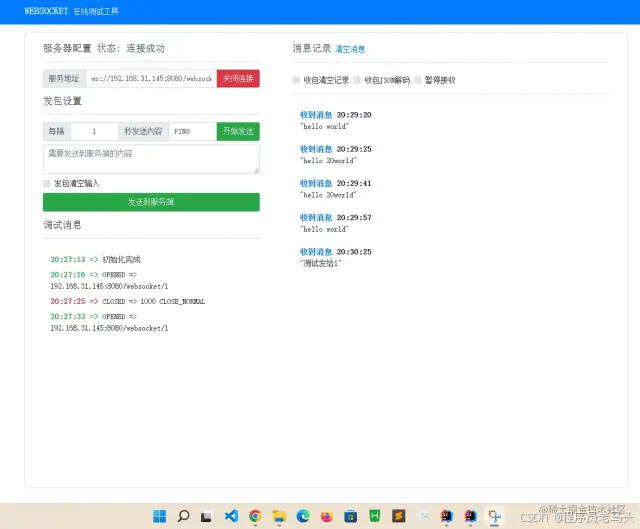
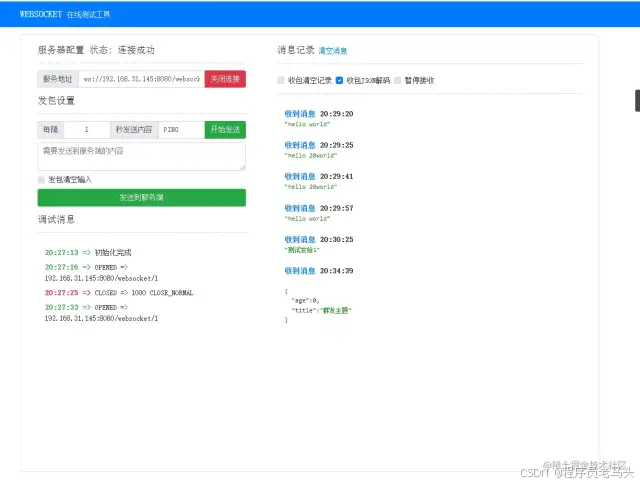
打开连接1
ws://192.168.31.145:8080/websocket/1
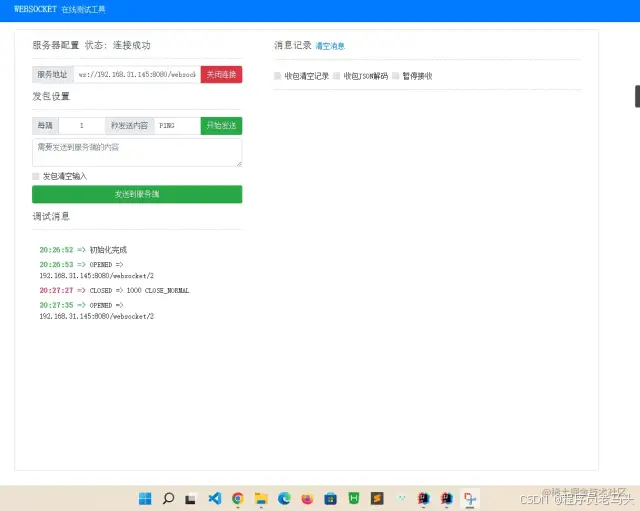
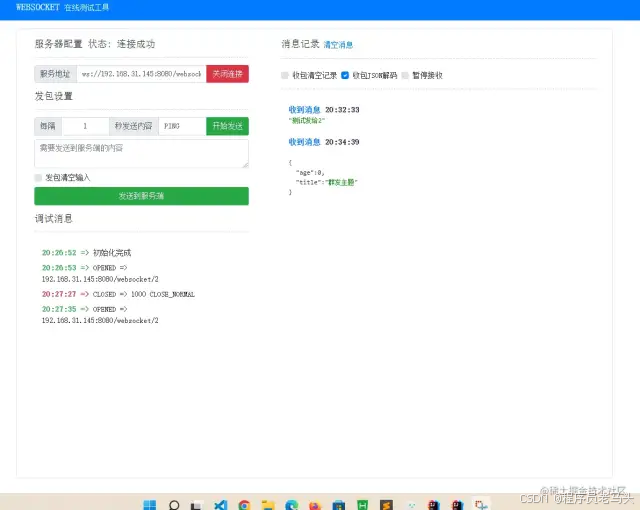
打开连接2
ws://192.168.31.145:8080/websocket/2
向指定用户发送消息:http://localhost:8080/ws/send/1/测试发给1/http://localhost:8080/ws/send/2/测试发给2
群发消息:http://localhost:8080/ws/sendmassmessage
后台
结尾
ok,到这里我们的webscoket学习就结束了,通过这个代码我们就可以实现简单的聊天和群聊实现数据的即时通讯
以上就是springboot+websocket实现即时通讯功能(j2ee方式)的详细内容,更多关于springboot websocket即时通讯的资料请关注代码网其它相关文章!




发表评论