
 我要评论
我要评论在工作中经常会遇到列表数据的导出,每次需要的时候都要去开发一次,且数据不断在变化,于是就有了下述的工具类,可传入各种实体对象的list,最终以指定格式导出excel,废话不多说,上代码~
1.控制层代码
    @postmapping("/test")
    public void test(httpservletresponse response) throws exception {

        //查询任意数据列表
        list<errorlog> list = errorlogservice.selectlistbyinfo();

        //导出操作
        commonexcelutils.exportdynamicsdata(response, list, "日志", "日志数据");
    }
此处的list可以是任意数据,也可以是任意sql组装的list数据,标题会以sql的别名为准.
2.commonexcelutils工具类
    /**
     * 动态列表导出
     * @param response
     * @param list        数据list
     * @param sheetname    页签名称,也是总标题的名称
     * @param filename    导出文件名
     */
    @suppresswarnings("all")
    public static string exportdynamicsdata(httpservletresponse response,
            list list, string sheetname, string filename) throws ioexception {

        //将list数据转成指定类型
        list<linkedhashmap<string, object>> data = commonbeanutils.convertlisttomap(list);

        list<list> rows = new arraylist<>();//excel导出整体数据
        list<string> titles = new arraylist<>();//excel导出标题(首行)
        list<string> title = new arraylist<>();
        title.add(sheetname);
        rows.add(title);

        //组装标题
         linkedhashmap<string,object> m = (linkedhashmap<string,object>) data.get(0);
         set<string> keyset = m.keyset();
          for (string t : keyset) {
              titles.add(t);
        }
        rows.add(titles);

        //组装数据
        for (linkedhashmap<string,object> info : data) {
            list d = new arraylist<>();
            set<entry<string, object>> entryset = info.entryset();
            for (entry<string, object> da : entryset) {
                d.add(da.getvalue());
            }
            rows.add(d);
        }
        filename = filename +"-"+ dateutils.parsedatetostr("yymmdd", new date()) +".xlsx";//导出文件名称

        //声明一个工作簿
        xssfworkbook workbook = new xssfworkbook();
          xssfsheet sheet = workbook.createsheet(sheetname);
          sheet.addmergedregion(new cellrangeaddress(0, 0, 0, titles.size()-1));//合并第一行的单元格,作标题
          sheet.setdefaultcolumnwidth(14);        //设置表格列宽度

          //导出操作
          excelutil.exportexcel(response, rows, workbook, sheet, filename);

          return filename;
    }
3.commonbeanutils工具类
    /**
     * list转map
     * @param <t>
     * @param list
     * @return
     */
    public static <t> list<linkedhashmap<string, object>> convertlisttomap(list<t> list) {
        return list.stream()
            .map(commonbeanutils::objecttomap)
            .collect(collectors.tolist());
    }

    /**
     * object 转 map
     * @param <t>
     * @param object
     * @return
     */
    private static <t> linkedhashmap<string, object> objecttomap(t object) {
        linkedhashmap<string, object> map = new linkedhashmap<>();
        for (field field : object.getclass().getdeclaredfields()) {
            field.setaccessible(true);
            try {
                map.put(field.getname(), field.get(object));
            } catch (illegalaccessexception e) {
                e.printstacktrace();
            }
        }
        return map;
    }
4.excelutil工具类
import java.io.ioexception;
import java.math.bigdecimal;
import java.util.list;
import javax.servlet.http.httpservletresponse;
import org.apache.poi.hssf.usermodel.hssffont;
import org.apache.poi.ss.usermodel.borderstyle;
import org.apache.poi.ss.usermodel.fillpatterntype;
import org.apache.poi.ss.usermodel.horizontalalignment;
import org.apache.poi.ss.usermodel.verticalalignment;
import org.apache.poi.xssf.usermodel.xssfcell;
import org.apache.poi.xssf.usermodel.xssfcellstyle;
import org.apache.poi.xssf.usermodel.xssfcolor;
import org.apache.poi.xssf.usermodel.xssffont;
import org.apache.poi.xssf.usermodel.xssfrow;
import org.apache.poi.xssf.usermodel.xssfsheet;
import org.apache.poi.xssf.usermodel.xssfworkbook;
import org.slf4j.logger;
import org.slf4j.loggerfactory;

public class excelutil<t>
{

    /**
     * 自定义导出
     * @param response
     * @param exceldata
     * @param sheetname
     * @param filename
     * @param columnwidth
     * @throws ioexception
     */
    public static void exportexcel(httpservletresponse response,list<list> exceldata,xssfworkbook workbook, xssfsheet sheet,string filename) throws ioexception {
        //设置单元格字体
        xssffont fontname = workbook.createfont();
        fontname.setfontname("宋体");
        //写入list<list<string>>中的数据
        int rowindex = 0;
        int rowflag = -2;
        xssfcellstyle createtitlecellstyle = createtitlecellstyle(workbook);
        xssfcellstyle createtablecellstyle = createtablecellstyle(workbook);
        xssfcellstyle rightrowcellstyle = createrightrowcellstyle(workbook);
        xssfcellstyle leftrowcellstyle = createleftrowcellstyle(workbook);

        for(list data : exceldata){
            if(rowflag == 8) rowflag = 0;
            rowflag++;
            //创建一个row行,然后自增1
            xssfrow row = sheet.createrow(rowindex++);
            if(rowindex==1) row.setheight((short)(20*30));

            //遍历添加本行数据
            for (int i = 0; i < data.size(); i++) {
                //创建一个单元格
                xssfcell cell = row.createcell(i);
                //value单元格值
                object value = data.get(i);

                //设置第一个行标题的样式
                if(i==0 && rowindex==1) {
                       cell.setcellstyle(createtitlecellstyle);
                   }
                //设置表头样式
                if(rowindex==2) {
                    cell.setcellstyle(createtablecellstyle);
                }
                if(rowindex>2) {
                    //如果是数字类型,则字体向右对齐
                    if(value instanceof bigdecimal || value instanceof integer) {
                        row.getcell(i).setcellstyle(rightrowcellstyle);
                    }else {
                        row.getcell(i).setcellstyle(leftrowcellstyle);
                    }
                }
                //将内容对象的文字内容写入到单元格中(单独处理数值类型)
                if(value instanceof bigdecimal) {
                    bigdecimal v = (bigdecimal)value;
                    cell.setcellvalue(v.doublevalue());
                }else {
                    cell.setcellvalue(string.valueof(value));
                }
            }
        }
        //准备将excel的输出流通过response输出到页面下载
        //八进制输出流
        response.setcontenttype("application/octet-stream");
        //设置导出excel的名称
        response.setheader("content-disposition", "attachment;filename=" + filename);
        //刷新缓冲
        response.flushbuffer();
        //workbook将excel写入到response的输出流中,供页面下载该excel文件
        workbook.write(response.getoutputstream());

        //关闭workbook
        workbook.close();
    }

    /**
     * 设置标题单元样式
     *
     * @param workbook
     * @return
     */
    public static xssfcellstyle createtitlecellstyle(xssfworkbook workbook) {
        xssfcellstyle  cellstyle = workbook.createcellstyle();
        xssffont font = workbook.createfont();
        font.setbold(true);
        font.setfontheightinpoints((short) 20);
        font.setfontname(hssffont.font_arial);// 设置标题字体
        cellstyle.setfont(font);
        cellstyle.setwraptext(true);
        cellstyle = workbook.createcellstyle();
        cellstyle.setfont(font);// 设置列标题样式

        xssfcolor color = new xssfcolor();
        //根据你需要的rgb值获取byte数组
        color.setrgb(inttobytearray(getintfromcolor(255,231,228)));
        //设置自定义背景颜色
        cellstyle.setfillforegroundcolor(color);
        cellstyle.setfillpattern(fillpatterntype.solid_foreground);
        //设置字体水平居中
        cellstyle.setalignment(horizontalalignment.center);
        //设置字体垂直居中
        cellstyle.setverticalalignment(verticalalignment.center);

        //设置边框
        cellstyle.setborderbottom(borderstyle.thin); //下边框
        cellstyle.setborderleft(borderstyle.thin);//左边框
        cellstyle.setbordertop(borderstyle.thin);//上边框
        cellstyle.setborderright(borderstyle.thin);//右边框

        return cellstyle;
    }

    /**
     * 设置表头单元样式
     *
     * @param workbook
     * @return
     */
    public static xssfcellstyle createtablecellstyle(xssfworkbook workbook) {
        xssfcellstyle cellstyle = workbook.createcellstyle();
        xssffont font = workbook.createfont();
        font.setfontheightinpoints((short) 11);
        font.setfontname(hssffont.font_arial);// 设置标题字体
        cellstyle.setfont(font);
        cellstyle.setwraptext(true);
        cellstyle = workbook.createcellstyle();
        cellstyle.setfont(font);// 设置列标题样式

        xssfcolor color = new xssfcolor();
        //根据你需要的rgb值获取byte数组
        color.setrgb(inttobytearray(getintfromcolor(251,241,227)));
        //设置自定义背景颜色
        cellstyle.setfillforegroundcolor(color);
        cellstyle.setfillpattern(fillpatterntype.solid_foreground);
        //设置字体水平居中
        cellstyle.setalignment(horizontalalignment.center);

        //设置边框
        cellstyle.setborderbottom(borderstyle.thin); //下边框
        cellstyle.setborderleft(borderstyle.thin);//左边框
        cellstyle.setbordertop(borderstyle.thin);//上边框
        cellstyle.setborderright(borderstyle.thin);//右边框

        return cellstyle;
    }

    /**
     * 设置内容单元样式
     *
     * @param workbook
     * @return
     */
    public static xssfcellstyle createrowcellstyle(xssfworkbook workbook) {
        xssfcellstyle cellstyle = workbook.createcellstyle();

        xssfcolor color = new xssfcolor();
        //根据你需要的rgb值获取byte数组
        color.setrgb(inttobytearray(getintfromcolor(220,220,220)));
        //设置自定义背景颜色
        cellstyle.setfillforegroundcolor(color);
        cellstyle.setfillpattern(fillpatterntype.solid_foreground);
        //设置边框
        cellstyle.setborderbottom(borderstyle.thin); //下边框
        cellstyle.setborderleft(borderstyle.thin);//左边框
        cellstyle.setbordertop(borderstyle.thin);//上边框
        cellstyle.setborderright(borderstyle.thin);//右边框
        xssfcolor bordercolor = new xssfcolor();
        //设置字体水平居中
        cellstyle.setalignment(horizontalalignment.center);
        //设置字体垂直居中
        cellstyle.setverticalalignment(verticalalignment.center);
        //根据你需要的rgb值获取byte数组
        bordercolor.setrgb(inttobytearray(getintfromcolor(181,181,181)));
        cellstyle.setleftbordercolor(bordercolor);
        cellstyle.setrightbordercolor(bordercolor);
        cellstyle.setbottombordercolor(bordercolor);
        cellstyle.settopbordercolor(bordercolor);

        return cellstyle;
    }

    /**
     * 设置内容单元样式(字体靠右对齐)
     * 数字类型
     * @param workbook
     * @return
     */
    public static xssfcellstyle createrightrowcellstyle(xssfworkbook workbook) {
        xssfcellstyle  cellstyle = workbook.createcellstyle();
        cellstyle.setwraptext(true);
        cellstyle = workbook.createcellstyle();

        xssffont font = workbook.createfont();
        font.setfontheightinpoints((short) 11);
        cellstyle.setfont(font);

        //设置字体水平居中
        cellstyle.setalignment(horizontalalignment.right);
        //设置字体垂直居中
        cellstyle.setverticalalignment(verticalalignment.center);
        return cellstyle;
    }

    /**
     * 设置内容单元样式(字体靠左对齐)
     * 文本类型
     * @param workbook
     * @return
     */
    public static xssfcellstyle createleftrowcellstyle(xssfworkbook workbook) {
        xssfcellstyle cellstyle = workbook.createcellstyle();
        //设置字体位置
        cellstyle.setalignment(horizontalalignment.left);
        //设置字体垂直居中
        cellstyle.setverticalalignment(verticalalignment.center);
        return cellstyle;
    }

    /**
     * rgb转int
     */
     private static int getintfromcolor(int red, int green, int blue){
         red = (red << 16) & 0x00ff0000;
         green = (green << 8) & 0x0000ff00;
         blue = blue & 0x000000ff;
         return 0xff000000 | red | green | blue;
     }

     /**
      * int转byte[]
      */
     public static byte[] inttobytearray(int i) {
         byte[] result = new byte[4];
         result[0] = (byte)((i >> 24) & 0xff);
         result[1] = (byte)((i >> 16) & 0xff);
         result[2] = (byte)((i >> 8) & 0xff);
         result[3] = (byte)(i & 0xff);
         return result;
     }
}
最终导出效果:
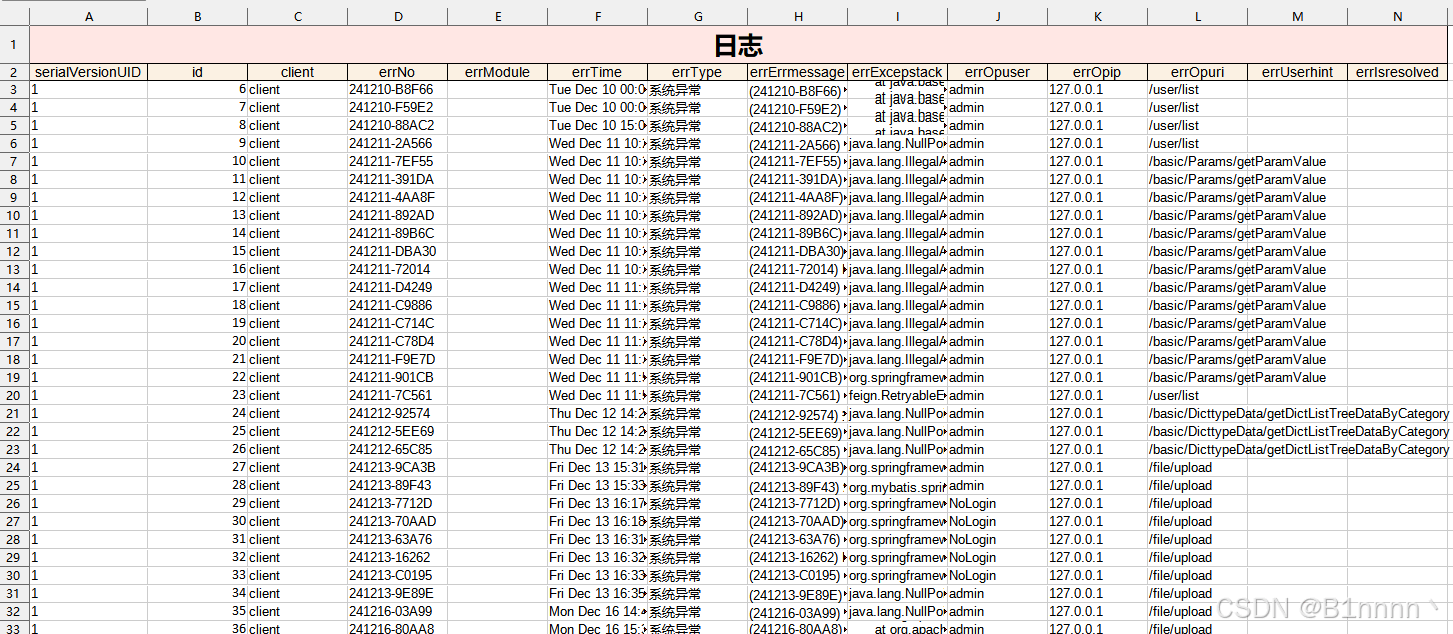
以上就是java编写通用的导出任何对象列表数据到excel的工具类的详细内容,更多关于java导出列表数据的资料请关注代码网其它相关文章!




发表评论