
 我要评论
我要评论前言
项目中,要求批量导入 excel 数据并读取其中图片,目前 easyexcel 不支持读取图片,因此需要使用 apache poi 进行导入。然而apache poi 需要开发者手动管理行、列、单元格等对象,相对较为底层且繁琐。
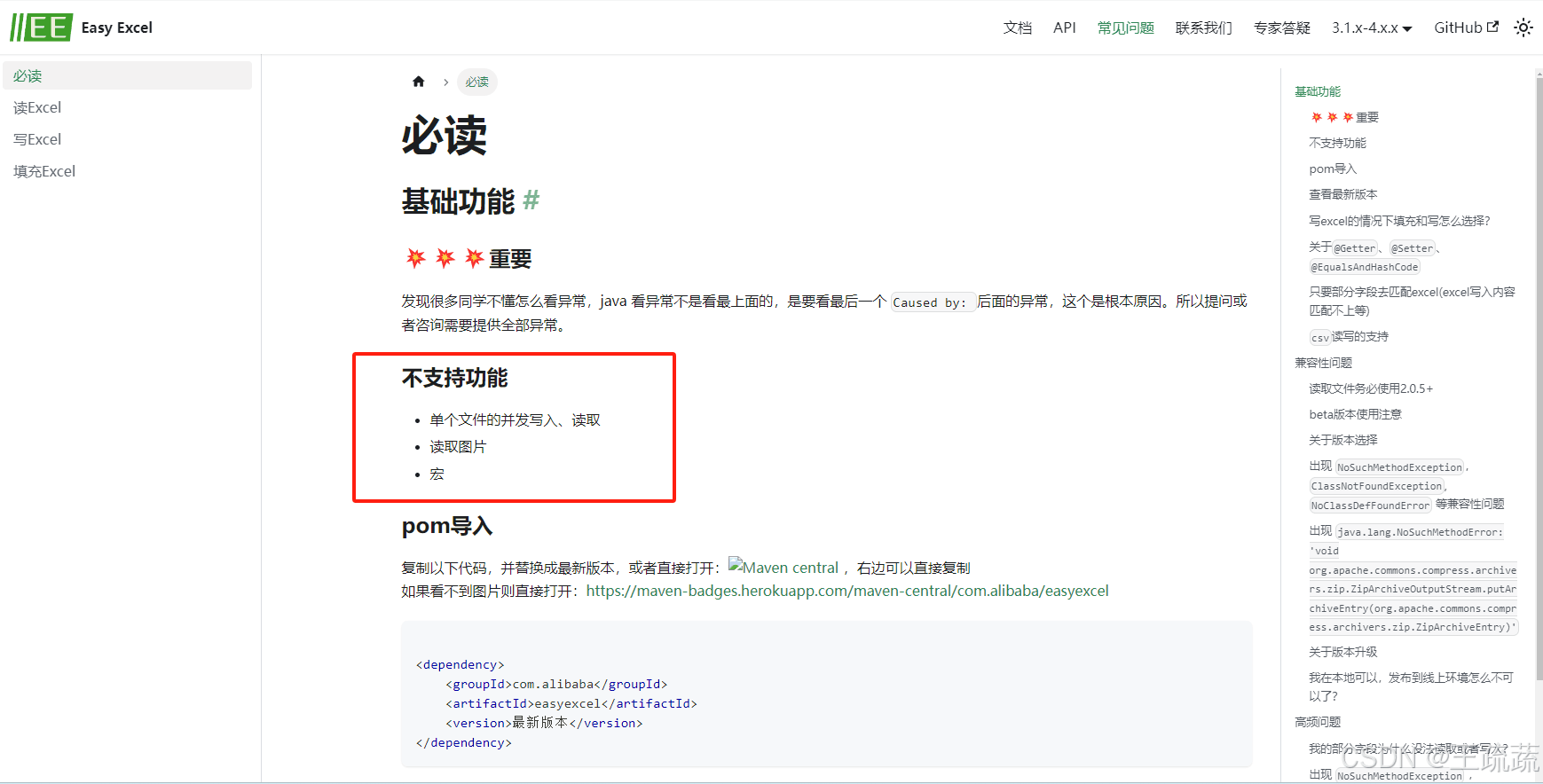
作者随即想到了一种方法,既能够使用 easyexcel 的简便导入方式,又能够识别图片并进行处理。
相关依赖
        <!-- apache poi -->
        <dependency>
            <groupid>org.apache.poi</groupid>
            <artifactid>poi</artifactid>
            <version>5.2.3</version>
        </dependency>
        <dependency>
            <groupid>org.apache.poi</groupid>
            <artifactid>poi-ooxml</artifactid>
            <version>5.2.3</version>
        </dependency>
        <!-- https://mvnrepository.com/artifact/com.alibaba/easyexcel -->
        <dependency>
            <groupid>com.alibaba</groupid>
            <artifactid>easyexcel</artifactid>
            <version>3.2.1</version>
        </dependency>
java 代码展示
import cn.hutool.core.date.dateutil;
import cn.hutool.core.util.idutil;
import com.alibaba.excel.easyexcel;
import com.alibaba.excel.context.analysiscontext;
import com.alibaba.excel.read.listener.readlistener;
import com.alibaba.excel.util.listutils;
import com.bi.my.vo.excelvo;
import lombok.extern.slf4j.slf4j;
import net.dreamlu.mica.core.result.r;
import org.apache.poi.ss.usermodel.sheet;
import org.apache.poi.xssf.usermodel.*;
import org.springframework.web.bind.annotation.postmapping;
import org.springframework.web.bind.annotation.requestmapping;
import org.springframework.web.bind.annotation.requestparam;
import org.springframework.web.bind.annotation.restcontroller;
import org.springframework.web.multipart.multipartfile;

import java.io.ioexception;
import java.util.arraylist;
import java.util.list;

/**
 * 数据+图片导入
 *
 * @author wss
 */
@slf4j
@restcontroller
@requestmapping("/easy")
public class easyexcelcontroller {

    /**
     * 数据导入并识别图片
     *
     * @param file file
     * @return r<object>
     * @author wss
     */
    @postmapping("/import")
    public r<object> dataimport(@requestparam("file") multipartfile file) {
        list<excelvo> excelvos = new arraylist<>();
        //数据处理
        this.dataprocess(file, excelvos);
        //图像处理
        this.imageprocess(file, excelvos);
        //返回结果,这里也可以处理excelvos数据,如往mysql存储
        return r.success(excelvos);
    }

    /**
     * 图片处理
     */
    public void imageprocess(multipartfile file, list<excelvo> excelvos) {
        try {
            xssfworkbook book = new xssfworkbook(file.getinputstream());
            //方式1 获取sheet数量,采用下标方式遍历读取每个工作表数据
            int sheetsnos = book.getnumberofsheets();
            for (int sheetno = 0; sheetno < sheetsnos; sheetno++) {
                sheet sheet = book.getsheetat(sheetno);
                //...省略,内容为方式2
            }
            //方式2 获取sheet数量,直接遍历读取每个工作表数据
            for (sheet sheet : book) {
                xssfsheet xsssheet = (xssfsheet) sheet;
                //获取工作表中绘图包
                xssfdrawing drawing = xsssheet.getdrawingpatriarch();
                if (drawing == null) {
                    break;
                }
                //获取所有图像形状
                list<xssfshape> shapes = drawing.getshapes();
                //遍历所有形状
                for (xssfshape shape : shapes) {
                    //获取形状在工作表中的顶点位置信息(anchor锚点)
                    xssfclientanchor anchor = (xssfclientanchor) shape.getanchor();
                    //图片形状在工作表中的位置, 所在行列起点和终点位置
                    short c1 = anchor.getcol1();
                    int r1 = anchor.getrow1();
                    string key = r1 + "行," + c1 + "列";
                    if (shape instanceof xssfpicture) {
                        try {
                            xssfpicture pic = (xssfpicture) shape;
                            //形状获取对应的图片数据
                            xssfpicturedata picdata = pic.getpicturedata();
                            //保存图片到本地
                            byte[] data = picdata.getdata();
                            //todo 这里上传文件至oss并生成链接,这里不做过多描述,有疑问请参照oss服务调用
                            string filename = "https://oss.cn/" + dateutil.today() + "/" + idutil.simpleuuid() + "/" + picdata.suggestfileextension();
                            //filetemplate.putobject(properties.getbucketname(), filename, new bytearrayinputstream(data));
                            //todo 放入excel集合,这里行数要减去1,获取图片是从表头开始(表头位置为0),获取excelvos是从数据开始(第一条数据位置为0)他们相差一个表头,所以要减去1才能对应
                            excelvos.get(r1 - 1).setpicture(filename);
                        } catch (exception e) {
                            log.error("asyncimportlist xssfclientanchor key|{} error|{}", key, e.getmessage());
                        }
                    }
                }
            }
        } catch (exception e) {
            log.error("asyncimportlist xssfworkbook error|{}", e.getmessage());
        }
    }

    /**
     * 数据处理
     */
    public void dataprocess(multipartfile file, list<excelvo> excelvos) {
        // 这里默认读取第一个sheet
        try {
            easyexcel.read(file.getinputstream(), excelvo.class, new readlistener() {
                /**
                 * 单次缓存的数据量
                 */
                public static final int batch_count = 100;
                /**
                 *临时存储
                 */
                private list<excelvo> cacheddatalist = listutils.newarraylistwithexpectedsize(batch_count);

                @override
                public void invoke(object object, analysiscontext context) {
                    excelvo data = (excelvo) object;
                    cacheddatalist.add(data);
                    if (cacheddatalist.size() >= batch_count) {
                        savedata();
                        // 存储完成清理 list
                        cacheddatalist = listutils.newarraylistwithexpectedsize(batch_count);
                    }
                }

                @override
                public void doafterallanalysed(analysiscontext context) {
                    savedata();
                }

                /**
                 * 加上存储数据库
                 */
                private void savedata() {
                    log.info("已获取数据|{}条", cacheddatalist.size());
                    excelvos.addall(cacheddatalist);
                }
            }).sheet().doread();
        } catch (ioexception e) {
            e.printstacktrace();
        }
    }
}
import com.alibaba.excel.annotation.excelproperty;
import lombok.data;

/**
 * 导入vo
 *
 * @author wss
 */
@data
public class excelvo {
    @excelproperty("序号")
    private integer ordinal;
    @excelproperty("标题")
    private string title;
    @excelproperty("图片")
    private string picture;
}
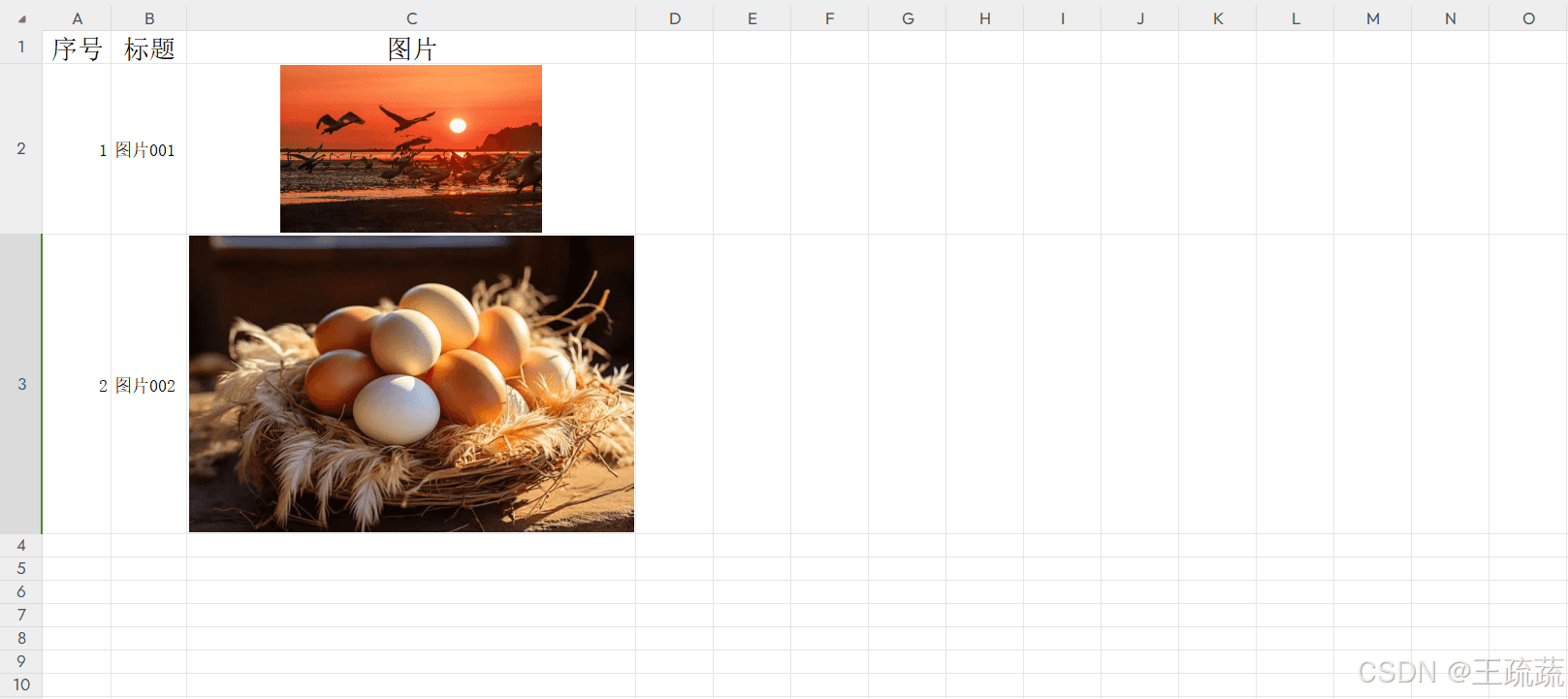
excel 表格准备
excel表头需和实体字段相对应
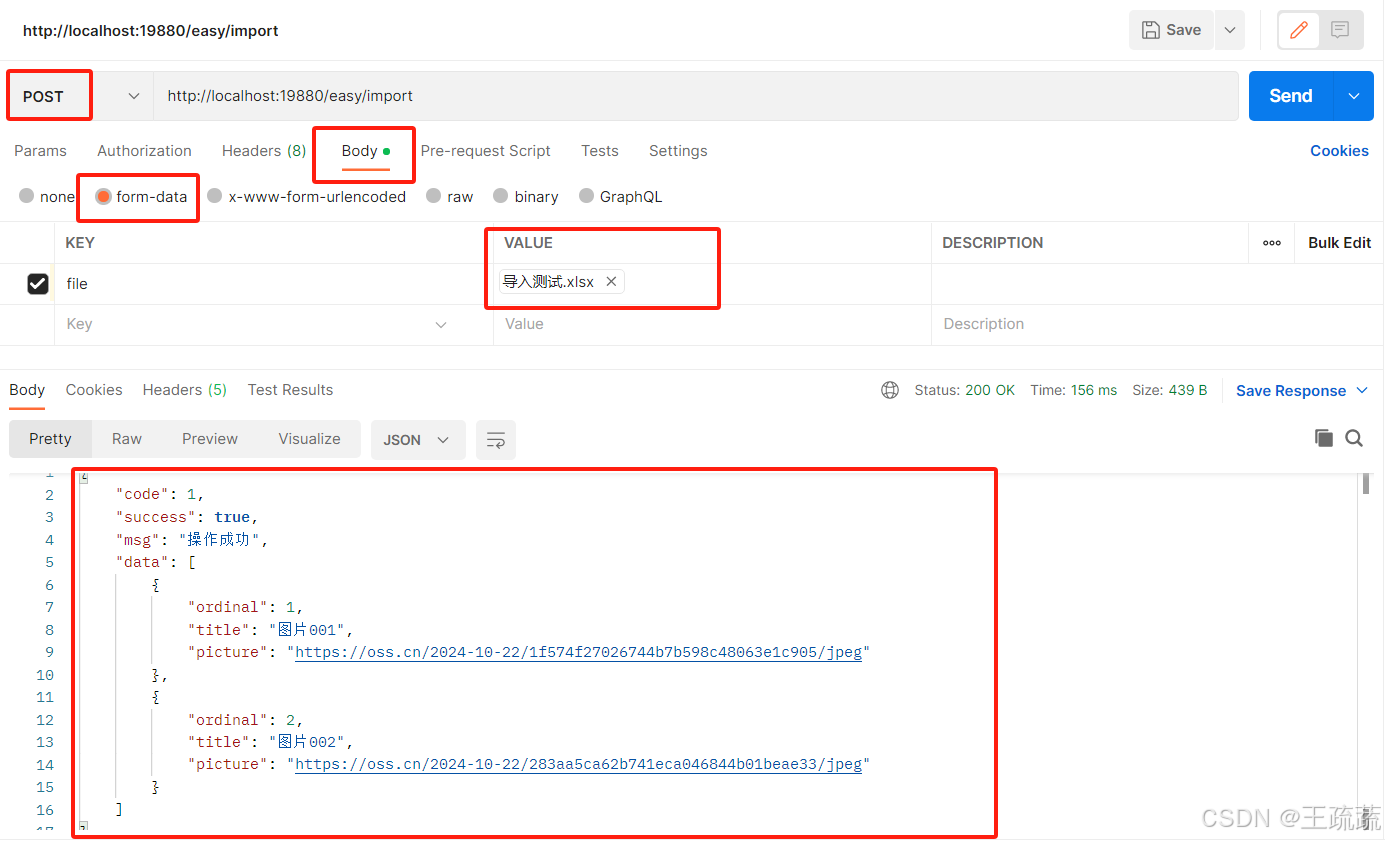
postman 调用测试
打开图片链接发现与excel中图片一致,对应数据一致,读取图片成功!
结尾
到这里,easyexcel 导入带图片已完成!读取图片速度较慢,可以通过异步或其它方式优化处理,根据自己需求修改即可,这里就不进行说明了。
补充
项目中本人是通过@requestexcel注解直接获取的excel数据,file专用于图片读取,即方法中不用再进行数据处理,代码更加简化。
这篇文章主要是用来处理读取图片的,这里就不再详细说明该注解了,感兴趣的小伙伴可以查阅一下相关资料。
    /**
     * 数据导入并识别图片
     *
     * @param file file
     * @return r<object>
     * @author wss
     */
    @postmapping("/import")
    public r<object> dataimport(@requestparam("file") multipartfile file, @requestexcel list<excelvo> excelvos) {
        //图像处理
        this.imageprocess(file, excelvos);
        //返回结果,这里也可以处理excelvos数据,如往库里存储
        return r.success(excelvos);
    }
到此这篇关于java easyexcel导入带图片的文章就介绍到这了,更多相关java easyexcel导入带图内容请搜索代码网以前的文章或继续浏览下面的相关文章希望大家以后多多支持代码网!



发表评论