
 我要评论
我要评论0.引言
我们在实际项目中,会遇到开发的项目部署在服务器上,但可能要控制权限、控制项目授权周期等,部署的环境可能纯内网使用,因此通过网络接口控制就不可行了,我们期望一种分发授权证书的形式,通过部署证书的形式,离线控制用户能使用这个项目的哪个模块、使用多久,甚至使用用户的哪些设备、哪台服务器可以使用。
今天我们来看看这样的需求如何实现
1. truelicense简介
1.1 原理简介
我们要实现的离线校验,实际上就是通过公私钥+证书的形式来实现的,首先生成公私钥,然后利用私钥生成证书,比如x509证书格式,x509证书由用户公共密钥和用户标识符组成。此外还包括版本号、证书序列号、ca标识符、签名算法标识、签发者名称、证书有效期等信息
我们的核心目的就是要生成的证书中包含有效期,即可实现授权有效期,然后通过接口拦截器,每次访问接口时利用公钥对证书进行校验,查看证书是否合法、是否在有效期内,即可实现我们进行离线控制的目的。
1.2 公钥私钥和证书
部分同学如果没接触过加密和验签的,可能对公私钥和证书没什么概念,所以我们先正对这几个概念做个解释,方便大家理解。
什么是公钥和私钥
公钥和私钥是一对相互匹配的密钥,用于加密和解密数据。 公钥用于加密数据,而私钥用于解密数据。公钥可以公开,任何人都可以使用,而私钥必须保密,只有持有者才能使用。一般会把公钥提供给客户,用于加密,私钥保留在自己侧,用于解密。
那么当自己需要加密数据发送给客户时怎么办呢? 这就需要客户再生成一对公私钥,由客户保留私钥,我方保留公钥,发送数据时,我们使用客户的公钥加密数据,客户使用自己的私钥进行解密
公私钥一般用于非对称加密中,与对称加密最大的不同就是,对称加密加密方和解密方使用的都是同一个密钥,在密钥交换过程中可能会产生泄漏的风险,而密钥对则只用交换双方的公钥,提高了安全性

公私钥长什么样呢,实际就是两个字符串,当然也可以保存为文件,但实质就是字符串,如下我们生成的一对公私钥,一般私钥会比公钥长:
private key:
miicdgibadanbgkqhkig9w0baqefaascamawggjcageaaogbaizdtf1id19xgnwlfxqfbnkyqm/uzr0/k9etnjaeqf2cl6cq1kk6aewjp/j540cwh5qn4rymzteomrbpkwysvvemzbsnckqtzsdgqkj8591xcueiftjbudzmnduprifqscdgsjci6+lo01tnfwz/ciuke/aqj0xhgpsy06ielyg3agmbaaecgybukh996c347wbeh/whyicd6vro0lvumfc1pu/3hherepy8v4tgpjum7ufohmuqnr2fzvebflp2lwp1ce+xdf5i7vol1euc9wqj+cgqmbfs8lisxbzzgauhl4eqdbovqggjvnw3nsywksu5x+zlr51v2e4mxoalanedmpr1mxt+8qjbambakqcqwwd0pzshireaygdj8fu4h3pqsocbce8gayh5f0gsbyi251b3+ru0who7fw+gqt8a0fixt4hv2if6btscqqcyykmpqrlakplywdtaepisenb8jqmllsswfrch0qsmfrzcmjh87ilzsd+dbzstkbz92xva40pr3qtoy6lypn21akavz0tkvwolvxgc97dpf9scqz5aztedk6bysixmysfv6p05l0ei5xh7uhqnjwmmuph0ohw2b1nfpxhvxeluy76fakaxygiuh56ssnfatdyvc8hzdaeylemynbwmtflwczgzmxdd3a8yn94jntdwqpe+oddwcy/rh/uj3t6mqhfa3pqrakeawdvpriz1+smqarqmycyyivvbvhaywhmtennq0kgww080wtvgecj/ug20xtb3lfglafqvw1l94haqkmrh9uct6a==
public key:
migfma0gcsqgsib3dqebaquaa4gnadcbiqkbgqcgq039shdfv4j1i316hw5ymkjp7s69pyvrltswnkh9gi+nktzjogbfo6f4+enalh+ajeewdm03qjq2z5fmlfbxdmwujqiqrwunyeji/ofdcxfhohbywbnczdxvd0sbakna4eo3iuvi6nnu5xvs/worinvwecdmr4kumnoibjwbtwidaqab
什么是证书
电子证书,通常指的是数字证书(digital certificate),在信息技术领域,它是一种用于在网络上验证身份和保障通信安全的电子证明。电子证书包含以下几个关键组成部分:
证书持有者的公钥:这是证书的主要部分,用于加密信息,只有证书持有者的私钥可以解密。
证书持有者的身份信息:这包括持有者的名称或其他标识信息,用于验证公钥所属的身份。
证书签发机构的数字签名:证书由一个可信的第三方机构——证书授权中心(certificate authority,简称ca)签发。ca通过其私钥对证书内容进行数字签名,以确保证书内容的真实性和完整性。
有效期:证书在特定的时间段内有效,过期后需要更新或更换。
证书使用目的:证书可能用于不同的目的,如网页安全浏览(https)、电子邮件加密、数字签名等。
电子证书的一般可用于:
身份验证:确认网络上的通信实体是真实的,不是假冒的。
数据加密:使用公钥加密数据,只有持有对应私钥的人才能解密。
数据完整性:确保在传输过程中数据没有被篡改。
证书本身也可以用一串字符串表示,更直观的我们可以在谷歌浏览器上点击左侧地址栏的图标查看网址https证书信息
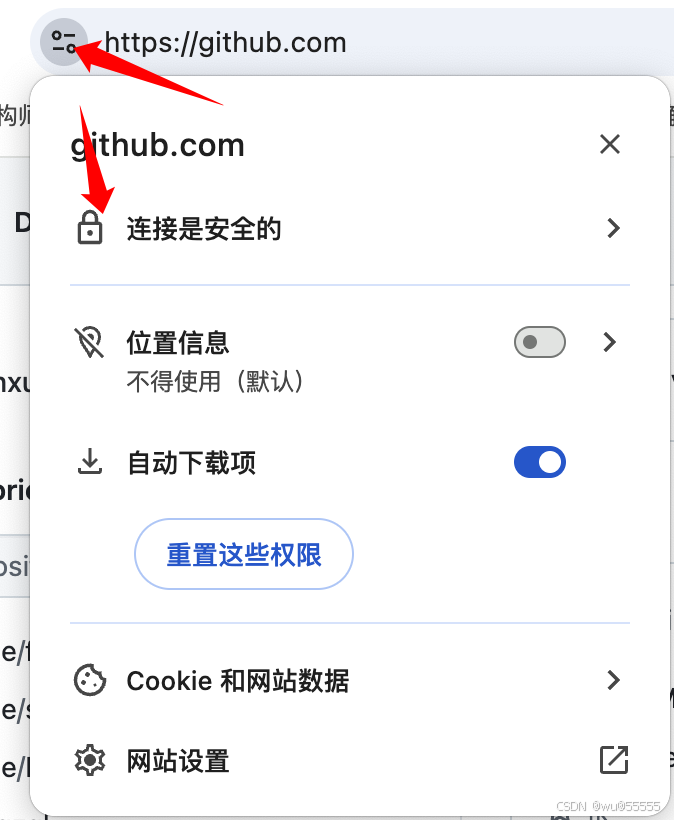
如下展示了github的证书信息,就可以看到其中包含ca机构、有效期、公钥等基本信息

1.3 truelicense简介
有了以上基本概念后,我们再来介绍truelicense:
truelicense是一个开源的证书管理引擎,主要用于软件产品的授权管理。它的主要功能是在软件项目交付给客户后,通过签名机制来确保客户不能随意使用该项目。truelicense的授权机制基于以下原理:
生成密钥对:使用工具(如keytool)生成包含私钥和公钥的密钥对。
授权者保留私钥:授权者使用私钥对包含授权信息(如使用截止日期、mac地址等)的license进行数字签名。
公钥给使用者:将公钥放在验证代码中使用,用于验证license是否符合使用条件。
truelicense的使用场景包括设定软件的试用期、绑定特定ip或mac地址等。通过这种方式,可以在不修改源代码的情况下,通过重新生成license来延长试用期或修改授权条件。
前面我们提到过,我们的核心目的就是要生成的证书中包含有效期,即可实现授权有效期,然后通过接口拦截器,每次访问接口时利用公钥对证书进行校验,查看证书是否合法、是否在有效期内,而truelicense就是帮助我们简化这一流程,他内部封装了这一系列的操作,我们只需要简单的集成即可实现功能
下面我们来具体实操。
2. 操作步骤
首先先介绍下,我们本次演示要构造的模块,一共分为3个模块:
- 证书校验模块:集成证书校验核心逻辑,作为工具包引入到需要进行离线授权的服务中
- 证书生成模块:用于生成证书,或对证书进行续约
- 测试模块:单独的一个用于测试离线授权逻辑的模块,模拟需要进行离线授权的web服务
2.1 生成公私钥
2.1.1 keytool工具介绍
前面提到我们需要生成一个公私钥,然后再生成证书,那么公私钥的生成就可以利用java自带的keytool工具来实现
keytool 是一个java密钥和证书管理工具,它是java sdk的一部分。keytool用于管理密钥库(keystore),在密钥库中可以存储私钥和公钥证书。以下是keytool的一些主要功能和用途:
生成密钥对:keytool可以生成密钥对(公钥和私钥),这是加密和安全通信的基础。
管理密钥库:它可以创建和管理密钥库文件,这些文件通常具有.keystore扩展名。密钥库用于存储密钥和证书。
导入和导出证书:keytool允许用户将证书导入到密钥库中,或者从密钥库中导出证书。
生成证书请求:可以生成证书签名请求(csr),这是发送给证书颁发机构(ca)以获取证书的过程的一部分。
查看和管理证书:可以查看密钥库中的证书详细信息,以及设置或更改其属性。
设置别名:在密钥库中,可以为密钥和证书设置别名,以便更容易地引用它们。
以下是keytool的一些常用命令:
keytool -genkeypair:生成密钥对。
keytool -list:列出密钥库中的条目。
keytool -importcert:导入证书或证书链。
keytool -exportcert:导出证书。
keytool -keystore:指定密钥库的名称和位置
2.1.2 生成公私钥文件
1、生成私钥库文件(因为keytool基于jdk, 所以需要提前安装jdk),执行后可得到privatekeys.keystore文件
谨记这里的密码库密码storepass为“wu@2024555”,私钥密码keypass为"wu@private2024",后续还会使用到,私钥别名为“privatekey”
注意这里密码至少由字母和数字组成不少于6位的字符串!
keytool -genkeypair -keysize 1024 -validity 36500 -alias "privatekey" -keystore "privatekeys.keystore" -storepass "wu@2024555" -keypass "wu@private2024" -dname "cn=wu.com, ou=wu, o=wu, l=guizhou, st=guizhou, c=cn"
| 参数 | 说明 |
|---|---|
-genkeypair | 生成一对非对称密钥 |
-keysize | 密钥长度 |
-validity | 有效期,单位天 |
-alias | 私钥别名 |
-keystore | 私钥文件名 |
-storepass | 访问整个密码库的密码 |
-keypass | 别名对应私钥的密码 |
-dname | 证书持有者详细信息 |
cn=localhost:cn是common name的缩写,通常用于指定域名或ip地址
ou=localhost:ou是organizational unit的缩写,表示组织单位
o=localhost:o是organization的缩写,表示组织名
l=sh:l是locality的缩写,表示城市或地区
st=sh:st是state的缩写,表示州或省
c=cn:c是country的缩写,表示国家代码 |
2、导出别名为"privatekey"的密钥对的证书文件,执行后得到certfile.cer文件
keytool -exportcert -alias "privatekey" -keystore "privatekeys.keystore" -storepass "wu@2024555" -file "certfile.cer"
3、将证书文件导入公钥库,用于生成公钥文件publiccerts.keystore
keytool -import -alias "publiccert" -file "certfile.cer" -keystore "publiccerts.keystore" -storepass "wu@2024555"
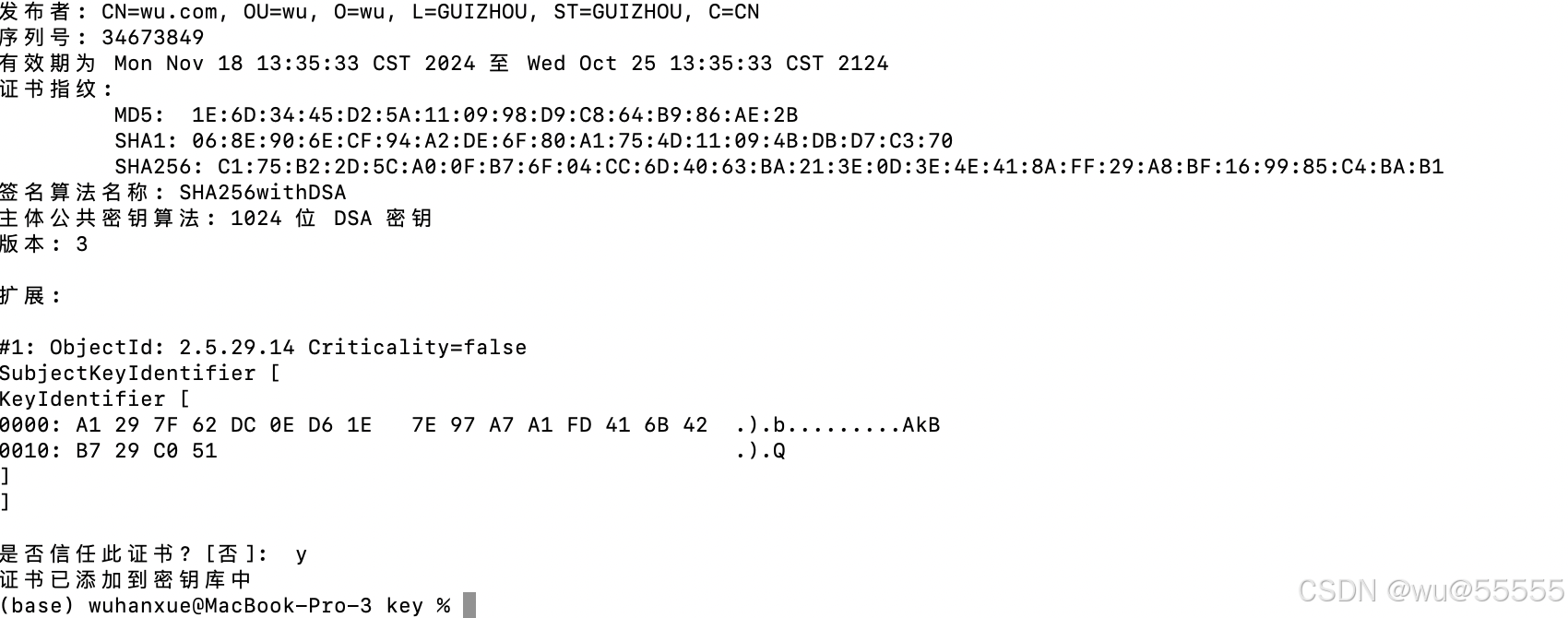
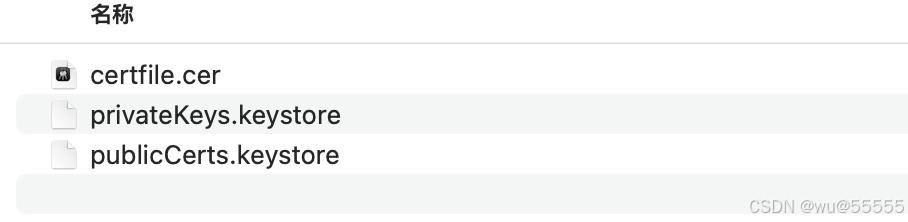
4、以上步骤执行完后,我们会得到3个文件,其中文件privatekeys.keystore用来为用户生成license文件,不可泄漏!publiccerts.keystore随应用工程部署到客户服务器,用其解密license文件并校验其许可信息,提供给客户;证书文件certfile.cer文件为临时文件,可删除,后续我们单独用truelicense生成提供给客户的证书
2.2 license校验模块
注:如下仅贴出核心代码,完整代码可见如下代码仓库:
https://gitee.com/wuhanxue/wu_study/tree/master/demo/license_demo
1、首先定义如下配置路径,用于后续安装、校验证书
license:
  # 证书subject
  subject: license-test-web
  # 公钥别称
  publicalias: publiccert
  # 访问公钥库的密码
  storepass: wu@2024555
  # 证书路径
  licensepath: /data/license/license.lic
  # 公钥路径
  publickeysstorepath: /data/license/publiccerts.keystore
2、创建springboot项目license-client,删除启动类,将该项目作为核心校验模块,后续引入其他项目中使用,项目依赖及配置如下
<project xmlns="http://maven.apache.org/pom/4.0.0" xmlns:xsi="http://www.w3.org/2001/xmlschema-instance"
         xsi:schemalocation="http://maven.apache.org/pom/4.0.0 https://maven.apache.org/xsd/maven-4.0.0.xsd">
    <modelversion>4.0.0</modelversion>
    <groupid>com.example</groupid>
    <artifactid>license-client</artifactid>
    <version>1.0.0</version>
    <name>license-client</name>
    <description>license-client</description>
    <properties>
        <java.version>1.8</java.version>
        <project.build.sourceencoding>utf-8</project.build.sourceencoding>
        <project.reporting.outputencoding>utf-8</project.reporting.outputencoding>
        <spring-boot.version>2.6.13</spring-boot.version>
        <!-- java servlet api -->
        <javax.servlet-api>4.0.1</javax.servlet-api>
        <!-- apache commons系列公共库 -->
        <commons-lang3>3.7</commons-lang3>
        <commons-io>2.6</commons-io>
        <commons-codec>1.11</commons-codec>
        <!-- apache httpclient -->
        <httpclient>4.5.5</httpclient>
        <!-- fastjson -->
        <fastjson>1.2.47</fastjson>
    </properties>
    <dependencies>
        <dependency>
            <groupid>org.springframework.boot</groupid>
            <artifactid>spring-boot-starter</artifactid>
        </dependency>
        <dependency>
            <groupid>org.springframework.boot</groupid>
            <artifactid>spring-boot-starter-thymeleaf</artifactid>
        </dependency>
        <dependency>
            <groupid>org.springframework.boot</groupid>
            <artifactid>spring-boot-starter-web</artifactid>
        </dependency>
        <!-- commons -->
        <dependency>
            <groupid>org.apache.commons</groupid>
            <artifactid>commons-lang3</artifactid>
            <version>${commons-lang3}</version>
        </dependency>
        <dependency>
            <groupid>commons-io</groupid>
            <artifactid>commons-io</artifactid>
            <version>${commons-io}</version>
        </dependency>
        <dependency>
            <groupid>commons-codec</groupid>
            <artifactid>commons-codec</artifactid>
            <version>${commons-codec}</version>
        </dependency>
        <!-- apache httpclient -->
        <dependency>
            <groupid>org.apache.httpcomponents</groupid>
            <artifactid>httpclient</artifactid>
            <version>${httpclient}</version>
        </dependency>
        <!-- fastjson -->
        <dependency>
            <groupid>com.alibaba</groupid>
            <artifactid>fastjson</artifactid>
            <version>${fastjson}</version>
        </dependency>
        <!-- java servlet api -->
        <dependency>
            <groupid>javax.servlet</groupid>
            <artifactid>javax.servlet-api</artifactid>
            <version>${javax.servlet-api}</version>
            <scope>provided</scope>
        </dependency>
        <!-- jackson对自动解析json和xml格式的支持 -->
        <dependency>
            <groupid>com.fasterxml.jackson.jaxrs</groupid>
            <artifactid>jackson-jaxrs-json-provider</artifactid>
        </dependency>
        <dependency>
            <groupid>com.fasterxml.jackson.dataformat</groupid>
            <artifactid>jackson-dataformat-xml</artifactid>
        </dependency>
        <!-- slf4j和logback -->
        <dependency>
            <groupid>org.slf4j</groupid>
            <artifactid>slf4j-api</artifactid>
        </dependency>
        <dependency>
            <groupid>org.slf4j</groupid>
            <artifactid>jcl-over-slf4j</artifactid>
        </dependency>
        <!-- license -->
        <dependency>
            <groupid>de.schlichtherle.truelicense</groupid>
            <artifactid>truelicense-core</artifactid>
            <version>1.33</version>
        </dependency>
        <dependency>
            <groupid>net.sourceforge.nekohtml</groupid>
            <artifactid>nekohtml</artifactid>
            <version>1.9.22</version>
        </dependency>
        <dependency>
            <groupid>org.projectlombok</groupid>
            <artifactid>lombok</artifactid>
        </dependency>
    </dependencies>
    <dependencymanagement>
        <dependencies>
            <!-- springboot的依赖配置-->
            <dependency>
                <groupid>org.springframework.boot</groupid>
                <artifactid>spring-boot-dependencies</artifactid>
                <version>${spring-boot.version}</version>
                <type>pom</type>
                <scope>import</scope>
            </dependency>
        </dependencies>
    </dependencymanagement>
    <build>
        <plugins>
            <plugin>
                <groupid>org.apache.maven.plugins</groupid>
                <artifactid>maven-compiler-plugin</artifactid>
                <version>3.8.1</version>
                <configuration>
                    <source>${java.version}</source>
                    <target>${java.version}</target>
                    <encoding>utf-8</encoding>
                </configuration>
            </plugin>
        </plugins>
    </build>
</project>
3、创建证书校验配置实体类
@data
@allargsconstructor
@noargsconstructor
public class licenseverifyparam {
    /**
     * 证书subject
     */
    private string subject;
    /**
     * 公钥别称
     */
    private string publicalias;
    /**
     * 访问公钥库的密码
     */
    private string storepass;
    /**
     * 证书生成路径
     */
    private string licensepath;
    /**
     * 密钥库存储路径
     */
    private string publickeysstorepath;
}
4、为了实现还可通设备、ip等控制授权,我们需要创建扩展证书管理器,如不需要的可以省略该步,使用licensemanager即可
该类中拓展了获取linux、window等系统下ip地址、mac地址、cpu、主板信息等操作,完整类方法可见代码仓库
import com.example.licenseclient.core.licensecheckmodel;
import com.example.licenseclient.serverinfo.abstractserverinfos;
import com.example.licenseclient.serverinfo.linuxserverinfos;
import com.example.licenseclient.serverinfo.windowsserverinfos;
import de.schlichtherle.license.*;
import de.schlichtherle.xml.genericcertificate;
import org.apache.commons.lang3.stringutils;
import org.apache.logging.log4j.logmanager;
import org.apache.logging.log4j.logger;
import java.beans.xmldecoder;
import java.io.bufferedinputstream;
import java.io.bytearrayinputstream;
import java.io.unsupportedencodingexception;
import java.util.date;
import java.util.list;
/**
 * @author benjamin5
 * @description 自定义licensemanager,用于增加额外的服务器硬件信息校验
 * @createtime 2024/10/31
 */
public class customlicensemanager extends licensemanager {
    private static logger logger = logmanager.getlogger(customlicensemanager.class);
    //xml编码
    private static final string xml_charset = "utf-8";
    //默认bufsize
    private static final int default_bufsize = 8 * 1024;
    public customlicensemanager() {
    }
    public customlicensemanager(licenseparam param) {
        super(param);
    }
    /**
     * @title create
     * @description 复写create方法
     */
    @override
    protected synchronized byte[] create(
            licensecontent content,
            licensenotary notary)
            throws exception {
        initialize(content);
        this.validatecreate(content);
        final genericcertificate certificate = notary.sign(content);
        return getprivacyguard().cert2key(certificate);
    }
    /**
     * @title install
     * @description 复写install方法,其中validate方法调用本类中的validate方法,校验ip地址、mac地址等其他信息
     */
    @override
    protected synchronized licensecontent install(
            final byte[] key,
            final licensenotary notary)
            throws exception {
        final genericcertificate certificate = getprivacyguard().key2cert(key);
        system.out.println("certificate.getencoded() = " + certificate.getencoded());
        notary.verify(certificate);
        final licensecontent content = (licensecontent) this.load(certificate.getencoded());
        this.validate(content);
        setlicensekey(key);
        setcertificate(certificate);
        return content;
    }
    /**
     * @title verify
     * @description 复写verify方法,调用本类中的validate方法,校验ip地址、mac地址等其他信息
     */
    @override
    protected synchronized licensecontent verify(final licensenotary notary)
            throws exception {
        genericcertificate certificate = getcertificate();
        // load license key from preferences,
        final byte[] key = getlicensekey();
        if (null == key) {
            throw new nolicenseinstalledexception(getlicenseparam().getsubject());
        }
        certificate = getprivacyguard().key2cert(key);
        notary.verify(certificate);
        final licensecontent content = (licensecontent) this.load(certificate.getencoded());
        this.validate(content);
        setcertificate(certificate);
        return content;
    }
    /**
     * @title validatecreate
     * @description 校验生成证书的参数信息
     */
    protected synchronized void validatecreate(final licensecontent content)
            throws licensecontentexception {
        final licenseparam param = getlicenseparam();
        final date now = new date();
        final date notbefore = content.getnotbefore();
        final date notafter = content.getnotafter();
        if (null != notafter && now.after(notafter)) {
            throw new licensecontentexception("证书失效时间不能早于当前时间");
        }
        if (null != notbefore && null != notafter && notafter.before(notbefore)) {
            throw new licensecontentexception("证书生效时间不能晚于证书失效时间");
        }
        final string consumertype = content.getconsumertype();
        if (null == consumertype) {
            throw new licensecontentexception("用户类型不能为空");
        }
    }
    /**
     * @title validate
     * @description 复写validate方法,增加ip地址、mac地址等其他信息校验
     */
    @override
    protected synchronized void validate(final licensecontent content)
            throws licensecontentexception {
        //1. 首先调用父类的validate方法
        super.validate(content);
        //2. 然后校验自定义的license参数
        //license中可被允许的参数信息
        licensecheckmodel expectedcheckmodel = (licensecheckmodel) content.getextra();
        if (expectedcheckmodel != null) {
            //当前服务器真实的参数信息
            licensecheckmodel servercheckmodel = getserverinfos();
            if (servercheckmodel != null) {
                //校验ip地址
                if (!checkipaddress(expectedcheckmodel.getipaddress(), servercheckmodel.getipaddress())) {
                    throw new licensecontentexception("当前服务器的ip没在授权范围内");
                }
                //校验mac地址
                if (!checkipaddress(expectedcheckmodel.getmacaddress(), servercheckmodel.getmacaddress())) {
                    throw new licensecontentexception("当前服务器的mac地址没在授权范围内");
                }
                //校验主板序列号
                if (!checkserial(expectedcheckmodel.getmainboardserial(), servercheckmodel.getmainboardserial())) {
                    throw new licensecontentexception("当前服务器的主板序列号没在授权范围内");
                }
                //校验cpu序列号
                if (!checkserial(expectedcheckmodel.getcpuserial(), servercheckmodel.getcpuserial())) {
                    throw new licensecontentexception("当前服务器的cpu序列号没在授权范围内");
                }
            } else {
                throw new licensecontentexception("不能获取服务器硬件信息");
            }
        }
    }
    /**
     * @title load
     * @description 重写xmldecoder解析xml
     */
    private object load(string encoded) {
        bufferedinputstream inputstream = null;
        xmldecoder decoder = null;
        try {
            inputstream = new bufferedinputstream(new bytearrayinputstream(encoded.getbytes(xml_charset)));
            decoder = new xmldecoder(new bufferedinputstream(inputstream, default_bufsize), null, null);
            return decoder.readobject();
        } catch (unsupportedencodingexception e) {
            e.printstacktrace();
        } finally {
            try {
                if (decoder != null) {
                    decoder.close();
                }
                if (inputstream != null) {
                    inputstream.close();
                }
            } catch (exception e) {
                logger.error("xmldecoder解析xml失败", e);
            }
        }
        return null;
    }
    /**
     * @title getserverinfos
     * @description 获取当前服务器需要额外校验的license参数
     */
    private licensecheckmodel getserverinfos() {
        //操作系统类型
        string osname = system.getproperty("os.name").tolowercase();
        abstractserverinfos abstractserverinfos = null;
        //根据不同操作系统类型选择不同的数据获取方法
        if (osname.startswith("windows")) {
            abstractserverinfos = new windowsserverinfos();
        } else if (osname.startswith("linux")) {
            abstractserverinfos = new linuxserverinfos();
        } else if (osname.startswith("mac os")) {
            return null;
        } else {//其他服务器类型
            abstractserverinfos = new linuxserverinfos();
        }
        return abstractserverinfos.getserverinfos();
    }
    /**
     * @title checkipaddress
     * @description 校验当前服务器的ip/mac地址是否在可被允许的ip范围内<br/>
     * 如果存在ip在可被允许的ip/mac地址范围内,则返回true
     */
    private boolean checkipaddress(list<string> expectedlist, list<string> serverlist) {
        if (expectedlist != null && expectedlist.size() > 0) {
            if (serverlist != null && serverlist.size() > 0) {
                for (string expected : expectedlist) {
                    if (serverlist.contains(expected.trim())) {
                        return true;
                    }
                }
            }
            return false;
        } else {
            return true;
        }
    }
    /**
     * @title checkserial
     * @description 校验当前服务器硬件(主板、cpu等)序列号是否在可允许范围内
     */
    private boolean checkserial(string expectedserial, string serverserial) {
        if (stringutils.isnotblank(expectedserial)) {
            if (stringutils.isnotblank(serverserial)) {
                if (expectedserial.equals(serverserial)) {
                    return true;
                }
            }
            return false;
        } else {
            return true;
        }
    }
}
5、实现证书管理器licensemanager生成器,这里我们通过双检锁来安全输出单例
import com.example.licenseclient.custom.customlicensemanager;
import de.schlichtherle.license.licensemanager;
import de.schlichtherle.license.licenseparam;
public class licensemanagerholder {
    private static volatile licensemanager license_manager;
    public static licensemanager getinstance(licenseparam param){
        if(license_manager == null){
            synchronized (licensemanagerholder.class){
                if(license_manager == null){
                    license_manager = new customlicensemanager(param);
                }
            }
        }
        return license_manager;
    }
}
6、实现密钥参数扩展类customkeystoreparam,用于声明密钥、证书位置在指定路径,而非项目中
import de.schlichtherle.license.abstractkeystoreparam;
import java.io.*;
/**
 * @author benjamin5
 * @description 自定义keystoreparam,用于将公私钥存储文件存放到其他磁盘位置而不是项目中
 * @createtime 2024/10/31
 */
public class customkeystoreparam extends abstractkeystoreparam {
    /**
     * 公钥/私钥在磁盘上的存储路径
     */
    private string storepath;
    private string alias;
    private string storepwd;
    private string keypwd;
    public customkeystoreparam(class clazz, string resource,string alias,string storepwd,string keypwd) {
        super(clazz, resource);
        this.storepath = resource;
        this.alias = alias;
        this.storepwd = storepwd;
        this.keypwd = keypwd;
    }
    @override
    public string getalias() {
        return alias;
    }
    @override
    public string getstorepwd() {
        return storepwd;
    }
    @override
    public string getkeypwd() {
        return keypwd;
    }
    /**
     * 复写de.schlichtherle.license.abstractkeystoreparam的getstream()方法
     * 用于将公私钥存储文件存放到其他磁盘位置而不是项目中
     */
    @override
    public inputstream getstream() throws ioexception {
        final inputstream in = new fileinputstream(new file(storepath));
        if (null == in){
            throw new filenotfoundexception(storepath);
        }
        return in;
    }
}7、实现证书安装和校验类licenseverify
import com.example.licenseclient.custom.customkeystoreparam;
import de.schlichtherle.license.*;
import org.apache.logging.log4j.logmanager;
import org.apache.logging.log4j.logger;
import java.io.file;
import java.text.dateformat;
import java.text.messageformat;
import java.text.simpledateformat;
import java.util.prefs.preferences;
/**
 * @author benjamin5
 * @description license校验类
 * @createtime 2024/10/31
 */
public class licenseverify {
    private static logger logger = logmanager.getlogger(licenseverify.class);
    /**
     * @title install
     * @description 安装license证书
     */
    public synchronized licensecontent install(licenseverifyparam param){
        licensecontent result = null;
        dateformat format = new simpledateformat("yyyy-mm-dd hh:mm:ss");
        //1. 安装证书
        try{
            licensemanager licensemanager = licensemanagerholder.getinstance(initlicenseparam(param));
            licensemanager.uninstall();
            result = licensemanager.install(new file(param.getlicensepath()));
            logger.info(messageformat.format("证书安装成功,证书有效期:{0} - {1}",format.format(result.getnotbefore()),format.format(result.getnotafter())));
        }catch (exception e){
            logger.error("证书安装失败!",e);
        }
        return result;
    }
    /**
     * @title verify
     * @description 校验license证书
     */
    public boolean verify(){
        licensemanager licensemanager = licensemanagerholder.getinstance(null);
        dateformat format = new simpledateformat("yyyy-mm-dd hh:mm:ss");
        //2. 校验证书
        try {
            licensecontent licensecontent = licensemanager.verify();
            system.out.println(messageformat.format("证书校验通过,证书有效期:{0} - {1}",format.format(licensecontent.getnotbefore()),format.format(licensecontent.getnotafter())));
            return true;
        }catch (exception e){
            logger.error("证书校验失败!",e);
            return false;
        }
    }
    /**
     * @title initlicenseparam
     * @description 初始化证书生成参数
     */
    private licenseparam initlicenseparam(licenseverifyparam param){
        preferences preferences = preferences.usernodeforpackage(licenseverify.class);
        cipherparam cipherparam = new defaultcipherparam(param.getstorepass());
        keystoreparam publicstoreparam = new customkeystoreparam(licenseverify.class
                ,param.getpublickeysstorepath()
                ,param.getpublicalias()
                ,param.getstorepass()
                ,null);
        return new defaultlicenseparam(param.getsubject()
                ,preferences
                ,publicstoreparam
                ,cipherparam);
    }
}8、然后在项目启动时安装证书,通过applicationlistener实现项目启动触发
import org.apache.logging.log4j.logmanager;
import org.apache.logging.log4j.logger;
import org.springframework.beans.factory.annotation.value;
import org.springframework.context.applicationcontext;
import org.springframework.context.applicationlistener;
import org.springframework.context.event.contextrefreshedevent;
import org.springframework.stereotype.component;
/**
 * @author benjamin5
 * @description 在项目启动时安装证书
 * @createtime 2024/10/31
 */
@component
public class licensechecklistener implements applicationlistener<contextrefreshedevent> {
    private static logger logger = logmanager.getlogger(licensechecklistener.class);
    /**
     * 证书subject
     */
    @value("${license.subject}")
    private string subject;
    /**
     * 公钥别称
     */
    @value("${license.publicalias}")
    private string publicalias;
    /**
     * 访问公钥库的密码
     */
    @value("${license.storepass}")
    private string storepass;
    /**
     * 证书生成路径
     */
    @value("${license.licensepath}")
    private string licensepath;
    /**
     * 密钥库存储路径
     */
    @value("${license.publickeysstorepath}")
    private string publickeysstorepath;
    @override
    public void onapplicationevent(contextrefreshedevent event) {
        //root application context 没有parent
        applicationcontext context = event.getapplicationcontext().getparent();
        if (context == null) {
            logger.info("++++++++ 开始安装证书 ++++++++");
            licenseverifyparam param = new licenseverifyparam();
            param.setsubject(subject);
            param.setpublicalias(publicalias);
            param.setstorepass(storepass);
            param.setlicensepath(licensepath);
            param.setpublickeysstorepath(publickeysstorepath);
            licenseverify licenseverify = new licenseverify();
            //安装证书
            licenseverify.install(param);
            logger.info("++++++++ 证书安装结束 ++++++++");
        }
    }
}
9、最后实现接口拦截器,在拦截器中校验证书
import com.alibaba.fastjson.json;
import org.apache.logging.log4j.logmanager;
import org.apache.logging.log4j.logger;
import org.springframework.web.servlet.handlerinterceptor;
import javax.servlet.http.httpservletrequest;
import javax.servlet.http.httpservletresponse;
import java.util.hashmap;
import java.util.map;
/**
 * @author benjamin5
 * @description 证书校验拦截器
 * @createtime 2024/10/31
 */
public class licensecheckinterceptor implements handlerinterceptor {
    private static logger logger = logmanager.getlogger(licensecheckinterceptor.class);
    @override
    public boolean prehandle(httpservletrequest request, httpservletresponse response, object handler) throws exception {
        licenseverify licenseverify = new licenseverify();
        //校验证书是否有效
        boolean verifyresult = licenseverify.verify();
        if(verifyresult){
            return true;
        }else{
            response.setcharacterencoding("utf-8");
            response.setcontenttype("text/html; charset=utf-8");
            map<string,string> result = new hashmap<>(1);
            result.put("code","500");
            result.put("msg","您的许可证无效或过期,请重新申请!");
            response.getwriter().write(json.tojsonstring(result));
            return false;
        }
    }
}
10、声明拦截器
@configuration
public class webmvcconfig implements webmvcconfigurer {
    /**
     * 添加拦截器
     */
    @override
    public void addinterceptors(interceptorregistry registry) {
        registry.addinterceptor(new licensecheckinterceptor())
                .addpathpatterns("/**")
//                .excludepathpatterns("/license/generatelicense","/license/getserverinfos")
        ;
    }
}
2.3 license生成模块
1、创建springboot项目license-server,引入依赖,注意将上述的license-client项目也引入进去,生成证书需要使用client中的接口
<dependencies>
        <dependency>
            <groupid>org.springframework.boot</groupid>
            <artifactid>spring-boot-starter-web</artifactid>
        </dependency>
        <dependency>
            <groupid>org.springframework.boot</groupid>
            <artifactid>spring-boot-starter-test</artifactid>
            <scope>test</scope>
        </dependency>
        <dependency>
            <groupid>com.example</groupid>
            <artifactid>license-client</artifactid>
            <version>1.0.0</version>
        </dependency>
    </dependencies>
2、创建证书生成参数类,licensecheckmodel子类代码详见代码仓库
@data
public class licensecreatorparam implements serializable {
    private static final long serialversionuid = -7793154252684580872l;
    /**
     * 证书subject
     */
    private string subject;
    /**
     * 密钥别称
     */
    private string privatealias;
    /**
     * 密钥密码(需要妥善保管,不能让使用者知道)
     */
    private string keypass;
    /**
     * 访问秘钥库的密码
     */
    private string storepass;
    /**
     * 证书生成路径
     */
    private string licensepath;
    /**
     * 密钥库存储路径
     */
    private string privatekeysstorepath;
    /**
     * 证书生效时间
     */
    @jsonformat(pattern = "yyyy-mm-dd hh:mm:ss", timezone = "gmt+8")
    private date issuedtime = new date();
    /**
     * 证书失效时间
     */
    @jsonformat(pattern = "yyyy-mm-dd hh:mm:ss", timezone = "gmt+8")
    private date expirytime;
    /**
     * 用户类型
     */
    private string consumertype = "user";
    /**
     * 用户数量
     */
    private integer consumeramount = 1;
    /**
     * 描述信息
     */
    private string description = "";
    /**
     * 额外的服务器硬件校验信息
     */
    private licensecheckmodel licensecheckmodel;
}3、创建证书生成类licensecreator
import com.example.licenseclient.custom.customkeystoreparam;
import com.example.licenseclient.custom.customlicensemanager;
import de.schlichtherle.license.*;
import org.apache.logging.log4j.logmanager;
import org.apache.logging.log4j.logger;
import javax.security.auth.x500.x500principal;
import java.io.file;
import java.text.messageformat;
import java.util.prefs.preferences;
/**
 * license生成类
 *
 */
public class licensecreator {
    private static logger logger = logmanager.getlogger(licensecreator.class);
    /**
     * cn=localhost:cn是common name的缩写,通常用于指定域名或ip地址
     * ou=localhost:ou是organizational unit的缩写,表示组织单位
     * o=localhost:o是organization的缩写,表示组织名
     * l=sh:l是locality的缩写,表示城市或地区
     * st=sh:st是state的缩写,表示州或省
     * c=cn:c是country的缩写,表示国家代码
     */
    private final static x500principal default_holder_and_issuer = new x500principal("cn=localhost, ou=localhost, o=localhost, l=sh, st=sh, c=cn");
    private licensecreatorparam param;
    public licensecreator(licensecreatorparam param) {
        this.param = param;
    }
    /**
     * 生成license证书
     * @return boolean
     */
    public boolean generatelicense(){
        try {
            licensemanager licensemanager = new customlicensemanager(initlicenseparam());
            licensecontent licensecontent = initlicensecontent();
            licensemanager.store(licensecontent,new file(param.getlicensepath()));
            return true;
        }catch (exception e){
            logger.error(messageformat.format("证书生成失败:{0}",param),e);
            return false;
        }
    }
    /**
     * 初始化证书生成参数
     * @return de.schlichtherle.license.licenseparam
     */
    private licenseparam initlicenseparam(){
        preferences preferences = preferences.usernodeforpackage(licensecreator.class);
        //设置对证书内容加密的秘钥
        cipherparam cipherparam = new defaultcipherparam(param.getstorepass());
        keystoreparam privatestoreparam = new customkeystoreparam(licensecreator.class
                ,param.getprivatekeysstorepath()
                ,param.getprivatealias()
                ,param.getstorepass()
                ,param.getkeypass());
        licenseparam licenseparam = new defaultlicenseparam(param.getsubject()
                ,preferences
                ,privatestoreparam
                ,cipherparam);
        return licenseparam;
    }
    /**
     * 设置证书生成正文信息
     * @return de.schlichtherle.license.licensecontent
     */
    private licensecontent initlicensecontent(){
        licensecontent licensecontent = new licensecontent();
        licensecontent.setholder(default_holder_and_issuer);
        licensecontent.setissuer(default_holder_and_issuer);
        licensecontent.setsubject(param.getsubject());
        licensecontent.setissued(param.getissuedtime());
        licensecontent.setnotbefore(param.getissuedtime());
        licensecontent.setnotafter(param.getexpirytime());
        licensecontent.setconsumertype(param.getconsumertype());
        licensecontent.setconsumeramount(param.getconsumeramount());
        licensecontent.setinfo(param.getdescription());
        //扩展校验服务器硬件信息
        licensecontent.setextra(param.getlicensecheckmodel());
        return licensecontent;
    }
}
4、最后声明证书创建接口
@restcontroller
@requestmapping("/license")
public class licensecreatorcontroller {
    /**
     * 证书生成路径
     */
    @value("${license.licensepath}")
    private string licensepath;
    @value("${license.privatekeysstorepath}")
    private string privatekeysstorepath;
    @value("${license.keypass}")
    private string keypass;
    @value("${license.privatealias}")
    private string privatealias;
    /**
     * 生成证书
     *
     * @param param 生成证书需要的参数,如:{"subject":"ccx-models","privatealias":"privatekey","keypass":"5t7zz5y0djfcqtxvzkh5ldgjjsgmzq","storepass":"3538cef8e7","licensepath":"c:/users/zifangsky/desktop/license.lic","privatekeysstorepath":"c:/users/zifangsky/desktop/privatekeys.keystore","issuedtime":"2018-04-26 14:48:12","expirytime":"2018-12-31 00:00:00","consumertype":"user","consumeramount":1,"description":"这是证书描述信息","licensecheckmodel":{"ipaddress":["192.168.245.1","10.0.5.22"],"macaddress":["00-50-56-c0-00-01","50-7b-9d-f9-18-41"],"cpuserial":"bfebfbff000406e3","mainboardserial":"l1hf65e00x9"}}
     *
    */
    @requestmapping(value = "/generatelicense", produces = {mediatype.application_json_utf8_value})
    public map<string, object> generatelicense(@requestbody(required = true) licensecreatorparam param) {
        map<string, object> resultmap = new hashmap<>(2);
        if (stringutils.isblank(param.getlicensepath())) {
            param.setlicensepath(licensepath);
        }
        if(stringutils.isblank(param.getprivatekeysstorepath())){
            url url = null;
            try {
                url = resourceutils.geturl(privatekeysstorepath);
                param.setprivatekeysstorepath(url.getpath());
            } catch (filenotfoundexception e) {
                e.printstacktrace();
            }
        }
        if(stringutils.isblank(param.getkeypass())){
            param.setkeypass(keypass);
        }
        if(stringutils.isblank(param.getprivatealias())){
            param.setprivatealias(privatealias);
        }
        licensecreator licensecreator = new licensecreator(param);
        boolean result = licensecreator.generatelicense();
        if (result) {
            resultmap.put("result", "ok");
            resultmap.put("msg", param);
        } else {
            resultmap.put("result", "error");
            resultmap.put("msg", "证书文件生成失败!");
        }
        return resultmap;
    }
}
5、配置文件声明
server:
  port: 18099
license:
  # 生成证书存放位置,也可在生成接口参数中指定
  licensepath: /users/wuhanxue/downloads/license/license.lic
  # 私钥库文件位置
  privatekeysstorepath: classpath:key/privatekeys.keystore
  # 私钥访问密码
  keypass: wu@private2024
  # 私钥别名
  privatealias: privatekey
6、我们在resources资源目录下创建key目录,并将之间生成的私钥库文件privatekeys.keystore放到该文件夹下,后续用来生成证书

7、启动该项目,然后调用证书生成接口,得到证书文件license.lic
接口参数说明:
- subject: 证书主题,可以以授权的服务名来命名,不允许使用中文
- storepass:访问密钥库密码
- licensepath:生成的证书存储位置和证书文件名
- expirytime: 过期时间
- description:描述
- licensecheckmodel: 扩展配置类,详见代码仓库
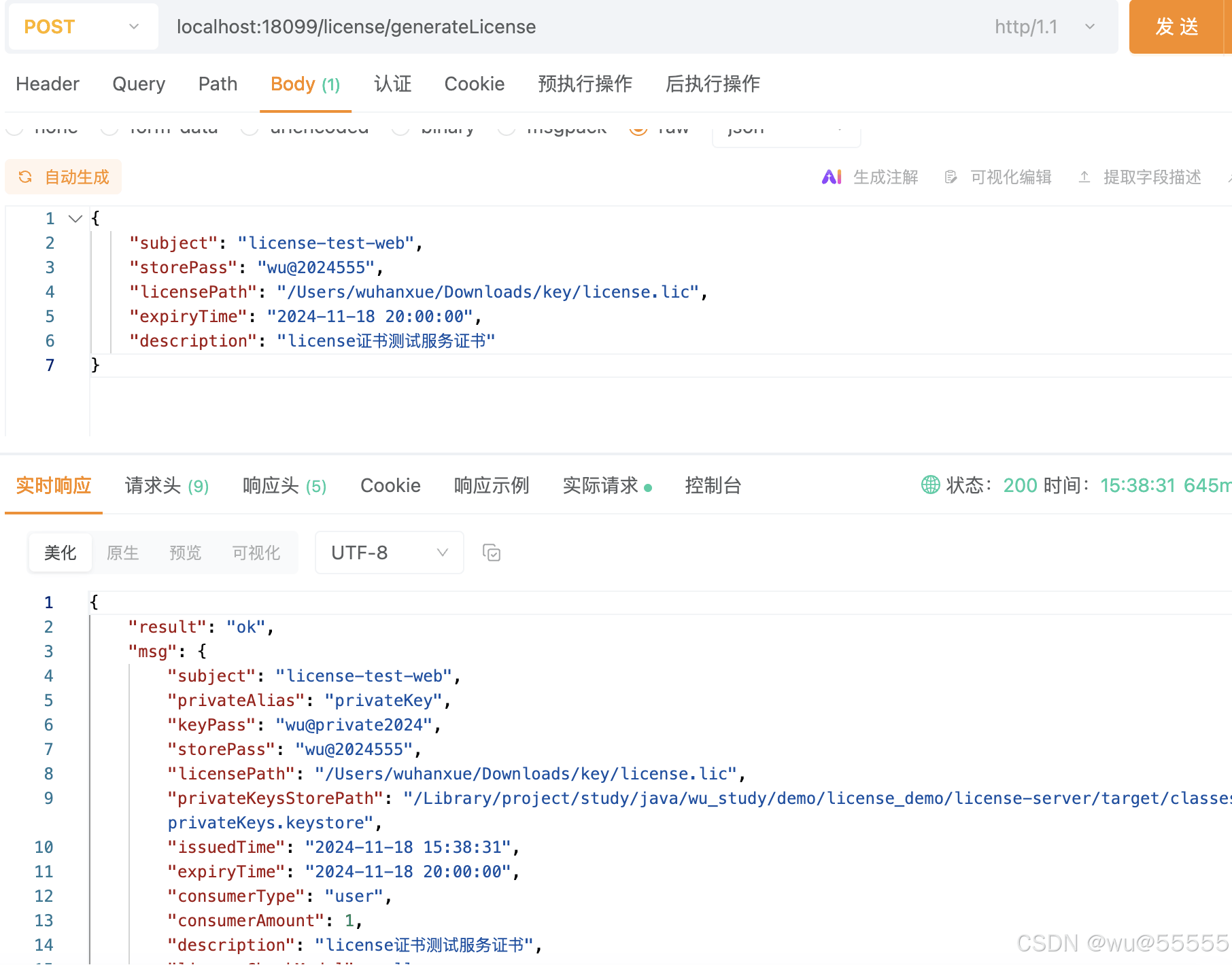
得到的证书文件license.lic、公钥文件和密钥库密码storepass我们需要提供给客户,当然密码可以提前配置在服务中,仅提供公钥和证书文件给客户即可。
2.4 测试模块
1、新建一个spring web服务,用于测试证书校验
2、引入license-client依赖
<dependency>
            <groupid>com.example</groupid>
            <artifactid>license-client</artifactid>
            <version>1.0.0</version>
</dependency>
3、配置文件声明
server:
  port: 1888
license:
  # 证书subject
  subject: license-test-web
  # 公钥别称
  publicalias: publiccert
  # 访问公钥库的密码
  storepass: wu@2024555
  # 证书路径
  licensepath: /users/wuhanxue/downloads/key/license.lic
  # 公钥路径
  publickeysstorepath: /users/wuhanxue/downloads/key/publiccerts.keystore
4、测试接口
@restcontroller
public class testcontroller {
    @getmapping("test")
    public string test(){
        return "test";
    }
}5、启动类添加bean扫描路径@componentscan(basepackages = {"com.example.*"})
@springbootapplication
@componentscan(basepackages = {"com.example.*"})
public class licensetestwebapplication {
    public static void main(string[] args) {
        springapplication.run(licensetestwebapplication.class, args);
    }
}
5、启动项目
显示证书安装成功

6、访问测试接口
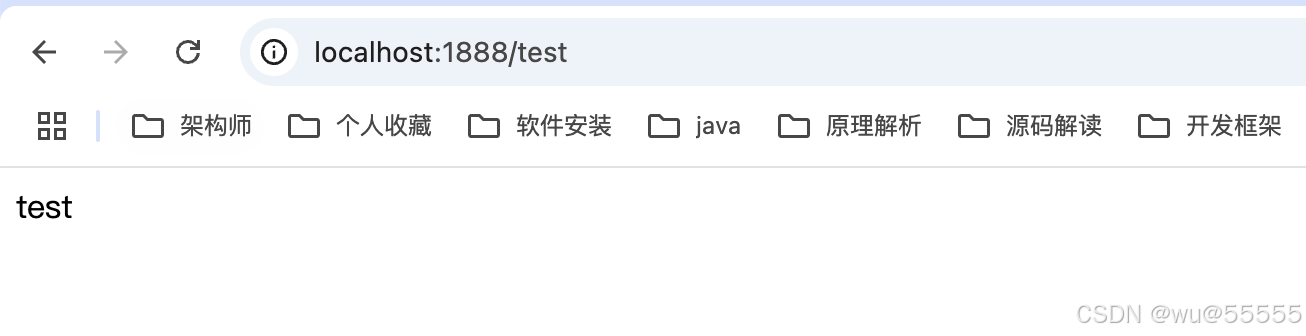
成功返回信息,且有校验通过提示,说明校验成功

7、我们继续测试校验不通过的场景,重新生成license文件,并将有效期调整为1分钟后,然后等待2分钟再重启项目,注意重新生成证书后要重新启动项目,让项目重新加载证书
8、首先可以看到启动项目时已经是一分钟后了,安装实际失败了
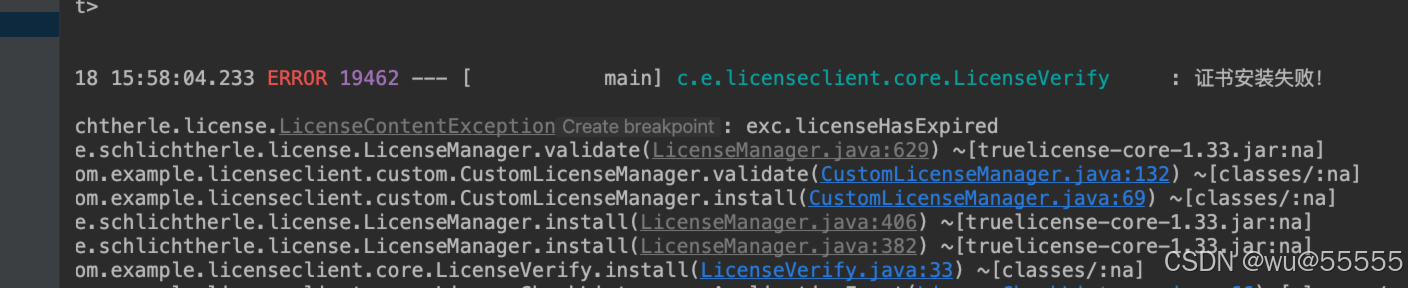
9、调用会显示证书过期,说明正常
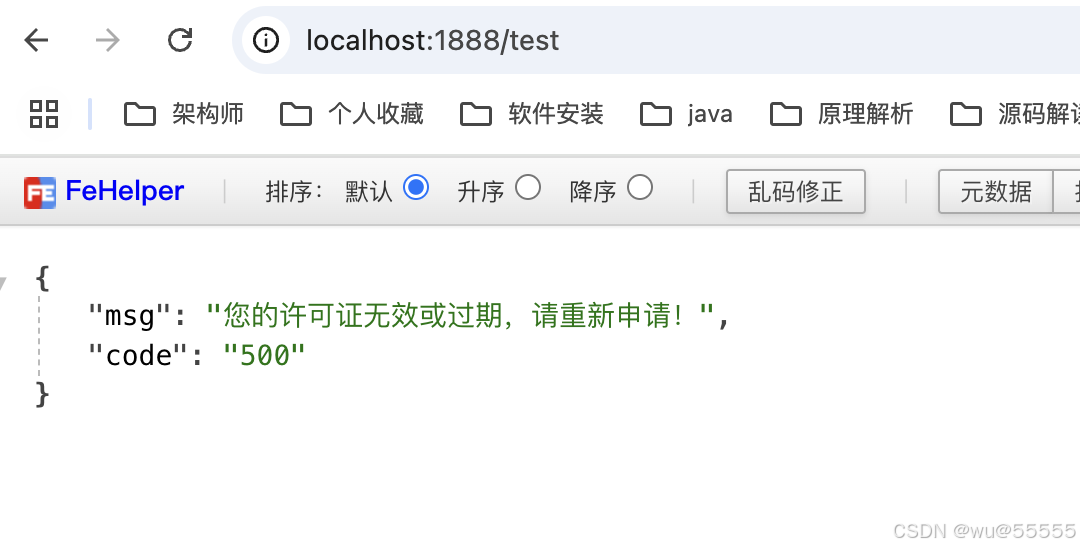
10、我们再模拟证书安装时是有效期内,调用时已经过了有效期的场景,将有效期调整为5分钟后,然后马上重启项目,在5分钟后调用接口,接口显示已过期,符合预期
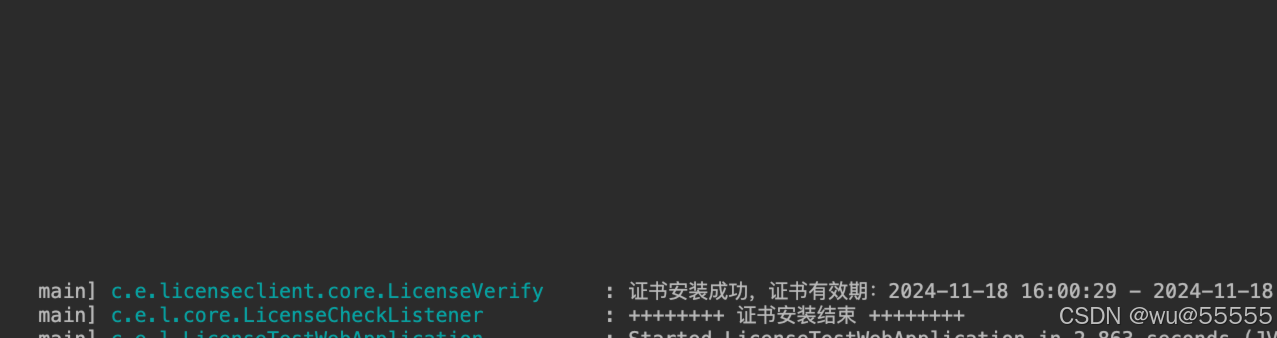

2.5 完整代码
完整代码可见如下代码仓库:https://gitee.com/wuhanxue/wu_study/tree/master/demo/license_demo
3.总结
如上我们演示了truelicense生成证书及证书校验的流程,如上演示中我并未针对设备、ip等进行演示,但代码仓库中有对应代码,大家感兴趣的可以自行验证。
到此这篇关于java利用truelicense实现项目离线证书授权操作步骤的文章就介绍到这了,更多相关java truelicense项目离线证书授权内容请搜索代码网以前的文章或继续浏览下面的相关文章希望大家以后多多支持代码网!



发表评论