
 我要评论
我要评论toraw 是 vue 3 提供的一个 api,主要用于从 vue 的响应式对象中获取其对应的原始非响应式对象。
1. toraw 的作用
1、获取原始对象
当对象被 vue 的响应式系统包裹时,直接访问它会返回一个 proxy 对象。如果需要访问未被响应式系统代理的原始对象,可以使用 toraw。
2、调试辅助
在调试时,如果响应式对象出现了意料之外的行为,toraw 可以帮助我们查看原始数据。
3、与第三方库兼容
某些第三方库不支持 vue 的响应式对象(proxy 对象),这时可以通过 toraw 将响应式对象转为普通对象传递给它们。
2. toraw 的用法
2.1 基本语法
import { reactive, toraw } from 'vue';
const reactiveobj = reactive({ foo: 'bar' });
const rawobj = toraw(reactiveobj);
console.log(reactiveobj); // proxy {foo: "bar"}
console.log(rawobj); // {foo: "bar"}
2.2 使用场景
1、获取原始对象进行对比或操作
响应式对象中的 proxy 包裹可能会导致意外行为,比如在比较对象时。
import { reactive, toraw } from 'vue';
const reactiveobj = reactive({ a: 1 });
const rawobj = toraw(reactiveobj);
// 比较原始对象
console.log(rawobj === reactiveobj); // false
console.log(rawobj == { a: 1 }); // false
// 使用原始对象
const anotherobj = { ...rawobj }; // 拷贝原始对象
console.log(anotherobj); // { a: 1 }
2、debug 或日志记录
为了避免调试时输出 proxy 对象,可以用 toraw 获取原始数据。
import { reactive, toraw } from 'vue';
const state = reactive({ count: 0 });
function logstate() {
  console.log('state:', toraw(state));
}
state.count++;
logstate(); // 输出:state: { count: 1 }
3、防止无限递归更新
在某些情况下(如递归处理响应式对象),直接操作响应式数据可能会导致不必要的额外开销或无限递归,使用 toraw 可以避免这些问题。
import { reactive, toraw } from 'vue';
const data = reactive({ nested: { value: 1 } });
function process(obj) {
  const raw = toraw(obj); // 获取原始对象
  console.log(raw); // { value: 1 }
}
process(data.nested);
3. 注意事项
1、toraw 不会脱离响应式系统
使用 toraw 获取原始对象后,对原始对象的修改不会触发 vue 的响应式更新,但对原始对象的修改仍会触发更新。
🌰
<template>
  <div>obj.foo: {{ obj.foo }}</div>
</template>
<script setup>
import { reactive, toraw } from 'vue'
const obj = reactive({ foo: '更新前数据 hello' })
const raw = toraw(obj)
settimeout(() => {
  raw.foo = '更新后数据 hi'
  console.log('obj.foo', obj.foo) // "更新后数据 hi"(原始对象和响应式对象指向同一内存地址)
})
</script>
2、 不要滥用 toraw
- toraw 应用于特定场景,如与第三方库交互或调试时。一般情况下,应尽量使用响应式数据。
- 滥用 toraw 可能破坏 vue 的响应式系统,导致不可预测的行为。
3、原始对象不能被 reactive 再次代理
如果对原始对象应用 reactive,vue 会返回其原始的响应式对象,而不是重新代理它。
🌰
import { reactive, toraw } from 'vue'
const obj = reactive({ foo: 'bar' })
const raw = toraw(obj)
const newreactive = reactive(raw)
console.log(newreactive === obj) // true
4、只对响应式对象有效
如果传入的不是响应式对象,toraw 会直接返回原对象。
import { toraw } from 'vue'
const plainobj = { foo: 'bar' }
console.log(toraw(plainobj) === plainobj) // true
完整示例 🌰
import { definecomponent, reactive, toraw } from 'vue';
export default definecomponent({
  setup() {
    const state = reactive({
      items: [
        { id: 1, name: 'vue' },
        { id: 2, name: 'react' },
      ],
    });
    const addrawitem = () => {
      const raw = toraw(state.items); // 获取原始数组
      raw.push({ id: raw.length + 1, name: 'angular' });
      console.log('raw', raw);
    };
    return () => (
      <div>
        <h1>技术栈</h1>
        <ul>
          {state.items.map((item) => (<li key={item.id}>{item.name}</li>))}
        </ul>
        <button onclick={addrawitem}>添加项</button>
      </div>
    );
  },
});
展示为:
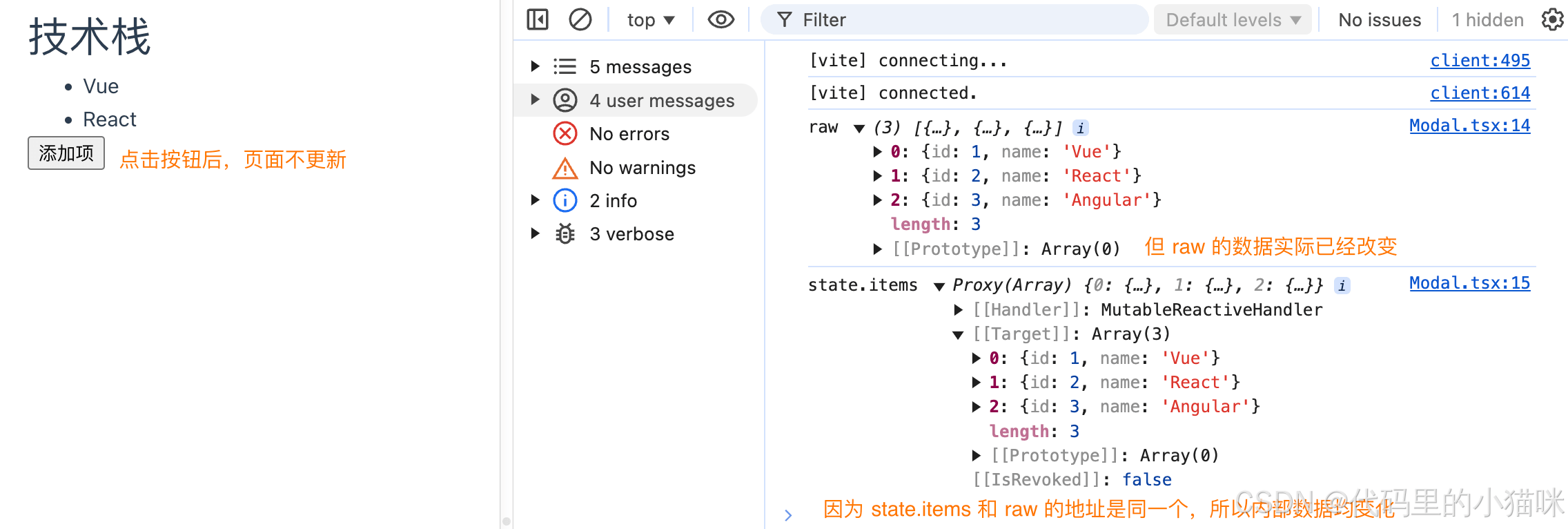
使用建议:
1、优先使用 vue 的响应式系统,toraw 只在特殊场景中使用。
2、📢:注意原始对象的修改不会触发视图更新。
3、避免过度依赖 toraw,以免破坏响应式的优势。
到此这篇关于vue 3 中 toraw 的详细讲解的文章就介绍到这了,更多相关vue 3 toraw 的详细讲解内容请搜索代码网以前的文章或继续浏览下面的相关文章希望大家以后多多支持代码网!




发表评论