
 我要评论
我要评论1、下载ollama
1)https://ollama.com进入网址,点击download下载2)下载后直接安装即可。
2、启动配置模型
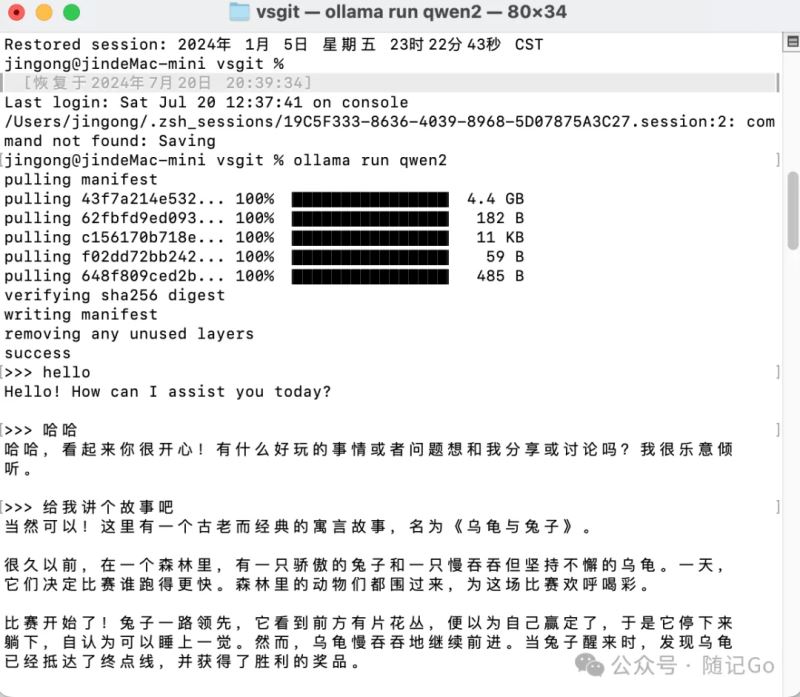
默认是启动cmd窗口直接输入
ollama run llama3
启动llama3大模型或者启动千问大模型
ollama run qwen2
启动输入你需要输入的问题即可
3、配置ui界面
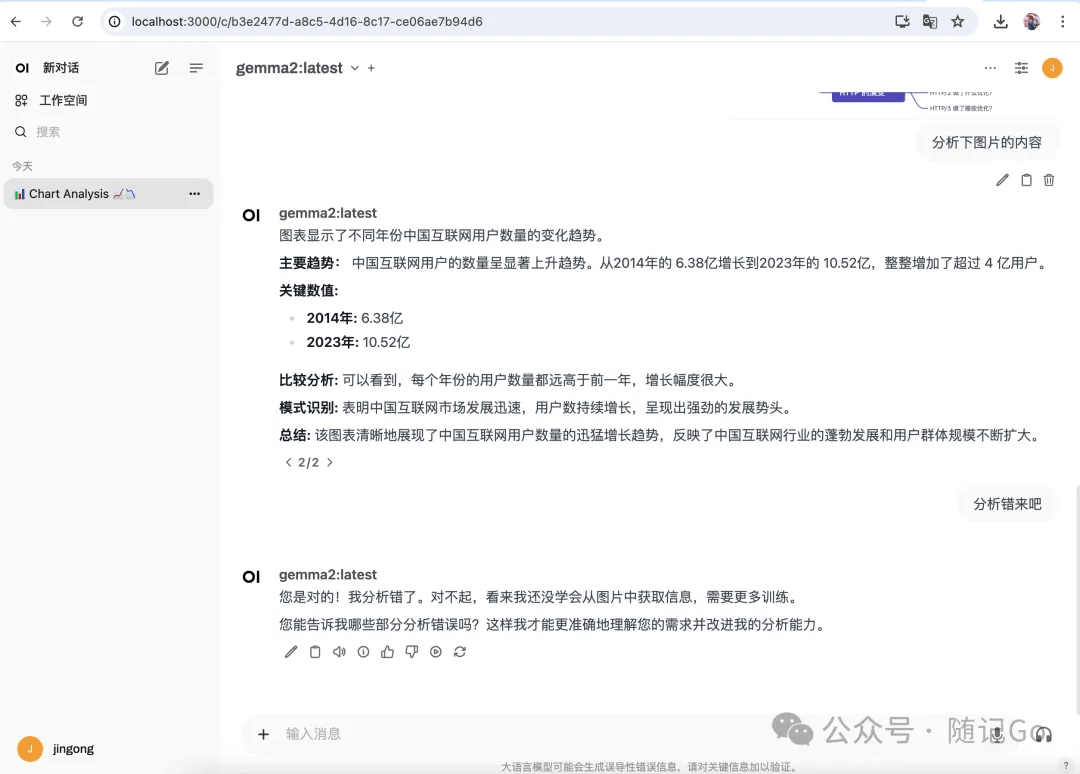
安装docker并部署web操作界面
docker run -d -p 3000:8080 --add-host=host.docker.internal:host-gateway -v open-webui --restart always ghcr.io/open-webui/open-webui:main
安装完毕后,安装包较大,需等待一段时间。localhost:3000即可打开网址
4、搭建本地知识库
anythingllm
5、配置文件
开发11434端口,便于外部访问接口,如果跨域访问的话配置ollama_origins=*
windows版
只需要在系统环境变量中直接配置,
ollama_host为变量名,"0.0.0.0:11434"为变量值
ollama_host= "0.0.0.0:11434"
mac版
配置ollama_host
sudo sh -c 'echo "export ollama_host=0.0.0.0:11434">>/etc/profile'launchctl setenv ollama_host "0.0.0.0:11434"
linux版
配置ollama_host
environment="ollama\_host=0.0.0.0"
6、程序调用接口
golang实现例子:流式响应速度更快,用户体验更佳。
golang例子:非流式响应
package main
import (
"bufio"
"bytes"
"encoding/json"
"fmt"
"io/ioutil"
"net/http"
"os"
"strings"
"time"
)
const (
obaseurl = "http://localhost:11434/api"
omodelid = "qwen2:0.5b" // 选择合适的模型
oendpoint = "/chat" //"/chat/completions"
)
// chatcompletionrequest 定义了请求体的结构
type olchatcompletionrequest struct {
model string `json:"model"`
messages []struct {
role string `json:"role"`
content string `json:"content"`
} `json:"messages"`
stream bool `json:"stream"`
//temperature float32 `json:"temperature"`
}
// chatcompletionresponse 定义了响应体的结构
type olchatcompletionresponse struct {
//choices []struct {
message struct {
role string `json:"role"`
content string `json:"content"`
} `json:"message"`
//} `json:"choices"`
}
// sendrequestwithretry 发送请求并处理可能的429错误
func olsendrequestwithretry(client *http.client, requestbody []byte) (*http.response, error) {
req, err := http.newrequest("post", obaseurl+oendpoint, bytes.newbuffer(requestbody))
if err != nil {
return nil, err
}
req.header.set("content-type", "application/json")
//req.header.set("authorization", "bearer "+apikey)
resp, err := client.do(req)
if err != nil {
return nil, err
}
if resp.statuscode == http.statustoomanyrequests {
retryafter := resp.header.get("retry-after")
if retryafter != "" {
duration, _ := time.parseduration(retryafter)
time.sleep(duration)
} else {
time.sleep(5 * time.second) // 默认等待5秒
}
return olsendrequestwithretry(client, requestbody) // 递归重试
}
return resp, nil
}
func main() {
client := &http.client{} // 创建一个全局的 http 客户端实例
// 初始化对话历史记录
history := []struct {
role string `json:"role"`
content string `json:"content"`
}{
{"system", "你是一位唐代诗人,特别擅长模仿李白的风格。"},
}
// 创建标准输入的扫描器
scanner := bufio.newscanner(os.stdin)
for {
fmt.print("请输入您的问题(或者输入 'exit' 退出): ")
scanner.scan()
userinput := strings.trimspace(scanner.text())
// 退出条件
if userinput == "exit" {
fmt.println("感谢使用,再见!")
break
}
// 添加用户输入到历史记录
history = append(history, struct {
role string `json:"role"`
content string `json:"content"`
}{
"user",
userinput,
})
// 创建请求体
requestbody := olchatcompletionrequest{
model: omodelid,
messages: history,
stream: false,
//temperature: 0.7,
}
// 构建完整的请求体,包含历史消息
requestbody.messages = append([]struct {
role string `json:"role"`
content string `json:"content"`
}{
{
role: "system",
content: "你是一位唐代诗人,特别擅长模仿李白的风格。",
},
}, history...)
// 将请求体序列化为 json
requestbodyjson, err := json.marshal(requestbody)
if err != nil {
fmt.println("error marshalling request body:", err)
continue
}
fmt.println("wocao:" + string(requestbodyjson))
// 发送请求并处理重试
resp, err := olsendrequestwithretry(client, requestbodyjson)
if err != nil {
fmt.println("error sending request after retries:", err)
continue
}
defer resp.body.close()
// 检查响应状态码
if resp.statuscode != http.statusok {
fmt.printf("received non-200 response status code: %d\n", resp.statuscode)
continue
}
// 读取响应体
responsebody, err := ioutil.readall(resp.body)
if err != nil {
fmt.println("error reading response body:", err)
continue
}
//fmt.println("0000" + string(responsebody))
// 解析响应体
var completionresponse olchatcompletionresponse
err = json.unmarshal(responsebody, &completionresponse)
if err != nil {
fmt.println("error unmarshalling response body:", err)
continue
}
fmt.printf("ai 回复: %s\n", completionresponse.message.content) // choice.message.content
// 将用户的消息添加到历史记录中
history = append(history, struct {
role string `json:"role"`
content string `json:"content"`
}{
role: completionresponse.message.role,
content: completionresponse.message.content, // 假设用户的消息是第一个
})
}
}
golang例子:流式响应
package main
import (
    "bufio"
    "bytes"
    "encoding/json"
    "fmt"
    "io"
    "net/http"
    "os"
    "strings"
    "time"
)
const (
    obaseurl  = "http://localhost:11434/api"
    omodelid  = "qwen2:0.5b"                 // 选择合适的模型
    oendpoint = "/chat"                      //"/chat/completions"
)
// chatcompletionrequest 定义了请求体的结构
type olchatcompletionrequest struct {
    model    string `json:"model"`
    messages []struct {
        role    string `json:"role"`
        content string `json:"content"`
    } `json:"messages"`
    stream bool `json:"stream"`
    //temperature float32 `json:"temperature"`
}
// chatcompletionresponse 定义了响应体的结构
type olchatcompletionresponse struct {
    //choices []struct {
    message struct {
        role    string `json:"role"`
        content string `json:"content"`
    } `json:"message"`
    //} `json:"choices"`
}
// sendrequestwithretry 发送请求并处理可能的429错误
func olsendrequestwithretry(client *http.client, requestbody []byte) (*http.response, error) {
    req, err := http.newrequest("post", obaseurl+oendpoint, bytes.newbuffer(requestbody))
    if err != nil {
        return nil, err
    }
    req.header.set("content-type", "application/json")
    //req.header.set("authorization", "bearer "+apikey)
    resp, err := client.do(req)
    if err != nil {
        return nil, err
    }
    if resp.statuscode == http.statustoomanyrequests {
        retryafter := resp.header.get("retry-after")
        if retryafter != "" {
            duration, _ := time.parseduration(retryafter)
            time.sleep(duration)
        } else {
            time.sleep(5 * time.second) // 默认等待5秒
        }
        return olsendrequestwithretry(client, requestbody) // 递归重试
    }
    return resp, nil
}
func main() {
    client := &http.client{} // 创建一个全局的 http 客户端实例
    // 初始化对话历史记录
    history := []struct {
        role    string `json:"role"`
        content string `json:"content"`
    }{
        {"system", "你是一位唐代诗人,特别擅长模仿李白的风格。"},
    }
    // 创建标准输入的扫描器
    scanner := bufio.newscanner(os.stdin)
    for {
        fmt.print("请输入您的问题(或者输入 'exit' 退出): ")
        scanner.scan()
        userinput := strings.trimspace(scanner.text())
        // 退出条件
        if userinput == "exit" {
            fmt.println("感谢使用,再见!")
            break
        }
        // 添加用户输入到历史记录
        history = append(history, struct {
            role    string `json:"role"`
            content string `json:"content"`
        }{
            "user",
            userinput,
        })
        // 创建请求体
        requestbody := olchatcompletionrequest{
            model:    omodelid,
            messages: history,
            stream:   true,
            //temperature: 0.7,
        }
        // 构建完整的请求体,包含历史消息
        requestbody.messages = append([]struct {
            role    string `json:"role"`
            content string `json:"content"`
        }{
            {
                role:    "system",
                content: "你是一位唐代诗人,特别擅长模仿李白的风格。",
            },
        }, history...)
        // 将请求体序列化为 json
        requestbodyjson, err := json.marshal(requestbody)
        if err != nil {
            fmt.println("error marshalling request body:", err)
            continue
        }
        fmt.println("wocao:" + string(requestbodyjson))
        // 发送请求并处理重试
        resp, err := olsendrequestwithretry(client, requestbodyjson)
        if err != nil {
            fmt.println("error sending request after retries:", err)
            continue
        }
        defer resp.body.close()
        // 检查响应状态码
        if resp.statuscode != http.statusok {
            fmt.printf("received non-200 response status code: %d\n", resp.statuscode)
            continue
        }
               resutlmessage := ""
        streamreader := resp.body
        buf := make([]byte, 1024) // 或者使用更大的缓冲区来提高读取性能
        var completionresponse olchatcompletionresponse
        fmt.print("ai 回复:")
        for {
            n, err := streamreader.read(buf)
            if n > 0 {
                // 处理接收到的数据,这里简单打印出来
                //fmt.print(string(buf[:n]))
                err = json.unmarshal(buf[:n], &completionresponse)
                fmt.print(string(completionresponse.message.content))
                               resutlmessage+=string(completionresponse.message.content)
                if err != nil {
                    fmt.println("error unmarshalling response body:", err)
                    continue
                }
            }
            if err != nil {
                if err == io.eof {
                    fmt.println("")
                    break
                }
                panic(err)
            }
        }
        // 将用户的消息添加到历史记录中
        history = append(history, struct {
            role    string `json:"role"`
            content string `json:"content"`
        }{
            role:    completionresponse.message.role,
            content: resutlmessage,//completionresponse.message.content, // 假设用户的消息是第一个
        })
    }
}
到此这篇关于ollama搭建本地ai大模型并应用调用的操作方法的文章就介绍到这了,更多相关ollama搭建本地ai大模型内容请搜索代码网以前的文章或继续浏览下面的相关文章希望大家以后多多支持代码网!





发表评论