
 我要评论
我要评论按照uni-app官方文档的写法 当前一条滑动确认之后 页面列表刷新 但是滑动的状态还在 入下图所示:
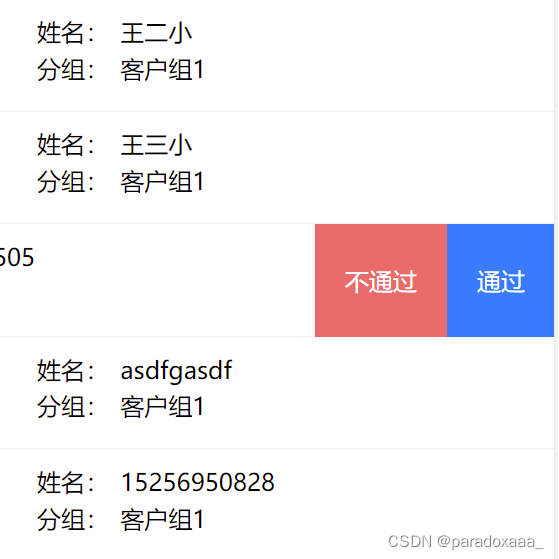
我们需要在滑动确认之后 页面刷新 滑动状态恢复 那么我们就来写一下这部分的逻辑:
首先,配置一下:show="isopened[item.id]" @change="change(index)"
注意:isopened一定要定位到你当前点击的内容,我这里是用id区分的, 不然会出现所有列表都同步滑开或者关闭
<view class="uni-swipe-box" v-for=" (item,index) in userlist" :key="index">
					<uni-swipe-action-item :threshold="0" :show="isopened[item.id]" @change="change(index)"
						:auto-close='true' :right-options="options2" @click="bindclick($event,item)">
						<view class="content-box">
							<view class="user-name">姓名:<span class="span">{{item.username}}</span></view>
							<view class="user-name">分组:<span class="span">{{item.groupname}}</span></view>
						</view>
					</uni-swipe-action-item>
				</view>
data() {
return {
isopened: {},
tempopened: null, // 临时状态
}
},
mounted() {
// 初始化 userlist 中每个item的 isopened 状态
this.userlist.foreach(item => {
this.$set(this.isopened, item.id, false);
});
},
methods: {
change(index) {
// 使用tempopened记录当前滑动状态,而不是直接改变isopened
this.tempopened = !this.isopened[this.userlist[index].id];
},
bindclick(e, item) {
const that = this
console.log(e);
console.log('item', item);
const id = item.id
if (e.content.text === '通过') {
uni.showmodal({
title: '提交确认',
content: `确认审核通过?`,
success: (res) => {
if (res.confirm) {
that.ispass = true
this.isopened[item.id] = this.tempopened;
that.tempopened = null; // 清理临时状态
that.makerequst(id) // 调用后台接口
} else if (res.cancel) {
that.ispass = false
that.isopened[item.id] = that.tempopened;
that.tempopened = null; // 清理临时状态
console.log('用户取消操作');
}
}
});
}
}这样就可以实现及时恢复滑动状态
官方文档uni-app官网
到此这篇关于uni-app uni-swipe-action 滑动操作状态恢复的文章就介绍到这了,更多相关uni-app uni-swipe-action 滑动操作内容请搜索代码网以前的文章或继续浏览下面的相关文章希望大家以后多多支持代码网!




发表评论