
 我要评论
我要评论pomelocli 是什么
我们已经有相当多的命令行工具实现或解析类库,pomelocli 并不是替代版本,它基于 nate mcmaster 的杰出工作 commandlineutils、dotnetcoreplugins 实现了一整套的命令行开发、管理、维护方案,在此特别鸣谢 nate。
为什么实现
作者述职于 devops 部门,编写、维护 cli 工具并将其部署到各个服务器节点上是很常规的需求,但是又常常面临一系列问题。
太多的工具太少的规范
命令行工具开发自由度过高,随之而来的是迥异的开发和使用体验:
- 依赖和配置管理混乱;
- 没有一致的参数、选项标准,缺失帮助命令;
- 永远找不到版本对号的说明文档;
基于二进制拷贝分发难以为继
工具开发完了还需要部署到计算节点上,但是对运维人员极其不友好:
- 永远不知道哪些机器有没有安装,安装了什么版本;
- 需要进入工具目录配置运行参数;
快速开始
你可以直接开始,但是在此之前理解命令、参数和选项仍然有很大的帮助。相关内容可以参考 introduction.
1. 引用 pomelocli 开发命令行应用
引用 pomelocli 来快速创建自己的命令行应用
$ dotnet new console -n sampleapp
$ cd sampleapp
$ dotnet add package pomelocli -v 1.3.0
在入口程序添加必要的处理逻辑,文件内容见于 docs/sample/3-sample-app/program.cs。这里使用了依赖注入管理命令,相关参考见 .net 依赖项注入。
using system;
using system.threading.tasks;
using microsoft.extensions.dependencyinjection;
using pomelocli;
class program
{
    static async task<int> main(string[] avg)
    {
        var services = new servicecollection()
            .addtransient<icommand, echocommand>()
            .addtransient<icommand, headcommand>()
            .buildserviceprovider();
        var application = applicationfactory.constructfrom(services);
        return await application.executeasync(args);
    }
}
这里有两个命令:echocommand,是对 echo 命令的模拟,文件内容见于 docs/sample/3-sample-app/echocommand.cs
#nullable disable
using system;
using system.threading;
using system.threading.tasks;
using mcmaster.extensions.commandlineutils;
using pomelocli;
[command("echo", description = "display a line of text")]
class echocommand : command
{
    [argument(0, "input")]
    public string input { get; set; }
    [option("-n|--newline", commandoptiontype.novalue, description = "do not output the trailing newline")]
    public boolean? newline { get; set; }
    protected override task<int> onexecuteasync(cancellationtoken cancellationtoken)
    {
        if (newline.hasvalue)
        {
            console.writeline(input);
        }
        else
        {
            console.write(input);
        }
        return task.fromresult(0);
    }
}
headcommand是对 head 命令的模拟,文件内容见于 docs/sample/3-sample-app/headcommand.cs。
#nullable disable
using system;
using system.componentmodel.dataannotations;
using system.io;
using system.linq;
using system.threading;
using system.threading.tasks;
using mcmaster.extensions.commandlineutils;
using pomelocli;
[command("head", description = "print the first 10 lines of each file to standard output")]
class headcommand : command
{
    [required]
    [argument(0)]
    public string path { get; set; }
    [option("-n|--line", commandoptiontype.singlevalue, description = "print the first num lines instead of the first 10")]
    public int32 line { get; set; } = 10;
    protected override task<int> onexecuteasync(cancellationtoken cancellationtoken)
    {
        if (!file.exists(path))
        {
            throw new filenotfoundexception($"file '{path}' not found");
        }
        var lines = file.readlines(path).take(line);
        foreach (var line in lines)
        {
            console.writeline(line);
        }
        return task.fromresult(0);
    }
}
进入目录 sampleapp 后,既可以通过 dotnet run -- --help 查看包含的 echo 和 head 命令及使用说明。
$ dotnet run -- --help
usage: sampleapp [command] [options]
options:
  -?|-h|--help  show help information.
commands:
  echo          display a line of text
  head          print the first 10 lines of each file to standard output
run 'sampleapp [command] -?|-h|--help' for more information about a command.
$ dotnet run -- echo --help
display a line of text
usage: sampleapp echo [options] <input>
arguments:
  input
options:
  -n|--newline  do not output the trailing newline
  -?|-h|--help  show help information.
也可以编译使用可执行的 sampleapp.exe 。
$ ./bin/debug/net8.0/sampleapp.exe --help
usage: sampleapp [command] [options]
options:
  -?|-h|--help  show help information.
commands:
  echo          display a line of text
  head          print the first 10 lines of each file to standard output
run 'sampleapp [command] -?|-h|--help' for more information about a command.
$ ./bin/debug/net8.0/sampleapp.exe echo --help
display a line of text
usage: sampleapp echo [options] <input>
arguments:
  input
options:
  -n|--newline  do not output the trailing newline
  -?|-h|--help  show help information.
bravo 很简单对吧。
2. 引用 pomelocli 开发命令行插件
如果只是提供命令行应用的创建能力,作者大可不必发布这样一个项目,因为 mcmaster.extensions.commandlineutils 本身已经做得足够好了。如上文"为什么实现章节"所说,作者还希望解决命令行工具的分发维护问题。
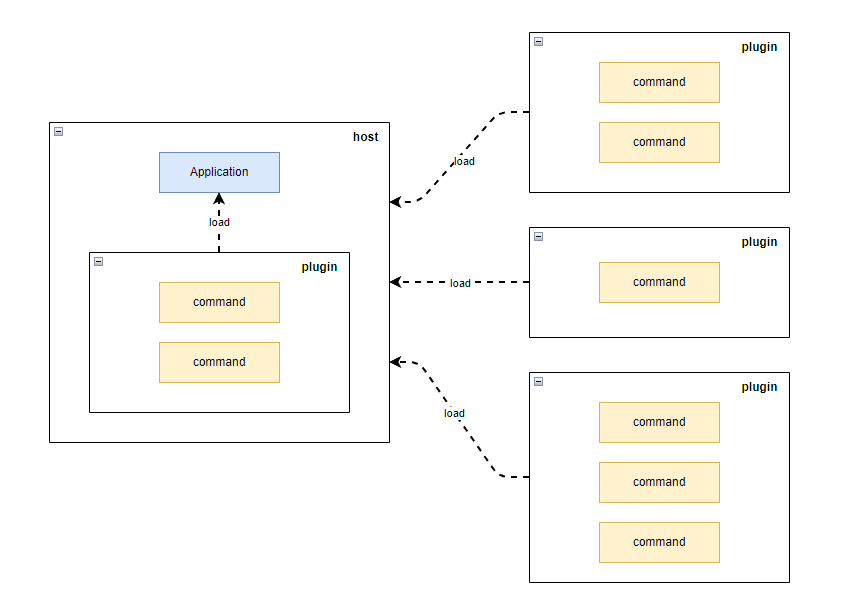
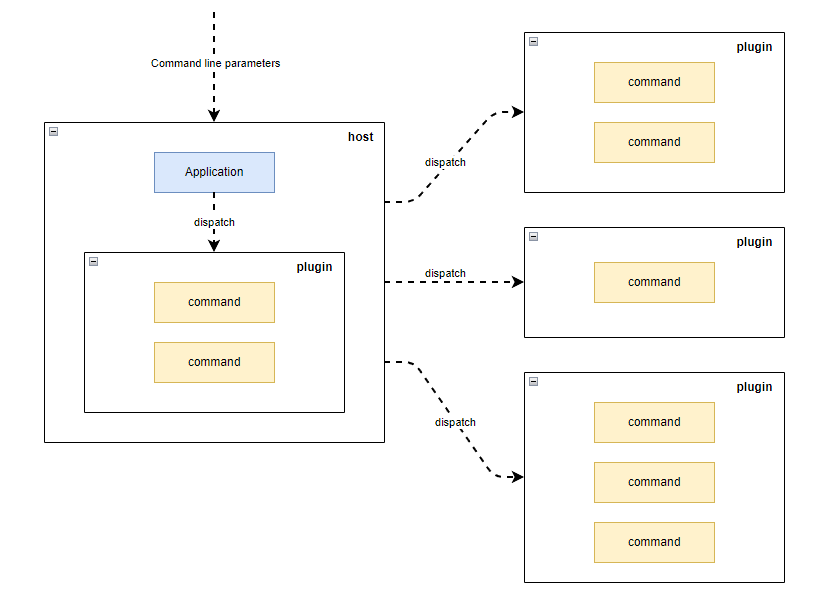
为了实现这一目标,pomelocli 继续基于 mcmaster.netcore.plugins 实现了一套插件系统或者说架构:
- 将命令行工具拆分成宿主和插件两部分功能;
- 宿主负责安装、卸载、加载插件,作为命令行入口将参数转交给对应的插件;
- 插件负责具体的业务功能的实现;
- 宿主和插件均打包成标准的 nuget 制品;
插件加载示意
命令行参数传递示意
通过将宿主的维护交由 dotnet tool 处理、将插件的维护交由宿主处理,我们希望解决命令行工具的分发维护问题:
- 开发人员
- 开发插件
- 使用
dotnet nuget push发布插件
- 运维/使用人员
- 使用
dotnet tool安装、更新、卸载宿主 - 使用
pomelo-cli install/uninstall安装、更新、卸载插件
- 使用
现在现在我们来开发一个插件应用。
开发命令行插件
引用 pomelocli 来创建自己的命令行插件
$ dotnet new classlib -n sampleplugin
$ cd sampleplugin
$ dotnet add package pomelocli -v 1.3.0
我们把上文提到的 echocommand 和 headcommand 复制到该项目,再添加依赖注入文件 servicecollectionextensions.cs,文件内容见于 docs/sample/4-sample-plugin/servicecollectionextensions.cs
using system;
using system.threading.tasks;
using microsoft.extensions.dependencyinjection;
using pomelocli;
public static class servicecollectionextensions
{
    /// <summary>
    /// pomelo-cli load plugin by this method, see
    /// <see cref="pomelocli.plugins.runtime.pluginresolver.loading()" />
    /// </summary>
    /// <param name="services"></param>
    /// <returns></returns>
    public static iservicecollection addcommands(this iservicecollection services)
    {
        return services
            .addtransient<icommand, echocommand>()
            .addtransient<icommand, headcommand>();
    }
}
为了能够使得插件运行起来,我们还需要在打包时将依赖添加到 nupkg 文件中。为此需要修改 csproj 添加打包配置,参考 docs/sample/4-sample-plugin/sampleplugin.csproj,相关原理见出处 how to include package reference files in your nuget
搭建私有 nuget 服务
为了托管我们的工具与插件,我们这里使用 baget 搭建轻量的 nuget 服务,docker-compose.yaml 已经提供见 baget。docker 等工具使用请自行查阅。
version: "3.3"
services:
  baget:
    image: loicsharma/baget
    container_name: baget
    ports:
      - "8000:80"
    volumes:
      - $pwd/data:/var/baget
我们使用 docker-compose up -d 将其运行起来,baget 将在地址 http://localhost:8000/ 上提供服务。
发布命令行插件
现我们在有了插件和 nuget 服务,可以发布插件了。
$ cd sampleplugin
$ dotnet pack -o nupkgs -c debug
$ dotnet nuget push -s http://localhost:8000/v3/index.json nupkgs/sampleplugin.1.0.0.nupkg
3. 使用 pomelocli 集成已发布插件
pomelo-cli 是一个 dotnet tool 应用,可以看作命令行宿主,它包含了一组 plugin 命令用来管理我们的命令行插件。
安装命令行宿主
我们使用标准的 dotnet tool cli 命令安装 pomelocli,相关参考见 how to manage .net tools
$ dotnet tool install pomelocli.host --version 1.3.0 -g
$ pomelo-cli --help
usage: pomelocli.host [command] [options]
options:
  -?|-h|--help  show help information.
commands:
  config
  plugin
  version
run 'pomelocli.host [command] -?|-h|--help' for more information about a command.
可以看到 pomelo-cli 内置了部分命令。
集成命令行插件
pomelo-cli 内置了一组插件,包含了其他插件的管理命令
$ pomelo-cli plugin --help
usage: pomelocli.host plugin [command] [options]
options:
  -?|-h|--help  show help information.
commands:
  install
  list
  uninstall
run 'plugging [command] -?|-h|--help' for more information about a command.
我们用 plugin install 命令安装刚刚发布的插件 sampleplugin
$ pomelo-cli plugin install sampleplugin -v 1.0.0 -s http://localhost:8000/v3/index.json
$ pomelo-cli --help
usage: pomelocli.host [command] [options]
options:
  -?|-h|--help  show help information.
commands:
  config
  echo          display a line of text
  head          print the first 10 lines of each file to standard output
  plugin
  version
run 'pomelocli.host [command] -?|-h|--help' for more information about a command.
$ pomelo-cli echo --help
display a line of text
usage: pomelocli.host echo [options] <input>
arguments:
  input
options:
  -n|--newline  do not output the trailing newline
  -?|-h|--help  show help information.
可以看到 sampleplugin 包含的 echo 和 head 命令已经被显示在子命令列表中。
卸载命令行插件
pomelo-cli 当然也可以卸载其他插件
$ pomelo-cli plugin uninstall sampleplugin
卸载命令行宿主
我们使用标准的 dotnet tool cli 命令卸载 pomelocli
$ dotnet tool uninstall pomelocli.host -g
4. 引用 pomelocli 开发命令行宿主
你可能需要自己的命令行宿主,这也很容易。
$ dotnet new console -n samplehost
$ cd samplehost/
$ dotnet add package pomelocli
$ dotnet add package pomelocli.plugins
修改 program.cs 替换为以下内容
using system;
using system.threading.tasks;
using microsoft.extensions.dependencyinjection;
using pomelocli;
using pomelocli.plugins;
class program
{
    static async task<int> main(string[] args)
    {
        var services = new servicecollection()
            .addpluginsupport()
            .buildserviceprovider();
        var applicationfactory = new applicationfactory(services);
        var application = applicationfactory.constructrootapp();
        return await application.executeasync(args);
    }
}
现在你得到了一个命令宿主,你可以运行它,甚至用它安装插件
$ dotnet build
$ ./bin/debug/net8.0/samplehost.exe --help
usage: samplehost [command] [options]
options:
  -?|-h|--help  show help information.
commands:
  plugin
run 'samplehost [command] -?|-h|--help' for more information about a command.
$ ./bin/debug/net8.0/samplehost.exe plugin install sampleplugin -v 1.0.0 -s http://localhost:8000/v3/index.json
...
$ ./bin/debug/net8.0/samplehost.exe --help
usage: samplehost [command] [options]
options:
  -?|-h|--help  show help information.
commands:
  echo          display a line of text
  head          print the first 10 lines of each file to standard output
  plugin
run 'samplehost [command] -?|-h|--help' for more information about a command.
其他:异常 nu1102 的处理
当安装插件失败且错误码是nu1102 时,表示未找到对应版本,可以执行命令 $ dotnet nuget locals http-cache --clear 以清理 http 缓存。
info : restoring packages for c:\users\leon\.pomelocli.host\plugin.csproj...
info :   get http://localhost:8000/v3/package/sampleplugin/index.json
info :   ok http://localhost:8000/v3/package/sampleplugin/index.json 2ms
error: nu1102: unable to find package sample plugin with version (>= 1.1.0)
error:   - found 7 version(s) in http://localhost:8000/v3/index.json [ nearest version: 1.0.0 ]
error: package 'sampleplugin' is incompatible with 'user specified' frameworks in project 'c:\users\leon\.pomelocli.host\plugin.csproj'.
其他事项
已知问题
- refit 支持存在问题
路线图
- 业务插件配置
到此这篇关于dotnet 命令行工具解决方案 pomelocli的文章就介绍到这了,更多相关dotnet 命令行工具解决方案 pomelocli内容请搜索代码网以前的文章或继续浏览下面的相关文章希望大家以后多多支持代码网!
发表评论