
 我要评论
我要评论话不多说。
vue需要在public-index.html中在线导入以下这些
或者找到相应的资源下载到本地,本地导入更快。
 <link
      rel="stylesheet"
      href="https://cdn.jsdelivr.net/npm/luckysheet/dist/plugins/css/pluginscss.css" rel="external nofollow"
    />
    <link
      rel="stylesheet"
      href="https://cdn.jsdelivr.net/npm/luckysheet/dist/plugins/plugins.css" rel="external nofollow"
    />
    <link
      rel="stylesheet"
      href="https://cdn.jsdelivr.net/npm/luckysheet/dist/css/luckysheet.css" rel="external nofollow"
    />
    <link
      rel="stylesheet"
      href="https://cdn.jsdelivr.net/npm/luckysheet/dist/assets/iconfont/iconfont.css" rel="external nofollow"
    />
    <script src="https://cdn.jsdelivr.net/npm/luckysheet/dist/plugins/js/plugin.js"></script>
    <script src="https://cdn.jsdelivr.net/npm/luckysheet/dist/luckysheet.umd.js"></script>
引入
npm i -s exceljs file-saver luckyexcel
import { exceloptions } from "@/common/common.js"
const exceljs = require("exceljs");
import filesaver from "file-saver";
import luckyexcel from 'luckyexcel';
import xlsx from 'xlsx'
注意:
- 按照以上导入去下载相应的包
- exceloptions 是表格功能的一一些配置
- 我只是放在外面了
版本:
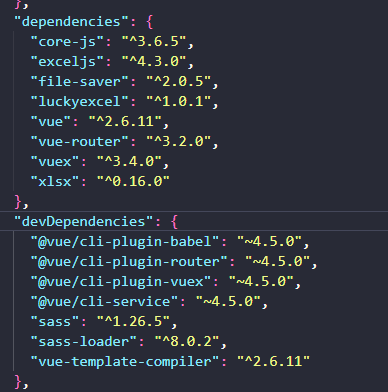
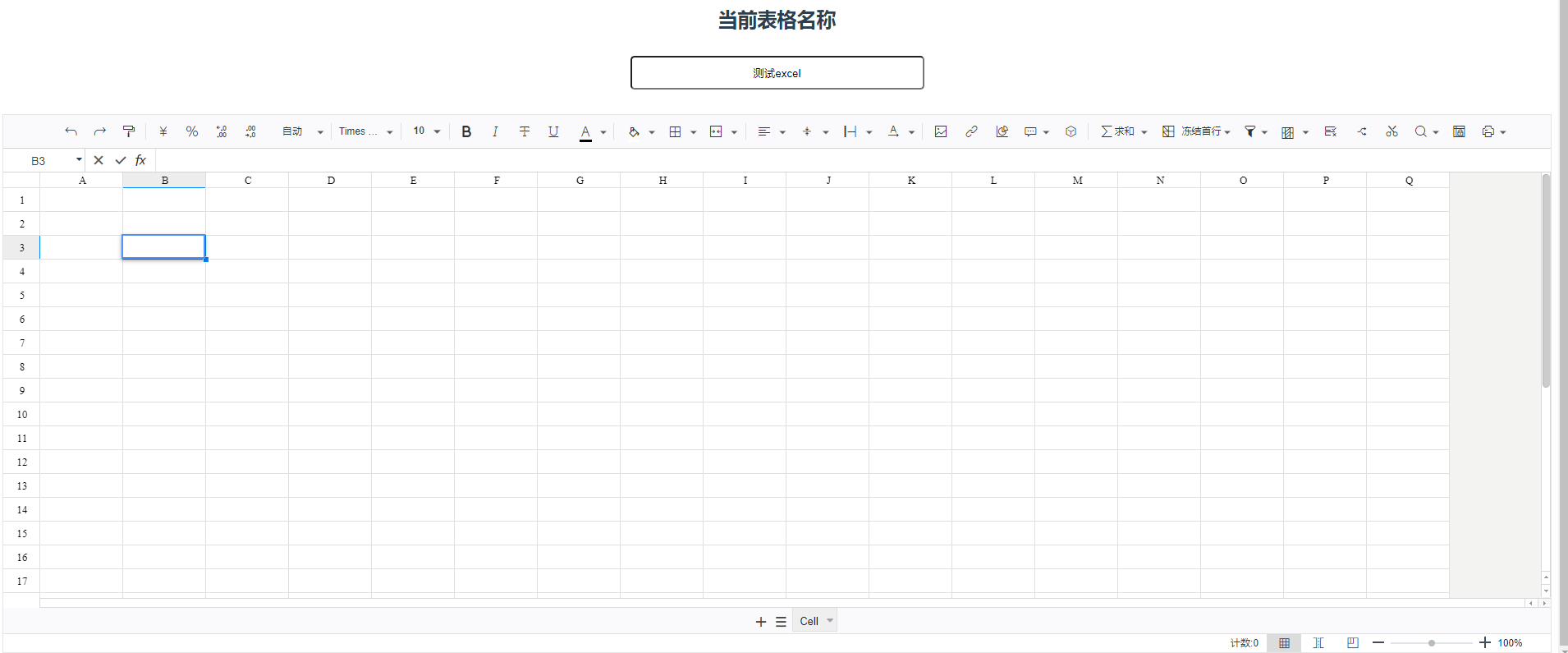
定义当前表格容器
我多加了一个表格名称
	<div class="allbtn">
      <button class="btn" @click="saveexcel">保存</button>
      <button class="btn" @click="outputexcel">导出表格</button>
      <input type="file" accept=".xlsx" @change="importexcel($event)" value="导入表格" />
    </div>
	<h2>当前表格名称</h2>
    <input class="inp" type="text" v-model="exceltitel">
    <div id="luckysheet"></div>
导入excel并展示
// 导入表格
    importexcel (event) {
      let file = event.target.files[0]
      let that = this;
      const types = file.name.split(".")[1];
      // 判断类型
      const filetype = ["xlsx"].some(
        item => item === types
      );
      console.log(file)
      if (!filetype) {
        alert("只支持上传xlsx后缀的表格!")
        return
      }
      luckyexcel.transformexceltolucky(file, (exportjson, luckysheetfile) => {
        if (exportjson.sheets === null || exportjson.sheets.length === 0) {
          this.$message.error('无法读取excel文件的内容,当前不支持xls文件!')
          return
        }
        window.luckysheet.destroy()
        this.changeexceloption.data = exportjson.sheets
        window.luckysheet.create(this.changeexceloption)
      })
    },
导出表格
这里我做了一点处理,初次加载时获取表格名称,然后可编辑当前表格名称,点击保存按钮后进行导出,则会导出你编辑的表格名称
1.初始获取表格名称
// 初始化加载
    init () {
      let opt = exceloptions();
      // 检测本地库中是否有配置
      let excelvalue = window.localstorage.getitem("excelvalue");
      if (excelvalue != null) {//有值
        let checkexcelvalue = json.parse(excelvalue)
        opt.data[0] = checkexcelvalue;
      }
      this.changeexceloption = opt;
      luckysheet.create(opt)
      // 保存初始表格名称
      this.exceltitel = this.changeexceloption.title;
    },
// 保存excel数据
    saveexcel () {
      var objsheet = luckysheet.getallsheets() // 得到表的数据
      // options = objsheet // 将表的数据保存本地
      // console.log(objsheet)

      // 获取标内容更新变化
      luckysheet.setworkbookname(this.exceltitel)
      this.changeexceloption.title = this.exceltitel;
    },
 // 导出表格
    outputexcel () {
      this.exportexcel(luckysheet.getluckysheetfile("修改"));
    },
    async exportexcel (luckysheet) {
      // 参数为luckysheet.getluckysheetfile()获取的对象
      // 1.创建工作簿,可以为工作簿添加属性
      const workbook = new exceljs.workbook();
      // 2.创建表格,第二个参数可以配置创建什么样的工作表
      luckysheet.every((table) => {
        if (table.data.length === 0) return true;
        const worksheet = workbook.addworksheet(table.name);
        // 3.设置单元格合并,设置单元格边框,设置单元格样式,设置值
        this.setstyleandvalue(table.data, worksheet);
        this.setmerge(table.config.merge, worksheet);
        this.setborder(table.config.borderinfo, worksheet);
        return true;
      });
      // 4.写入 buffer
      const buffer = await workbook.xlsx.writebuffer();
      //调用文件保存插件
      filesaver.saveas(
        new blob([buffer], { type: "application/octet-stream" }),
        this.changeexceloption.title + ".xlsx"
      );
      return buffer;
    },

    setmerge (luckymerge = {}, worksheet) {
      const mergearr = object.values(luckymerge);
      mergearr.foreach((elem) => {
        // elem格式:{r: 0, c: 0, rs: 1, cs: 2}
        // 按开始行,开始列,结束行,结束列合并(相当于 k10:m12)
        worksheet.mergecells(elem.r + 1, elem.c + 1, elem.r + elem.rs, elem.c + elem.cs);
      });
    },

    setborder (luckyborderinfo, worksheet) {
      if (!array.isarray(luckyborderinfo)) return;
      luckyborderinfo.foreach(function (elem) {
        var val = elem.value;
        let border = {};
        const luckytoexcel = {
          type: {
            "border-all": "all",
            "border-top": "top",
            "border-right": "right",
            "border-bottom": "bottom",
            "border-left": "left",
          },
          style: {
            0: "none",
            1: "thin",
            2: "hair",
            3: "dotted",
            4: "dashdot", // 'dashed',
            5: "dashdot",
            6: "dashdotdot",
            7: "double",
            8: "medium",
            9: "mediumdashed",
            10: "mediumdashdot",
            11: "mediumdashdotdot",
            12: "slantdashdot",
            13: "thick",
          },
        };

        if (val) {
          if (val.t != undefined) {
            border["top"] = {
              style: luckytoexcel.style[val.t.style],
              color: val.t.color,
            };
          }
          if (val.r != undefined) {
            border["right"] = {
              style: luckytoexcel.style[val.r.style],
              color: val.r.color,
            };
          }
          if (val.b != undefined) {
            border["bottom"] = {
              style: luckytoexcel.style[val.b.style],
              color: val.b.color,
            };
          }
          if (val.l != undefined) {
            border["left"] = {
              style: luckytoexcel.style[val.l.style],
              color: val.l.color,
            };
          }
          worksheet.getcell(val.row_index + 1, val.col_index + 1).border = border;
        }
      });
    },
    setstyleandvalue (cellarr, worksheet) {
      if (!array.isarray(cellarr)) return;
      cellarr.foreach((row, rowid) => {
        row.every((cell, columnid) => {
          if (!cell) return true;
          let fill = this.fillconvert(cell.bg);
          let font = this.fontconvert(
            cell.ff,
            cell.fc,
            cell.bl,
            cell.it,
            cell.fs,
            cell.cl,
            cell.ul
          );
          let alignment = this.alignmentconvert(cell.vt, cell.ht, cell.tb, cell.tr);
          let value;
          if (cell.f) {
            value = { formula: cell.f, result: cell.v };
          } else {
            value = cell.v;
          }
          let target = worksheet.getcell(rowid + 1, columnid + 1);
          target.fill = fill;
          target.font = font;
          target.alignment = alignment;
          target.value = value;
          return true;
        });
      });
    },

    fillconvert (bg) {
      if (!bg) {
        return {
          type: "pattern",
          pattern: "solid",
          fgcolor: { argb: "#ffffff".replace("#", "") },
        };
      }
      let fill = {
        type: "pattern",
        pattern: "solid",
        fgcolor: { argb: this.colorhex(bg).replace("#", "") },
      };
      console.log(fill);
      return fill;
    },
    //将rgb()转成16进制
    colorhex (color) {
      // rgb颜色值的正则
      var reg = /^(rgb|rgb)/;
      if (reg.test(color)) {
        var strhex = "#";
        // 把rgb的3个数值变成数组
        var colorarr = color.replace(/(?:\(|\)|rgb|rgb)*/g, "").split(",");
        // 转成16进制
        for (var i = 0; i < colorarr.length; i++) {
          var hex = number(colorarr[i]).tostring(16);
          if (hex === "0") {
            hex += hex;
          }
          strhex += hex;
        }
        return strhex;
      } else {
        return string(color);
      }
    },
    fontconvert (ff = 0, fc = "#000000", bl = 0, it = 0, fs = 10, cl = 0, ul = 0) {
      // luckysheet:ff(样式), fc(颜色), bl(粗体), it(斜体), fs(大小), cl(删除线), ul(下划线)
      const luckytoexcel = {
        0: "微软雅黑",
        1: "宋体(song)",
        2: "黑体(st heiti)",
        3: "楷体(st kaiti)",
        4: "仿宋(st fangsong)",
        5: "新宋体(st song)",
        6: "华文新魏",
        7: "华文行楷",
        8: "华文隶书",
        9: "arial",
        10: "times new roman ",
        11: "tahoma ",
        12: "verdana",
        num2bl: function (num) {
          return num === 0 ? false : true;
        },
      };

      let font = {
        name: luckytoexcel[ff],
        family: 1,
        size: fs,
        color: { argb: fc.replace("#", "") },
        bold: luckytoexcel.num2bl(bl),
        italic: luckytoexcel.num2bl(it),
        underline: luckytoexcel.num2bl(ul),
        strike: luckytoexcel.num2bl(cl),
      };

      return font;
    },

    alignmentconvert (vt = "default", ht = "default", tb = "default", tr = "default") {
      // luckysheet:vt(垂直), ht(水平), tb(换行), tr(旋转)
      const luckytoexcel = {
        vertical: {
          0: "middle",
          1: "top",
          2: "bottom",
          default: "top",
        },
        horizontal: {
          0: "center",
          1: "left",
          2: "right",
          default: "left",
        },
        wraptext: {
          0: false,
          1: false,
          2: true,
          default: false,
        },
        textrotation: {
          0: 0,
          1: 45,
          2: -45,
          3: "vertical",
          4: 90,
          5: -90,
          default: 0,
        },
      };

      let alignment = {
        vertical: luckytoexcel.vertical[vt],
        horizontal: luckytoexcel.horizontal[ht],
        wraptext: luckytoexcel.wraptext[tb],
        textrotation: luckytoexcel.textrotation[tr],
      };
      return alignment;
    },

    borderconvert (bordertype, style = 1, color = "#000") {
      // 对应luckysheet的config中borderinfo的的参数
      if (!bordertype) {
        return {};
      }
      const luckytoexcel = {
        type: {
          "border-all": "all",
          "border-top": "top",
          "border-right": "right",
          "border-bottom": "bottom",
          "border-left": "left",
        },
        style: {
          0: "none",
          1: "thin",
          2: "hair",
          3: "dotted",
          4: "dashdot", // 'dashed',
          5: "dashdot",
          6: "dashdotdot",
          7: "double",
          8: "medium",
          9: "mediumdashed",
          10: "mediumdashdot",
          11: "mediumdashdotdot",
          12: "slantdashdot",
          13: "thick",
        },
      };
      let template = {
        style: luckytoexcel.style[style],
        color: { argb: color.replace("#", "") },
      };
      let border = {};
      if (luckytoexcel.type[bordertype] === "all") {
        border["top"] = template;
        border["right"] = template;
        border["bottom"] = template;
        border["left"] = template;
      } else {
        border[luckytoexcel.type[bordertype]] = template;
      }
      return border;
    }
总结
该开源表格确实很好用,但是更多功能可以深度挖掘,我只是简单玩了一下,体验可以,不过配合后端一起食用效果更佳。
说个题外话:
写这个完全是被坑了,一天时间实现多人在线协同表格,我使用了本地缓存写了个简易版的,完事了又问我会不会pythonweb…我应届生,也只会一点python语法,自然是挂了,虽然对这种外包公司印象一般,但是这样搞我确实头大。
以上为个人经验,希望能给大家一个参考,也希望大家多多支持代码网。



发表评论