
 我要评论
我要评论kotlin - 正则表达式,识别年月日
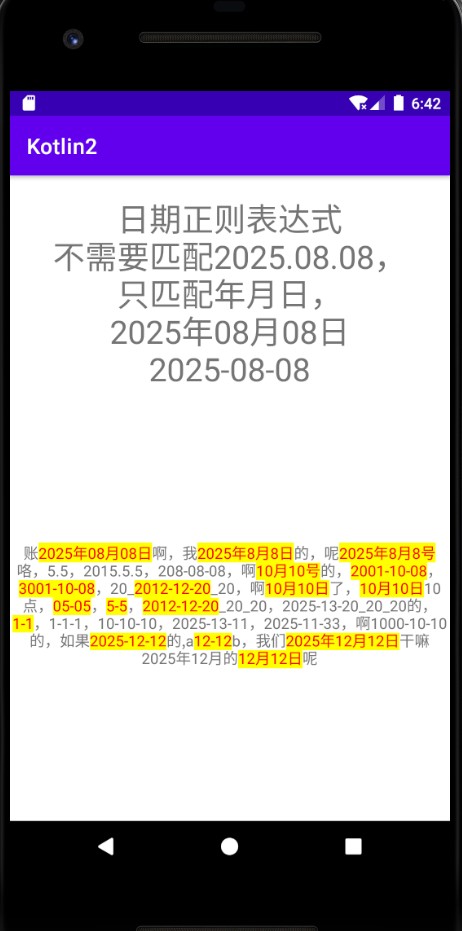
<!--正则表达式日期识别,不需要处理2025.08.08的日期--> <string name="date_regex">(?:^|(?<![-\\d]))(?:(?:[2-9][0-9]{3}[-年](?:(?:0?[1-9]|1[0-2])[-月](?:0?[1-9]|[12][0-9]|3[01]))|(?:(?:0?[1-9]|1[0-2])[-月](?:0?[1-9]|[12][0-9]|3[01])))(?=(?:[日号]|$|(?![-\\d]))))[日号]?</string>结构分解
1. 向前边界检查 (?:^|(?<![-\\d]))
(?:^|(?<![-\\d]))
(?: ) - 非捕获分组
^ - 字符串开头
| - 或者
(?<![-\\d]) - 负向前瞻,确保前面不是 - 或数字
作用:确保匹配的日期要么在字符串开头,要么前面不是 - 或数字
2. 日期格式主体(分两部分)
第一部分:年月日格式
(?:[2-9][0-9]{3}[-年](?:(?:0?[1-9]|1[0-2])[-月](?:0?[1-9]|[12][0-9]|3[01]))
[2-9][0-9]{3} - 年份:2000-9999
[-年] - 分隔符:- 或 年
(?:0?[1-9]|1[0-2]) - 月份:1-12(可选前导零)
[-月] - 分隔符:- 或 月
(?:0?[1-9]|[12][0-9]|3[01]) - 日期:1-31(可选前导零)
第二部分:月日格式
|(?:(?:0?[1-9]|1[0-2])[-月](?:0?[1-9]|[12][0-9]|3[01]))
与第一部分相同,只是没有年份部分
3. 向后边界检查 (?=(?:[日号]|$|(?![-\\d])))
(?=(?:[日号]|$|(?![-\\d])))
(?= ) - 正向前瞻
[日号] - 后面是 日 或 号
$ - 或者字符串结尾
(?![-\\d]) - 或者后面不是 - 或数字
作用:确保日期后面是有效的边界
4. 可选后缀 [日号]?
[日号]?
可选的 日 或 号 后缀
package com.example.androidkotlindemo2.patternmatcher

import android.graphics.color
import android.os.bundle
import android.text.spannable
import android.text.spannablestring
import android.text.style.backgroundcolorspan
import android.text.style.foregroundcolorspan
import android.widget.textview
import androidx.appcompat.app.appcompatactivity
import com.example.androidkotlindemo2.r
import com.example.androidkotlindemo2.utils.logutils
import java.util.regex.pattern

/**
 * author : wn
 * email : maoning20080809@163.com
 * date : 2025/10/12 10:34
 * description : 正则表达式 - 识别日期,年月日
 */
class patternmatchermainactivity : appcompatactivity(){

    var resulttextview : textview? = null

    override fun oncreate(savedinstancestate: bundle?) {
        super.oncreate(savedinstancestate)

        setcontentview(r.layout.pattern_matcher_main)

        resulttextview = findviewbyid<textview>(r.id.pattern_matcher_result)

        test()
    }

    private fun test(){
        val regexstr = resources.getstring(r.string.date_regex)
        val matcherstr = "账2025年08月08日啊,我2025年8月8日的,呢2025年8月8号咯,5.5,2015.5.5,208-08-08,啊10月10号的,2001-10-08,3001-10-08,20_2012-12-20_20,啊10月10日了,10月10日10点,05-05,5-5,2012-12-20_20_20,2025-13-20_20_20的,1-1,1-1-1,10-10-10,2025-13-11,2025-11-33,啊1000-10-10的,如果2025-12-12的,a12-12b,我们2025年12月12日干嘛2025年12月的12月12日呢"

        val pattern = pattern.compile(regexstr)
        val matcher = pattern.matcher(matcherstr)

        val spannablestring = spannablestring(matcherstr)
        while (matcher.find()){
            val start = matcher.start();
            val end = matcher.end()

            //设置背景颜色高亮
            val backgroundcolorspan = backgroundcolorspan(color.yellow)
            spannablestring.setspan(backgroundcolorspan, start, end, spannable.span_exclusive_exclusive)

            //设置文字颜色
            val foregroundcolorspan = foregroundcolorspan(color.red)
            spannablestring.setspan(foregroundcolorspan, start, end, spannable.span_exclusive_exclusive)

            val result = matcher.group()
            logutils.i("匹配到:" + result)
        }

        resulttextview?.settext(spannablestring)
    }
}
pattern_matcher_main.xml布局:
<?xml version="1.0" encoding="utf-8"?>
<linearlayout xmlns:android="http://schemas.android.com/apk/res/android"
    android:layout_width="match_parent"
    android:layout_height="match_parent"
    android:orientation="vertical">


    <textview
        android:layout_width="match_parent"
        android:layout_height="wrap_content"
        android:gravity="center_horizontal"
        android:layout_margintop="20dp"
        android:textsize="30sp"
        android:text="日期正则表达式\n不需要匹配2025.08.08,\n只匹配年月日,\n2025年08月08日\n2025-08-08"/>

    <textview
        android:id="@+id/pattern_matcher_result"
        android:layout_width="match_parent"
        android:layout_height="match_parent"
        android:gravity="center"
        android:text="结果"/>


</linearlayout>
<!--正则表达式日期识别,不需要处理2025.08.08的日期--> <string name="date_regex">(?:^|(?<![-\\d]))(?:(?:[2-9][0-9]{3}[-年](?:(?:0?[1-9]|1[0-2])[-月](?:0?[1-9]|[12][0-9]|3[01]))|(?:(?:0?[1-9]|1[0-2])[-月](?:0?[1-9]|[12][0-9]|3[01])))(?=(?:[日号]|$|(?![-\\d]))))[日号]?</string>总结
到此这篇关于kotlin正则表达式识别年月日的文章就介绍到这了,更多相关kotlin正则表达式识别年月日内容请搜索代码网以前的文章或继续浏览下面的相关文章希望大家以后多多支持代码网!



发表评论