
 我要评论
我要评论前言
在日常 .net 开发中,**正则表达式(regex)**是处理字符串的利器:数据校验、日志分析、文本替换、爬虫规则、接口参数验证……几乎无处不在。
本文将带你系统掌握 c# 中的正则表达式,包括:
- ✅ 基础语法结构
- ✅ 常用匹配规则
- ✅ 分组与断言(进阶重点)
- ✅ 替换与实战案例
- ✅ 性能优化建议
- ✅ 常见坑位总结
一、什么是正则表达式?
正则表达式(regular expression)是一种用于匹配字符串模式的规则表达式。
在 c# 中,正则表达式由 .net 框架中的
👉 system.text.regularexpressions.regex 类提供支持。
使用命名空间:
using system.text.regularexpressions;
二、regex 常用方法
| 方法 | 说明 |
|---|---|
regex.ismatch() | 判断是否匹配 |
regex.matches() | 获取所有匹配结果 |
regex.match() | 获取第一个匹配 |
regex.replace() | 替换匹配内容 |
regex.split() | 按规则拆分字符串 |
三、正则表达式基础语法
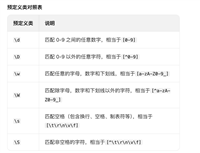
字符类
| 表达式 | 含义 |
|---|---|
\d | 数字 |
\d | 非数字 |
\w | 字母、数字、下划线 |
\w | 非单词字符 |
\s | 空白字符 |
. | 任意字符(除换行) |
[abc] | 匹配 a/b/c |
[^abc] | 不匹配 a/b/c |
示例:
string input = "abc123";
bool result = regex.ismatch(input, @"\d+");
console.writeline(result); // true
定位符
| 表达式 | 含义 |
|---|---|
^ | 字符串开始 |
$ | 字符串结束 |
\b | 单词边界 |
\b | 非单词边界 |
示例:匹配以 s 开头的单词
string text = "a thousand splendid suns";
matchcollection matches = regex.matches(text, @"\bs\s*");

foreach (match match in matches)
{
    console.writeline(match.value);
}
输出:
splendid
suns
量词(限定符)
| 表达式 | 含义 |
|---|---|
* | 0次或多次 |
+ | 1次或多次 |
? | 0或1次 |
{n} | n次 |
{n,} | 至少n次 |
{n,m} | n到m次 |
示例:匹配手机号
string pattern = @"^1\d{10}$";
四、分组与捕获(核心重点)
普通分组
(\w+)
示例:
string text = "one two";
string pattern = @"(\w+)\s(\w+)";
string result = regex.replace(text, pattern, "$2 $1");

console.writeline(result); // two one
命名分组(推荐使用)
(?<name>pattern)
示例:
string text = "2025-03-04";
string pattern = @"(?<year>\d{4})-(?<month>\d{2})-(?<day>\d{2})";

match match = regex.match(text, pattern);

console.writeline(match.groups["year"].value);
console.writeline(match.groups["month"].value);
console.writeline(match.groups["day"].value);
五、零宽断言(高级必会)
断言不会消耗字符,只判断位置。
正向先行断言
\w+(?=\.)
匹配 . 之前的内容
负向先行断言
\b(?!un)\w+\b
匹配不以 un 开头的单词
正向后行断言
(?<=19)\d{2}
示例:
string input = "1851 1999 1950 1905 2003";
string pattern = @"(?<=19)\d{2}\b";

foreach (match match in regex.matches(input, pattern))
{
    console.writeline(match.value);
}
输出:
99
50
05
六、实战案例
案例1:去除多余空格
string input = "hello   world   ";
string result = regex.replace(input, @"\s+", " ");

console.writeline(result);
案例2:验证邮箱
string pattern = @"^[\w\.-]+@[\w\.-]+\.\w+$";
案例3:提取html标签内容
string pattern = @"<title>(.*?)</title>";
⚠️ 注意:复杂 html 不建议用正则,建议使用 html 解析器。
案例4:验证身份证号(简单版)
string pattern = @"^\d{17}[\dx]$";
七、性能优化建议(高级开发者必看)
预编译正则
regex regex = new regex(pattern, regexoptions.compiled);
适用于高频调用场景。
使用静态缓存
private static readonly regex phoneregex =
    new regex(@"^1\d{10}$", regexoptions.compiled);
避免重复创建对象。
避免灾难性回溯
问题示例:
(a+)+
解决方法:
- 使用非贪婪模式
- 使用原子组
(?>...) - 限制量词范围
八、常见坑位总结
| 错误 | 说明 |
|---|---|
| 忘记使用 @ 字符串 | 转义错乱 |
| .* 贪婪匹配过多 | 应使用 .*? |
| 正则写得过长 | 建议拆分逻辑 |
| 复杂 html 用正则 | 容易翻车 |
九、什么时候不该用正则?
- 复杂 html/xml 解析
- json 解析
- 复杂业务规则判断
正则适合做:
✔ 字符串校验
✔ 模式匹配
✔ 批量替换
✔ 日志分析
十、总结
c# 正则表达式核心掌握五点:
- 字符类
- 量词
- 分组
- 断言
- 替换
建议学习路径:
基础语法 → 分组 → 断言 → 实战 → 性能优化
结语
正则表达式不是洪水猛兽,而是一把利器。
写得好,是优雅。
写得烂,是灾难。
建议:
✔ 多写小例子练习
✔ 善用在线调试工具
✔ 养成写注释习惯
到此这篇关于c#正则表达式从入门到实战的文章就介绍到这了,更多相关c#正则表达式内容请搜索代码网以前的文章或继续浏览下面的相关文章希望大家以后多多支持代码网!



发表评论