
 我要评论
我要评论一、正则表达式支持
在鸿蒙(harmonyos)开发中,正则表达式主要通过以下两种方式实现:
1.arkts/javascript 原生支持
// 直接使用 javascript/typescript 正则表达式语法
const regex = /pattern/flags;
const result = regex.test(string);
2.arkts 扩展库
// 使用 arkts 提供的正则相关 api
import { regexp } from '@kit.arkts';正则表达式是一种"文本模式匹配工具",可以:
查找:在文本中查找特定内容
验证:检查输入是否符合规则
替换:把找到的内容替换成其他内容
提取:从文本中提取需要的信息
二、创建正则表达式
方法1:字面量方式(最常用)
// 最简单的方式
const regex1 = /hello/;
// 创建一个匹配 "hello" 的正则表达式

// 带标志(flags)
const regex2 = /hello/i;  // i = 不区分大小写
const regex3 = /hello/g;  // g = 全局匹配(找所有)
方法2:构造函数方式
const regex1 = new regexp('hello');
const regex2 = new regexp('hello', 'i');  // 第二个参数是标志
两种方式区别:
// 动态创建正则时用构造函数
const word = "hello";
const regex1 = new regexp(word, 'i');  // ✓ 可以
const regex2 = /word/i;                // ✗ 错误!会匹配"word"字符串本身
三、简单匹配:字面字符
正则表达式最基础的就是直接匹配文本
// 示例1:匹配固定单词
const regex = /apple/;
const text = "i have an apple";

// 检查是否包含 "apple"
regex.test(text);  // true

// 实际
if (/apple/.test("i have an apple")) {
  console.log("找到了苹果!");
}
// 示例2:匹配多个固定词 const regex = /apple|banana|orange/; // | 表示"或者" const text = "i like banana"; regex.test(text); // true(包含 banana)
四、重要的特殊字符("魔法")
1..- 匹配任意单个字符
// . 匹配除了换行外的任何单个字符
const regex = /a.c/;

regex.test("abc");  // true  (a 任意字符 c)
regex.test("adc");  // true
regex.test("a c");  // true(中间是空格)
regex.test("ac");   // false(少了一个字符)
regex.test("abcc"); // false(多了字符)
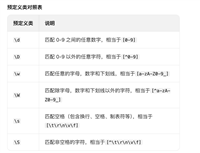
2.\d- 匹配数字
// \d 匹配一个数字(0-9)
const regex = /\d/;

regex.test("a");     // false
regex.test("1");     // true
regex.test("abc123"); // true(包含数字)
3.\w- 匹配单词字符
// \w 匹配字母、数字、下划线
const regex = /\w/;

regex.test("a");     // true
regex.test("1");     // true
regex.test("_");     // true
regex.test("@");     // false
regex.test(" ");     // false
4.\s- 匹配空白字符
// \s 匹配空格、制表符、换行等
const regex = /\s/;

regex.test(" ");     // true(空格)
regex.test("\t");    // true(制表符)
regex.test("\n");    // true(换行)
regex.test("a");     // false
说明:
\d= digit(数字)\w= word(单词)\s= space(空格)
五、量词:控制匹配次数
1.*- 0次或多次
// a* 匹配:0个a、1个a、多个a
const regex = /a*/;

regex.test("");      // true(0个a)
regex.test("a");     // true
regex.test("aaa");   // true
regex.test("b");     // true(0个a也匹配!注意这个特性)
2.+- 1次或多次
// a+ 匹配:至少1个a
const regex = /a+/;

regex.test("");      // false(没有a)
regex.test("a");     // true
regex.test("aaa");   // true
regex.test("b");     // false
3.?- 0次或1次
// a? 匹配:0个或1个a
const regex = /a?/;

regex.test("");      // true(0个a)
regex.test("a");     // true
regex.test("aa");    // true(只匹配第一个a)
regex.test("b");     // true(0个a)
4.{n}- 精确n次
// a{3} 匹配:正好3个a
const regex = /a{3}/;

regex.test("aa");    // false
regex.test("aaa");   // true
regex.test("aaaa");  // true(包含3个连续a)
5.{n,}- 至少n次
// a{2,} 匹配:至少2个a
const regex = /a{2,}/;

regex.test("a");     // false
regex.test("aa");    // true
regex.test("aaaa");  // true
6.{n,m}- n到m次
// a{2,4} 匹配:2-4个a
const regex = /a{2,4}/;

regex.test("a");     // false
regex.test("aa");    // true
regex.test("aaa");   // true
regex.test("aaaa");  // true
regex.test("aaaaa"); // true(只匹配前4个a)
六、字符集:匹配一组字符中的任意一个
1.[abc]- 匹配a、b、c中的任意一个
const regex = /[abc]/;

regex.test("a");     // true
regex.test("b");     // true
regex.test("c");     // true
regex.test("d");     // false
regex.test("apple"); // true(包含a)
2.[a-z]- 匹配小写字母
const regex = /[a-z]/;

regex.test("a");     // true
regex.test("z");     // true
regex.test("a");     // false
regex.test("1");     // false
3.[a-z]- 匹配大写字母
const regex = /[a-z]/;

regex.test("a");     // true
regex.test("z");     // true
regex.test("a");     // false
4.[0-9]- 匹配数字
const regex = /[0-9]/;  // 等价于 \d

regex.test("0");     // true
regex.test("5");     // true
regex.test("9");     // true
regex.test("a");     // false
5.[^abc]- 匹配不是a、b、c的字符
const regex = /[^abc]/;

regex.test("a");     // false
regex.test("b");     // false
regex.test("c");     // false
regex.test("d");     // true
regex.test("1");     // true
regex.test(" ");     // true
七、边界匹配
1.^- 匹配开头
// ^a 匹配:以a开头的字符串
const regex = /^a/;

regex.test("apple");   // true
regex.test("an apple"); // true
regex.test("i have an apple"); // false(不是以a开头)
2.$- 匹配结尾
// e$ 匹配:以e结尾的字符串
const regex = /e$/;

regex.test("apple");   // true
regex.test("applee");  // true
regex.test("apple pie"); // false(不是以e结尾)
3.^...$- 匹配整个字符串
// ^a.*e$ 匹配:以a开头,以e结尾
const regex = /^a.*e$/;

regex.test("apple");     // true
regex.test("able");      // true
regex.test("a large apple"); // true
regex.test("apple pie"); // false(不是以e结尾)
八、实际应用
案例1:手机号验证
// 中国手机号规则:1开头,第二位3-9,总共11位
function validatephone(phone: string): boolean {
  const regex = /^1[3-9]\d{9}$/;
  // 拆解:
  // ^     : 开头
  // 1     : 第一个数字必须是1
  // [3-9] : 第二个数字是3-9
  // \d{9} : 后面9个都是数字
  // $     : 结尾
  return regex.test(phone);
}

// 测试
validatephone("13800138000"); // true
validatephone("12800138000"); // false(第二位是2)
validatephone("1380013800");  // false(只有10位)
validatephone("138001380001"); // false(12位)
案例2:邮箱验证
function validateemail(email: string): boolean {
  const regex = /^\w+@\w+\.\w+$/;
  // 拆解:
  // ^     : 开头
  // \w+   : 一个或多个单词字符(用户名)
  // @     : @符号
  // \w+   : 一个或多个单词字符(域名)
  // \.    : 点(需要转义)
  // \w+   : 一个或多个单词字符(后缀)
  // $     : 结尾
  return regex.test(email);
}

// 测试
validateemail("test@example.com");  // true
validateemail("test@example");      // false(没有点)
validateemail("test.example.com");  // false(没有@)
validateemail("@example.com");      // false(没有用户名)
案例3:密码强度检查
function checkpassword(password: string): string {
  // 至少8位,包含数字和字母
  const strongregex = /^(?=.*[a-za-z])(?=.*\d).{8,}$/;
  // 拆解:
  // ^             : 开头
  // (?=.*[a-za-z]): 必须包含字母(正向预查)
  // (?=.*\d)     : 必须包含数字
  // .{8,}        : 至少8个字符
  // $            : 结尾

  // 至少6位
  const mediumregex = /^.{6,}$/;

  if (strongregex.test(password)) {
    return "强密码";
  } else if (mediumregex.test(password)) {
    return "中密码";
  } else {
    return "弱密码";
  }
}

// 测试
checkpassword("abc12345");  // 强密码(有字母有数字,8位)
checkpassword("abcdef");    // 中密码(6位纯字母)
checkpassword("12345");     // 弱密码(只有5位)
常用正则速查
| 需求 | 正则 | 说明 |
|---|---|---|
| 数字 | \d | 一个数字 |
| 多个数字 | \d+ | 一个或多个数字 |
| 字母数字 | \w | 字母、数字、下划线 |
| 空格 | \s | 空白字符 |
| 任意字符 | . | 除换行外任意字符 |
| 手机号 | ^1[3-9]\d{9}$ | 中国手机号 |
| 邮箱 | ^\w+@\w+\.\w+$ | 简单邮箱验证 |
| 汉字 | [\u4e00-\u9fa5] | 单个汉字 |
| 提取数字 | \d+ | 连续数字 |
| 替换空格 | \s+ | 一个或多个空格 |
总结
到此这篇关于鸿蒙中正则表达式两种实现方式的文章就介绍到这了,更多相关鸿蒙正则表达式内容请搜索代码网以前的文章或继续浏览下面的相关文章希望大家以后多多支持代码网!




发表评论