
 我要评论
我要评论项目概述
本文通过 pygame 实现一个一笔画益智游戏(one stroke puzzle)。
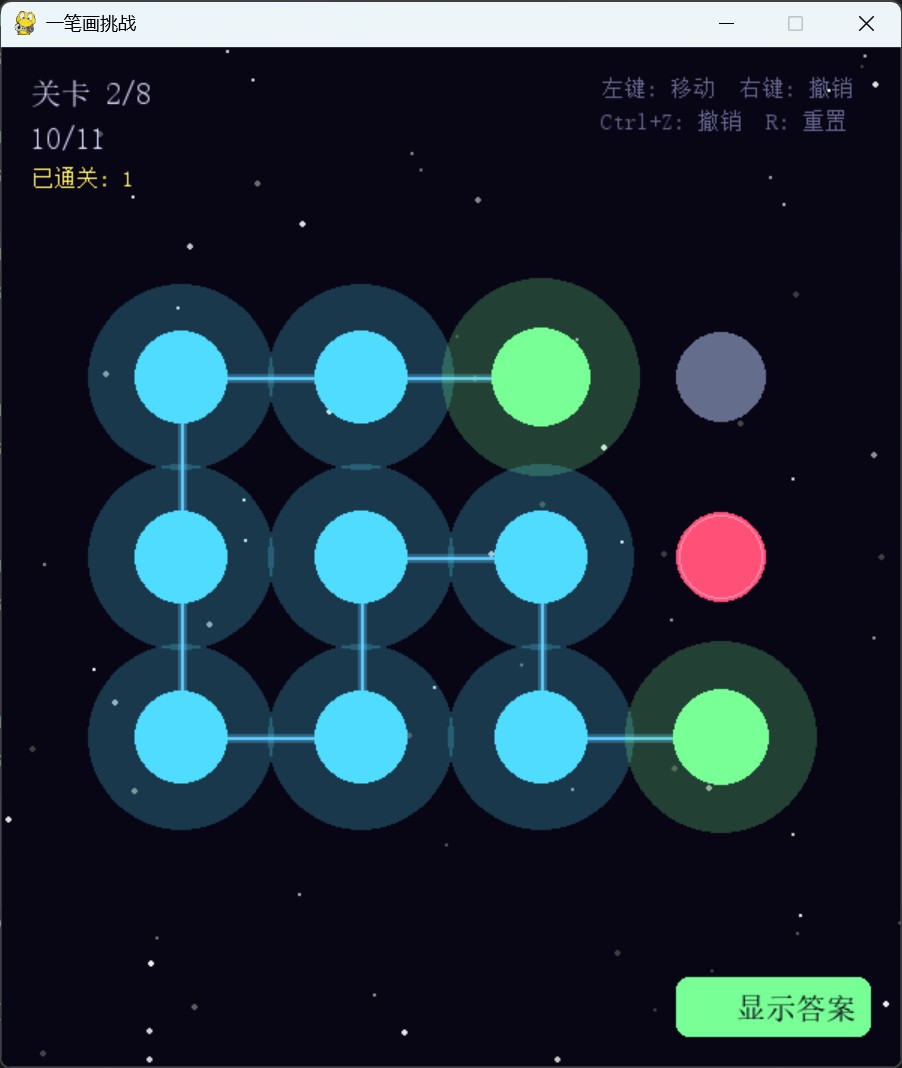
玩家需要在网格上找到一条不重复的路径,一笔连通所有合法圆点,同时避开红色障碍点。其中:
- 鼠标点击操控:左键点击相邻圆点延伸路径,右键或 ctrl+z 撤销上一步,操作简洁直观。
- 八关卡设计:5 个入门关 + 3 个中级关,每关均预存经过验证的合法解法,保证 100% 可解。
- 答案演示系统:卡关时可一键查看动画解法演示,每 0.25 秒自动走一步,兼具教学与观赏性。
- 路径可视化:已走路径以发光连线和渐变圆点实时展示,起点、当前位置、已访问节点各有专属颜色。
- 键盘快捷键:r 重置、backspace/右键撤销、n 下一关、p 上一关、esc 退出。
游戏实现
初始化与基础设置
游戏启动时初始化 pygame,定义窗口尺寸和全局常量。
pygame.init()

w, h = 600, 680
fps = 60
窗口尺寸 600×680,竖向略长以容纳底部按钮区域。帧率锁定 60fps,保证动画演示和粒子效果的流畅度。
颜色定义
c_bg       = (8,   5,  20)
c_dot      = (200, 220, 255)
c_dot_empty= (100, 110, 140)
c_dot_path = (80, 220, 255)
c_dot_start= (120, 255, 150)
c_block    = (255, 80, 120)
c_line     = (100, 200, 255)
c_success  = (120, 255, 150)
c_star     = (255, 240, 100)
整体延续深色宇宙风格:接近纯黑的深蓝背景搭配高对比色系。圆点状态通过颜色分层传达:未访问点为暗灰蓝色(c_dot_empty),路径上的点为亮蓝色(c_dot_path),起始点为绿色(c_dot_start),障碍点以红色(c_block)警示。绿色同时承担"成功"语义,贯穿按钮、通关弹窗和粒子效果,形成一致的视觉反馈。
关卡数据结构
levels = [
    {'name': '入门 1', 'rows': 3, 'cols': 3, 'blocks': [(1, 1)],
     'solution': [(0, 0), (0, 1), (0, 2), (1, 2), (2, 2), (2, 1), (2, 0), (1, 0)]},

    {'name': '入门 2', 'rows': 3, 'cols': 4, 'blocks': [(1, 3)],
     'solution': [(0, 3), (0, 2), (0, 1), (0, 0), (1, 0), (2, 0), (2, 1), (1, 1), (1, 2), (2, 2), (2, 3)]},
    # ... 共 8 关
]
每个关卡用字典描述四个要素:网格行列数(rows、cols)、障碍点坐标列表(blocks)、以及预存的合法解法路径(solution)。解法以 (row, col) 元组序列存储,保证每一步都是相邻移动(曼哈顿距离为 1)、不经过障碍点、且覆盖所有合法格子。
关卡设计遵循渐进原则:入门关从 3×3 单障碍起步,逐步增大网格至 5×5 并增加障碍数量;中级关引入 5×6 和 6×6 网格,障碍点增至 4–5 个,路径规划的复杂度显著提升。
粒子系统
class particle:
    def __init__(self, x, y, color=(255, 255, 255)):
        self.x, self.y = x, y
        a = random.uniform(0, math.pi * 2)
        s = random.uniform(1, 4)
        self.vx, self.vy = math.cos(a) * s, math.sin(a) * s
        self.life = 1.0
        self.color = color
        self.r = random.randint(1, 3)

    def update(self):
        self.x += self.vx
        self.y += self.vy
        self.vx *= 0.92
        self.vy *= 0.92
        self.life -= 0.03
        return self.life > 0
粒子初速度方向在整个圆周上均匀随机分布(全向爆炸感),速度大小 1–4px/帧。每帧对速度分量乘以摩擦系数 0.92,模拟空气阻力使粒子自然减速。life 约 33 帧(0.55 秒)归零,同步控制透明度淡出。
粒子在两个场景触发:通关时在所有路径点上一次性生成 60 颗绿色粒子形成满屏庆祝;答案演示时每走一步生成 8 颗粒子标记进度。
# 通关庆祝
for _ in range(60):
    r, c = random.choice(self.path)
    x, y = self.get_dot_pos(r, c)
    self.particles.append(particle(x, y, c_success))
星空背景
stars = [(random.randint(0, w), random.randint(0, h), random.random() * 2 + 1) for _ in range(80)]

def draw_stars(surf, t):
    for sx, sy, sr in stars:
        a = int((math.sin(t * 0.02 + sx) * 0.5 + 0.5) * 180 + 60)
        pygame.draw.circle(surf, (a, a, a), (sx, sy), int(sr))
80 颗星点在初始化时一次性随机生成并固定位置,运行时零额外内存分配。亮度以 math.sin(t*0.02 + sx) 随帧数缓慢变化,每颗星的 sx 坐标作为相位偏移,使星点彼此错开闪烁节奏而非同步明灭。亮度映射到 60–240 区间,避免全灭或过曝,为益智游戏营造沉静的宇宙氛围。
网格布局与自适应
margin = 60
available_w = w - 2 * margin
available_h = h - 2 * margin - 80

cell_size = min(available_w // self.cols, available_h // self.rows)
self.cell_size = max(40, cell_size)

grid_w = self.cell_size * self.cols
grid_h = self.cell_size * self.rows
self.offset_x = (w - grid_w) // 2
self.offset_y = (h - grid_h - 80) // 2 + 40
网格布局自动适配不同关卡的行列数。先在留出 60px 边距和底部 80px 按钮区后计算可用空间,取行列方向的较小值作为格子尺寸(保证不溢出),下限 40px 确保最小网格仍可操作。最终通过 offset_x 和 offset_y 将网格居中放置,无论 3×3 还是 6×6 都能合理填充画面。
核心交互逻辑
点击检测
def get_clicked_dot(self, pos):
    mx, my = pos
    for row in range(self.rows):
        for col in range(self.cols):
            if self.grid[row][col] == 1:
                continue
            x, y = self.get_dot_pos(row, col)
            if math.hypot(mx - x, my - y) < self.cell_size // 2:
                return row, col
    return none
遍历所有非障碍格子,用 math.hypot 计算鼠标到圆点中心的欧几里得距离。判定半径为 cell_size // 2,即每个格子的一半,保证相邻格子的点击区域不重叠。障碍格子(grid[row][col] == 1)直接跳过,不可选中。
移动合法性验证
def can_move(self, to_pos):
    if not self.path:
        return true
    fr, fc = self.path[-1]
    tr, tc = to_pos
    if abs(fr - tr) + abs(fc - tc) != 1:
        return false
    if to_pos in self.path:
        return false
    return true
移动合法需满足两个条件:目标点与当前路径末端的曼哈顿距离恰好为 1(即上下左右相邻,不允许对角线或跳跃);目标点不在已有路径中(不可重复访问)。若路径为空则任意合法点均可作为起点,给予玩家选择起点的自由度。
通关判定
def check_complete(self):
    total_dots = self.rows * self.cols - len(self.blocks)
    if len(self.path) == total_dots and not self.level_complete:
        self.level_complete = true
        self.completed_levels = max(self.completed_levels, self.current_level + 1)
通关条件清晰:路径长度等于网格总格数减去障碍数,即所有合法格子都被恰好访问一次。completed_levels 取历史最大值,跨关卡保留进度。
答案演示系统
def show_solution(self):
    if self.level_complete:
        return
    level_data = levels[self.current_level]
    if 'solution' in level_data:
        self.path = []
        self.full_solution_path = level_data['solution']
        self.current_solution_step = 0
        self.solution_step_timer = 0
        self.is_showing_solution = true
演示系统的设计重点是零延迟启动:直接读取预存解法序列,无需运行时计算,避免复杂关卡求解导致的卡顿。启动时先清空当前路径,再逐步回放。
演示动画更新
if self.is_showing_solution and self.full_solution_path:
    self.solution_step_timer += 1
    if self.solution_step_timer >= 15:
        self.solution_step_timer = 0
        if self.current_solution_step < len(self.full_solution_path):
            next_pos = self.full_solution_path[self.current_solution_step]
            self.path.append(next_pos)
            self.current_solution_step += 1
每 15 帧(60fps 下约 0.25 秒)自动走一步,节奏适中——既能让玩家看清每步走向,又不至于等待过久。每步伴随 8 颗绿色粒子标记当前位置,最后一步完成时自动触发 check_complete() 进入通关状态。
路径渲染
连线与发光
if len(self.path) > 1:
    points = [self.get_dot_pos(r, c) for r, c in self.path]
    pygame.draw.lines(self.screen, c_line, false, points, 2)
    glow_surf = pygame.surface((w, h), pygame.srcalpha)
    pygame.draw.lines(glow_surf, (*c_line, 80), false, points, 6)
    self.screen.blit(glow_surf, (0, 0))
路径绘制采用双层结构:底层是 6px 宽、alpha=80 的半透明蓝色发光线,上层叠加 2px 实色线。发光效果通过独立 srcalpha surface 实现,避免影响其他图层的透明度。false 参数表示不闭合路径(非环形)。
圆点状态分层
if is_current:
    radius, color = base_r + 3, c_dot_start
elif is_start:
    radius, color = base_r + 2, c_success
elif in_path:
    radius, color = base_r + 1, c_dot_path
else:
    radius, color = base_r, c_dot_empty
四种状态通过半径和颜色双重区分:当前位置最大(base_r+3)且为绿色,起点次之,路径上的点稍大于未访问点。路径上的点额外叠加半透明光晕(alpha=60),使已走路径在视觉上自然突出。障碍点以红色填充并带有浅粉色描边,与可用点形成鲜明对比。
步骤序号标注
if self.is_showing_solution or self.level_complete:
    for idx, (r, c) in enumerate(self.path):
        x, y = self.get_dot_pos(r, c)
        num_text = str(idx + 1)
        num_surf = font_xs.render(num_text, true, c_bg)
        self.screen.blit(num_surf, num_surf.get_rect(center=(x, y)))
在答案演示和通关状态下,每个路径点中心叠加深色序号文字(从 1 开始),帮助玩家理解解法的步骤顺序。文字颜色选用背景色(c_bg),在浅色圆点上形成高对比度,同时不引入新色彩以保持画面整洁。
绘制层次
绘制顺序为:星空背景 → 路径连线(含发光层)→ 网格圆点(障碍/空/路径/当前)→ 步骤序号 → 粒子效果 → ui(关卡信息/进度/快捷键提示/功能按钮)→ 通关遮罩弹窗。严格保证层次正确,路径线在圆点之下避免遮挡判定区域,粒子在圆点之上增强视觉反馈,ui 文字始终处于最顶层。
功能按钮
btn_rect = pygame.rect(w - 150, h - 60, 130, 40)
mouse_pos = pygame.mouse.get_pos()
is_hover = btn_rect.collidepoint(mouse_pos)

btn_color = c_btn_hover if is_hover else c_success
pygame.draw.rect(self.screen, btn_color, btn_rect, border_radius=8)
右下角多功能按钮根据游戏状态自动切换文案和行为:默认显示"💡 显示答案",演示中变为"⏹ 停止演示",通关后变为"▶ 下一关"。按钮支持鼠标悬停高亮(c_btn_hover),8px 圆角使外观柔和。
通关弹窗
if self.level_complete:
    overlay = pygame.surface((w, h), pygame.srcalpha)
    overlay.fill((0, 0, 0, 160))
    self.screen.blit(overlay, (0, 0))

    texts = [
        (font_lg, "✓ 挑战成功!", c_success, -50),
        (font_md, f"完美使用 {len(self.path)} 步", c_text, 10),
        (font_sm, "点击右下角按钮继续", c_grey, 60),
    ]
半透明黑色遮罩(alpha=160)叠加在完整游戏画面之上,让玩家在结算界面仍能看到自己走出的完整路径。弹窗以深色圆角矩形承载三行信息:通关标题(绿色)、步数统计、操作提示,与路径上的步骤序号形成完整的结算回顾。
事件处理
if event.type == pygame.mousebuttondown:
    if event.button == 1:
        btn_rect = pygame.rect(w - 150, h - 60, 130, 40)
        if btn_rect.collidepoint(event.pos):
            if self.level_complete:
                self.next_level()
            elif self.is_showing_solution:
                self.reset()
            else:
                self.show_solution()
        elif not self.level_complete and not self.is_showing_solution:
            pos = self.get_clicked_dot(event.pos)
            if pos:
                self.move_to(pos)
    elif event.button == 3:
        self.undo()
事件处理优先级清晰:左键先判断是否点击按钮区域,再处理网格点击;右键直接触发撤销。通关和演示状态下网格点击被禁用,防止误操作。键盘快捷键提供完整的操作覆盖,ctrl+z 和 backspace 双重撤销适配不同用户习惯,r 一键重置、n/p 切关。
主循环
def run(self):
    running = true
    while running:
        running = self.handle_events()
        self.update()
        self.draw()
        self.clock.tick(fps)
    pygame.quit()
    sys.exit()
主循环采用经典的「事件处理 → 状态更新 → 画面绘制」三段式结构。handle_events() 返回布尔值控制循环退出,clock.tick(fps) 锁定 60 帧确保动画一致性。整个游戏逻辑封装在 onestrokegame 类中,状态管理清晰,关卡切换只需调用 load_level() 即可完成全部重置。
全部代码
import pygame
import sys
import random
import math

pygame.init()

# ── 常量和颜色 ───────────────────────────────────────────────────
w, h = 600, 680
fps = 60

c_bg = (8, 5, 20)
c_dot = (200, 220, 255)
c_dot_empty = (100, 110, 140)
c_dot_path = (80, 220, 255)
c_dot_start = (120, 255, 150)
c_block = (255, 80, 120)
c_line = (100, 200, 255)
c_text = (220, 220, 255)
c_grey = (100, 100, 140)
c_success = (120, 255, 150)
c_star = (255, 240, 100)
c_btn_hover = (140, 255, 170)

# 中文字体
chinese_font_path = r"c:/windows/fonts/simsun.ttc"
try:
    font_lg = pygame.font.font(chinese_font_path, 32)
    font_md = pygame.font.font(chinese_font_path, 20)
    font_sm = pygame.font.font(chinese_font_path, 15)
    font_xs = pygame.font.font(chinese_font_path, 12)
except:
    font_lg = pygame.font.sysfont("microsoftyahei", 32)
    font_md = pygame.font.sysfont("microsoftyahei", 20)
    font_sm = pygame.font.sysfont("microsoftyahei", 15)
    font_xs = pygame.font.sysfont("microsoftyahei", 12)

# ── 关卡设计
levels = [
    {'name': '入门 1', 'rows': 3, 'cols': 3, 'blocks': [(1, 1)],
     'solution': [(0, 0), (0, 1), (0, 2), (1, 2), (2, 2), (2, 1), (2, 0), (1, 0)]},

    {'name': '入门 2', 'rows': 3, 'cols': 4, 'blocks': [(1, 3)],
     'solution': [(0, 3), (0, 2), (0, 1), (0, 0), (1, 0), (2, 0), (2, 1), (1, 1), (1, 2), (2, 2), (2, 3)]},

    {'name': '入门 3', 'rows': 4, 'cols': 4, 'blocks': [(2, 2), (2, 1)],
     'solution': [(0, 0), (0, 1), (0, 2), (1, 2), (1, 1), (1, 0), (2, 0), (3, 0), (3, 1), (3, 2), (3, 3), (2, 3),
                  (1, 3), (0, 3)]},

    {'name': '入门 4', 'rows': 4, 'cols': 5, 'blocks': [(0, 3), (0, 2), (2, 3)],
     'solution': [(0, 4), (1, 4), (1, 3), (1, 2), (1, 1), (0, 1), (0, 0), (1, 0), (2, 0), (3, 0), (3, 1), (2, 1),
                  (2, 2), (3, 2), (3, 3), (3, 4), (2, 4)]},

    {'name': '入门 5', 'rows': 5, 'cols': 5, 'blocks': [(1, 3), (3, 2), (0, 2), (3, 3)],
     'solution': [(0, 3), (0, 4), (1, 4), (2, 4), (2, 3), (2, 2), (1, 2), (1, 1), (0, 1), (0, 0), (1, 0), (2, 0),
                  (2, 1), (3, 1), (3, 0), (4, 0), (4, 1), (4, 2), (4, 3), (4, 4), (3, 4)]},

    {'name': '中级 1', 'rows': 5, 'cols': 6, 'blocks': [(3, 3), (2, 5), (3, 4), (1, 3)],
     'solution': [(0, 1), (0, 0), (1, 0), (1, 1), (1, 2), (0, 2), (0, 3), (0, 4), (0, 5), (1, 5), (1, 4), (2, 4),
                  (2, 3), (2, 2), (2, 1), (2, 0), (3, 0), (4, 0), (4, 1), (3, 1), (3, 2), (4, 2), (4, 3), (4, 4),
                  (4, 5), (3, 5)]},

    {'name': '中级 2', 'rows': 5, 'cols': 6, 'blocks': [(1, 4), (4, 2), (3, 0), (0, 2), (3, 2)],
     'solution': [(4, 0), (4, 1), (3, 1), (2, 1), (2, 2), (2, 3), (2, 4), (3, 4), (3, 3), (4, 3), (4, 4), (4, 5),
                  (3, 5), (2, 5), (1, 5), (0, 5), (0, 4), (0, 3), (1, 3), (1, 2), (1, 1), (0, 1), (0, 0), (1, 0),
                  (2, 0)]},

    {'name': '中级 3', 'rows': 6, 'cols': 6, 'blocks': [(5, 4), (4, 4), (3, 0), (2, 0), (1, 2)],
     'solution': [(5, 5), (4, 5), (3, 5), (3, 4), (3, 3), (3, 2), (4, 2), (4, 3), (5, 3), (5, 2), (5, 1), (5, 0),
                  (4, 0), (4, 1), (3, 1), (2, 1), (1, 1), (1, 0), (0, 0), (0, 1), (0, 2), (0, 3), (0, 4), (0, 5),
                  (1, 5), (2, 5), (2, 4), (1, 4), (1, 3), (2, 3), (2, 2)]},
]


# ── 粒子效果 ─────────────────────────────────────────────────────
class particle:
    def __init__(self, x, y, color=(255, 255, 255)):
        self.x, self.y = x, y
        a = random.uniform(0, math.pi * 2)
        s = random.uniform(1, 4)
        self.vx, self.vy = math.cos(a) * s, math.sin(a) * s
        self.life = 1.0
        self.color = color
        self.r = random.randint(1, 3)

    def update(self):
        self.x += self.vx
        self.y += self.vy
        self.vx *= 0.92
        self.vy *= 0.92
        self.life -= 0.03
        return self.life > 0

    def draw(self, surf):
        a = int(self.life * 255)
        s = pygame.surface((self.r * 2 + 1, self.r * 2 + 1), pygame.srcalpha)
        pygame.draw.circle(s, (*self.color, a), (self.r, self.r), self.r)
        surf.blit(s, (int(self.x) - self.r, int(self.y) - self.r))


# ── 星星背景 ─────────────────────────────────────────────────────
stars = [(random.randint(0, w), random.randint(0, h), random.random() * 2 + 1) for _ in range(80)]


def draw_stars(surf, t):
    for sx, sy, sr in stars:
        a = int((math.sin(t * 0.02 + sx) * 0.5 + 0.5) * 180 + 60)
        pygame.draw.circle(surf, (a, a, a), (sx, sy), int(sr))


# ── 游戏主类 ─────────────────────────────────────────────────────
class onestrokegame:
    def __init__(self):
        self.screen = pygame.display.set_mode((w, h))
        pygame.display.set_caption("一笔画挑战")
        self.clock = pygame.time.clock()

        self.current_level = 0
        self.grid = []
        self.path = []
        self.particles = []
        self.frame = 0
        self.level_complete = false
        self.completed_levels = 0

        # 答案演示相关状态
        self.is_showing_solution = false
        self.full_solution_path = []
        self.current_solution_step = 0
        self.solution_step_timer = 0

        self.load_level(0)

    def load_level(self, level_idx):
        if level_idx >= len(levels):
            level_idx = 0

        self.current_level = level_idx
        level_data = levels[level_idx]

        self.rows = level_data['rows']
        self.cols = level_data['cols']
        self.blocks = level_data['blocks']

        margin = 60
        available_w = w - 2 * margin
        available_h = h - 2 * margin - 80

        cell_size = min(available_w // self.cols, available_h // self.rows)
        self.cell_size = max(40, cell_size)

        grid_w = self.cell_size * self.cols
        grid_h = self.cell_size * self.rows
        self.offset_x = (w - grid_w) // 2
        self.offset_y = (h - grid_h - 80) // 2 + 40

        self.grid = [[0 for _ in range(self.cols)] for _ in range(self.rows)]
        for br, bc in self.blocks:
            self.grid[br][bc] = 1

        self.path = []
        self.level_complete = false
        self.is_showing_solution = false
        self.full_solution_path = []
        self.current_solution_step = 0
        self.solution_step_timer = 0
        self.particles.clear()

    def get_dot_pos(self, row, col):
        x = self.offset_x + col * self.cell_size + self.cell_size // 2
        y = self.offset_y + row * self.cell_size + self.cell_size // 2
        return x, y

    def get_clicked_dot(self, pos):
        mx, my = pos
        for row in range(self.rows):
            for col in range(self.cols):
                if self.grid[row][col] == 1:
                    continue
                x, y = self.get_dot_pos(row, col)
                if math.hypot(mx - x, my - y) < self.cell_size // 2:
                    return row, col
        return none

    def can_move(self, to_pos):
        if not self.path:
            return true
        fr, fc = self.path[-1]
        tr, tc = to_pos
        if abs(fr - tr) + abs(fc - tc) != 1:
            return false
        if to_pos in self.path:
            return false
        return true

    def move_to(self, pos):
        if self.level_complete or self.is_showing_solution:
            return
        if self.can_move(pos):
            self.path.append(pos)
            self.check_complete()

    def check_complete(self):
        total_dots = self.rows * self.cols - len(self.blocks)
        if len(self.path) == total_dots and not self.level_complete:
            self.level_complete = true
            self.completed_levels = max(self.completed_levels, self.current_level + 1)
            for _ in range(60):
                r, c = random.choice(self.path)
                x, y = self.get_dot_pos(r, c)
                self.particles.append(particle(x, y, c_success))

    # ★ 核心优化:直接读取预存解法,0 延迟,0 卡顿
    def show_solution(self):
        if self.level_complete:
            return

        level_data = levels[self.current_level]
        if 'solution' in level_data:
            self.path = []
            self.full_solution_path = level_data['solution']
            self.current_solution_step = 0
            self.solution_step_timer = 0
            self.is_showing_solution = true
        else:
            print("警告:本关卡暂无预设答案")

    def undo(self):
        if self.path and not self.level_complete and not self.is_showing_solution:
            self.path.pop()

    def reset(self):
        self.path.clear()
        self.level_complete = false
        self.is_showing_solution = false
        self.full_solution_path = []
        self.current_solution_step = 0
        self.solution_step_timer = 0

    def next_level(self):
        self.load_level(self.current_level + 1)

    def prev_level(self):
        if self.current_level > 0:
            self.load_level(self.current_level - 1)

    def handle_events(self):
        for event in pygame.event.get():
            if event.type == pygame.quit:
                return false

            if event.type == pygame.keydown:
                if event.key == pygame.k_escape:
                    return false
                if event.key == pygame.k_z and (pygame.key.get_mods() & pygame.kmod_ctrl):
                    self.undo()
                if event.key == pygame.k_r:
                    self.reset()
                if event.key == pygame.k_n and self.level_complete:
                    self.next_level()
                if event.key == pygame.k_p:
                    self.prev_level()
                if event.key == pygame.k_backspace:
                    self.undo()

            if event.type == pygame.mousebuttondown:
                if event.button == 1:
                    btn_rect = pygame.rect(w - 150, h - 60, 130, 40)
                    if btn_rect.collidepoint(event.pos):
                        if self.level_complete:
                            self.next_level()
                        elif self.is_showing_solution:
                            self.reset()
                        else:
                            self.show_solution()
                    elif not self.level_complete and not self.is_showing_solution:
                        pos = self.get_clicked_dot(event.pos)
                        if pos:
                            self.move_to(pos)
                elif event.button == 3:
                    self.undo()

        return true

    def update(self):
        self.frame += 1
        self.particles = [p for p in self.particles if p.update()]

        # 答案演示动画逻辑
        if self.is_showing_solution and self.full_solution_path:
            self.solution_step_timer += 1
            if self.solution_step_timer >= 15:  # 每 15 帧 (约 0.25 秒) 走一步
                self.solution_step_timer = 0
                if self.current_solution_step < len(self.full_solution_path):
                    next_pos = self.full_solution_path[self.current_solution_step]
                    self.path.append(next_pos)
                    self.current_solution_step += 1

                    r, c = next_pos
                    x, y = self.get_dot_pos(r, c)
                    for _ in range(8):
                        self.particles.append(particle(x, y, c_success))

                    if self.current_solution_step == len(self.full_solution_path):
                        self.is_showing_solution = false
                        self.check_complete()

    def draw(self):
        self.screen.fill(c_bg)
        draw_stars(self.screen, self.frame)

        if len(self.path) > 1:
            points = [self.get_dot_pos(r, c) for r, c in self.path]
            pygame.draw.lines(self.screen, c_line, false, points, 2)
            glow_surf = pygame.surface((w, h), pygame.srcalpha)
            pygame.draw.lines(glow_surf, (*c_line, 80), false, points, 6)
            self.screen.blit(glow_surf, (0, 0))

        base_r = self.cell_size // 4

        for row in range(self.rows):
            for col in range(self.cols):
                x, y = self.get_dot_pos(row, col)

                if self.grid[row][col] == 1:
                    pygame.draw.circle(self.screen, c_block, (x, y), base_r)
                    pygame.draw.circle(self.screen, (255, 150, 180), (x, y), base_r - 2, 1)
                else:
                    in_path = (row, col) in self.path
                    is_current = self.path and self.path[-1] == (row, col)
                    is_start = self.path and self.path[0] == (row, col)

                    if is_current:
                        radius, color = base_r + 3, c_dot_start
                    elif is_start:
                        radius, color = base_r + 2, c_success
                    elif in_path:
                        radius, color = base_r + 1, c_dot_path
                    else:
                        radius, color = base_r, c_dot_empty

                    pygame.draw.circle(self.screen, color, (x, y), radius)

                    if in_path or is_current:
                        glow = pygame.surface((radius * 4, radius * 4), pygame.srcalpha)
                        pygame.draw.circle(glow, (*color, 60), (radius * 2, radius * 2), radius * 2)
                        self.screen.blit(glow, (x - radius * 2, y - radius * 2))

        # 绘制步骤序号
        if self.is_showing_solution or self.level_complete:
            for idx, (r, c) in enumerate(self.path):
                x, y = self.get_dot_pos(r, c)
                num_text = str(idx + 1)
                num_surf = font_xs.render(num_text, true, c_bg)
                self.screen.blit(num_surf, num_surf.get_rect(center=(x, y)))

        for p in self.particles:
            p.draw(self.screen)

        level_text = font_md.render(f"关卡 {self.current_level + 1}/{len(levels)}", true, c_text)
        self.screen.blit(level_text, (20, 20))

        total_dots = self.rows * self.cols - len(self.blocks)
        prog_text = font_md.render(f"{len(self.path)}/{total_dots}", true, c_text)
        self.screen.blit(prog_text, (20, 50))

        comp_text = font_sm.render(f"已通关: {self.completed_levels}", true, c_star)
        self.screen.blit(comp_text, (20, 80))

        hints = ["左键: 移动  右键: 撤销", "ctrl+z: 撤销  r: 重置"]
        for i, hint in enumerate(hints):
            h_text = font_sm.render(hint, true, c_grey)
            self.screen.blit(h_text, (w - 200, 20 + i * 22))

        btn_rect = pygame.rect(w - 150, h - 60, 130, 40)
        mouse_pos = pygame.mouse.get_pos()
        is_hover = btn_rect.collidepoint(mouse_pos)

        btn_color = c_btn_hover if is_hover else c_success
        pygame.draw.rect(self.screen, btn_color, btn_rect, border_radius=8)

        if self.level_complete:
            btn_text = font_md.render("▶ 下一关", true, c_bg)
        elif self.is_showing_solution:
            btn_text = font_md.render("⏹ 停止演示", true, c_bg)
        else:
            btn_text = font_md.render("💡 显示答案", true, c_bg)

        self.screen.blit(btn_text, btn_text.get_rect(center=btn_rect.center))

        if self.level_complete:
            overlay = pygame.surface((w, h), pygame.srcalpha)
            overlay.fill((0, 0, 0, 160))
            self.screen.blit(overlay, (0, 0))

            box = pygame.rect(w // 2 - 160, h // 2 - 100, 320, 200)
            pygame.draw.rect(self.screen, (15, 10, 35), box, border_radius=16)
            pygame.draw.rect(self.screen, c_success, box, 3, border_radius=16)

            texts = [
                (font_lg, "✓ 挑战成功!", c_success, -50),
                (font_md, f"完美使用 {len(self.path)} 步", c_text, 10),
                (font_sm, "点击右下角按钮继续", c_grey, 60),
            ]
            for font, text, color, dy in texts:
                t = font.render(text, true, color)
                self.screen.blit(t, t.get_rect(centerx=w // 2, centery=h // 2 + dy))

        pygame.display.flip()

    def run(self):
        running = true
        while running:
            running = self.handle_events()
            self.update()
            self.draw()
            self.clock.tick(fps)
        pygame.quit()
        sys.exit()


if __name__ == "__main__":
    game = onestrokegame()
    game.run()
以上就是python使用pygame实现一个笔画益智游戏的详细内容,更多关于python pygame笔画益智游戏的资料请关注代码网其它相关文章!



发表评论