
 我要评论
我要评论前言
最近公司开启了一个新的电商项目,项目中用到了naocs作为注册中心和配置中心,在将nacos服务器启动后,发现是直接可以访问nacos的后台不用登录,看了一下官方的介绍,开启登录的的话需要开启鉴权,那么将我实测后的配置记录一下!
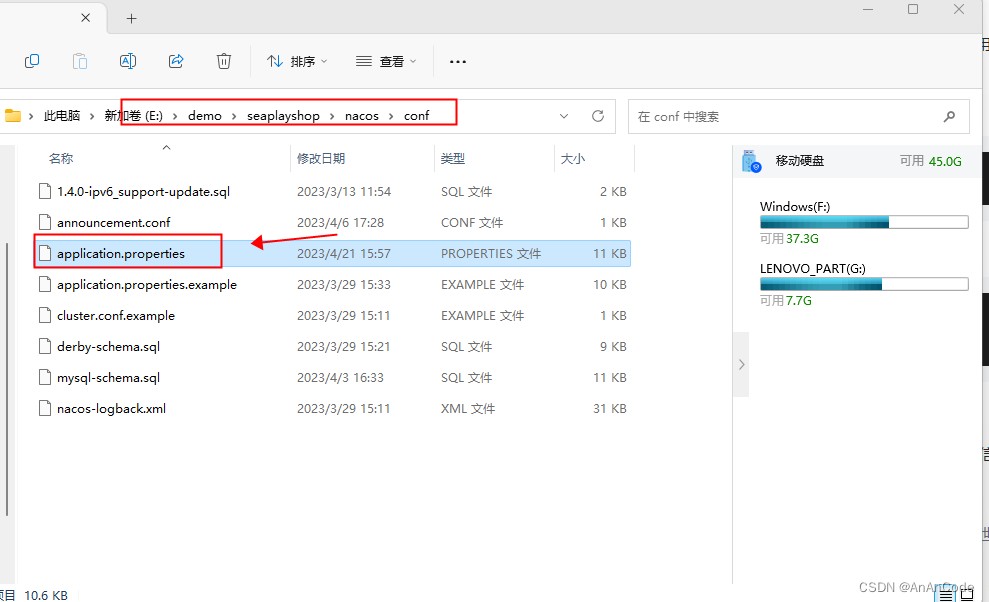
一、更改application.properties中的配置
路径:你的nacos的位置下confg/application.properties
二、修改配置
开启鉴权之前,application.properties中的配置信息为:
### if turn on auth system:
nacos.core.auth.enabled=false
开启鉴权之后,application.properties中的配置信息为:
### if turn on auth system:
nacos.core.auth.system.type=nacos
nacos.core.auth.enabled=true
在2.2.0.1版本后,社区发布版本将移除以文档如下值作为默认值,需要自行填充,否则无法启动节点。
### the default token(base64 string):
nacos.core.auth.default.token.secret.key=secretkey012345678901234567890123456789012345678901234567890123456789

### 2.1.0 版本后
nacos.core.auth.plugin.nacos.token.secret.key=secretkey012345678901234567890123456789012345678901234567890123456789
自定义密钥时,推荐将配置项设置为base64编码的字符串,且原始密钥长度不得低于32字符
### the default token(base64 string):
nacos.core.auth.default.token.secret.key=vghpc0lztxlddxn0b21tzwnyzxrlzxkwmtizndu2nzg=

### 2.1.0 版本后
nacos.core.auth.plugin.nacos.token.secret.key=vghpc0lztxlddxn0b21tzwnyzxrlzxkwmtizndu2nzg=
nacos.core.auth.server.identity.key和nacos.core.auth.server.identity.value必须要有值
nacos.core.auth.server.identity.key=example
nacos.core.auth.server.identity.value=example
那么我的全部配置如下:
#
# copyright 1999-2021 alibaba group holding ltd.
#
# licensed under the apache license, version 2.0 (the "license");
# you may not use this file except in compliance with the license.
# you may obtain a copy of the license at
#
#      http://www.apache.org/licenses/license-2.0
#
# unless required by applicable law or agreed to in writing, software
# distributed under the license is distributed on an "as is" basis,
# without warranties or conditions of any kind, either express or implied.
# see the license for the specific language governing permissions and
# limitations under the license.
#

#*************** spring boot related configurations ***************#
### default web context path:
server.servlet.contextpath=/nacos
### include message field
server.error.include-message=always
### default web server port:
server.port=8848

#*************** network related configurations ***************#
### if prefer hostname over ip for nacos server addresses in cluster.conf:
# nacos.inetutils.prefer-hostname-over-ip=false

### specify local server's ip:
# nacos.inetutils.ip-address=


#*************** config module related configurations ***************#
### if use mysql as datasource:
### deprecated configuration property, it is recommended to use `spring.sql.init.platform` replaced.
 spring.datasource.platform=mysql
# spring.sql.init.platform=mysql

### count of db:
 db.num=1

### connect url of db:
 db.url.0=jdbc:mysql://127.0.0.1:3306/nacos?characterencoding=utf8&connecttimeout=1000&sockettimeout=3000&autoreconnect=true&useunicode=true&usessl=false&servertimezone=utc
 db.user.0=root
 db.password.0=123456

### connection pool configuration: hikaricp
db.pool.config.connectiontimeout=30000
db.pool.config.validationtimeout=10000
db.pool.config.maximumpoolsize=20
db.pool.config.minimumidle=2

#*************** naming module related configurations ***************#

### if enable data warmup. if set to false, the server would accept request without local data preparation:
# nacos.naming.data.warmup=true

### if enable the instance auto expiration, kind like of health check of instance:
# nacos.naming.expireinstance=true

### add in 2.0.0
### the interval to clean empty service, unit: milliseconds.
# nacos.naming.clean.empty-service.interval=60000

### the expired time to clean empty service, unit: milliseconds.
# nacos.naming.clean.empty-service.expired-time=60000

### the interval to clean expired metadata, unit: milliseconds.
# nacos.naming.clean.expired-metadata.interval=5000

### the expired time to clean metadata, unit: milliseconds.
# nacos.naming.clean.expired-metadata.expired-time=60000

### the delay time before push task to execute from service changed, unit: milliseconds.
# nacos.naming.push.pushtaskdelay=500

### the timeout for push task execute, unit: milliseconds.
# nacos.naming.push.pushtasktimeout=5000

### the delay time for retrying failed push task, unit: milliseconds.
# nacos.naming.push.pushtaskretrydelay=1000

### since 2.0.3
### the expired time for inactive client, unit: milliseconds.
# nacos.naming.client.expired.time=180000

#*************** cmdb module related configurations ***************#
### the interval to dump external cmdb in seconds:
# nacos.cmdb.dumptaskinterval=3600

### the interval of polling data change event in seconds:
# nacos.cmdb.eventtaskinterval=10

### the interval of loading labels in seconds:
# nacos.cmdb.labeltaskinterval=300

### if turn on data loading task:
# nacos.cmdb.loaddataatstart=false


#*************** metrics related configurations ***************#
### metrics for prometheus
#management.endpoints.web.exposure.include=*

### metrics for elastic search
management.metrics.export.elastic.enabled=false
#management.metrics.export.elastic.host=http://localhost:9200

### metrics for influx
management.metrics.export.influx.enabled=false
#management.metrics.export.influx.db=springboot
#management.metrics.export.influx.uri=http://localhost:8086
#management.metrics.export.influx.auto-create-db=true
#management.metrics.export.influx.consistency=one
#management.metrics.export.influx.compressed=true

#*************** access log related configurations ***************#
### if turn on the access log:
server.tomcat.accesslog.enabled=true

### the access log pattern:
server.tomcat.accesslog.pattern=%h %l %u %t "%r" %s %b %d %{user-agent}i %{request-source}i

### the directory of access log:
server.tomcat.basedir=file:.

#*************** access control related configurations ***************#
### if enable spring security, this option is deprecated in 1.2.0:
#spring.security.enabled=false

### the ignore urls of auth
nacos.security.ignore.urls=/,/error,/**/*.css,/**/*.js,/**/*.html,/**/*.map,/**/*.svg,/**/*.png,/**/*.ico,/console-ui/public/**,/v1/auth/**,/v1/console/health/**,/actuator/**,/v1/console/server/**

### the auth system to use, currently only 'nacos' and 'ldap' is supported:
nacos.core.auth.system.type=nacos

### if turn on auth system:
nacos.core.auth.enabled=true

### turn on/off caching of auth information. by turning on this switch, the update of auth information would have a 15 seconds delay.
nacos.core.auth.caching.enabled=true

### since 1.4.1, turn on/off white auth for user-agent: nacos-server, only for upgrade from old version.
nacos.core.auth.enable.useragentauthwhite=false

### since 1.4.1, worked when nacos.core.auth.enabled=true and nacos.core.auth.enable.useragentauthwhite=false.
### the two properties is the white list for auth and used by identity the request from other server.
nacos.core.auth.server.identity.key=example
nacos.core.auth.server.identity.value=example

### worked when nacos.core.auth.system.type=nacos
### the token expiration in seconds:
nacos.core.auth.plugin.nacos.token.cache.enable=false
nacos.core.auth.plugin.nacos.token.expire.seconds=18000
### the default token (base64 string):
nacos.core.auth.plugin.nacos.token.secret.key=vghpc0lztxlddxn0b21tzwnyzxrlzxkwmtizndu2nzg=

### worked when nacos.core.auth.system.type=ldap,{0} is placeholder,replace login username
#nacos.core.auth.ldap.url=ldap://localhost:389
#nacos.core.auth.ldap.basedc=dc=example,dc=org
#nacos.core.auth.ldap.userdn=cn=admin,${nacos.core.auth.ldap.basedc}
#nacos.core.auth.ldap.password=admin
#nacos.core.auth.ldap.userdn=cn={0},dc=example,dc=org
#nacos.core.auth.ldap.filter.prefix=uid
#nacos.core.auth.ldap.case.sensitive=true


#*************** istio related configurations ***************#
### if turn on the mcp server:
nacos.istio.mcp.server.enabled=false

#*************** core related configurations ***************#

### set the workerid manually
# nacos.core.snowflake.worker-id=

### member-metadata
# nacos.core.member.meta.site=
# nacos.core.member.meta.adweight=
# nacos.core.member.meta.weight=

### memberlookup
### addressing pattern category, if set, the priority is highest
# nacos.core.member.lookup.type=[file,address-server]
## set the cluster list with a configuration file or command-line argument
# nacos.member.list=192.168.16.101:8847?raft_port=8807,192.168.16.101?raft_port=8808,192.168.16.101:8849?raft_port=8809
## for addressservermemberlookup
# maximum number of retries to query the address server upon initialization
# nacos.core.address-server.retry=5
## server domain name address of [address-server] mode
# address.server.domain=jmenv.tbsite.net
## server port of [address-server] mode
# address.server.port=8080
## request address of [address-server] mode
# address.server.url=/nacos/serverlist

#*************** jraft related configurations ***************#

### sets the raft cluster election timeout, default value is 5 second
# nacos.core.protocol.raft.data.election_timeout_ms=5000
### sets the amount of time the raft snapshot will execute periodically, default is 30 minute
# nacos.core.protocol.raft.data.snapshot_interval_secs=30
### raft internal worker threads
# nacos.core.protocol.raft.data.core_thread_num=8
### number of threads required for raft business request processing
# nacos.core.protocol.raft.data.cli_service_thread_num=4
### raft linear read strategy. safe linear reads are used by default, that is, the leader tenure is confirmed by heartbeat
# nacos.core.protocol.raft.data.read_index_type=readonlysafe
### rpc request timeout, default 5 seconds
# nacos.core.protocol.raft.data.rpc_request_timeout_ms=5000

#*************** distro related configurations ***************#

### distro data sync delay time, when sync task delayed, task will be merged for same data key. default 1 second.
# nacos.core.protocol.distro.data.sync.delayms=1000

### distro data sync timeout for one sync data, default 3 seconds.
# nacos.core.protocol.distro.data.sync.timeoutms=3000

### distro data sync retry delay time when sync data failed or timeout, same behavior with delayms, default 3 seconds.
# nacos.core.protocol.distro.data.sync.retrydelayms=3000

### distro data verify interval time, verify synced data whether expired for a interval. default 5 seconds.
# nacos.core.protocol.distro.data.verify.intervalms=5000

### distro data verify timeout for one verify, default 3 seconds.
# nacos.core.protocol.distro.data.verify.timeoutms=3000

### distro data load retry delay when load snapshot data failed, default 30 seconds.
# nacos.core.protocol.distro.data.load.retrydelayms=30000

### enable to support prometheus service discovery
#nacos.prometheus.metrics.enabled=true

### since 2.3
#*************** grpc configurations ***************#

## sdk grpc(between nacos server and client) configuration
## sets the maximum message size allowed to be received on the server.
#nacos.remote.server.grpc.sdk.max-inbound-message-size=10485760

## sets the time(milliseconds) without read activity before sending a keepalive ping. the typical default is two hours.
#nacos.remote.server.grpc.sdk.keep-alive-time=7200000

## sets a time(milliseconds) waiting for read activity after sending a keepalive ping. defaults to 20 seconds.
#nacos.remote.server.grpc.sdk.keep-alive-timeout=20000


## sets a time(milliseconds) that specify the most aggressive keep-alive time clients are permitted to configure. the typical default is 5 minutes
#nacos.remote.server.grpc.sdk.permit-keep-alive-time=300000

## cluster grpc(inside the nacos server) configuration
#nacos.remote.server.grpc.cluster.max-inbound-message-size=10485760

## sets the time(milliseconds) without read activity before sending a keepalive ping. the typical default is two hours.
#nacos.remote.server.grpc.cluster.keep-alive-time=7200000

## sets a time(milliseconds) waiting for read activity after sending a keepalive ping. defaults to 20 seconds.
#nacos.remote.server.grpc.cluster.keep-alive-timeout=20000

## sets a time(milliseconds) that specify the most aggressive keep-alive time clients are permitted to configure. the typical default is 5 minutes
#nacos.remote.server.grpc.cluster.permit-keep-alive-time=300000
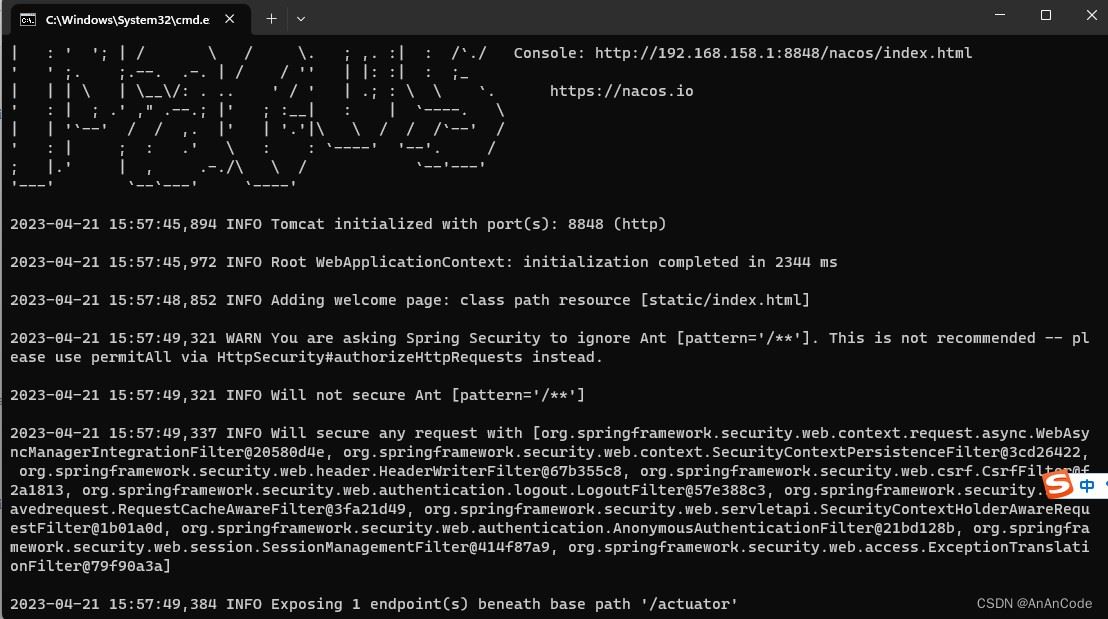
配置完成后就可以在/bin cmd
输入命令 startup.cmd -m standalone 运行就可以了
总结
以上为个人经验,希望能给大家一个参考,也希望大家多多支持代码网。





发表评论