
 我要评论
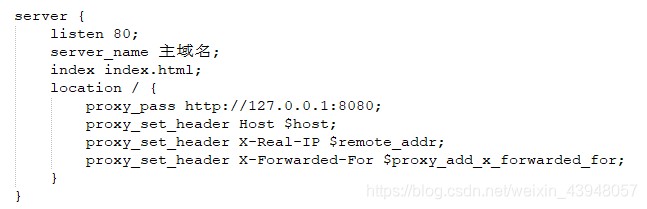
我要评论主域名配置
二级域名配置
详细配置
#user  nobody;
worker_processes  1;

#error_log  logs/error.log;
#error_log  logs/error.log  notice;
#error_log  logs/error.log  info;

#pid        logs/nginx.pid;


events {
    worker_connections  1024;
}


http {
    include       mime.types;
    default_type  application/octet-stream;

    #log_format  main  '$remote_addr - $remote_user [$time_local] "$request" '
    #                  '$status $body_bytes_sent "$http_referer" '
    #                  '"$http_user_agent" "$http_x_forwarded_for"';

    #access_log  logs/access.log  main;

    sendfile        on;
    #tcp_nopush     on;

    #keepalive_timeout  0;
    keepalive_timeout  65;

    gzip  on;

    server {
      #  listen       80;
       # server_name  localhost;

        #charset koi8-r;

        #access_log  logs/host.access.log  main;

        location / {
            root   html;
            index  index.html index.htm;
        }


        #error_page  404              /404.html;

        # redirect server error pages to the static page /50x.html
        #
        error_page   500 502 503 504  /50x.html;
        location = /50x.html {
            root   html;
        }

        # proxy the php scripts to apache listening on 127.0.0.1:80
        #
        #location ~ \.php$ {
        #    proxy_pass   http://127.0.0.1;
        #}

        # pass the php scripts to fastcgi server listening on 127.0.0.1:9000
        #
        #location ~ \.php$ {
        #    root           html;
        #    fastcgi_pass   127.0.0.1:9000;
        #    fastcgi_index  index.php;
        #    fastcgi_param  script_filename  /scripts$fastcgi_script_name;
        #    include        fastcgi_params;
        #}

        # deny access to .htaccess files, if apache's document root
        # concurs with nginx's one
        #
        #location ~ /\.ht {
        #    deny  all;
        #}
    }


    # another virtual host using mix of ip-, name-, and port-based configuration
    #
    #server {
    #    listen       8000;
    #    listen       somename:8080;
    #    server_name  somename  alias  another.alias;

    #    location / {
    #        root   html;
    #        index  index.html index.htm;
    #    }
    #}

	# 主域名配置
	server {
        listen 80;
        server_name 主域名;
        index index.html;
        location / {
			proxy_pass http://127.0.0.1:8080;
			proxy_set_header host $host;
			proxy_set_header x-real-ip $remote_addr;
			proxy_set_header x-forwarded-for $proxy_add_x_forwarded_for;
		}

    }

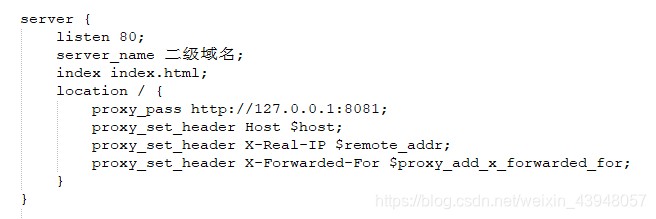
	# 二级域名配置
	server {
        listen 80;
        server_name 二级域名;
        index index.html;
        location / {
			proxy_pass http://127.0.0.1:8081;
			proxy_set_header host $host;
			proxy_set_header x-real-ip $remote_addr;
			proxy_set_header x-forwarded-for $proxy_add_x_forwarded_for;
		}
    }

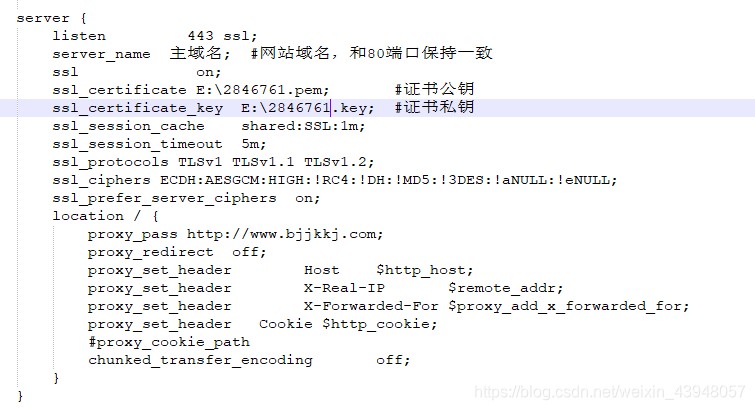
  	# 主域名https配置
    server {
        listen         443 ssl;
        server_name  主域名;  #网站域名,和80端口保持一致
        ssl             on;
        ssl_certificate e:\2846761.pem;       #证书公钥
        ssl_certificate_key  e:\2846761.key;  #证书私钥
        ssl_session_cache    shared:ssl:1m;
        ssl_session_timeout  5m;
        ssl_protocols tlsv1 tlsv1.1 tlsv1.2;
        ssl_ciphers ecdh:aesgcm:high:!rc4:!dh:!md5:!3des:!anull:!enull;
        ssl_prefer_server_ciphers  on;
        location / {
            proxy_pass http://www.bjjkkj.com;
            proxy_redirect  off;
            proxy_set_header        host    $http_host;
            proxy_set_header        x-real-ip       $remote_addr;
            proxy_set_header        x-forwarded-for $proxy_add_x_forwarded_for;
            proxy_set_header   cookie $http_cookie;
            #proxy_cookie_path
            chunked_transfer_encoding       off;
        }
    }

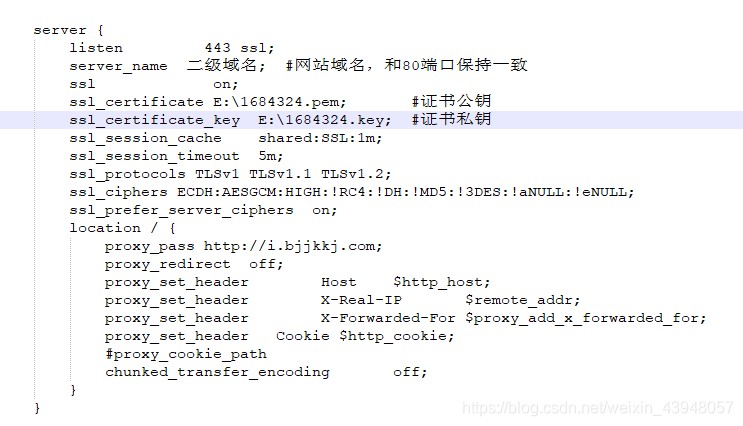
	# 二级域名https配置
	server {
        listen         443 ssl;
        server_name  二级域名;  #网站域名,和80端口保持一致
        ssl             on;
        ssl_certificate e:\1684324.pem;       #证书公钥
        ssl_certificate_key  e:1684324.key;  #证书私钥
        ssl_session_cache    shared:ssl:1m;
        ssl_session_timeout  5m;
        ssl_protocols tlsv1 tlsv1.1 tlsv1.2;
        ssl_ciphers ecdh:aesgcm:high:!rc4:!dh:!md5:!3des:!anull:!enull;
        ssl_prefer_server_ciphers  on;
        location / {
            proxy_pass http://i.bjjkkj.com;
            proxy_redirect  off;
            proxy_set_header        host    $http_host;
            proxy_set_header        x-real-ip       $remote_addr;
            proxy_set_header        x-forwarded-for $proxy_add_x_forwarded_for;
            proxy_set_header   cookie $http_cookie;
            #proxy_cookie_path
            chunked_transfer_encoding       off;
        }
    }

	server {
		listen         80;
		server_name    主域名;
		return         301 https://$server_name$request_uri;
	}

	server {
		listen         80;
		server_name    二级域名;
		return         301 https://$server_name$request_uri;
	}
}
注:
- 查资料的过程中,有些资料说主域名配置https之后,二级域名会默认为https,配置过程中始终没有配置成功,目前使用的是一个域名对应一条https证书。
- 域名配置https时,需下载nginx的证书,且每个域名都会对应一套证书
总结
以上为个人经验,希望能给大家一个参考,也希望大家多多支持代码网。





发表评论