
 我要评论
我要评论一、redis安装
# 安装包存放目录
cd /opt/software/
# 下载最新稳定版
wget https://download.redis.io/releases/redis-6.2.6.tar.gz
# 解压
tar -zxvf redis-6.2.6.tar.gz
# 进入解压后的目录
cd /opt/software/redis-6.2.6/
# 编译
make
# 执行 "make install" 默认会安装到 /usr/local/bin,可通过prefix指定安装路径
make install prefix=/usr/local/redis
# 测试是否安装成功,执行下面命令
/usr/local/redis/bin/redis-server
二、主从及哨兵配置
三个redis实例都运行在192.168.162.10服务器上,端口分别是7001、7002、7003,默认启动时已7001作为主节点,7002与7003作为从节点,下面是主从与哨兵的配置文件需要修改的地方。
1、redis配置
原始配置文件可在解压后的源码文件根目录中找到,这里以从节点 7002 配置文件为例,其余两个配置文件几乎一致。
首先将配置文件拷贝到/opt/software/redis-cluster/redis-7002.conf,然后进行下面的修改。
# (1)设置允许外部ip访问,需要注释掉bind配置,并关掉保护模式
# bind 127.0.0.1 -::1
protected-mode no

# (2)修改端口号
port 7002

# (3)修改为以守护进程模式后台运行
daemonize yes

# (4)修改pid文件名,以守护进程运行的时候,会产生pid文件,默认位置为 /run/redis.pid
# 因为这里在同一台机器上运行多个实例,所以需要指定
pidfile /opt/software/redis-cluster/redis_7002.pid

# (5)修改日志文件位置
logfile /opt/software/redis-cluster/redis_7002.log

# (6)修改rdb快照文件位置
dir /opt/software/redis-cluster
dbfilename dump_7002.rdb

# (7)修改主节点地址,在部分旧版本中是slaveof命令,主节点7001配置文件中不要加这一行
replicaof 192.168.162.10 7001

# (8)aof可按需要开启
appendonly yes
appendfilename appendonly_7002.aof
在上面的配置中,7001文件与7003一致,改一下其中的端口及地址就可以了,其中,7001作为主节点,没有第(7)点。
建议三个实例运行在不同的文件夹下,我为了省去切换文件目录的时间,都放在一个文件夹下了。

配置完成后,按三个端口号的顺序启动分别启动三个实例。
/usr/local/redis/bin/redis-server /opt/software/redis-cluster/redis-7001.conf
/usr/local/redis/bin/redis-server /opt/software/redis-cluster/redis-7002.conf
/usr/local/redis/bin/redis-server /opt/software/redis-cluster/redis-7003.conf
启动后,产生的文件如下所示
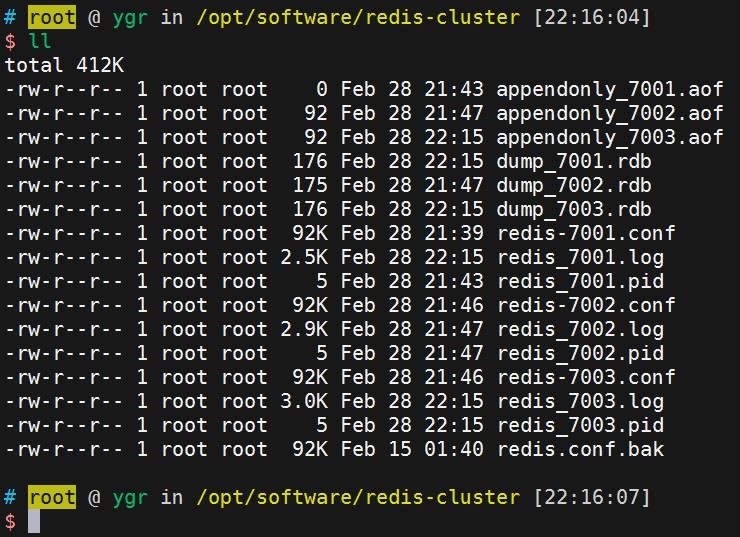
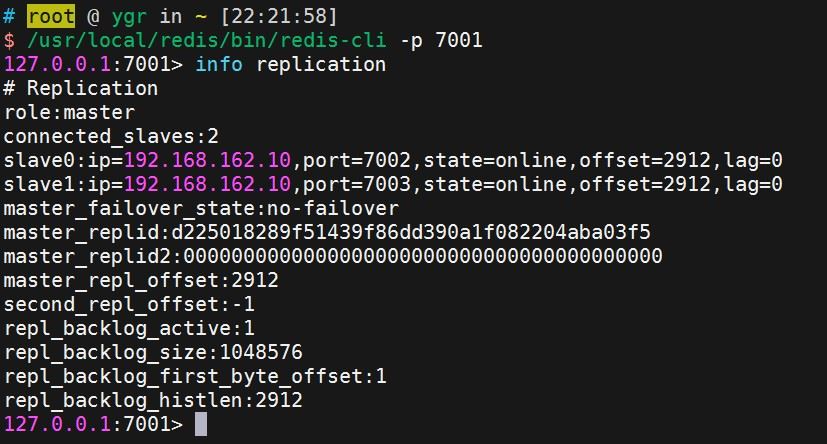
进入主节点,查看实例主从状况
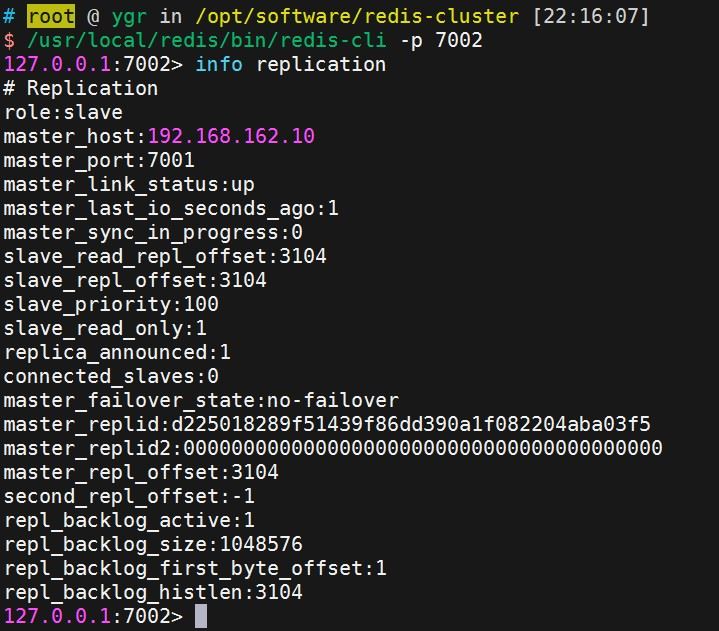
进入从节点,查看实例主从状况
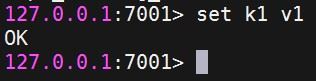
测试主从复制,在主节点中添加一个缓存,然后从节点中查询

至此,主从复制基本上差不多了,接下来就是哨兵的配置了。
2、sentinel配置
共计启动三个实例,分别运行于27001、27002、27003三个端口,以sentinel-27001.conf为例,配置信息如下,其余两个配置文件基本上一致,改一下端口以及pidfile、logfile即可。
port 27001
daemonize yes
pidfile /opt/software/redis-cluster/sentinel-27001.pid
logfile /opt/software/redis-cluster/sentinel-27001.log

# 监控192.168.162.10:7001实例,实例取名为mymaster,当有两个哨兵认为实例下线后,自动进行故障转移
sentinel monitor mymaster 192.168.162.10 7001 2
# 服务不可达时间,心跳超过这个时间,sentinel将认为节点挂了
sentinel down-after-milliseconds mymaster 5000
sentinel failover-timeout mymaster 60000
sentinel parallel-syncs mymaster 1
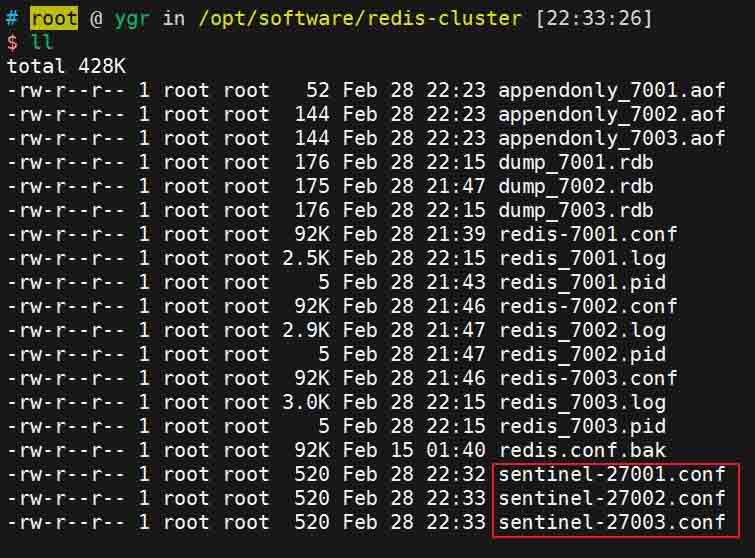
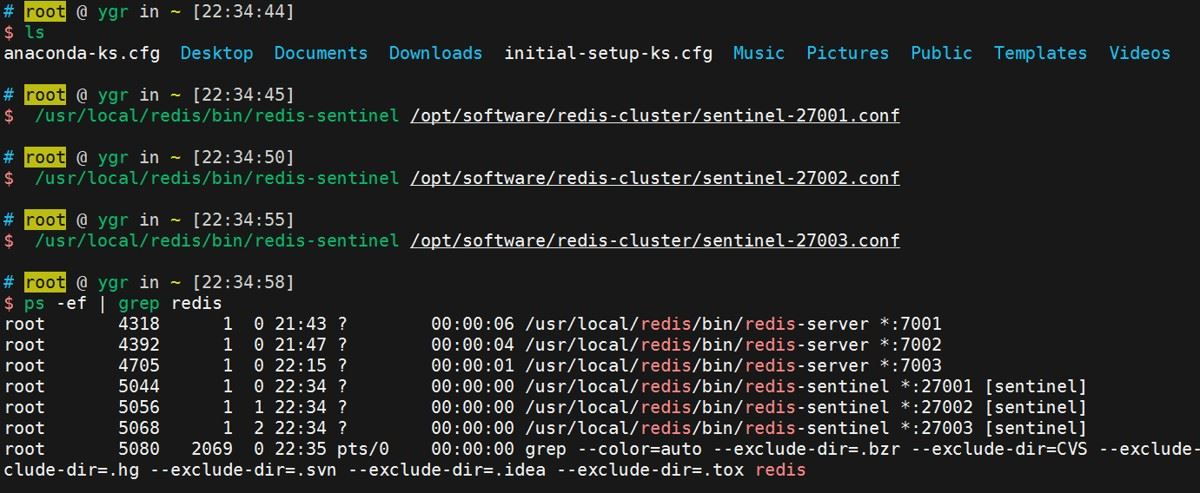
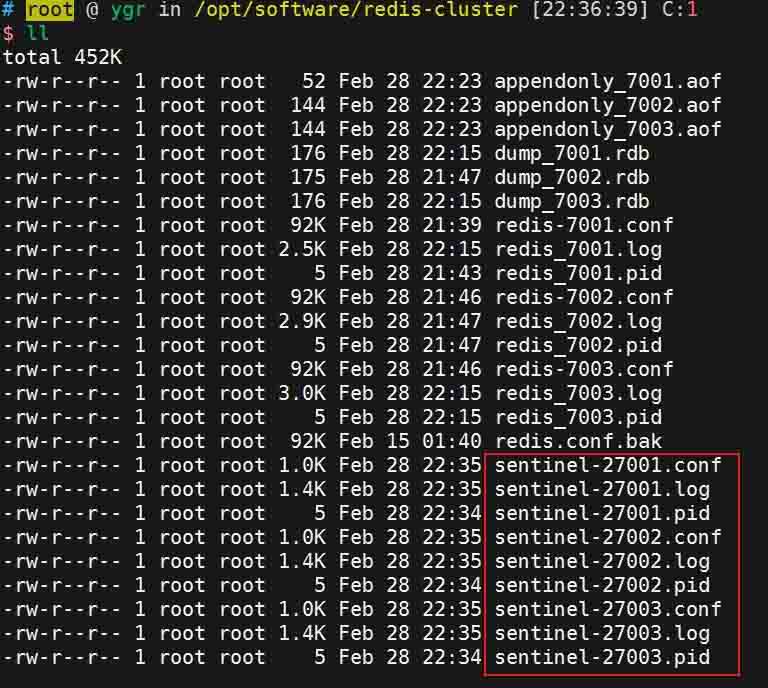
分别启动三个哨兵实例
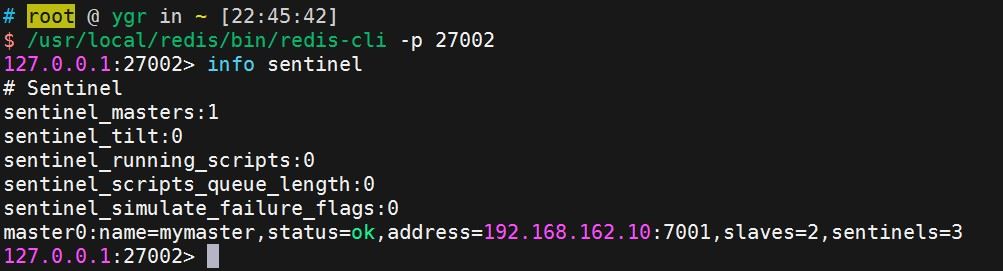
随意连接一个哨兵,查看哨兵监控信息
查看哨兵日志
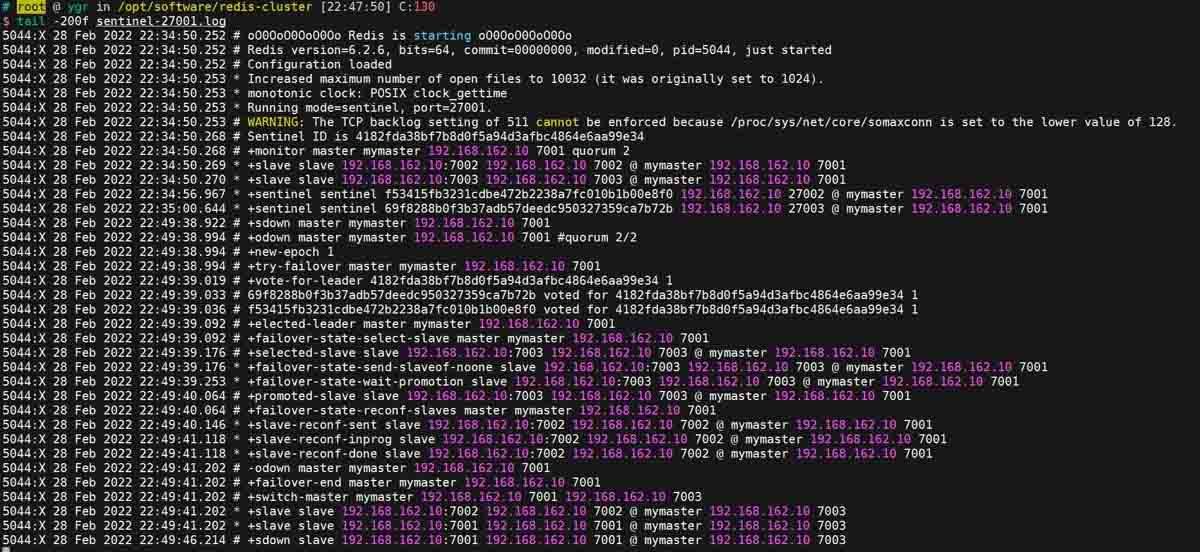
关闭主节点,再看哨兵日志
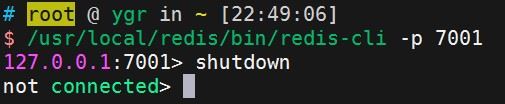
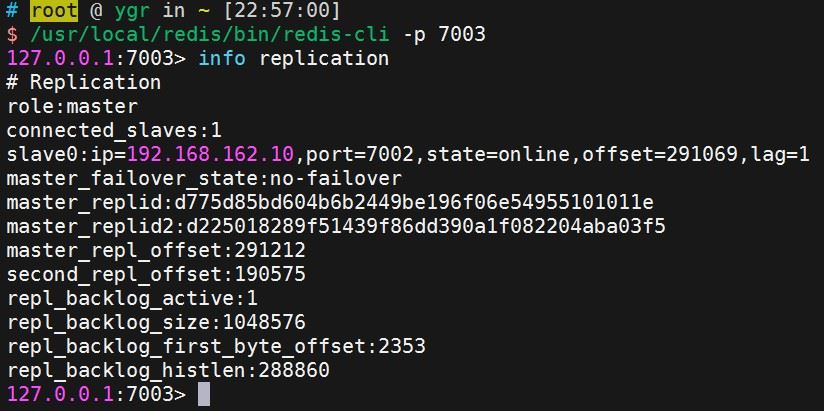
从上面的日志文件中,我们可以看到哨兵投票选举leader以及切换主节点的大概过程,这时候,主节点已经切换到7003节点了。
这时候,再重新启动7001节点,也就是之前的主节点,这个节点会被哨兵自动加入到集群中作为从节点,sentinel会打印如下日志
+convert-to-slave slave 192.168.162.10:7001 192.168.162.10 7001 @ mymaster 192.168.162.10 7003
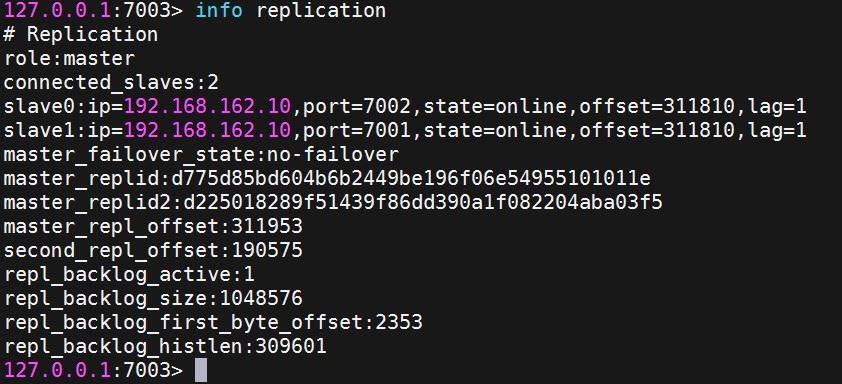
至此,哨兵集群也ok了。接下来就是springboot中配置哨兵集群了。
三、springboot配置哨兵集群及读写分离
创建springboot测试项目,pom.xml如下所示
<?xml version="1.0" encoding="utf-8"?>
<project xmlns="http://maven.apache.org/pom/4.0.0" xmlns:xsi="http://www.w3.org/2001/xmlschema-instance"
	xsi:schemalocation="http://maven.apache.org/pom/4.0.0 https://maven.apache.org/xsd/maven-4.0.0.xsd">
	<modelversion>4.0.0</modelversion>
	<parent>
		<groupid>org.springframework.boot</groupid>
		<artifactid>spring-boot-starter-parent</artifactid>
		<version>2.6.3</version>
		<relativepath/> <!-- lookup parent from repository -->
	</parent>
	<groupid>com.example</groupid>
	<artifactid>sentinel-cluster</artifactid>
	<version>0.0.1-snapshot</version>
	<name>spring-boot-sentinel-cluster</name>
	<description>spring-boot-sentinel-cluster</description>
	<properties>
		<java.version>1.8</java.version>
	</properties>
	<dependencies>
		<dependency>
			<groupid>org.springframework.boot</groupid>
			<artifactid>spring-boot-starter-data-redis</artifactid>
		</dependency>
        <dependency>
            <groupid>org.apache.commons</groupid>
            <artifactid>commons-pool2</artifactid>
        </dependency>
        <dependency>
            <groupid>org.springframework.boot</groupid>
            <artifactid>spring-boot-starter-json</artifactid>
        </dependency>
		<dependency>
			<groupid>org.projectlombok</groupid>
			<artifactid>lombok</artifactid>
			<optional>true</optional>
		</dependency>
		<dependency>
			<groupid>org.springframework.boot</groupid>
			<artifactid>spring-boot-starter-test</artifactid>
			<scope>test</scope>
		</dependency>
	</dependencies>
	<build>
		<plugins>
			<plugin>
				<groupid>org.springframework.boot</groupid>
				<artifactid>spring-boot-maven-plugin</artifactid>
				<configuration>
					<excludes>
						<exclude>
							<groupid>org.projectlombok</groupid>
							<artifactid>lombok</artifactid>
						</exclude>
					</excludes>
				</configuration>
			</plugin>
		</plugins>
	</build>
</project>配置文件application.yml如下
spring:
  redis:
    sentinel:
      master: mymaster
      nodes:
        - 192.168.162.10:27001
        - 192.168.162.10:27002
        - 192.168.162.10:27003
logging:
  pattern:
    console: '%date{yyyy-mm-dd hh:mm:ss.sss} | %highlight(%5level) [%green(%16.16thread)] %clr(%-50.50logger{49}){cyan} %4line -| %highlight(%msg%n)'
  level:
root: info创建配置类,配置redistemplate
package com.example.config;

import com.fasterxml.jackson.core.jsonparser;
import com.fasterxml.jackson.databind.deserializationfeature;
import com.fasterxml.jackson.databind.mapperfeature;
import com.fasterxml.jackson.databind.objectmapper;
import com.fasterxml.jackson.databind.serializationfeature;
import lombok.extern.slf4j.slf4j;
import org.springframework.boot.autoconfigure.condition.conditionalonmissingbean;
import org.springframework.context.annotation.bean;
import org.springframework.context.annotation.configuration;
import org.springframework.data.redis.connection.redisconnectionfactory;
import org.springframework.data.redis.core.redistemplate;
import org.springframework.data.redis.serializer.jackson2jsonredisserializer;
import org.springframework.data.redis.serializer.stringredisserializer;

import java.text.simpledateformat;
import java.util.timezone;

/**
 * @author ygr
 * @date 2022-02-15 16:30
 */
@slf4j
@configuration
public class redisconfig {

    public objectmapper objectmapper() {
        objectmapper objectmapper = new objectmapper();
        objectmapper.settimezone(timezone.gettimezone("gmt+8"));
        objectmapper.configure(serializationfeature.write_dates_as_timestamps, false);
        objectmapper.configure(deserializationfeature.fail_on_unknown_properties, false);
        objectmapper.setdateformat(new simpledateformat("yyyy-mm-dd hh:mm:ss"));
        objectmapper.configure(jsonparser.feature.allow_single_quotes, true);
        return objectmapper;
    }

    @bean
    @conditionalonmissingbean
    public redistemplate<string, object> redistemplate(redisconnectionfactory factory) {
        // 创建redistemplate<string, object>对象
        redistemplate<string, object> template = new redistemplate<>();
        template.setconnectionfactory(factory);

        // 定义jackson2jsonredisserializer序列化对象
        jackson2jsonredisserializer<object> jackson2jsonredisserializer = new jackson2jsonredisserializer<>(object.class);
        jackson2jsonredisserializer.setobjectmapper(objectmapper());

        stringredisserializer stringserial = new stringredisserializer();
        // redis key 序列化方式使用stringserial
        template.setkeyserializer(stringserial);
        // redis value 序列化方式使用jackson
        template.setvalueserializer(jackson2jsonredisserializer);
        // redis hash key 序列化方式使用stringserial
        template.sethashkeyserializer(stringserial);
        // redis hash value 序列化方式使用jackson
        template.sethashvalueserializer(jackson2jsonredisserializer);

        template.afterpropertiesset();
        return template;
    }
}
新建一个redisinit类来进行测试,该类实现了applicationrunner接口,在应用启动后自动运行
package com.example.init;

import lombok.requiredargsconstructor;
import lombok.extern.slf4j.slf4j;
import org.springframework.boot.applicationarguments;
import org.springframework.boot.applicationrunner;
import org.springframework.data.redis.core.redistemplate;
import org.springframework.stereotype.component;

import java.util.concurrent.timeunit;

/**
 * @author ygr
 * @date 2022-02-15 16:32
 */
@slf4j
@requiredargsconstructor
@component
public class redisinit implements applicationrunner {

    private final redistemplate<string, object> redistemplate;

    @override
    public void run(applicationarguments args) throws exception {
        for (int i = 0; i < 300; i++) {
            try {
                redistemplate.opsforvalue().set("k" + i, "v" + i);
                log.info("set value success: {}", i);

                object val = redistemplate.opsforvalue().get("k" + i);
                log.info("get value success: {}", val);
                timeunit.seconds.sleep(1);
            } catch (exception e) {
                log.error("error: {}", e.getmessage());
            }
        }
        log.info("finished...");
    }
}
项目结构特别简单
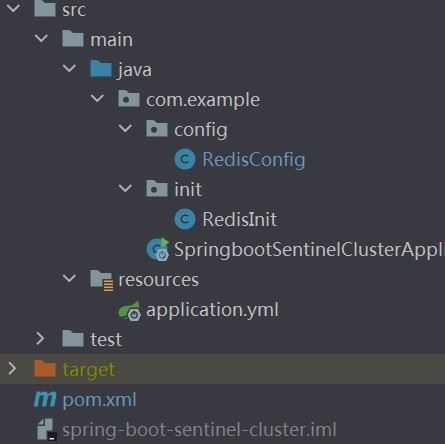
启动项目,查看日志,可以看到读写一切正常。

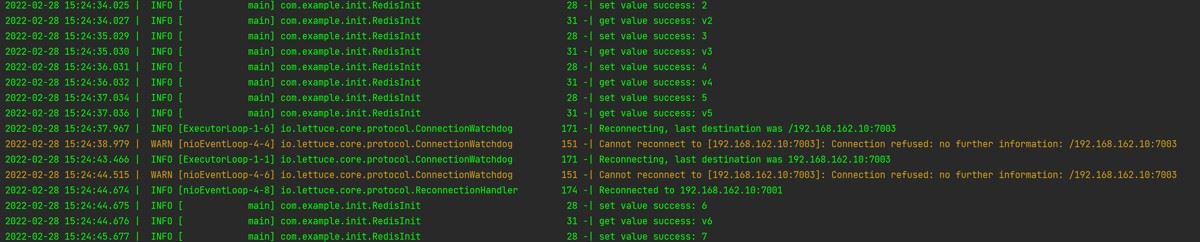
途中尝试将主节点干掉,接着看日志,从日志中可以看到,主从切换过来后,一切ok
但从info级别日志中,我们是看不出具体的读写连接信息的。将刚刚干掉的主节点重新启动起来,保持一主二从的模式,并修改一下部分包的日志级别为debug,然后再次启动看日志
logging:
  pattern:
    console: '%date{yyyy-mm-dd hh:mm:ss.sss} | %highlight(%5level) [%green(%16.16thread)] %clr(%-50.50logger{49}){cyan} %4line -| %highlight(%msg%n)'
  level:
    root: info
    io.lettuce.core: debug
    org.springframework.data.redis: debug
这部分日志有点长,我直接截取了一次读写的日志,如下
2022-02-28 15:43:04.962 | debug [            main] o.s.data.redis.core.redisconnectionutils            143 -| fetching redis connection from redisconnectionfactory
2022-02-28 15:43:04.962 | debug [            main] io.lettuce.core.redischannelhandler                 175 -| dispatching command asynccommand [type=set, output=statusoutput [output=null, error='null'], commandtype=io.lettuce.core.protocol.command]
2022-02-28 15:43:04.962 | debug [            main] io.lettuce.core.protocol.defaultendpoint            430 -| [channel=0x72e65475, /192.168.162.1:61674 -> /192.168.162.10:7001, epid=0x1] write() writeandflush command asynccommand [type=set, output=statusoutput [output=null, error='null'], commandtype=io.lettuce.core.protocol.command]
2022-02-28 15:43:04.962 | debug [            main] io.lettuce.core.protocol.defaultendpoint            207 -| [channel=0x72e65475, /192.168.162.1:61674 -> /192.168.162.10:7001, epid=0x1] write() done
2022-02-28 15:43:04.963 | debug [nioeventloop-6-2] io.lettuce.core.protocol.commandhandler             383 -| [channel=0x72e65475, /192.168.162.1:61674 -> /192.168.162.10:7001, epid=0x1, chid=0x2] write(ctx, asynccommand [type=set, output=statusoutput [output=null, error='null'], commandtype=io.lettuce.core.protocol.command], promise)
2022-02-28 15:43:04.963 | debug [nioeventloop-6-2] io.lettuce.core.protocol.commandencoder             101 -| [channel=0x72e65475, /192.168.162.1:61674 -> /192.168.162.10:7001] writing command asynccommand [type=set, output=statusoutput [output=null, error='null'], commandtype=io.lettuce.core.protocol.command]
2022-02-28 15:43:04.964 | debug [nioeventloop-6-2] io.lettuce.core.protocol.commandhandler             577 -| [channel=0x72e65475, /192.168.162.1:61674 -> /192.168.162.10:7001, epid=0x1, chid=0x2] received: 5 bytes, 1 commands in the stack
2022-02-28 15:43:04.964 | debug [nioeventloop-6-2] io.lettuce.core.protocol.commandhandler             651 -| [channel=0x72e65475, /192.168.162.1:61674 -> /192.168.162.10:7001, epid=0x1, chid=0x2] stack contains: 1 commands
2022-02-28 15:43:04.964 | debug [nioeventloop-6-2] io.lettuce.core.protocol.redisstatemachine          298 -| decode done, empty stack: true
2022-02-28 15:43:04.964 | debug [nioeventloop-6-2] io.lettuce.core.protocol.commandhandler             679 -| [channel=0x72e65475, /192.168.162.1:61674 -> /192.168.162.10:7001, epid=0x1, chid=0x2] completing command asynccommand [type=set, output=statusoutput [output=ok, error='null'], commandtype=io.lettuce.core.protocol.command]
2022-02-28 15:43:04.964 | debug [            main] o.s.data.redis.core.redisconnectionutils            389 -| closing redis connection.
2022-02-28 15:43:04.965 |  info [            main] com.example.init.redisinit                           28 -| set value success: 4
2022-02-28 15:43:04.965 | debug [            main] o.s.data.redis.core.redisconnectionutils            143 -| fetching redis connection from redisconnectionfactory
2022-02-28 15:43:04.965 | debug [            main] io.lettuce.core.redischannelhandler                 175 -| dispatching command asynccommand [type=get, output=valueoutput [output=null, error='null'], commandtype=io.lettuce.core.protocol.command]
2022-02-28 15:43:04.965 | debug [            main] io.lettuce.core.protocol.defaultendpoint            430 -| [channel=0x72e65475, /192.168.162.1:61674 -> /192.168.162.10:7001, epid=0x1] write() writeandflush command asynccommand [type=get, output=valueoutput [output=null, error='null'], commandtype=io.lettuce.core.protocol.command]
2022-02-28 15:43:04.965 | debug [            main] io.lettuce.core.protocol.defaultendpoint            207 -| [channel=0x72e65475, /192.168.162.1:61674 -> /192.168.162.10:7001, epid=0x1] write() done
2022-02-28 15:43:04.965 | debug [nioeventloop-6-2] io.lettuce.core.protocol.commandhandler             383 -| [channel=0x72e65475, /192.168.162.1:61674 -> /192.168.162.10:7001, epid=0x1, chid=0x2] write(ctx, asynccommand [type=get, output=valueoutput [output=null, error='null'], commandtype=io.lettuce.core.protocol.command], promise)
2022-02-28 15:43:04.966 | debug [nioeventloop-6-2] io.lettuce.core.protocol.commandencoder             101 -| [channel=0x72e65475, /192.168.162.1:61674 -> /192.168.162.10:7001] writing command asynccommand [type=get, output=valueoutput [output=null, error='null'], commandtype=io.lettuce.core.protocol.command]
2022-02-28 15:43:04.966 | debug [nioeventloop-6-2] io.lettuce.core.protocol.commandhandler             577 -| [channel=0x72e65475, /192.168.162.1:61674 -> /192.168.162.10:7001, epid=0x1, chid=0x2] received: 10 bytes, 1 commands in the stack
2022-02-28 15:43:04.966 | debug [nioeventloop-6-2] io.lettuce.core.protocol.commandhandler             651 -| [channel=0x72e65475, /192.168.162.1:61674 -> /192.168.162.10:7001, epid=0x1, chid=0x2] stack contains: 1 commands
2022-02-28 15:43:04.966 | debug [nioeventloop-6-2] io.lettuce.core.protocol.redisstatemachine          298 -| decode done, empty stack: true
2022-02-28 15:43:04.966 | debug [nioeventloop-6-2] io.lettuce.core.protocol.commandhandler             679 -| [channel=0x72e65475, /192.168.162.1:61674 -> /192.168.162.10:7001, epid=0x1, chid=0x2] completing command asynccommand [type=get, output=valueoutput [output=[b@393ff2f4, error='null'], commandtype=io.lettuce.core.protocol.command]
2022-02-28 15:43:04.967 | debug [            main] o.s.data.redis.core.redisconnectionutils            389 -| closing redis connection.
2022-02-28 15:43:04.967 |  info [            main] com.example.init.redisinit                           31 -| get value success: v4
从日志中可以看到,读与写都是走的主节点(目前7001是主)。
如果想做读写分离,也很简单,修改redisconfig类,加入如下bean的配置代码
@bean
public redisconnectionfactory lettuceconnectionfactory(redisproperties redisproperties) {
    redissentinelconfiguration redissentinelconfiguration = new redissentinelconfiguration(
        redisproperties.getsentinel().getmaster(), new hashset<>(redisproperties.getsentinel().getnodes())
    );

    lettucepoolingclientconfiguration lettuceclientconfiguration = lettucepoolingclientconfiguration.builder()
        // 读写分离,若主节点能抗住读写并发,则不需要设置,全都走主节点即可
        .readfrom(readfrom.any_replica)
        .build();

    return new lettuceconnectionfactory(redissentinelconfiguration, lettuceclientconfiguration);
}
readfrom的取值及读取方式的对应关系如下,其中,replica会一直读取的同一个从节点,any_replica则会随机选择
| readfrom | 读取方式 |
|---|---|
| master / upstream | 仅读取主节点 |
| master_preferred / upstream_preferred | 优先读取主节点,如果主节点不可用,则读取从节点 |
| replica/ slave(已废弃) | 仅读取从节点 |
| replica_preferred / slave_preferred(已废弃) | 优先读取从节点,如果从节点不可用,则读取主节点 |
| nearest | 从最近节点读取 |
| any | 从任何节点读取 |
| any_replica | 从任意一个从节点读取 |
再重启查看日志
2022-02-28 15:40:58.971 | debug [            main] o.s.data.redis.core.redisconnectionutils            143 -| fetching redis connection from redisconnectionfactory
2022-02-28 15:40:58.971 | debug [            main] io.lettuce.core.redischannelhandler                 175 -| dispatching command asynccommand [type=set, output=statusoutput [output=null, error='null'], commandtype=io.lettuce.core.protocol.command]
2022-02-28 15:40:58.971 | debug [            main] i.l.c.m.masterreplicaconnectionprovider             112 -| getconnectionasync(write)
2022-02-28 15:40:58.971 | debug [            main] io.lettuce.core.redischannelhandler                 175 -| dispatching command asynccommand [type=set, output=statusoutput [output=null, error='null'], commandtype=io.lettuce.core.protocol.command]
2022-02-28 15:40:58.971 | debug [            main] io.lettuce.core.protocol.defaultendpoint            430 -| [channel=0x4c2f55eb, /192.168.162.1:61317 -> /192.168.162.10:7001, epid=0x7] write() writeandflush command asynccommand [type=set, output=statusoutput [output=null, error='null'], commandtype=io.lettuce.core.protocol.command]
2022-02-28 15:40:58.972 | debug [nioeventloop-6-7] io.lettuce.core.protocol.commandhandler             383 -| [channel=0x4c2f55eb, /192.168.162.1:61317 -> /192.168.162.10:7001, epid=0x7, chid=0x7] write(ctx, asynccommand [type=set, output=statusoutput [output=null, error='null'], commandtype=io.lettuce.core.protocol.command], promise)
2022-02-28 15:40:58.972 | debug [            main] io.lettuce.core.protocol.defaultendpoint            207 -| [channel=0x4c2f55eb, /192.168.162.1:61317 -> /192.168.162.10:7001, epid=0x7] write() done
2022-02-28 15:40:58.973 | debug [nioeventloop-6-7] io.lettuce.core.protocol.commandencoder             101 -| [channel=0x4c2f55eb, /192.168.162.1:61317 -> /192.168.162.10:7001] writing command asynccommand [type=set, output=statusoutput [output=null, error='null'], commandtype=io.lettuce.core.protocol.command]
2022-02-28 15:40:58.974 | debug [nioeventloop-6-7] io.lettuce.core.protocol.commandhandler             577 -| [channel=0x4c2f55eb, /192.168.162.1:61317 -> /192.168.162.10:7001, epid=0x7, chid=0x7] received: 5 bytes, 1 commands in the stack
2022-02-28 15:40:58.974 | debug [nioeventloop-6-7] io.lettuce.core.protocol.commandhandler             651 -| [channel=0x4c2f55eb, /192.168.162.1:61317 -> /192.168.162.10:7001, epid=0x7, chid=0x7] stack contains: 1 commands
2022-02-28 15:40:58.974 | debug [nioeventloop-6-7] io.lettuce.core.protocol.redisstatemachine          298 -| decode done, empty stack: true
2022-02-28 15:40:58.974 | debug [nioeventloop-6-7] io.lettuce.core.protocol.commandhandler             679 -| [channel=0x4c2f55eb, /192.168.162.1:61317 -> /192.168.162.10:7001, epid=0x7, chid=0x7] completing command asynccommand [type=set, output=statusoutput [output=ok, error='null'], commandtype=io.lettuce.core.protocol.command]
2022-02-28 15:40:58.974 | debug [            main] o.s.data.redis.core.redisconnectionutils            389 -| closing redis connection.
2022-02-28 15:40:58.974 |  info [            main] com.example.init.redisinit                           28 -| set value success: 4
2022-02-28 15:40:58.974 | debug [            main] o.s.data.redis.core.redisconnectionutils            143 -| fetching redis connection from redisconnectionfactory
2022-02-28 15:40:58.975 | debug [            main] io.lettuce.core.redischannelhandler                 175 -| dispatching command asynccommand [type=get, output=valueoutput [output=null, error='null'], commandtype=io.lettuce.core.protocol.command]
2022-02-28 15:40:58.975 | debug [            main] i.l.c.m.masterreplicaconnectionprovider             112 -| getconnectionasync(read)
2022-02-28 15:40:58.975 | debug [            main] io.lettuce.core.redischannelhandler                 175 -| dispatching command asynccommand [type=get, output=valueoutput [output=null, error='null'], commandtype=io.lettuce.core.protocol.command]
2022-02-28 15:40:58.975 | debug [            main] io.lettuce.core.protocol.defaultendpoint            430 -| [channel=0x83e97184, /192.168.162.1:61318 -> /192.168.162.10:7002, epid=0x8] write() writeandflush command asynccommand [type=get, output=valueoutput [output=null, error='null'], commandtype=io.lettuce.core.protocol.command]
2022-02-28 15:40:58.975 | debug [nioeventloop-6-8] io.lettuce.core.protocol.commandhandler             383 -| [channel=0x83e97184, /192.168.162.1:61318 -> /192.168.162.10:7002, epid=0x8, chid=0x8] write(ctx, asynccommand [type=get, output=valueoutput [output=null, error='null'], commandtype=io.lettuce.core.protocol.command], promise)
2022-02-28 15:40:58.975 | debug [            main] io.lettuce.core.protocol.defaultendpoint            207 -| [channel=0x83e97184, /192.168.162.1:61318 -> /192.168.162.10:7002, epid=0x8] write() done
2022-02-28 15:40:58.976 | debug [nioeventloop-6-8] io.lettuce.core.protocol.commandencoder             101 -| [channel=0x83e97184, /192.168.162.1:61318 -> /192.168.162.10:7002] writing command asynccommand [type=get, output=valueoutput [output=null, error='null'], commandtype=io.lettuce.core.protocol.command]
2022-02-28 15:40:58.976 | debug [nioeventloop-6-8] io.lettuce.core.protocol.commandhandler             577 -| [channel=0x83e97184, /192.168.162.1:61318 -> /192.168.162.10:7002, epid=0x8, chid=0x8] received: 10 bytes, 1 commands in the stack
2022-02-28 15:40:58.976 | debug [nioeventloop-6-8] io.lettuce.core.protocol.commandhandler             651 -| [channel=0x83e97184, /192.168.162.1:61318 -> /192.168.162.10:7002, epid=0x8, chid=0x8] stack contains: 1 commands
2022-02-28 15:40:58.977 | debug [nioeventloop-6-8] io.lettuce.core.protocol.redisstatemachine          298 -| decode done, empty stack: true
2022-02-28 15:40:58.977 | debug [nioeventloop-6-8] io.lettuce.core.protocol.commandhandler             679 -| [channel=0x83e97184, /192.168.162.1:61318 -> /192.168.162.10:7002, epid=0x8, chid=0x8] completing command asynccommand [type=get, output=valueoutput [output=[b@75c09ac4, error='null'], commandtype=io.lettuce.core.protocol.command]
2022-02-28 15:40:58.977 | debug [            main] o.s.data.redis.core.redisconnectionutils            389 -| closing redis connection.
2022-02-28 15:40:58.977 |  info [            main] com.example.init.redisinit                           31 -| get value success: v4
从日志中可以看到,写操作走的是主节点(7001),读操作走的是从节点(7002),日志太长,没有粘贴其他的,从完整的日志中可以看到,从节点其实是一直随机选择的。
总结
以上为个人经验,希望能给大家一个参考,也希望大家多多支持代码网。





发表评论