
 我要评论
我要评论在 mysql 日常开发里,单表查询只能处理最简单的数据需求,真正的业务场景几乎都要用到复合查询—— 也就是多表关联、嵌套查询、自连接、结果合并这类高级查询。
今天这篇文章,我就带着大家把复合查询从基础到实战彻底讲透,每一个知识点都配案例 + 解释,小白也能轻松学会。
一、先回顾:单表基础查询(温故知新)
复合查询是单表查询的进阶,我们先用几个经典案例快速过一遍重点语法。
1. 多条件筛选
查询工资高于 500 或岗位是 manager,且姓名以 j 开头的员工:
select * from emp
where (sal>500 or job='manager')
and ename like 'j%';
2. 多字段排序
按部门号升序、同部门内工资降序:
select * from emp order by deptno asc, sal desc;
3. 计算年薪并排序
奖金为空时用 ifnull 转 0,避免计算错误:
select ename, sal*12+ifnull(comm,0) as '年薪'
from emp
order by 年薪 desc;
4. 聚合函数搭配子查询
查工资最高的员工:
select ename, job from emp
where sal = (select max(sal) from emp);
查高于平均工资的员工:
select ename, sal from emp
where sal > (select avg(sal) from emp);
5. 分组统计 + 分组后过滤
每个部门平均工资(保留两位小数)、最高工资:
select deptno, format(avg(sal), 2), max(sal)
from emp
group by deptno;
这里的format 是 mysql 里专门用来「格式化数字 / 日期」的函数,最常用作用是:把数字保留指定位小数、加千分位分隔符。标准格式:format(数字, 保留小数位数)。
平均工资低于 2000 的部门:
select deptno, avg(sal) as avg_sal
from emp
group by deptno
having avg_sal < 2000;
二、多表查询:跨表取数的核心
实际开发中,数据分散在多张表里,必须用多表连接才能拿到完整信息。
本文用经典 3 张表演示:
emp:员工表(员工号、姓名、岗位、工资、部门号…)dept:部门表(部门号、部门名、位置…)salgrade:工资等级表(等级、最低工资、最高工资)
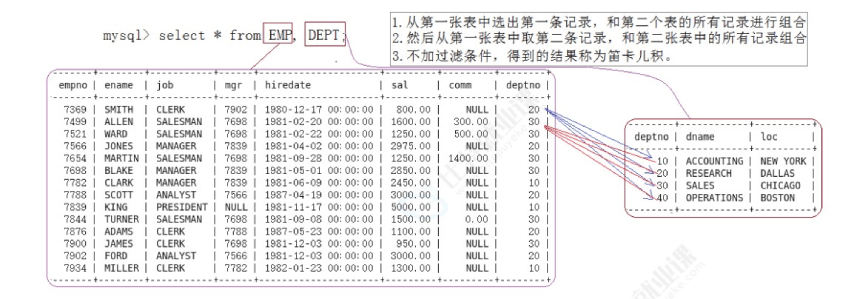
1. 什么是笛卡尔积
不加连接条件直接查多张表,会出现全组合,数据量爆炸,绝对不能用。
-- 错误示例:产生笛卡尔积
select * from emp, dept;
2. 正确多表查询(内连接)
必须加上关联条件(通常是外键 = 主键)。
案例 1:员工名、工资、所在部门名
select emp.ename, emp.sal, dept.dname
from emp, dept
where emp.deptno = dept.deptno;
案例 2:只看 10 号部门的员工与部门名
select ename, sal, dname
from emp, dept
where emp.deptno = dept.deptno
and dept.deptno = 10;
案例 3:员工姓名、工资、工资等级
select ename, sal, grade
from emp, salgrade
where emp.sal between losal and hisal;
三、自连接:一张表自己连自己
自连接:同一张表起两个别名,当成两张表用。典型场景:员工与领导关系(员工表的 mgr 指向领导的 empno)。
案例:查员工 ford 的上级编号与姓名
方式 1:子查询
select empno, ename
from emp
where empno = (select mgr from emp where ename='ford');
方式 2:自连接(更优雅)
select leader.empno, leader.ename
from emp leader, emp worker
where leader.empno = worker.mgr
and worker.ename='ford';
要点:给表起别名,区分 “领导表”leader 和 “员工表”worker。
四、子查询(嵌套查询):复合查询灵魂
子查询:把一个 select 嵌套在另一个 sql 里,先执行内层,再执行外层。
1. 单行子查询(返回 1 行 1 列)
用于 = > < >= <= 这类单值比较。
案例:和 smith 同一部门的员工
select * from emp
where deptno = (select deptno from emp where ename='smith');
2. 多行子查询(返回多行 1 列)
必须搭配 in / any / all 使用。
① in(在结果列表里)
查询和 10 部门岗位相同,但不属于 10 部门的员工:
select ename, job, sal, deptno
from emp
where job in (select distinct job from emp where deptno=10)
and deptno != 10;
② all(比所有都…)
工资比 30 部门所有人都高的员工:
select ename, sal, deptno
from emp
where sal > all(select sal from emp where deptno=30);
③ any(比任意一个…)
工资比 30 部门任意一人高即可:
select ename, sal, deptno
from emp
where sal > any(select sal from emp where deptno=30);
3. 多列子查询(返回多列)
同时匹配多个字段,用 (字段1, 字段2) = (子查询列1, 列2)。
案例:和 smith 部门、岗位完全相同的人(排除 smith):
select ename from emp
where (deptno, job) = (select deptno, job from emp where ename='smith')
and ename <> 'smith';
4. from 里的子查询(临时表 / 派生表)
把子查询结果当临时表使用,非常适合先分组统计、再关联查询。
案例 1:高于本部门平均工资的员工
select ename, deptno, sal, format(asal,2)
from emp,
  (select avg(sal) asal, deptno dt from emp group by deptno) tmp
where emp.sal > tmp.asal and emp.deptno = tmp.dt;
案例 2:每个部门工资最高的人
select emp.ename, emp.sal, emp.deptno, ms
from emp,
  (select max(sal) ms, deptno from emp group by deptno) tmp
where emp.deptno = tmp.deptno and emp.sal = tmp.ms;
案例 3:部门信息 + 部门人数
select dept.deptno, dname, mycnt, loc
from dept,
  (select count(*) mycnt, deptno from emp group by deptno) tmp
where dept.deptno = tmp.deptno;
五、合并查询:union 与 union all
把多个 select 结果纵向拼接,要求:
- 列数相同
- 对应列类型兼容
- 列名以第一个 select 为准
1. union:合并并自动去重
select ename, sal, job from emp where sal>2500
union
select ename, sal, job from emp where job='manager';
2. union all:直接合并,不去重
性能比 union 高很多,确定无重复时优先用它。
select ename, sal, job from emp where sal>2500
union all
select ename, sal, job from emp where job='manager';
对比速记
| 关键字 | 是否去重 | 性能 | 适用场景 |
|---|---|---|---|
| union | 是 | 较低 | 需去重 |
| union all | 否 | 高 | 允许重复 / 确定无重复 |
六、复合查询核心总结
- 多表查询一定要加连接条件,避免笛卡尔积
- 自连接 = 同表起别名,处理层级关系
- 子查询分:单行 / 多行 / 多列 / from 子查询
in / any / all专门处理多行子查询union去重,union all性能更高- 分组后过滤用
having,不是where
七、学习建议
- 先把本文案例手敲一遍
- 用
explain看执行计划,理解查询原理 - 多刷牛客 / leetcode sql 专题,强化手感
复合查询是 mysql 最核心、面试最高频的知识点,吃透它,你的 sql 水平会直接上一个台阶。



发表评论