
 我要评论
我要评论场景
spring ai 是什么?
spring ai 是 spring 官方推出的 ai 应用开发框架,定位:像 springboot 封装 web、mybatis 封装数据库一样,统一封装大模型、向量库、rag、agent、工具调用、mcp 协议,做到一套代码、无缝切换任意大模型。
支持:
- 国产模型:通义千问、文心一言、讯飞星火、智谱
- 海外模型:openai、anthropic
- 本地模型:ollama、localai
协议:openai 兼容接口、mcp 模型控制协议(streamable http/sse)
设计思想:抽象统一接口,底层厂商自由替换,业务代码不用改。
spring ai 顶层核心架构
分层理解:
- 应用层:chat 对话、rag 知识库问答、agent 智能体、工作流编排
- 核心抽象层:chatmodel、embeddingmodel、prompt、advisor、tool、vectorstore
- 适配层:对接各厂商(openai/ollama/ 通义千问 / 阿里云百炼)
- 基础设施层:向量数据库、mcp 服务、内存、日志、可观测性
chatmodel 对话模型
spring ai 最核心抽象,所有大模型都实现这个接口。
能力:同步对话、流式对话、多轮上下文、函数调用
实现类举例:
- openaichatmodel
- ollamachatmodel
- dashscopechatmodel(通义千问)
特点:切换模型只改配置,不改业务代码
chatclient 聊天客户端(开发首选)
spring ai 推荐业务层入口,封装 chatmodel,链式调用。
优势:
- 内置 prompt 模板、记忆、工具注入
- 流式返回、拦截器扩展
实现
环境前提
jdk 17
springboot 3.4.5
本地已装 ollama,并拉取模型:ollama pull qwen2.5:7b-instruct
不用复杂依赖、不搞 mcp,先跑通 spring ai 核心基础:chatclient + 普通对话
pom文件
    <parent>
        <groupid>org.springframework.boot</groupid>
        <artifactid>spring-boot-starter-parent</artifactid>
        <version>3.3.3</version> <!-- 降级为稳定版,解决冲突 -->
    </parent>
    <groupid>com.example</groupid>
    <artifactid>spring-ai-ollama-demo</artifactid>
    <version>1.0</version>
    <properties>
        <java.version>17</java.version>
        <spring-ai.version>1.0.0-m1</spring-ai.version>
    </properties>
    <dependencies>
        <dependency>
            <groupid>org.springframework.boot</groupid>
            <artifactid>spring-boot-starter-web</artifactid>
        </dependency>
        <!-- spring ai ollama 核心 -->
        <dependency>
            <groupid>org.springframework.ai</groupid>
            <artifactid>spring-ai-ollama-spring-boot-starter</artifactid>
            <version>${spring-ai.version}</version>
        </dependency>
    </dependencies>
    <repositories>
        <repository>
            <id>spring-milestones</id>
            <url>https://repo.spring.io/milestone</url>
            <snapshots>
                <enabled>false</enabled>
            </snapshots>
        </repository>
    </repositories>
application.yml 配置
server:
port: 886
spring:
ai:
ollama:
base-url: http://localhost:11434
chat:
model: qwen2.5:7b-instruct
配置类:注册 chatclient(spring ai 标准入口)
package com.badao.ai.config;

import org.springframework.ai.chat.client.chatclient;
import org.springframework.context.annotation.bean;
import org.springframework.context.annotation.configuration;

@configuration
public class springaiconfig {

    /**
     * 注入统一聊天客户端,全局使用
     */
    @bean
    public chatclient chatclient(chatclient.builder builder) {
        return builder.build();
    }
}
controller(最简单对话)
package com.badao.ai.controller;

import org.springframework.ai.chat.client.chatclient;
import org.springframework.ai.chat.prompt.prompt;
import org.springframework.web.bind.annotation.getmapping;
import org.springframework.web.bind.annotation.requestparam;
import org.springframework.web.bind.annotation.restcontroller;

@restcontroller
public class simplechatcontroller {

    private final chatclient chatclient;

    public simplechatcontroller(chatclient chatclient) {
        this.chatclient = chatclient;
    }

    @getmapping("/chat")
    public string chat(@requestparam string msg) {
        // 链式调用:发提示词 -> 调用模型 -> 返回内容
        return chatclient.prompt(new prompt(msg))
                .call()
                .content();
    }
}
测试访问
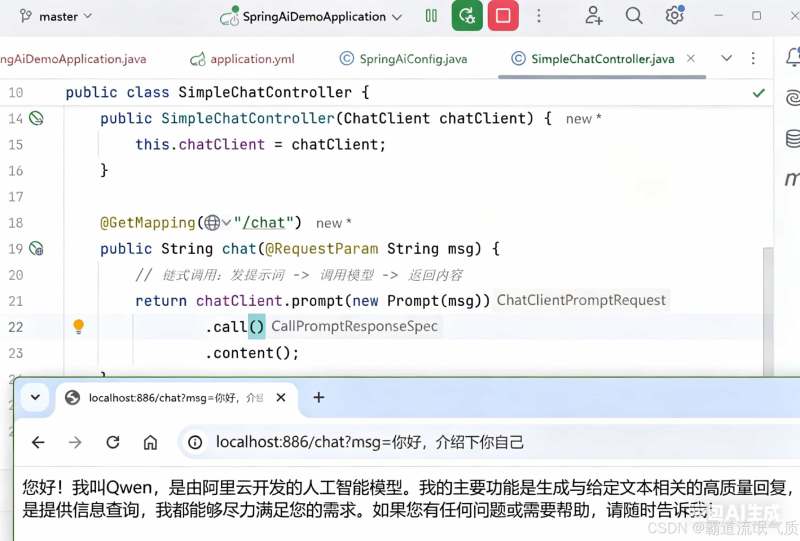
以上就是springai+ollama本地模型实现快速对话的实战指南的详细内容,更多关于springai结合ollama实现快速对话的资料请关注代码网其它相关文章!




发表评论