
 我要评论
我要评论springboot解决跨域导致sessionid不一致
在用谷歌的kaptcha做验证码登录校验,将后端发布到阿里云,前端是本地启动,用谷歌浏览器(版本85)访问验证码遇到了如下问题(360浏览器、microsoft edge未重现)
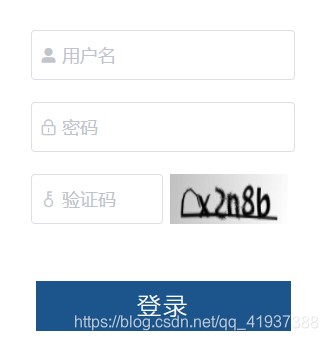

可以定位到是浏览器兼容问题
代码是这样的:
后端先用httpservletrequest request的getsession().setattribute将验证码存进session,请求登录的时候再用request.getsession().getattribute来判断,然后发现请求验证码的sessionid跟请求登录的sessionid不一致,导致提示验证码一直失效。
如下为获取验证码的接口
  @apioperation(value = "获取验证码", notes = "此接口用于获取验证码")
    @getmapping("captcha.jpg")
    public void captcha(httpservletresponse response, httpservletrequest request) throws servletexception, ioexception {
        response.setheader("cache-control", "no-store, no-cache");
        response.setcontenttype("image/jpeg");
        // 生成文字验证码
        string text = producer.createtext();
        // 生成图片验证码
        bufferedimage image = producer.createimage(text);
        // 保存到验证码到 session
        system.out.println("=============================");
        request.getsession().setattribute(constants.kaptcha_session_key, text);
        system.out.println("生成文字验证码:" + text);
        system.out.println("获取验证码 session:" + request.getsession().getattribute(constants.kaptcha_session_key));
        system.out.println("获取验证码 request.getsession().getid():" + request.getsession().getid());
        system.out.println("=============================");
        servletoutputstream out = response.getoutputstream();
        imageio.write(image, "jpg", out);
        ioutils.closequietly(out);
    }
登录的部分接口
@apioperation(value = "系统登录", notes = "此接口用于系统登录")
    @postmapping(value = "/login")
    public apiresponses login(@requestbody loginparam loginparam, httpservletrequest request) {
        string username = loginparam.getusername();
        string password = loginparam.getpassword();
        string captcha = loginparam.getcaptcha();
        system.out.println("=============================");
        system.out.println("系统登录时 request.getsession().getattribute(constants.kaptcha_session_key):" + request.getsession().getattribute(constants.kaptcha_session_key));
        system.out.println("系统登录时 request.getsession().getid():" + request.getsession().getid());
。
。
.
}
这种方式请求验证码的时候会带cookie给前端,如下所示,jsessionid就是后端的request.getsession().getid(),登录的时候如果设置了跨域,前端会将jsessionid返回给后端,后端会进行判断。但是现在的问题就是两次的sessionid不一致。所以还是要检查是否设置对了跨域
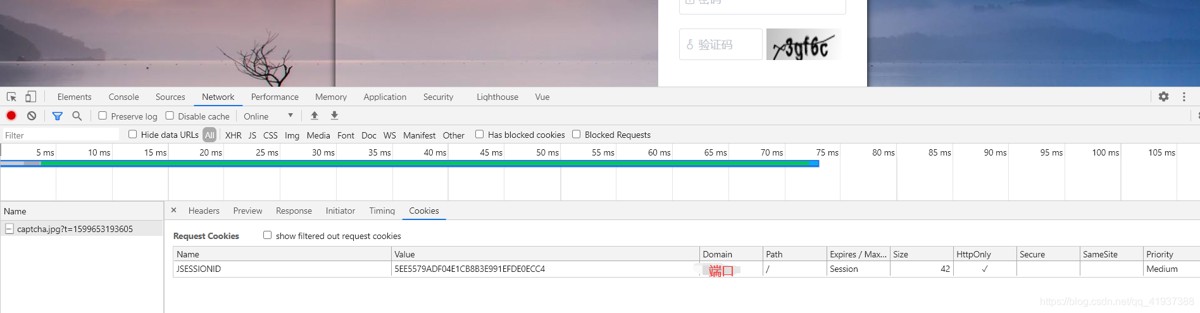
检查后端设置的跨域
这是我的跨域配置类,需要注意的是
当allowcredentials为true时
allowedorigins尽量不要设置为 *
@configuration
public class corsconfig implements webmvcconfigurer {
    @override
    public void addcorsmappings(corsregistry registry) {
        // 允许跨域访问的路径
        registry.addmapping("/**")
                // 允许跨域访问的源
                .allowedorigins("http://服务器ip:9528","http://服务器ip:9001")
                // 允许请求方法
                .allowedmethods("post", "get", "put", "options", "delete")
                // 预检间隔时间
                .maxage(168000)
                // 允许头部设置
                .allowedheaders("*")
                // 是否发送cookie
                .allowcredentials(true);
    }
}
前端设置的跨域
前端设置跨域主要为:axios.defaults.withcredentials = true,然后此项目前端如下
const service = axios.create({
  baseurl: process.env.vue_app_base_api, // url = base url + request url
  withcredentials: true, // send cookies when cross-domain requests
  timeout: 5000 // request timeout
})
寻思着,这样配置也没问题吧。
经过度娘的助攻,终于找出了问题的源头
新版的chrome,加强了防止csrf攻击,需要设置cookie的samesite属性
samesite的值可以填3个:strict,lax,none.
缺省的值为lax,而且当你设置其为空时,在新的chrome中还是会给予默认值lax.
3个模式的介绍
- strict:严格模式
- lax:宽松模式
- none:可以在第三方环境中发送cookie
在这种模式下,必须同时启用secure才行
似乎看到了黎明的曙光,上后端代码
@configuration
public class springsessionconfig {
    // 最新的chrome,设置null会默认成lax 但是如果设置samesite为none,又需要设置secure。https支持secure,http不行
    @bean
    public cookieserializer httpsessionidresolver() {
        defaultcookieserializer cookieserializer = new defaultcookieserializer();
        cookieserializer.setusehttponlycookie(false);
        cookieserializer.setsamesite("none");
        cookieserializer.setcookiepath("/");
        cookieserializer.setusesecurecookie(true);
        return cookieserializer;
    }
}
然后将后端继续发布到阿里云,然而的然而 还是翻车了。。。
再次寻求百度,然后发现要满足https +samesite("none") +securecookie(true)
三者条件才能在高版本的谷歌浏览器访问
但是阿里云是http,那怎么办呢
还有一种解决方法
弃用通过session校验,可以引入redis来做判断
上代码:
@autowired
private redistemplate redistemplate;
 @apioperation(value = "获取验证码", notes = "此接口用于获取验证码")
    @getmapping("captcha.jpg")
    public void captcha(httpservletresponse response, httpservletrequest request) throws servletexception, ioexception {
        response.setheader("cache-control", "no-store, no-cache");
        response.setcontenttype("image/jpeg");
        // 生成文字验证码
        string text = producer.createtext();
        // 生成图片验证码
        bufferedimage image = producer.createimage(text);
        // 保存到验证码到 redis 设置1分钟过期
        redistemplate.opsforvalue().set(constants.kaptcha_session_key,text,1, timeunit.minutes);
        servletoutputstream out = response.getoutputstream();
        imageio.write(image, "jpg", out);
        ioutils.closequietly(out);
}
 @apioperation(value = "系统登录", notes = "此接口用于系统登录")
    @postmapping(value = "/login")
    public apiresponses login(@requestbody loginparam loginparam, httpservletrequest request) {
        string username = loginparam.getusername();
        string password = loginparam.getpassword();
        string captcha = loginparam.getcaptcha();
        object kaptcha = redistemplate.opsforvalue().get(constants.kaptcha_session_key);
。
。
。
}
这样就可以解决啦
问题调整
用如上方法写验证码会有一种问题,就是当多个用户同时请求获取验证码,其中先获取验证码的人就会失效。然后做了如下改进
我弃用了谷歌的kaptcha,重写了验证码。给redis set值的时候同时加上一个token,登录的时候需要返回token来验证
续上部分代码
  /**
     * 生成验证码
     *
     * @return
     */
public captchadto getcaptcha() {
        //1.在内存中创建一张图片
        bufferedimage bi = new bufferedimage(width, height, bufferedimage.type_int_rgb);
        // 画布颜色数组
        color[] colors = new color[]{color.blue, color.cyan, color.gray, color.green, color.orange, color.red, color.black};
        //2.得到图片
        graphics g = bi.getgraphics();
        //3.设置图片的背影色
        setbackground(g, width, height);
        //4.设置图片的边框
        //setborder(g,width,height);
        //5.在图片上画干扰线
        drawrandomline(g, colors, width, height);
        string random = drawrandomnum((graphics2d) g, colors);
        bytearrayoutputstream outputstream = new bytearrayoutputstream();
        try {
            imageio.write(bi, "jpg", outputstream);
        } catch (ioexception e) {
            e.printstacktrace();
        }
        // 对字节数组base64编码
        base64encoder encoder = new base64encoder();
        string imagecode = encoder.encode(outputstream.tobytearray()).replaceall("\r|\n", "");
        string token = jwttokenutils.generatecheckcode(random);
        captchadto captchadto = new captchadto();
        captchadto.setcodetoken(token);
        captchadto.setimagecode(imagecode);
        // 保存到验证码到 redis 设置1分钟过期
        redistemplate.opsforvalue().set(constants.kaptcha_session_key + token, random, 1, timeunit.minutes);
        return captchadto;
    }
// 登录部分代码
string username = loginparam.getusername();
string password = loginparam.getpassword();
string imagecode = loginparam.getimagecode();
string codetoken = loginparam.getcodetoken();
// 校验验证码
string code = (string) redistemplate.opsforvalue().get(constants.kaptcha_session_key + codetoken);
if (stringutils.isblank(code)) {
apiassert.failure(errorcodeenum.kaptcha_not_found);
}
// 清除token,防止重用
redistemplate.delete(constants.kaptcha_session_key + codetoken);
if (!imagecode.equalsignorecase(code)) {
apiassert.failure(errorcodeenum.kaptcha_error);
}总结
以上为个人经验,希望能给大家一个参考,也希望大家多多支持代码网。





发表评论