
 我要评论
我要评论一、file类的概述
file对象表示一个路径,可以是文件的路径,也可以是文件夹的路径。这个路径可以是存在的,也可以是不存在的。
- 绝对路径:带盘符的。
- 相对路径:不带盘符的。
- file类的弊端:只能对文件本身进行操作,不能读写文件里面存储的数据。
二、file的三种构造方法
| public file(string pathname) | 根据文件路径创建文件对象 即:把字符串表示的路径变成file对象 |
| public file(string parent, string child) | 根据父路径名字符串,和子路径名字符串创建文件对象 即:把父级路径和子级路径进行拼接 |
| public file(file parent, string child) | 根据父路径对应文件对象,和子路径名字符串创建文件对象 即:把父级路径和子级路径进行拼接 |
public class filedemo1 {
    public static void main(string[] args) {
        // 1.根据字符串表示的路径,变成file对象
        string str = "c:\\users\\alienware\\desktop\\a.txt";
        file f1 = new file(str);
        system.out.println(f1);
        // c:\users\alienware\desktop\a.txt

        // 2.父级路径:c:\users\alienware\desktop
        //   子级路径:a.txt
        string parent = "c:\\users\\alienware\\desktop";
        string child = "a.txt";
        file f2 = new file(parent, child);
        system.out.println(f2);
        // c:\users\alienware\desktop\a.txt

        // 下面的操作不建议:因为不同的操作系统下,磁盘分隔符不同
        // windows:\(反斜杠)    linux和macos:/(正斜杠)
        file f3 = new file(parent + "\\" + child);
        system.out.println(f3);
        // c:\users\alienware\desktop\a.txt

        // 文件拼接 建议用file.separator的方式:
        string directory = "documents";
        string subdirectory = "projects";
        string filename = "report.pdf";
        string filepath1 = directory + file.separator + subdirectory + file.separator + filename;
        // 或者
        string filepath2 = "documents" + file.separator + "documents" + file.separator + "report.pdf";
        file file1 = new file(filepath1);
        file file2 = new file(filepath2);
        // file.getabsolutepath():返回调用该方法时file对象所表示的文件或目录的绝对路径
        system.out.println(file1.getabsolutepath());
        system.out.println(file2.getabsolutepath());
        // g:\develop\workspace\one\basecode\documents\projects\report.pdf

        // 3.把一个file表示的路径和string表示路径进行拼接
        file parent2 = new file("c:\\users\\alienware\\desktop");
        string child2 = "a.txt";
        file f4 = new file(parent2, child2);
        system.out.println(f4);
        // c:\users\alienware\desktop\a.txt
    }
}
三、file类常见的成员方法
(一)判断、获取
1.判断的方法
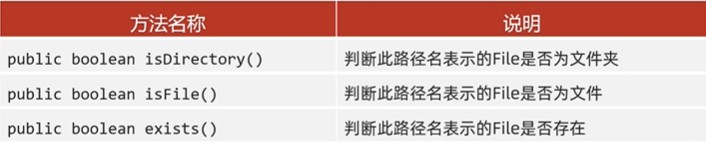
public class filedemo2 {
    public static void main(string[] args) {
        // 1.对一个文件的路径进行判断
        file f1 = new file("d:\\test\\a.txt");
        system.out.println(f1.isdirectory()); // false
        system.out.println(f1.isfile()); // true
        system.out.println(f1.exists()); // true

        system.out.println("----------------------------");

        // 2.对一个文件夹进行判断
        file f2 = new file("d:\\test\\bbb");
        system.out.println(f2.isdirectory()); // true
        system.out.println(f2.isfile()); // false
        system.out.println(f2.exists()); // true

        system.out.println("----------------------------");

        // 3.对一个不存在的路径进行判断
        file f3 = new file("d:\\test\\ddd");
        system.out.println(f3.isdirectory()); // false
        system.out.println(f3.isfile()); // false
        system.out.println(f3.exists()); // false
    }
}
2.获取的方法
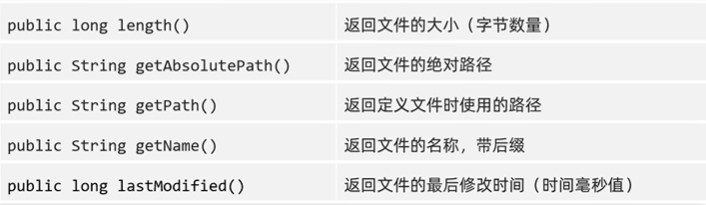
public class filedemo3 {
    public static void main(string[] args) {
        // 1.length  返回文件的大小(字节数量)
        // 细节1:这个方法只能获取文件的大小,单位是字节
        // 如果单位想要m,g,可以不断的除以1024
        // 细节2:这个方法无法获取[文件夹]的大小
        // 如果我们要获取一个文件夹的大小,需要把这个文件夹里面所有的文件大小都累加在一起。

        file f1 = new file("d:\\test\\a.txt");
        long len = f1.length();
        system.out.println(len); // 970

        file f2 = new file("d:\\test\\bbb");
        long len2 = f2.length();
        system.out.println(len2); // 0

        system.out.println("--------------------------------");

        // 2.getabsolutepath 返回文件的绝对路径
        file f3 = new file("d:\\test\\a.txt");
        string path1 = f3.getabsolutepath();
        system.out.println(path1);
        // d:\test\a.txt

        file f4 = new file("chapter16\\a.txt");
        string path2 = f4.getabsolutepath();
        system.out.println(path2);
        // g:\develop\workspace\one\basecode\chapter16\a.txt

        system.out.println("--------------------------------");

        // 3.getpath 返回定义文件时使用的路径
        // 即:new file()中是什么就返回什么
        file f5 = new file("d:\\test\\a.txt");
        string path3 = f5.getpath();
        system.out.println(path3);
        // d:\test\a.txt

        file f6 = new file("chapter16\\a.txt");
        string path4 = f6.getpath();
        system.out.println(path4);
        // chapter16\a.txt

        system.out.println("--------------------------------");

        // 4.getname 返回文件的名称,带后缀
        // 如果是文件,就返回文件名+后缀名
        // 如果是文件夹,就返回文件夹的名字
        file f7 = new file("d:\\test\\a.txt");
        string name1 = f7.getname();
        system.out.println(name1);
        // a.txt  文件名+后缀名

        file f8 = new file("d:\\test\\bbb");
        string name2 = f8.getname();
        system.out.println(name2);
        // bbb

        system.out.println("--------------------------------");

        // 5.lastmodified 返回文件的最后修改时间(时间毫秒值)
        file f9 = new file("d:\\test\\a.txt");
        long lastmodified = f9.lastmodified();
        system.out.println(lastmodified);
        // 1729183893084   毫秒值

        simpledateformat simpledateformat = new simpledateformat("yyyy-mm-dd hh:mm:ss");
        string format = simpledateformat.format(lastmodified);
        system.out.println(format);
        // 2024-10-18 00:51:33
    }
}
(二)创建、删除
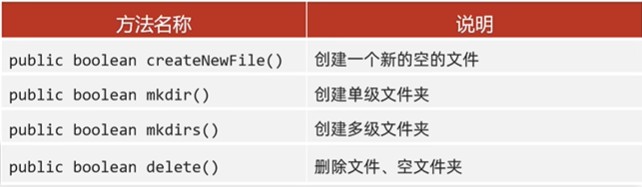
注意:delete方法默认只能删除文件和空文件夹,直接删除不走回收站
public class filedemo4 {
    public static void main(string[] args) throws ioexception {
        // 1.createnewfile 创建一个新的空的文件
        // 细节1:如果当前路径表示的文件是不存在的,则创建成功,方法返回true
        //       如果当前路径表示的文件是存在的,则创建失败,方法返回false
        // 细节2:如果父级路径是不存在的,那么方法会有异常ioexception
        // 细节3:createnewfile方法创建的一定是文件,如果路径中不包含后缀名,则创建一个没有后缀的文件
        file file = new file("d:\\test\\aaa\\c.txt");
        boolean newfile = file.createnewfile();
        system.out.println(newfile);

        // 2.mkdir   make directory,文件夹(目录)
        // 细节1:windows当中路径是唯一的,如果当前路径已经存在,则创建失败,返回false
        // 细节2:mkdir方法只能创建单级文件夹,无法创建多级文件夹。
        file file2 = new file("d:\\test\\aaa");
        boolean mkdir = file2.mkdir();
        system.out.println(mkdir);

        // 3.mkdirs   创建多级文件夹
        // 细节:既可以创建单级的,又可以创建多级的文件夹
        file file3 = new file("d:\\test\\aaa\\bbb\\ccc");
        file file3 = new file("d:\\test\\ggg");
        boolean mkdirs = file3.mkdirs();
        system.out.println(mkdirs);

        /*
           4.delete    删除文件、文件夹
        细节:
            如果删除的是文件,则直接删除,不走回收站。
            如果删除的是空文件夹,则直接删除,不走回收站
            如果删除的是有内容的文件夹,则删除失败
      */
        // 1.创建file对象
        file f1 = new file("d:\\test\\aaa");
        // 2.删除
        boolean b = f1.delete();
        system.out.println(b);
    }
}
(三)获取并遍历
public file[] listfiles() 获取当前该路径下所有内容
- 当调用者file表示的路径不存在时,返回nullpointerexception
- 当调用者file表示的路径是文件时,返回nullpointerexception
- 当调用者file表示的路径是一个空文件夹时,返回一个长度为0的数组
- 当调用者file表示的路径是一个有内容的文件夹时,将里面所有文件和文件夹的路径放在file数组中返回
- 当调用者file表示的路径是一个有隐藏文件的文件夹时,将里面所有文件和文件夹的路径放在file数组中返回,包含隐藏文件
- 当调用者file表示的路径是需要权限才能访问的文件夹时,返回nullpointerexception
public class filedemo6 {
    public static void main(string[] args) {
        // 1.创建file对象
        file f = new file("d:\\test");
        // 2.listfiles方法
        //作用:获取aaa文件夹里面的所有内容,把所有的内容放到数组中返回
        file[] files1 = f.listfiles();
        for (file file : files1) {
            // file依次表示test文件夹里面的每一个文件或者文件夹
            system.out.println(file);
        }
    }
}
运行结果:
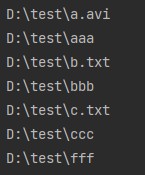
(四)所有获取并遍历的方法
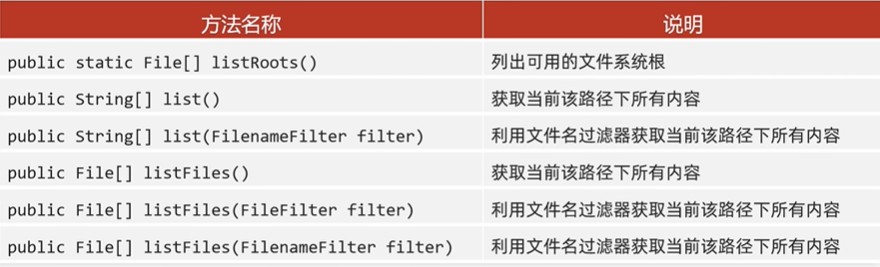
public class filedemo7 {
    public static void main(string[] args) {
        // 1.listroots  获取系统中所有的盘符
        file[] arr = file.listroots();
        system.out.println(arrays.tostring(arr));
        // [c:\, d:\, e:\, g:\]

        // 2.list()    获取当前该路径下所有内容(仅仅能获取名字)
        file file = new file("d:\\test");
        string[] arr2 = file.list();
        system.out.println(arrays.tostring(arr2));
        // [a.avi, aaa, b.txt, bbb, c.txt, ccc, fff]

        // 3.list(filenamefilter filter)  利用文件名过滤器获取当前该路径下所有内容
        // 需求:获取d:\\test文件夹里面所有的txt文件
        file file1 = new file("d:\\test");
        // accept方法的形参,依次表示test文件夹里面每一个文件或者文件夹的路径
        // 参数一:父级路径; 参数二:子级路径
        // 返回值:如果返回值为true,就表示当前路径保留
        //        如果返回值为false,就表示当前路径舍弃不要
        string[] arr3 = file1.list(new filenamefilter() {
            @override
            public boolean accept(file dir, string name) {
                file file2 = new file(dir, name);
                return file2.isfile() && name.endswith(".txt");
            }
        });
        system.out.println(arrays.tostring(arr3));
        // [b.txt, c.txt]

        // lambda表达式
        string[] arr4 = file1.list((s1, s2) -> {
            file file2 = new file(s1, s2);
            return file2.isfile() && s2.endswith(".txt");
        });
        system.out.println(arrays.tostring(arr4));
        // [b.txt, c.txt]
    }
}
public class filedemo8 {
public static void main(string[] args) {
// 1.创建file对象
file f = new file("d:\\test");
// 2.需求:打印里面所有的txt文件
file[] files = f.listfiles();
for (file file : files) {
if (file.isfile() && file.getname().endswith(".txt")) {
system.out.println(file);
}
}
/**
* d:\test\b.txt
* d:\test\c.txt
*/
}
}public class filedemo9 {
public static void main(string[] args) {
// 创建file对象
file f = new file("d:\\test");
// 调用listfiles(filefilter filter)
file[] arr = f.listfiles(new filefilter() {
@override
public boolean accept(file pathname) {
return pathname.isfile() && pathname.getname().endswith(".txt");
}
});
system.out.println(arrays.tostring(arr));
// [d:\test\b.txt, d:\test\c.txt]
// lambda表达式
file[] arr2 = f.listfiles((name) -> name.isfile() && name.getname().endswith(".txt"));
system.out.println(arrays.tostring(arr2));
// [d:\test\b.txt, d:\test\c.txt]
file[] arr3 = f.listfiles(new filenamefilter() {
@override
public boolean accept(file dir, string name) {
file file = new file(dir, name);
return file.isfile() && name.endswith(".txt");
}
});
system.out.println(arrays.tostring(arr3));
// [d:\test\b.txt, d:\test\c.txt]
}
}(五)常用方法总结
public class filedemo2 {
    public static void main(string[] args) throws ioexception {
        file file = new file("d:\\aa\\meinv.txt");
        // 创建文件
        file.createnewfile();
        // 判断是否是只读文件
        system.out.println(file.canwrite());
        // 判断文件或者目录是否存在
        system.out.println(file.exists());
        // 获取绝对路径
        system.out.println(file.getabsolutepath());
        // 获取剩余空间 单位是字节
        system.out.println(file.getfreespace());
        // 获取可用空间
        system.out.println(file.getusablespace());
        // 获取总空间
        system.out.println(file.gettotalspace());
        // 获取文件名
        system.out.println(file.getname());
        // 获取父路径
        system.out.println(file.getparent());
        // 获取路径
        system.out.println(file.getpath());
        // 判断是否是绝对路径
        system.out.println(file.isabsolute());
        // 判断是否是文件
        system.out.println(file.isfile());
        // 判断是否是隐藏文件
        system.out.println(file.ishidden());
        // 获取修改时间到计算机元年的毫秒值
        system.out.println(file.lastmodified());
        system.out.println(new date(1729674265163l));

        // 返回true就会保留在数组中
        // 获取名称中带数字的文件或目录
        // 匿名内部类
        file[] files1 = file.listfiles(new filefilter() {
        // 传入file对象
            @override
            public boolean accept(file pathname) {
                return pathname.getname().matches(".*\\d.*");
            }
        });

        // lambda表达式
        file[] files2 = file.listfiles(f -> f.getname().matches(".*\\d.*"));

        // 匿名内部类
        file[] files3 = file.listfiles(new filenamefilter() {
            // dir 文件所在的父目录
            // name 文件名称
            @override
            public boolean accept(file dir, string name) {
                return name.matches(".*\\d.*");
            }
        });

        // lambda表达式
        file[] files4 = file.listfiles((dir, name) -> name.matches(".*\\d.*"));
        for (file f : files4) {
            system.out.println(f);
        }

        // 移动并重命名文件
        file.renameto(new file("d:\\aa\\meinv.jpg"));

        // 设置修改时间
        // 参数就是计算机元年到某个时间的毫秒值
        file.setlastmodified(1000l);
        // 设置只读文件
        file.setreadonly();
    }
}
四、分隔符
- separatorchar 目录分隔符 在windows中是\ 在linux中是 /
- pathseparatorchar 路径分隔符 在windows中是 ; 在linux中 是 :
五、file类操作文件与递归(重要)
(一)创建文件
public class testdemo1 {
    public static void main(string[] args) throws ioexception {
        file file = new file("chapter16\\aaa");

        // mkdirs()方法无论文件夹在不在,都会创建成功
        file.mkdirs();
        file file1 = new file(file + file.separator + "a.txt");

        // createnewfile()方法如果文件已存在是false
        boolean newfile = file1.createnewfile();
        if (newfile) {
            system.out.println("创建成功");
        } else {
            system.out.println("创建失败");
        }
    }
}
(二)单个文件夹查找文件
需求:定义一个方法,查找某一个文件夹中,是否有以.avi结尾的文件,暂时不需要考虑子文件夹。
public class testdemo2 {
    public static void main(string[] args) {
        boolean b = haveavi(new file("d:\\test"));
        system.out.println(b);
        // d:\test\a - 副本.avi
        // true
    }

    private static boolean haveavi(file src) {
        file[] files = src.listfiles();
        for (file f : files) {
            if (f.isfile() && f.getname().endswith(".avi")) {
                system.out.println(f);
                return true;
            }
        }
        return false;
    }
}
(三)递归遍历硬盘查找文件
凡是考虑到文件夹里面的递归操作,可套用下面的步骤:
- 进入文件夹src
- 遍历数组,依次得到src里面的每一个文件或文件夹
- 判断:如果是文件,就可以执行题目的业务逻辑
- 判断:如果是文件夹,就可以递归 (细节:再次调用本方法的时候,参数一定要是src的次一级路径)
public class testdemo3 {
    public static void main(string[] args) {
        // 查找电脑中所有以.avi结尾的文件
        findavi();
    }

    private static void findavi() {
        file[] files = file.listroots();
        for (file file : files) {
            findavi(file);
        }
    }

    private static void findavi(file src) {
        // 1.进入文件夹src
        file[] files = src.listfiles();
        // 2.遍历数组,依次得到src里面的每一个文件或文件夹
        if (files != null) {
            for (file file : files) {
                if (file.isfile()){
                    // 3.判断:如果是文件,就可以执行题目的业务逻辑
                    string name = file.getname();
                    if (name.endswith(".avi")){
                        system.out.println(name);
                    }
                  //  4.判断:如果是文件夹,就可以递归
                  //  (细节:再次调用本方法的时候,参数一定要是src的次一级路径)
                }else {
                    findavi(file);
                }
            }
        }
    }
}
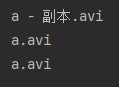
运行结果:
(四)递归删除文件夹

递归删除ggg文件夹
删除一个多级文件夹
如果我们要删除一个有内容的文件夹:1.先删除文件夹里面所有的内容;2.再删除自己
public class testdemo4 {
    public static void main(string[] args) {
        // 删除一个多级文件夹
        delete(new file("d:\\test\\ggg"));
    }

    // 方式一:
    private static void delete(file src) {
        // 进入src
        file[] files = src.listfiles();
        // 如果执行过程中遇到了空指针异常,可以对files做非空判断
        if (files != null) {
            // 遍历数组
            for (file file : files) {
                if (file.isfile()) {
                    // 判断,如果是文件,就删除
                    file.delete();
                } else {
                    // 判断,如果是文件夹,就递归
                    // 这里的参数一定是src的次一级路径
                    delete(file);
                }
            }
            // 最后删除自己
            src.delete();
        }
    }

    // 方式二:
    public static void del(file file){
        // 如果是目录
        if (file.isdirectory()){
            // 获取所有的子目录和子文件
            file[] files = file.listfiles();
            for (file f : files) {
                del(f);
            }
        }
        // 删除文件或者目录
        file.delete();
    }
}
ggg文件夹被成功删除!
(五)统计文件夹总大小
public class testdemo5 {
    public static void main(string[] args) {
        long len = getlen(new file("d:\\test")) / 1024;
        system.out.println(len + "kb");
        // 178kb
    }

    private static long getlen(file src) {
        // 1.定义变量进行累加
        long len = 0;
        // 2.进入src文件夹
        file[] files = src.listfiles();
        // 3.遍历数组
        if (files != null) {
            for (file file : files) {
                // 4.判断是不是文件
                if (file.isfile()) {
                    // 5.是文件,则进行长度累加
                    len += file.length();
                } else {
                    // 6.不是文件,则继续遍历
                    len += getlen(file);
                }
            }
        }
        // 7.返回最后累加的长度
        return len;
    }
}
(六)统计各种文件数量(重要)
需求:统计一个文件夹中每种文件的个数并打印。(考虑子文件夹)
打印格式如下:
- txt:3个
- doc:4个
- jpg:6个
参数:
- 要统计的那个文件夹
返回值:
- 用来统计map集合
- 键:后缀名 值:次数
- a.txt
- a.a.txt
- aaa(不需要统计的)
遍历方式一:
public class test6 {
    public static void main(string[] args) throws ioexception {
        file file = new file("d:\\test");
        hashmap<string, integer> hm = getcount(file);
        system.out.println(hm);
        // {jpg=6, txt=3, avi=3, doc=4}
    }

    public static hashmap<string, integer> getcount(file src) {
        // 1.定义集合用来统计
        hashmap<string, integer> hm = new hashmap<>();
        // 2.进入src文件夹
        file[] files = src.listfiles();
        // 3.遍历数组
        for (file file : files) {
            // 4.判断,如果是文件,统计
            if (file.isfile()) {
                // a.txt
                string name = file.getname();
                string[] arr = name.split("\\.");
                if (arr.length >= 2) {
                    string endname = arr[arr.length - 1];
                    if (hm.containskey(endname)) {
                        // 存在
                        int count = hm.get(endname);
                        count++;
                        hm.put(endname, count);
                    } else {
                        // 不存在,没有后缀名的文件,分割后长度为1
                        hm.put(endname, 1);
                    }
                }
            } else {
                // 5.判断,如果是文件夹,递归
                // sonmap里面是子文件中每一种文件的个数
                hashmap<string, integer> sonmap = getcount(file);
                // hm:  txt=1  jpg=2  doc=3
                // sonmap: txt=3 jpg=1
                // 遍历sonmap把里面的值累加到hm当中
                set<map.entry<string, integer>> entries = sonmap.entryset();
                for (map.entry<string, integer> entry : entries) {
                    string key = entry.getkey();
                    int value = entry.getvalue();
                    if (hm.containskey(key)) {
                        // 存在
                        int count = hm.get(key);
                        count = count + value;
                        hm.put(key, count);
                    } else {
                        // 不存在
                        hm.put(key, value);
                    }
                }
            }
        }
        return hm;
    }
}
遍历方式二:
public class testdemo6 {
    public static void main(string[] args) {
        hashmap<string, integer> hashmap = getcount(new file("d:\\test"));
        system.out.println(hashmap);
        // {jpg=6, txt=3, avi=3, doc=4}
    }

    private static hashmap<string, integer> getcount(file src) {
        file[] files = src.listfiles();
        hashmap<string, integer> hm = new hashmap<>();
        for (file file : files) {
            if (file.isfile()) {
                string name = file.getname();
                string[] split = name.split("\\.");
                // 分成2个才考虑
                if (split.length >= 2) {
                    string endname = split[split.length - 1];
                    if (hm.containskey(endname)) {
                        // 存在
                        int count = hm.get(endname);
                        count++;
                        hm.put(endname, count);
                    } else {
                        // 不存在
                        hm.put(endname, 1);
                    }
                }
            } else {
                hashmap<string, integer> sonmap = getcount(file);
                set<string> keyset = sonmap.keyset();
                for (string key : keyset) {
                    int value = sonmap.get(key);
                    if (hm.containskey(key)) {
                        // 存在
                        int count = hm.get(key);
                        count = count + value;
                        hm.put(key, count);
                    } else {
                        // 不存在
                        hm.put(key, value);
                    }
                }
            }
        }
        return hm;
    }
}
(七)统计指定文件的个数
public class filetest {
    public static void main(string[] args) {
        getcount(new file("g:\\develop\\workspace"));
        system.out.println("java文件" + javacount);
        system.out.println("class文件" + classcount);
    }

    static int javacount = 0;
    static int classcount = 0;

    // 统计文件个数:java文件与class文件个数
    public static void getcount(file file) {
        if (file.isdirectory()) {
            file[] files = file.listfiles();
            for (file file1 : files) {
                getcount(file1);
            }
        } else if (file.getname().endswith(".java")) {
            javacount++;
        } else if (file.getname().endswith(".class")) {
            classcount++;
        }
    }
}
总结
以上为个人经验,希望能给大家一个参考,也希望大家多多支持代码网。





发表评论