
 我要评论
我要评论elasticsearch是一个基于apache lucene开发的的搜索服务,提供了一个分布式多用户能力的全文搜索引擎,并基于restful web接口。支持结构化搜索、数据分析、复杂的语言处理、地理位置和对象间关联关系等功能。那么如何在springboot项目中整合elasticsearch来完成数据的存储呢?下面我们就来看看。
这里需要特别说明在高版本的elasticsearch对于数据的处理方式与低版本的处理方式是不同的,并且,在spring boot中所支持的elasticsearch客户端版本也是有所差异的。这里演示的是基于 spring boot 2.1.4.release 版本和elasticsearch 6.8.0的版本处理方式。
依赖和配置
添加elasticsearch的依赖到pom.xml文件中。
<parent>
    <artifactid>spring-boot-parent</artifactid>
    <groupid>org.springframework.boot</groupid>
    <version>2.1.4.release</version>
</parent>
```js
```
<dependency>
    <groupid>org.springframework.boot</groupid>
    <artifactid>spring-boot-starter-data-elasticsearch</artifactid>
</dependency>
在配置文件文件中配置elasticsearch的连接
spring.data.elasticsearch.cluster-name=my-cluster
spring.data.elasticsearch.cluster-nodes=192.168.1.202:9300
这里需要注意,在高版本的springboot配置中已经不支持这样的配置操作,需要注意的实,在这个配置中如果是通过elk调用则添加的端口是9200,如果是通过java程序调用则配置的连接端口是9300。
具体实现
@document(indexname = "my_index", type = "my_type")
public class mydocument {
    @id
    private string id;
    private string name;
    private string description;
    // 省略构造函数、getter和setter
}
继承elasticsearchrepository接口实现数据访问层代码
public interface mydocumentrepository
extends elasticsearchrepository<mydocument, string> {
}
编写服务层代码
@service
public class mydocumentservice {
    @autowired
    private mydocumentrepository repository;
    public mydocument save(mydocument document) {
        return repository.save(document);
    }
    public iterable<mydocument> findall() {
        iterable<mydocument> all = repository.findall();
        return all;
    }
    public mydocument findbyid(string id) {
        return repository.findbyid(id).orelse(null);
    }
    public void deletebyid(string id) {
        repository.deletebyid(id);
    }
}
编写controller类进行测试
@restcontroller
@requestmapping("/documents")
public class mydocumentcontroller {
    @autowired
    private mydocumentservice service;
    @postmapping
    public mydocument create(@requestbody mydocument document) {
        return service.save(document);
    }
    @getmapping
    public iterable<mydocument> getall() {
        iterable<mydocument> iterable = service.findall();
        return iterable;
    }
    @getmapping("/{id}")
    public mydocument getbyid(@pathvariable string id) {
        return service.findbyid(id);
    }
    @deletemapping("/{id}")
    public void deletebyid(@pathvariable string id) {
        service.deletebyid(id);
    }
}
以上代码示例演示了如何使用spring boot整合elasticsearch实现数据存储。
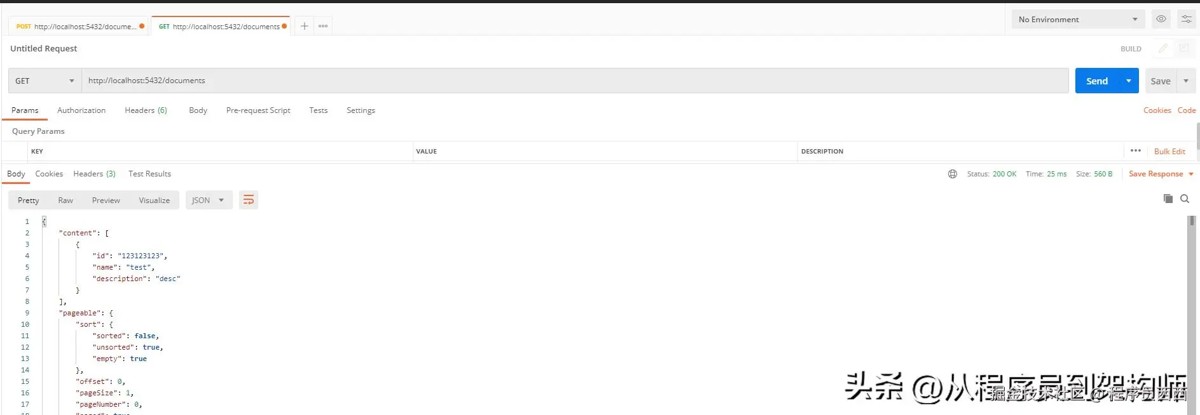
调用接口进行测试
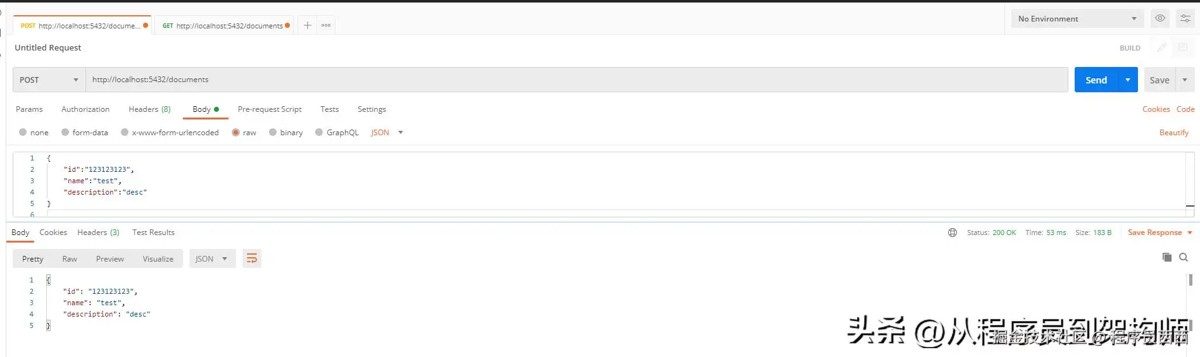
获取列表
总结
在上面的例子中,通过springboot 2.1.4与elasticsearch6.8.0完成了整合,如果想要适配更高版本的elasticsearch或者是spring boot ,在过程中一定注意对于版本兼容性的选择。
到此这篇关于springboot 数据存储实战指南的文章就介绍到这了,更多相关springboot 数据存储内容请搜索代码网以前的文章或继续浏览下面的相关文章希望大家以后多多支持代码网!


![springboot启动报错Failed to load class [javax.servlet.Filter]的解决](https://images1.3wcode.com/3wcode/20260323/s_0_202603231913206517.jpg)


发表评论