
 我要评论
我要评论前言
最近,不少技术圈的朋友都在讨论一个话题:minio是不是开始收费了?
这背后其实涉及到一个更深刻的问题——开源许可证的商业化边界。
有些小伙伴在工作中可能已经遇到了这样的困惑:公司法务审查后,认为minio的agplv3许可证在商业产品中使用存在风险,要求寻找替代方案。
今天就给大家推荐5种其他开源的分布式文件系统替代方案。
01 minio许可证的“罗生门”
minio自2025年10月起实施以下关键变化:
- 停止免费docker镜像分发:社区版不再提供预构建的docker镜像,用户需从源码自行编译构建。
- 功能限制与移除:控制台管理功能被删除,仅保留基础存储能力。
- 社区版文档从官网移除,且不再接受新功能请求。
许可证策略收紧:从apache 2.0协议转向agplv3许可证,强化对衍生作品的约束,若违反需购买商业授权。
首先,让我们明确一点:minio的核心产品仍然是开源的,使用agplv3许可证。
但是,这里有几个关键细节需要理解:
agplv3许可证的“传染性”
agplv3(gnu affero通用公共许可证第3版)有一个著名特性:“网络服务即分发”。
简单来说,如果你的服务通过网络提供基于agplv3代码的功能,那么你必须开源整个服务的源代码。
// 假设你基于minio开发了一个文件管理服务
public class filemanagementservice {
    // 这段代码本身可能没问题...
    private minioclient minioclient;
    public void processuserfile(userfile file) {
        // 但是,如果你的整个服务基于agplv3代码
        // 根据严格解释,你可能需要开源整个项目
        minioclient.putobject(...);
        // 更多业务逻辑...
    }
}
minio的商业化策略
minio公司确实提供了:
- 企业版:包含更多企业功能(如多站点复制、监控等)
- 商业许可证:允许在不开放源代码的情况下使用minio
这使得很多公司面临选择:是接受agplv3的开源要求,还是购买商业许可证?
为什么这很重要?
如果你的公司属于以下情况之一,可能需要重新考虑minio的使用:
- saas提供商:通过网络提供服务
- 专有软件开发商:不希望开源核心代码
- 对许可证合规性严格的企业:有专门的法务审查
下面的决策流程图清晰地展示了这一困境:
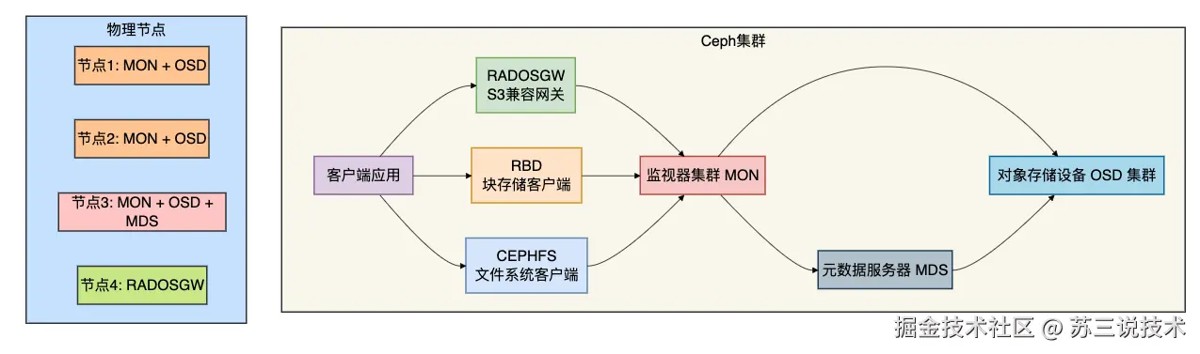
接下来介绍的5个免费替代方案,可能会适合你。
02 seaweedfs:极致简单的海量小文件专家
首先介绍的是我个人非常喜欢的seaweedfs。
它最初是为小文件存储优化的,但现在已经成为功能全面的分布式文件系统。
核心优势
- 完全开源:apache license 2.0(商业友好)
- 架构简单:学习曲线平缓
- 性能卓越:特别适合海量小文件场景
- s3兼容:提供完整的s3 api支持
部署示例:5分钟快速搭建
# seaweedfs的部署简单到令人惊讶
# 1. 下载(只有一个二进制文件!)
wget https://github.com/seaweedfs/seaweedfs/releases/download/3.55/linux_amd64.tar.gz
tar -xzf linux_amd64.tar.gz
# 2. 启动主服务器(管理元数据)
./weed master -ip=localhost -port=9333
# 3. 启动存储节点
./weed volume -dir="./data" -max=100 -mserver="localhost:9333" -port=8080
# 就是这么简单!现在你已经有了一个分布式文件系统
java客户端集成示例
// seaweedfs的java客户端使用示例
public class seaweedfsexample {
    // seaweedfs提供s3兼容接口,可以使用标准的aws sdk
    private amazons3 s3client;
    public void init() {
        // 配置连接到seaweedfs的filer组件(提供s3接口)
        awscredentials credentials = new basicawscredentials(
            "your-access-key",  // seaweedfs默认无需认证,但可以配置
            "your-secret-key"
        );
        s3client = amazons3clientbuilder.standard()
            .withendpointconfiguration(
                new awsclientbuilder.endpointconfiguration(
                    "http://localhost:8333",  // filer默认端口
                    "us-east-1"
                )
            )
            .withcredentials(new awsstaticcredentialsprovider(credentials))
            .withpathstyleaccessenabled(true)  // seaweedfs需要此设置
            .build();
    }
    // 上传文件到seaweedfs
    public void uploadfile(string bucketname, string objectkey, file file) {
        // 创建存储桶(如果需要)
        if (!s3client.doesbucketexistv2(bucketname)) {
            s3client.createbucket(bucketname);
        }
        // 上传文件
        s3client.putobject(bucketname, objectkey, file);
        system.out.println("文件已上传至seaweedfs");
        system.out.println("下载url: http://localhost:8333/" + bucketname + "/" + objectkey);
    }
    // seaweedfs特色功能:小文件合并存储
    public void uploadsmallfiles(list<file> smallfiles, string bucketname) {
        // seaweedfs内部会自动将小文件合并存储
        // 这大大提高了海量小文件的存储效率
        for (int i = 0; i < smallfiles.size(); i++) {
            file file = smallfiles.get(i);
            string objectkey = "small-file-" + i + "-" + file.getname();
            s3client.putobject(bucketname, objectkey, file);
        }
        system.out.println("已上传 " + smallfiles.size() + " 个小文件");
        system.out.println("seaweedfs会自动优化这些文件的存储");
    }
}
适用场景
- 图片、文档等小文件存储服务
- 需要快速部署和验证的场景
- 对s3兼容性有要求的迁移项目
- 资源有限的团队或环境
为什么选择seaweedfs替代minio?
- 许可证更友好:apache 2.0 vs agplv3
- 部署更简单:单二进制文件 vs 需要docker或复杂配置
- 小文件性能更好:专门为小文件优化
- 社区活跃:持续更新和维护
03 garage:专注于去中心化的新选择
garage是一个相对较新但非常有潜力的分布式对象存储系统,源自法国国立计算机与自动化研究所(inria)。
核心特色
- 完全开源:apache license 2.0
- 去中心化设计:无单点故障
- 轻量级:资源消耗少
- 兼容s3 api:完美替代minio
集群部署示例
# docker-compose.yml - 3节点garage集群
version: '3.8'
services:
  garage1:
    image: dxflrs/garage:v0.9.0
    command: "garage server"
    environment:
      - garage_node_name=node1
      - garage_rpc_secret=my-secret-key
      - garage_bind_addr=0.0.0.0:3901
      - garage_rpc_bind_addr=0.0.0.0:3902
      - garage_replication_mode=3
    volumes:
      - ./data/garage1:/var/lib/garage
    ports:
      - "3901:3901"
      - "3902:3902"
  garage2:
    image: dxflrs/garage:v0.9.0
    command: "garage server"
    environment:
      - garage_node_name=node2
      - garage_rpc_secret=my-secret-key
      - garage_bind_addr=0.0.0.0:3901
      - garage_rpc_bind_addr=0.0.0.0:3902
      - garage_seed=garage1:3902
    volumes:
      - ./data/garage2:/var/lib/garage
  garage3:
    image: dxflrs/garage:v0.9.0
    command: "garage server"
    environment:
      - garage_node_name=node3
      - garage_rpc_secret=my-secret-key
      - garage_bind_addr=0.0.0.0:3901
      - garage_rpc_bind_addr=0.0.0.0:3902
      - garage_seed=garage1:3902
    volumes:
      - ./data/garage3:/var/lib/garage
java集成代码
// garage的java客户端示例
public class garageexample {
    // garage完全兼容s3 api,可以直接使用aws sdk
    private amazons3 garageclient;
    public void initgarageconnection() {
        // garage的配置与minio非常相似
        awscredentials credentials = new basicawscredentials(
            "gk...",  // garage生成的访问密钥
            "..."     // 对应的秘密密钥
        );
        garageclient = amazons3clientbuilder.standard()
            .withendpointconfiguration(
                new awsclientbuilder.endpointconfiguration(
                    "http://localhost:3900",  // garage的s3 api端口
                    "garage"  // 区域名称可自定义
                )
            )
            .withcredentials(new awsstaticcredentialsprovider(credentials))
            .withpathstyleaccessenabled(true)
            .build();
    }
    // 创建存储桶并设置策略
    public void createbucketwithpolicy(string bucketname) {
        // 创建存储桶
        garageclient.createbucket(bucketname);
        // garage支持灵活的存储策略配置
        string bucketpolicy = """
        {
            "version": "2012-10-17",
            "statement": [
                {
                    "effect": "allow",
                    "principal": "*",
                    "action": "s3:getobject",
                    "resource": "arn:aws:s3:::%s/*"
                }
            ]
        }
        """.formatted(bucketname);
        garageclient.setbucketpolicy(bucketname, bucketpolicy);
        system.out.println("存储桶创建完成,已设置公开读取策略");
    }
    // 上传文件并生成访问url
    public string uploadandgenerateurl(string bucketname,
                                       string objectkey,
                                       inputstream inputstream) {
        objectmetadata metadata = new objectmetadata();
        // 可以在这里设置内容类型等元数据
        metadata.setcontenttype("application/octet-stream");
        putobjectrequest request = new putobjectrequest(
            bucketname, objectkey, inputstream, metadata
        );
        garageclient.putobject(request);
        // 生成预签名url(garage支持此功能)
        java.util.date expiration = new java.util.date();
        long exptimemillis = expiration.gettime();
        exptimemillis += 1000 * 60 * 60; // 1小时有效期
        expiration.settime(exptimemillis);
        generatepresignedurlrequest generatepresignedurlrequest =
            new generatepresignedurlrequest(bucketname, objectkey)
                .withmethod(httpmethod.get)
                .withexpiration(expiration);
        return garageclient.generatepresignedurl(
            generatepresignedurlrequest).tostring();
    }
}
适用场景
- 去中心化应用或区块链项目
- 需要轻量级对象存储的场景
- 研究或教育项目
- 对新兴技术有兴趣的团队
04 ceph:企业级的全能开源方案
ceph是最知名、功能最全面的开源分布式存储系统之一。
虽然它比minio复杂得多,但也强大得多。
为什么ceph是真正的免费?
- 开源许可证:lgpl(较gpl更宽松)
- 社区驱动:由red hat支持但社区主导
- 无商业限制:可以自由用于商业产品
部署架构
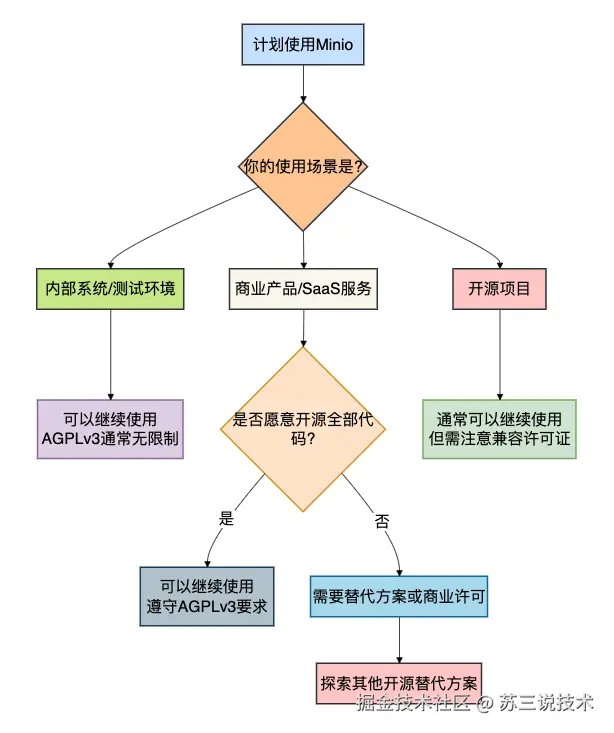
java客户端操作ceph
// 使用ceph的s3兼容接口(radosgw)
public class cephexample {
    private amazons3 cephclient;
    public void initcephconnection() {
        // ceph通过radosgw提供s3兼容接口
        // 配置方式与aws s3几乎完全相同
        awscredentials credentials = new basicawscredentials(
            system.getenv("ceph_access_key"),
            system.getenv("ceph_secret_key")
        );
        cephclient = amazons3clientbuilder.standard()
            .withcredentials(new awsstaticcredentialsprovider(credentials))
            .withendpointconfiguration(
                new awsclientbuilder.endpointconfiguration(
                    "http://ceph-gateway.example.com:7480",
                    ""  // ceph可以不指定区域
                )
            )
            .withpathstyleaccessenabled(true)
            .build();
    }
    // ceph的高级特性:多部分上传
    public void uploadlargefiletoceph(string bucketname,
                                      string objectkey,
                                      file largefile)
                                      throws exception {
        // 初始化多部分上传
        initiatemultipartuploadrequest initrequest =
            new initiatemultipartuploadrequest(bucketname, objectkey);
        initiatemultipartuploadresult initresponse =
            cephclient.initiatemultipartupload(initrequest);
        string uploadid = initresponse.getuploadid();
        // 分片上传(ceph可以处理非常大的文件)
        long filesize = largefile.length();
        long partsize = 100 * 1024 * 1024; // 100mb分片
        long byteposition = 0;
        list<partetag> partetags = new arraylist<>();
        int partnumber = 1;
        try (fileinputstream fis = new fileinputstream(largefile)) {
            while (byteposition < filesize) {
                long currentpartsize = math.min(partsize, filesize - byteposition);
                uploadpartrequest uploadrequest = new uploadpartrequest()
                    .withbucketname(bucketname)
                    .withkey(objectkey)
                    .withuploadid(uploadid)
                    .withpartnumber(partnumber)
                    .withinputstream(fis)
                    .withpartsize(currentpartsize);
                uploadpartresult uploadresult = cephclient.uploadpart(uploadrequest);
                partetags.add(uploadresult.getpartetag());
                byteposition += currentpartsize;
                partnumber++;
            }
            // 完成上传
            completemultipartuploadrequest comprequest =
                new completemultipartuploadrequest(
                    bucketname, objectkey, uploadid, partetags);
            cephclient.completemultipartupload(comprequest);
        } catch (exception e) {
            // 发生错误时中止上传
            cephclient.abortmultipartupload(
                new abortmultipartuploadrequest(bucketname, objectkey, uploadid));
            throw e;
        }
    }
    // ceph特有的功能:获取存储使用情况
    public void checkcephusage() {
        // 注意:ceph不通过s3 api提供使用统计
        // 需要通过管理api或命令行获取
        system.out.println("ceph使用统计需通过以下方式获取:");
        system.out.println("1. 命令行: ceph df");
        system.out.println("2. 管理api: /api/auth");
        system.out.println("3. dashboard: 内置web界面");
    }
}
适用场景
- 大型企业存储需求
- 需要同时支持对象、块和文件存储
- 已经有一定运维能力的团队
- 对可靠性和扩展性要求极高的场景
05 glusterfs:简单可靠的横向扩展文件系统
glusterfs是一个开源的分布式横向扩展文件系统,特别适合需要posix文件系统语义的场景。
核心优势
- 开源许可证:gplv3(但无agpl的网络服务条款)
- 无元数据服务器:独特的无中心架构
- 部署简单:易于理解和维护
- 成熟稳定:经过多年生产验证
快速部署脚本
#!/bin/bash
# glusterfs 3节点集群快速部署脚本
# 在三个节点上执行类似命令
# 节点1:
gluster peer probe node2
gluster peer probe node3
# 创建分布式卷(数据分散在所有节点)
gluster volume create gv0 disperse 3 node1:/data/brick1 node2:/data/brick1 node3:/data/brick1
# 或创建复制卷(数据在所有节点复制)
gluster volume create gv1 replica 3 node1:/data/brick2 node2:/data/brick2 node3:/data/brick2
# 启动卷
gluster volume start gv0
gluster volume start gv1
# 在客户端挂载
mount -t glusterfs node1:/gv0 /mnt/glusterfs
java中使用glusterfs
// 通过标准的java文件api访问glusterfs
public class glusterfsexample {
    private path glustermountpoint;
    public glusterfsexample(string mountpath) {
        this.glustermountpoint = paths.get(mountpath);
        // 验证挂载点
        if (!files.exists(glustermountpoint)) {
            throw new illegalargumentexception("glusterfs挂载点不存在: " + mountpath);
        }
        system.out.println("glusterfs挂载点: " + mountpoint.toabsolutepath());
    }
    // 写入文件 - glusterfs自动处理数据分布
    public void writefile(string filename, string content) throws ioexception {
        path filepath = glustermountpoint.resolve(filename);
        // 创建父目录(如果需要)
        if (filepath.getparent() != null) {
            files.createdirectories(filepath.getparent());
        }
        // 写入文件
        files.write(filepath,
                   content.getbytes(standardcharsets.utf_8),
                   standardopenoption.create,
                   standardopenoption.write,
                   standardopenoption.truncate_existing);
        system.out.println("文件已写入glusterfs: " + filepath);
    }
    // 读取文件
    public string readfile(string filename) throws ioexception {
        path filepath = glustermountpoint.resolve(filename);
        if (files.exists(filepath)) {
            byte[] content = files.readallbytes(filepath);
            return new string(content, standardcharsets.utf_8);
        }
        return null;
    }
    // 列出目录内容
    public list<string> listfiles(string directory) throws ioexception {
        path dirpath = glustermountpoint.resolve(directory);
        if (files.exists(dirpath) && files.isdirectory(dirpath)) {
            try (stream<path> stream = files.list(dirpath)) {
                return stream
                    .filter(files::isregularfile)
                    .map(path::getfilename)
                    .map(path::tostring)
                    .collect(collectors.tolist());
            }
        }
        return collections.emptylist();
    }
    // 获取文件信息
    public void printfileinfo(string filename) throws ioexception {
        path filepath = glustermountpoint.resolve(filename);
        if (files.exists(filepath)) {
            basicfileattributes attrs = files.readattributes(
                filepath, basicfileattributes.class);
            system.out.println("文件: " + filename);
            system.out.println("大小: " + attrs.size() + " 字节");
            system.out.println("创建时间: " + attrs.creationtime());
            system.out.println("修改时间: " + attrs.lastmodifiedtime());
            system.out.println("访问时间: " + attrs.lastaccesstime());
        }
    }
}
适用场景
- 需要标准文件系统接口的应用
- 媒体处理、日志存储等场景
- 已有大量基于文件api的遗留系统
- 希望避免学习新api的团队
最近为了帮助大家找工作,专门建了一些工作内推群,各大城市都有,欢迎各位hr和找工作的小伙伴进群交流,群里目前已经收集了20多家大厂的工作内推岗位。加苏三的微信:li_su223,备注:掘金+所在城市,即可进群。
06 openstack swift:企业级对象存储标准
openstack swift是openstack生态中的对象存储组件,是一个完全开源、高度可扩展的对象存储系统。
开源承诺
- 完全开源:apache license 2.0
- 社区治理:由openstack基金会管理
- 无商业限制:真正的自由使用
swift集群架构
# 简化的swift集群配置示例
# swift.conf - 主要配置文件
[swift-hash]
# 随机hash种子,集群中所有节点必须相同
swift_hash_path_prefix = changeme
swift_hash_path_suffix = changeme
[storage-policy:0]
name = policy-0
default = yes
# ring文件 - 数据分布配置
# 使用swift-ring-builder工具管理
$ swift-ring-builder account.builder create 10 3 24
$ swift-ring-builder container.builder create 10 3 24
$ swift-ring-builder object.builder create 10 3 24
# 添加存储节点
$ swift-ring-builder object.builder add r1z1-127.0.0.1:6010/sdb1 100
$ swift-ring-builder object.builder rebalance
java客户端示例
// 使用jclouds库访问openstack swift
public class swiftexample {
    private blobstore blobstore;
    public void initswiftconnection() {
        // 配置swift连接
        properties overrides = new properties();
        overrides.setproperty("jclouds.swift.auth.version", "3");
        // swift支持多种认证方式
        swiftapi swiftapi = contextbuilder.newbuilder("openstack-swift")
            .endpoint("http://swift.example.com:5000/v3")
            .credentials("project:username", "password")
            .overrides(overrides)
            .buildapi(swiftapi.class);
        blobstore = swiftapi.getblobstore("regionone");
    }
    // 上传对象到swift
    public string uploadtoswift(string containername,
                                string objectname,
                                inputstream data,
                                long size) {
        // 确保容器存在
        if (!blobstore.containerexists(containername)) {
            blobstore.createcontainerinlocation(null, containername);
        }
        // 创建blob对象
        blob blob = blobstore.blobbuilder(objectname)
            .payload(data)
            .contentlength(size)
            .contenttype("application/octet-stream")
            .build();
        // 上传
        string etag = blobstore.putblob(containername, blob);
        system.out.println("对象上传成功,etag: " + etag);
        // 生成临时url(swift支持此功能)
        return generatetempurl(containername, objectname);
    }
    private string generatetempurl(string container, string object) {
        // swift支持通过临时url共享对象
        // 这里需要swift集群配置了临时url密钥
        long expires = system.currenttimemillis() / 1000 + 3600; // 1小时后过期
        // 临时url生成逻辑(实际实现更复杂)
        return string.format(
            "http://swift.example.com:8080/v1/auth_%s/%s/%s?temp_url_sig=xxx&temp_url_expires=%d",
            "account", container, object, expires
        );
    }
    // 大对象分片上传(swift称为"静态大对象")
    public void uploadlargeobject(string container,
                                  string objectname,
                                  list<file> segments) {
        // 上传所有分片
        list<string> segmentpaths = new arraylist<>();
        for (int i = 0; i < segments.size(); i++) {
            string segmentname = string.format("%s/%08d", objectname, i);
            try (inputstream is = new fileinputstream(segments.get(i))) {
                uploadtoswift(container, segmentname, is, segments.get(i).length());
                segmentpaths.add(string.format("/%s/%s", container, segmentname));
            } catch (ioexception e) {
                throw new runtimeexception("分片上传失败", e);
            }
        }
        // 创建清单文件
        string manifest = string.join("\n", segmentpaths);
        try (inputstream is = new bytearrayinputstream(manifest.getbytes())) {
            blobstore.putblob(container,
                blobstore.blobbuilder(objectname)
                    .payload(is)
                    .contentlength(manifest.length())
                    .contenttype("text/plain")
                    .build());
        } catch (ioexception e) {
            throw new runtimeexception("清单文件创建失败", e);
        }
        system.out.println("大对象上传完成,共 " + segments.size() + " 个分片");
    }
}
适用场景
- openstack云环境
- 需要高持久性保证的企业应用
- 多地域复制需求
- 已有openstack基础设施的团队
07 综合对比与选型指南
现在我们已经了解了5个minio的免费替代方案。
如何选择最适合你的那个?
下面的对比表格和决策指南可以帮助你:
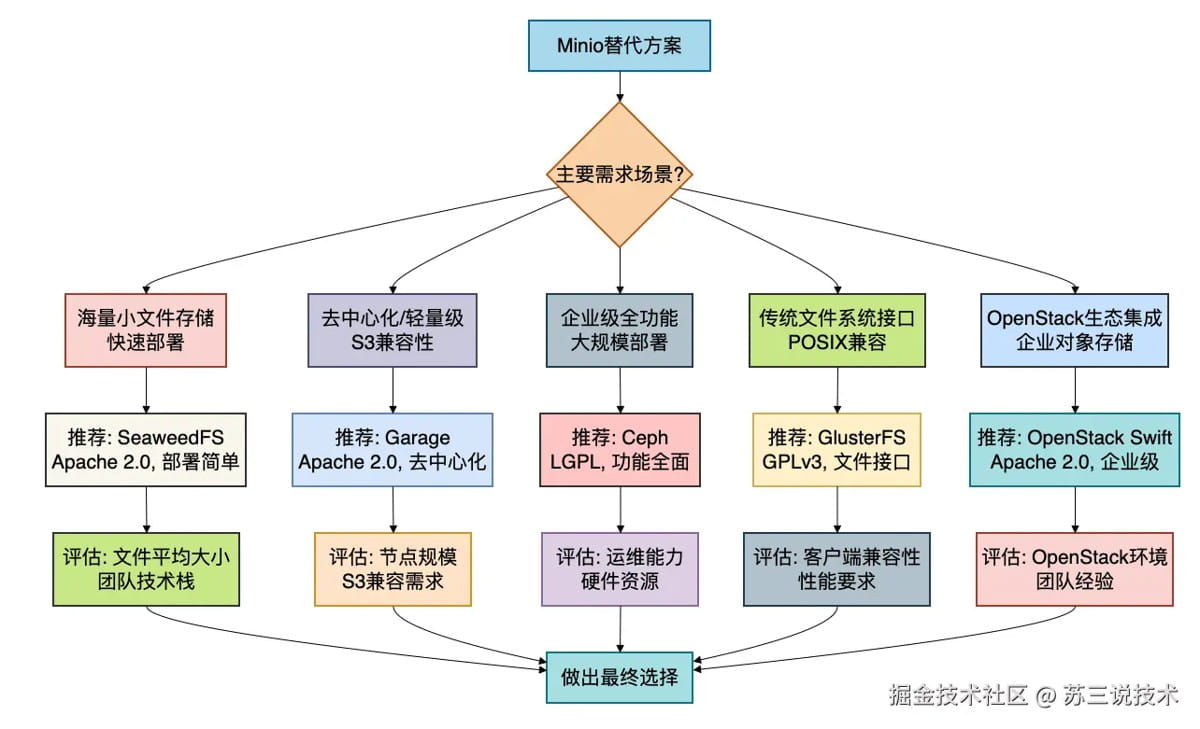
详细对比表
| 特性 | seaweedfs | garage | ceph | glusterfs | openstack swift |
|---|---|---|---|---|---|
| 许可证 | apache 2.0 | apache 2.0 | lgpl | gplv3 | apache 2.0 |
| 部署复杂度 | ⭐☆☆☆☆ (极简) | ⭐⭐☆☆☆ (简单) | ⭐⭐⭐⭐⭐ (复杂) | ⭐⭐⭐☆☆ (中等) | ⭐⭐⭐⭐☆ (较复杂) |
| s3兼容性 | 完全兼容 | 完全兼容 | 通过radosgw | 通过第三方 | 原生支持 |
| 文件系统支持 | 有限 | 无 | cephfs | 原生posix | 无 |
| 适用规模 | 中小规模 | 中小规模 | 超大规模 | 中大规模 | 大规模 |
| 小文件性能 | ⭐⭐⭐⭐⭐ | ⭐⭐⭐☆☆ | ⭐⭐⭐☆☆ | ⭐⭐☆☆☆ | ⭐⭐⭐⭐☆ |
| 大文件性能 | ⭐⭐⭐☆☆ | ⭐⭐⭐⭐☆ | ⭐⭐⭐⭐⭐ | ⭐⭐⭐⭐☆ | ⭐⭐⭐⭐⭐ |
| 运维要求 | 低 | 低 | 高 | 中 | 中高 |
总结
有些小伙伴在工作中可能会因为minio的许可证变化而感到焦虑,但实际上,开源世界给了我们丰富的选择。
关键是要根据你的具体需求做出明智的决策:
- 如果你是小型团队或创业公司,需要快速部署且主要处理小文件,seaweedfs是最佳选择。
- 如果你在构建去中心化应用或需要极简架构,garage值得考虑。
- 如果你有企业级需求,需要同时支持对象、块和文件存储,ceph是行业标准。
- 如果你需要标准的文件系统接口,并且希望迁移简单,glusterfs非常合适。
- 如果你已经在openstack环境中或需要企业级对象存储,openstack swift是最佳选择。
记住,技术选型的核心原则是:没有最好的系统,只有最适合的系统。
许可证只是考量的一个方面,你还需要考虑性能需求、团队技能、运维成本等多个因素。
到此这篇关于minio开始收费了,这5种免费的分布式文件系统更香的文章就介绍到这了,更多相关minio分布式文件系统内容请搜索代码网以前的文章或继续浏览下面的相关文章希望大家以后多多支持代码网!



发表评论