
 我要评论
我要评论1. 环境准备与安装
1.1 安装 nuget 包
在 visual studio 中,通过 nuget 包管理器安装 tesseract:
1.2 配置语言数据文件
tesseract 需要语言训练数据文件(.traineddata)才能识别特定语言的文字。对于中文识别,我们需要下载简体中文语言包:
下载语言包:
访问 tesseract ocr github下载 chi_sim.traineddata(简体中文)
创建文件夹结构:
在项目根目录创建 tessdata文件夹,并将下载的语言文件放入其中。
设置文件属性:
右键点击 chi_sim.traineddata文件
生成操作:设置为"内容"
复制到输出目录:设置为"如果较新则复制" 或 “始终复制”
基本使用代码
using system;
using tesseract;

class program
{
    static void main(string[] args)
    {
        // 图片路径
        string imagepath = @"d:\test.png";
        // tessdata 文件夹路径
        string tessdatapath = @".\tessdata";

        try
        {
            // 初始化tesseract引擎,使用简体中文
            using (var engine = new tesseractengine(tessdatapath, "chi_sim", enginemode.default))
            {
                // 加载图片
                using (var img = pix.loadfromfile(imagepath))
                {
                    // 进行ocr识别
                    using (var page = engine.process(img))
                    {
                        // 获取识别结果
                        string text = page.gettext();
                        // 获取识别置信度
                        float confidence = page.getmeanconfidence();

                        console.writeline("识别结果:");
                        console.writeline("-----------------------------------");
                        console.writeline(text);
                        console.writeline("-----------------------------------");
                        console.writeline($"识别置信度: {confidence:p}");
                    }
                }
            }
        }
        catch (exception ex)
        {
            console.writeline($"识别出错: {ex.message}");
        }
    }
}
2.核心api详解
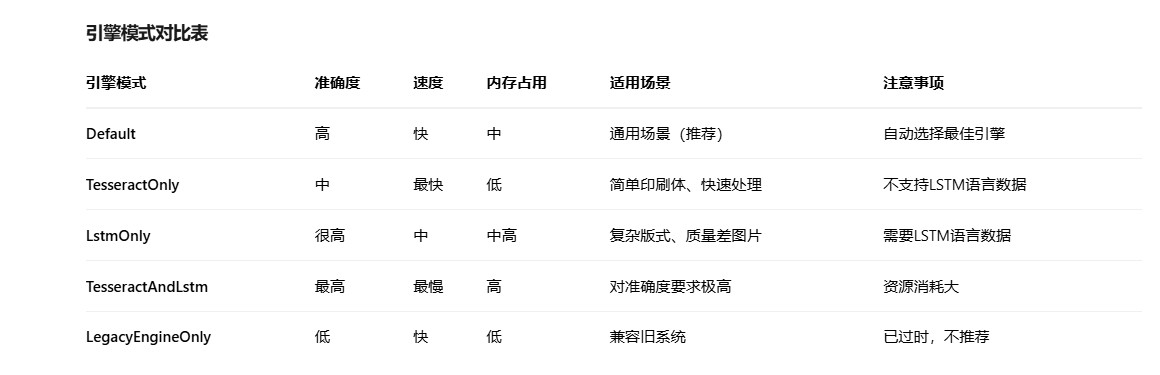
2.1引擎模式对比表
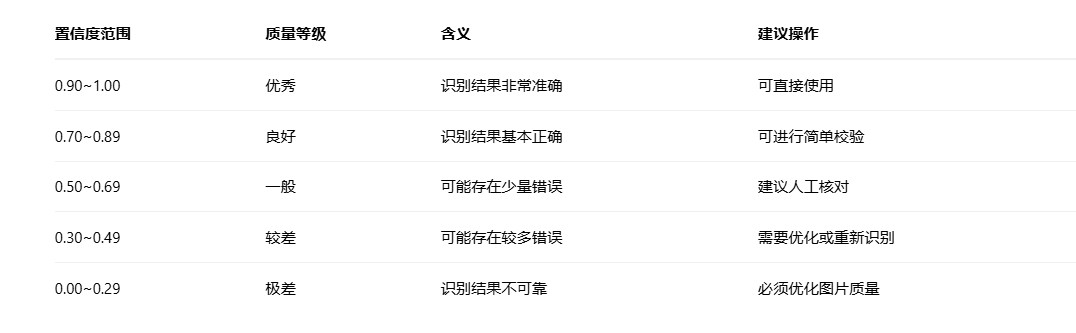
page.getmeanconfidence()- 置信度获取
getmeanconfidence()方法返回ocr识别的置信度,数值范围在0.0到1.0之间,表示识别结果的可靠程度。
2.2引擎模式对比表
3. 高级功能与优化
public pix preprocessimage(string imagepath)
{
    // 加载原始图片
    using (var original = pix.loadfromfile(imagepath))
    {
        // 1. 转为灰度图
        using (var gray = original.convertrgbtogray())
        {
            // 2. 调整对比度
            using (var contrast = gray.adjustcontrast(1.5f))
            {
                // 3. 二值化(黑白化)
                using (var binary = contrast.binarizeotsuadaptivethreshold())
                {
                    // 4. 降噪
                    using (var denoised = binary.removenoise())
                    {
                        // 5. 锐化
                        using (var sharpened = denoised.unsharpmasking(1.5f, 0.7f))
                        {
                            return sharpened.clone();
                        }
                    }
                }
            }
        }
    }
}
3.1页面分割模式(page segmentation mode)
// 设置不同的页面分割模式
public void setpagesegmentationmodes(tesseractengine engine)
{
    // 模式0: 方向检测和脚本检测
    engine.setvariable("tessedit_pageseg_mode", "0");

    // 模式1: 自动页面分割,启用方向检测
    engine.setvariable("tessedit_pageseg_mode", "1");

    // 模式2: 自动页面分割,不启用方向检测
    engine.setvariable("tessedit_pageseg_mode", "2");

    // 模式3: 全自动页面分割(默认)
    engine.setvariable("tessedit_pageseg_mode", "3");

    // 模式4: 假设单列可变大小的文本
    engine.setvariable("tessedit_pageseg_mode", "4");

    // 模式5: 假设统一的垂直对齐文本块
    engine.setvariable("tessedit_pageseg_mode", "5");

    // 模式6: 假设统一的文本块
    engine.setvariable("tessedit_pageseg_mode", "6");

    // 模式7: 将图像视为单个文本行
    engine.setvariable("tessedit_pageseg_mode", "7");

    // 模式8: 将图像视为单个单词
    engine.setvariable("tessedit_pageseg_mode", "8");

    // 模式9: 将图像视为圆形中的单个单词
    engine.setvariable("tessedit_pageseg_mode", "9");

    // 模式10: 将图像视为单个字符
    engine.setvariable("tessedit_pageseg_mode", "10");
}
3.2识别特定区域(roi)
public string recognizeregion(string imagepath, rect region)
{
    using (var engine = new tesseractengine(tessdatapath, "chi_sim", enginemode.default))
    {
        using (var img = pix.loadfromfile(imagepath))
        {
            // 设置识别区域
            using (var page = engine.process(img, region))
            {
                return page.gettext();
            }
        }
    }
}

// 使用示例
rect region = new rect(100, 100, 300, 200); // x, y, width, height
string result = recognizeregion(@"d:\test.png", region);
4.智能ocr识别类
using system;
using system.collections.generic;
using system.io;
using tesseract;

namespace tesseractocrhelper
{
    public class smartocr
    {
        private readonly string _tessdatapath;

        public smartocr(string tessdatapath = null)
        {
            _tessdatapath = tessdatapath ?? path.combine(appdomain.currentdomain.basedirectory, "tessdata");

            if (!directory.exists(_tessdatapath))
            {
                throw new directorynotfoundexception($"tessdata目录不存在: {_tessdatapath}");
            }
        }

        /// <summary>
        /// 识别图片中的文字
        /// </summary>
        public ocrresult recognize(string imagepath, string language = "chi_sim",
                                   enginemode? enginemode = null, rect? region = null)
        {
            if (!file.exists(imagepath))
            {
                return new ocrresult
                {
                    success = false,
                    errormessage = $"图片文件不存在: {imagepath}"
                };
            }

            try
            {
                var mode = enginemode ?? enginemode.default;

                using (var engine = new tesseractengine(_tessdatapath, language, mode))
                {
                    // 优化识别参数
                    configureengine(engine);

                    using (var img = pix.loadfromfile(imagepath))
                    {
                        page page;

                        if (region.hasvalue)
                        {
                            page = engine.process(img, region.value);
                        }
                        else
                        {
                            page = engine.process(img);
                        }

                        using (page)
                        {
                            return new ocrresult
                            {
                                success = true,
                                text = page.gettext(),
                                confidence = page.getmeanconfidence(),
                                enginemode = mode.tostring(),
                                language = language
                            };
                        }
                    }
                }
            }
            catch (exception ex)
            {
                return new ocrresult
                {
                    success = false,
                    errormessage = $"ocr识别失败: {ex.message}"
                };
            }
        }

        /// <summary>
        /// 智能识别:自动选择最佳引擎
        /// </summary>
        public ocrresult smartrecognize(string imagepath, float confidencethreshold = 0.7f)
        {
            // 先用默认模式
            var result = recognize(imagepath, "chi_sim", enginemode.default);

            // 如果置信度低于阈值,尝试lstm模式
            if (result.success && result.confidence < confidencethreshold)
            {
                console.writeline($"默认模式置信度较低({result.confidence:p}),尝试lstm模式...");

                var lstmresult = recognize(imagepath, "chi_sim", enginemode.lstmonly);
                if (lstmresult.success && lstmresult.confidence > result.confidence)
                {
                    lstmresult.message = $"从默认模式切换到lstm模式,置信度提升: {result.confidence:p} -> {lstmresult.confidence:p}";
                    return lstmresult;
                }
            }

            return result;
        }

        /// <summary>
        /// 批量识别
        /// </summary>
        public list<ocrresult> batchrecognize(list<string> imagepaths, string language = "chi_sim")
        {
            var results = new list<ocrresult>();

            foreach (var imagepath in imagepaths)
            {
                console.writeline($"正在处理: {path.getfilename(imagepath)}");
                var result = recognize(imagepath, language);
                results.add(result);
            }

            return results;
        }

        /// <summary>
        /// 配置引擎参数
        /// </summary>
        private void configureengine(tesseractengine engine)
        {
            // 设置页面分割模式
            engine.setvariable("tessedit_pageseg_mode", "3"); // 全自动

            // 设置白名单(可选)
            // engine.setvariable("tessedit_char_whitelist", "0123456789abcdefghijklmnopqrstuvwxyzabcdefghijklmnopqrstuvwxyz");

            // 设置黑名单(可选)
            // engine.setvariable("tessedit_char_blacklist", "!@#$%^&*()");

            // 设置ocr引擎模式
            engine.setvariable("classify_bln_numeric_mode", "0");
        }

        /// <summary>
        /// 预处理图片
        /// </summary>
        public pix preprocessimage(string imagepath)
        {
            using (var original = pix.loadfromfile(imagepath))
            {
                    // 1. 转为灰度
                using (var gray = original.convertrgbtogray())
                {
                    // 2. 二值化
                    using (var binary = gray.binarizeotsuadaptivethreshold())
                    {
                        // 3. 降噪
                        using (var denoised = binary.removenoise())
                        {
                            return denoised.clone();
                        }
                    }
                }
            }
        }
    }

    /// <summary>
    /// ocr识别结果
    /// </summary>
    public class ocrresult
    {
        public bool success { get; set; }
        public string text { get; set; }
        public float confidence { get; set; }
        public string enginemode { get; set; }
        public string language { get; set; }
        public string message { get; set; }
        public string errormessage { get; set; }

        public override string tostring()
        {
            if (!success)
            {
                return $"识别失败: {errormessage}";
            }

            return $"识别成功! 模式: {enginemode}, 语言: {language}, 置信度: {confidence:p}\n" +
                   $"识别结果:\n{text}\n" +
                   $"{(string.isnullorempty(message) ? "" : $"备注: {message}")}";
        }
    }
}
到此这篇关于c#使用tesseract进行中文识别的全过程的文章就介绍到这了,更多相关c# tesseract中文识别内容请搜索代码网以前的文章或继续浏览下面的相关文章希望大家以后多多支持代码网!





发表评论