
 我要评论
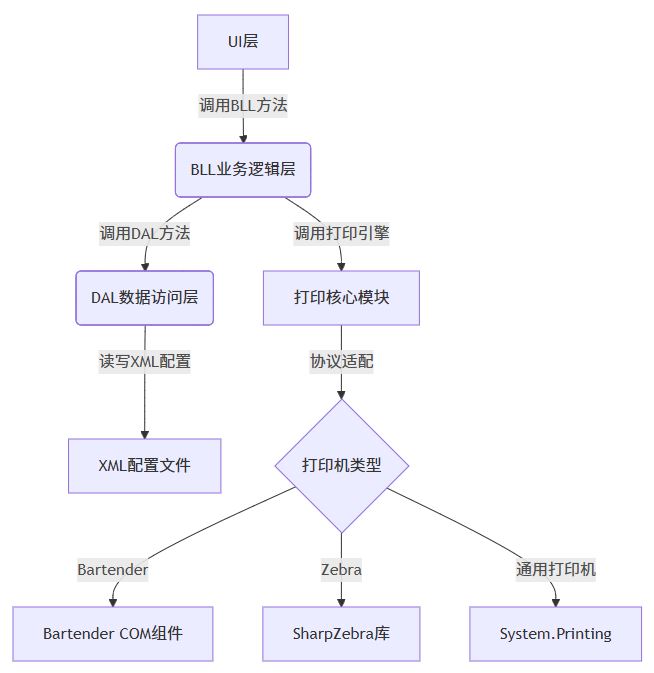
我要评论一、系统架构设计
二、核心功能模块
1. 动态模板引擎
// templateengine.cs
public class templateengine {
    private dictionary<string, string> _templates = new();

    // 加载xml模板配置
    public void loadtemplates(string configfile) {
        var xmldoc = xdocument.load(configfile);
        foreach (var elem in xmldoc.descendants("template")) {
            _templates[elem.attribute("name").value] = elem.value;
        }
    }

    // 数据绑定
    public string binddata(string templatename, dictionary<string, string> data) {
        string template = _templates[templatename];
        foreach (var item in data) {
            template = template.replace($"{{{item.key}}}", item.value);
        }
        return template;
    }
}
2. 多协议打印适配器
// printadapter.cs
public interface iprintadapter {
    bool print(string content, string printername);
}

// bartender适配器
public class bartenderadapter : iprintadapter {
    public bool print(string content, string printername) {
        var btapp = new bartender.application();
        var btformat = btapp.formats.open(content);
        btformat.setnamedsubstringvalue("productcode", "abc123");
        btformat.printout(false, printername);
        return true;
    }
}

// zebra zpl适配器
public class zebraadapter : iprintadapter {
    public bool print(string zplcode, string printername) {
        using (var client = new tcpclient(printername, 9100)) {
            networkstream stream = client.getstream();
            byte[] data = encoding.ascii.getbytes(zplcode);
            stream.write(data, 0, data.length);
            return true;
        }
    }
}
3. 配置管理模块
<!-- config.xml -->
<config>
  <printer>
    <name>zebra zt410</name>
    <type>zebra</type>
    <ip>192.168.1.100</ip>
  </printer>
  <templates>
    <template name="productlabel">
      ^xa^fo50,50^a0n,30,30^fd{productname}^fs^xz
    </template>
  </templates>
</config>
三、数据流实现
1. 业务逻辑层
// printservice.cs
public class printservice {
    private iprintadapter _adapter;
    private templateengine _templateengine;

    public printservice(iprintadapter adapter) {
        _adapter = adapter;
        _templateengine = new templateengine();
        _templateengine.loadtemplates("templates.xml");
    }

    public void processprint(labeldata data) {
        try {
            string template = _templateengine.binddata(data.templatename, data.fields);
            _adapter.print(template, data.printername);
            logmanager.log($"打印成功: {data.orderid}");
        } catch (exception ex) {
            logmanager.logerror($"打印失败: {ex.message}");
            throw;
        }
    }
}
2. 数据模型
// labeldata.cs
public class labeldata {
    public string orderid { get; set; }
    public string templatename { get; set; }
    public dictionary<string, string> fields { get; set; }
    public string printername { get; set; }
}
四、关键技术创新
1. 智能模板解析
占位符语法:支持{fieldname}动态替换
条件渲染:
<template>
  ^xa
  {if:producttype="food"}
    ^fo100,100^a0n,25^fd保质期: {expirydate}^fs
  {/if}
  ^xz
</template>
2. 打印队列管理
// printqueue.cs
public class printqueue {
    private concurrentqueue<printjob> _queue = new();

    public void enqueue(printjob job) {
        _queue.enqueue(job);
        processnext();
    }

    private async void processnext() {
        if (_queue.trydequeue(out var job)) {
            await _adapter.printasync(job.content, job.printername);
        }
    }
}
3. 异常处理机制
// printexceptionhandler.cs
public class printexceptionhandler {
    public void handle(printjob job, exception ex) {
        if (job.retrycount < 3) {
            job.retrycount++;
            thread.sleep(5000);
            printservice.instance.processprint(job);
        } else {
            alertservice.notify($"打印失败: {job.orderid}");
            logmanager.saveerrorlog(job, ex);
        }
    }
}
五、测试用例
| 测试场景 | 输入数据 | 预期结果 |
|---|---|---|
| zebra打印机基础打印 | 订单号: ord001, 产品名称: 手机 | 打印机输出带条码的标签 |
| bartender模板渲染 | 模板: productlabel, 字段: 颜色=红 | 输出红色标注的标签 |
| 打印队列重试机制 | 模拟打印机脱机 | 自动重试3次后记录错误日志 |
六、部署方案
依赖组件
- bartender runtime(版本≥2022)
- zebra zsdk(适用于zebra打印机)
- .net framework 4.8+
安装包结构
labelprinterinstaller/
├── programs/
│   ├── labelprinterui.exe
│   └── bartenderruntime/
├── drivers/
│   ├── zebra_zt410/
│   └── epson/
└── config/
    ├── templates.xml
    └── printers.xml
七、扩展功能建议
web api集成
[httppost("print")]
public iactionresult printlabel([frombody] printrequest request) {
    _printservice.processprint(request.data);
    return ok(new { status = "queued" });
}
移动端支持
- 开发uwp应用实现蓝牙/wifi打印机连接
- 集成电子签名功能
ai质检模块
- 使用opencv检测打印质量
- 自动报警模糊/错位标签
八、总结
本方案通过多协议适配器和智能模板引擎实现灵活标签打印,结合三层架构保证系统可维护性。
以上就是c#实现标签打印工具的设计方案的详细内容,更多关于c#标签打印工具的资料请关注代码网其它相关文章!





发表评论