
 我要评论
我要评论一定是spring boot项目,spring cloud gateway基于spring boot
前言
提示:本文所用的是spring cloud gateway web mvc特性
本文提供了对spring cloud gateway网关的使用案例,并没有列举出所有过滤器或谓词的使用示例,但是包含了从工程搭建及基本使用至概念理解再到一些自定义客制化的使用。为你打开基本使用到深入使用的一扇门。所配关键代码都有注释,一定可以为你答疑解惑。
一、前置条件
提示:spring cloud gateway是基于spring boot,项目一定是spring boot项目,一定是spring boot项目
jdk:17
构建工具:maven 3.6.3
spring相关jar:spring-cloud-starter-gateway-server-webmvc 4.3.0(必须),spring boot 3.5.8(被间接依赖至项目中),spring cloud 2025.0.0(作为pom)
参考资料:https://docs.spring.io/spring-cloud-gateway/reference/4.3/spring-cloud-gateway-server-webmvc.html
开发工具:idea 2021.2
二、工程搭建(创建一个普通maven工程,添加必要依赖及构建工具即可,本案例是一个maven子工程)
提示:按需可引入spring boot starter parent,直接按需用spring 配套的插件及依赖包,更为方便
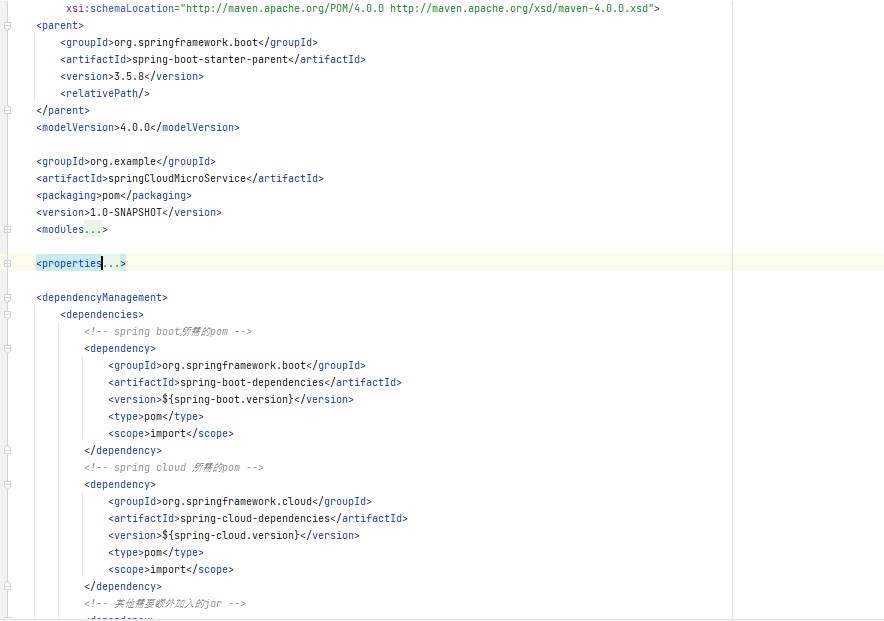
父工程pom.xml (仅列出关键依赖)
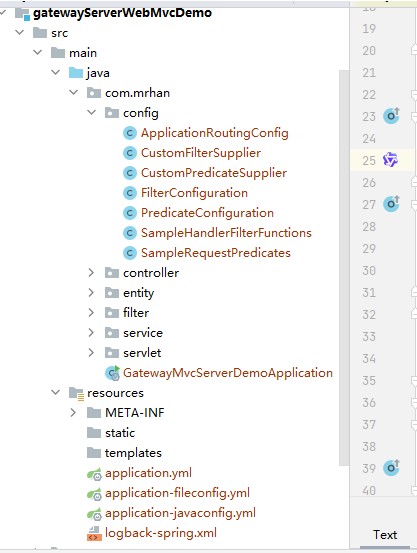
工程目录
pom.xml文件
<?xml version="1.0" encoding="utf-8"?>
<project xmlns="http://maven.apache.org/pom/4.0.0"
         xmlns:xsi="http://www.w3.org/2001/xmlschema-instance"
         xsi:schemalocation="http://maven.apache.org/pom/4.0.0 http://maven.apache.org/xsd/maven-4.0.0.xsd">
    <parent>
        <artifactid>springcloudmicroservice</artifactid>
        <groupid>org.example</groupid>
        <version>1.0-snapshot</version>
    </parent>
    <modelversion>4.0.0</modelversion>
    <artifactid>gatewayserverwebmvcdemo</artifactid>
    <properties>
        <maven.compiler.source>17</maven.compiler.source>
        <maven.compiler.target>17</maven.compiler.target>
        <!-- 设置编码格式,防止maven打包构建时没有统一编码格式导致有中文注释的文件解析异常,影响项目启动 -->
        <project.build.sourceencoding>utf-8</project.build.sourceencoding>
        <project.reporting.outputencoding>utf-8</project.reporting.outputencoding>
    </properties>
    <dependencies>
        <dependency>
            <groupid>org.springframework.cloud</groupid>
            <artifactid>spring-cloud-starter-gateway-server-webmvc</artifactid>
        </dependency>
        <dependency>
            <groupid>org.springframework.boot</groupid>
            <artifactid>spring-boot-starter-test</artifactid>
            <scope>test</scope>
        </dependency>
    </dependencies>
    <!-- spring boot构建相关配置 -->
    <build>
        <plugins>
            <plugin>
                <groupid>org.apache.maven.plugins</groupid>
                <artifactid>maven-compiler-plugin</artifactid>
                <configuration>
                    <parameters>true</parameters>
                </configuration>
            </plugin>
            <plugin>
                <groupid>org.springframework.boot</groupid>
                <artifactid>spring-boot-maven-plugin</artifactid>
                <version>3.5.8</version>
                <configuration>
                    <mainclass>${start-class}</mainclass>
                    <layout>jar</layout>
                </configuration>
                <executions>
                    <execution>
                        <goals>
                            <goal>repackage</goal>
                        </goals>
                    </execution>
                </executions>
            </plugin>
            <plugin>
                <groupid>org.apache.maven.plugins</groupid>
                <artifactid>maven-resources-plugin</artifactid>
                <version>3.1.0</version>
                <configuration>
                    <!-- 【很关键】自定义${}占位符,用于将pom文件的变量动态替换到applicaton**.yml的某处
                    例如这里的application.yml文件,使用${spring.profiles.active}取
                    将pom.xml->properties->profile->properties->spring.profiles.active属性值
                     -->
                    <delimiters>
                        <delimiter>${}</delimiter>
                    </delimiters>
                    <!-- 禁用默认的占位符@xxpropertiesname@ -->
                    <usedefaultdelimiters>false</usedefaultdelimiters>
                    <resources>
                        <resource>
                            <directory>src/main/resources</directory>
                            <filtering>true</filtering> <!-- 根据需要开启或关闭 -->
                            <includes>
                                <include>public/**</include>
                                <include>static/**</include>
                                <include>templates/**</include>
                                <include>mapper/**</include>
                                <include>properties/**</include>
                                <include>i18n/**</include>
                                <include>logback*.xml</include>
                                <!-- 包含默认的配置文件,这个配置文件仅有spring.profiles.active属性,这是不加profiles启动的关键 -->
                                <include>application.yml</include>
                                <!-- 按maven不同的打包参数,打包不同的环境相关的配置文件 -->
                                <include>application-${spring.profiles.active}.*</include>
                                <include>log*-${spring.profiles.active}.xml</include>
                            </includes>
                        </resource>
                    </resources>
                </configuration>
            </plugin>
        </plugins>
    </build>
    <!-- profiles 相关配置 -->
    <profiles>
        <!--
        profile中的<id>div</id>元素值指的是-p 的参数, 如:mvn clean install -p div
        profile中的<properties><spring.profiles.active>dev</spring.profiles.active></properties>中的spring.profiles.active元素及值
        值指的是-d 的参数, 如:mvn clean install -dspring.profiles.active=dev
        -->
        <profile>
            <!-- 开发环境 -->
            <id>dev</id>
            <properties>
                <spring.profiles.active>dev</spring.profiles.active>
            </properties>
            <activation>
                <activebydefault>true</activebydefault>
            </activation>
        </profile>
        <!-- 测试环境 -->
        <profile>
            <id>sit</id>
            <properties>
                <spring.profiles.active>sit</spring.profiles.active>
            </properties>
            <activation>
                <activebydefault>false</activebydefault>
            </activation>
        </profile>
        <!-- 生产环境 -->
        <profile>
            <id>prod</id>
            <properties>
                <spring.profiles.active>prod</spring.profiles.active>
            </properties>
            <activation>
                <activebydefault>false</activebydefault>
            </activation>
        </profile>
    </profiles>
</project>
三、功能实现范围
- 配置文件或java编程方式的路由配置
- 自定义过滤器(filter)、自定义谓词(predicate)的实现与使用
- 路由到本服务接口(就是用于spring mvc的函数式端点的使用)
四、需要路由访问的服务(应用)准备
网关自身(服务/应用):http://localhost:8888
应用一:http://localhost:8081/entitleservice
应用二:http://localhost:8082/functonservletpath
五、路由配置(配置文件方式)
提示:两种路由配置方式二选一,二选一,二选一!!!
默认配置文件(application.yml)
server:
  server-name: gatewaymvcdemo
  port: 8888
spring:
  profiles:
#    active: javaconfig
    active: fileconfig
路由配置文件(application-fileconfig.yml)
# 使用配置文件方式配置路由
spring:
  cloud:
    gateway:
      server:
        webmvc:
          routes:
            # 配置路由到function demo服务
            - id: function_demo_route
              uri: http://localhost:8082
              predicates:
                - method=get,put,delete,post
                - path=/functionservletpath/**
              filters:
                - addrequestparameter=code, gateway for functiondemo
                - addrequestheader=function-request-id,function_header_value
            - id: entitle_route
              uri: http://localhost:8081
              predicates:
                - method=get,put,delete,post
                - path=/entitleservice/info/**,/entitleservice/gatewayinfo/**,/entitleservice/user/**,/entitleservice/role/**
                - predicateheaderexists=custom_header
              filters:
                - addrequestparameter=code, gate way for entitleservice
                - addrequestheader=entitle-request-id,entitle_header_value
                - instrumentforfilter=req_header,rep_header
六、路由配置(java编程方式)
提示:两种路由配置方式二选一,二选一,二选一!!!!
默认配置文件(application.yml)
server:
  server-name: gatewaymvcdemo
  port: 8888
spring:
  profiles:
active: javaconfig路由配置文件(application-javaconfig.yml)提示:路由配置文件为空,因使用java编程方式配置
java配置文件(applicationroutingconfig.java)
package com.mrhan.config;
import com.mrhan.service.gatewayhandler;
import com.mrhan.service.userhandler;
import org.slf4j.logger;
import org.slf4j.loggerfactory;
import org.springframework.context.annotation.bean;
import org.springframework.context.annotation.configuration;
import org.springframework.context.annotation.profile;
import org.springframework.http.httpmethod;
import org.springframework.http.mediatype;
import org.springframework.web.servlet.function.*;
import java.time.zoneddatetime;
import java.util.function.bifunction;
import java.util.function.function;
import static org.springframework.cloud.gateway.server.mvc.filter.beforefilterfunctions.*;
import static org.springframework.cloud.gateway.server.mvc.handler.gatewayrouterfunctions.route;
import static org.springframework.cloud.gateway.server.mvc.handler.handlerfunctions.http;
import static org.springframework.cloud.gateway.server.mvc.predicate.gatewayrequestpredicates.*;
import static org.springframework.web.servlet.function.requestpredicates.accept;
/**
 * @author mr han
 * @date 2025/12/6
 * @description 路由配置,此处配置了路由后,application.yml中配置的路由将无效,两种配置只能存在一种,不能并存
 * 同等效果配置文件方式配置@see application.yml,自定义的filter和predicate在两种配置方式都能够生效
 *
 *
*/
@configuration(proxybeanmethods = false)
@profile("javaconfig")
public class applicationroutingconfig {
    private static final logger log = loggerfactory.getlogger(applicationroutingconfig.class);
    /**
     *
     * @return
     * @date 2025/12/17
     * @description 使用java代码方式配置路由,等价于@see application.yml文件配置方式
     *
     */
    @bean
    public routerfunction<serverresponse> customroutes(gatewayhandler gatewayhandler) {
        // @formatter:off
        return route("path_route")
                .get("/gateway/getrole", accept(mediatype.text_html),gatewayhandler::getrole)
                .post("/gateway/updaterole/{roleid}", accept(mediatype.application_json), gatewayhandler::updaterole)
                .before(request -> {
                    string path = request.requestpath().value();
                    log.error("=========开始进入本服务请求:{}=========",path);
                    return request;
                })
                // 添加请求之后的函数处理器
                .after((request,response) -> {
                    log.error("==========本服务请求处理完毕:{},响应的状态码:",request.requestpath().value(),response.statuscode());
                    return response;
                })
                .build().and(route("entitle_route")
                    .route(path("/entitleservice/**").and(samplerequestpredicates.predicateheaderexists("entitle_header")), http())
                    .before(uri("http://localhost:8081"))
                    .before(addrequestparameter("code","java gateway for entitlementservice"))
                    .before(addrequestheader("java_config_header","java config value"))
                    .filter(samplehandlerfilterfunctions.instrumentforfilter("req_header","rep_header"))
                .build().and(route("function_demo_route")
                    .route(path("/functionservletpath/**").and(samplerequestpredicates.predicateheaderexists("function_header")), http())
                    .before(uri("http://localhost:8082"))
                    .before(addrequestparameter("code","java config gateway for functiondemo"))
                    .before(addrequestheader("function-request-id","function_header_value"))
                .build()));
    }
    /**
     * @author mr han
     * @date 2025/12/15
     * @description 自定义的predicate 是否包含某个固定的请求头,此类的实现等等同于方法 @see {@link samplerequestpredicates#predicateheaderexists(string)}
     *
    */
    private static class customheaderexists implements requestpredicate {
        // 请求头名称
        private static final string header_name = "custom_header";
        /**
         *
         * @return
         * @date 2025/12/15
         * @description 需要包含custom_header请求头
         *
         */
        @override
        public boolean test(serverrequest request) {
            return request.headers().ashttpheaders().containskey(header_name);
        }
    }
    /**
     *
     * @return
     * @date 2025/12/15
     * @description 使用函数式的方法,自定义过滤器,使用函数式方法实现过滤器
     * 在自定义的过滤器中可以实现日志的打印,已经权限的认证等逻辑,这里仅仅是增加请求头及响应头
     * 此方法等同于@see {@link samplehandlerfilterfunctions#instrumentforfilter(string, string)}
     *
     */
    private static handlerfilterfunction<serverresponse, serverresponse> instrumentwithfilter(string requestheader,string responseheader){
        return (request,next) -> {
            serverrequest modifier = serverrequest.from(request).header(requestheader, "hello").build();
            serverresponse responsehandler = next.handle(modifier);
            responsehandler.headers().add(responseheader, "world");
            return responsehandler;
        };
    }
    /**
     *
     * @return
     * @date 2025/12/15
     * @description 使用函数式的方法,定义before方式的过滤器
     *
     */
    private static function<serverrequest, serverrequest> instrumentwithbefore(string requestheader){
        return request -> {
            return serverrequest.from(request).header(requestheader, "before_header_value").build();
        };
    }
    /**
     *
     * @return
     * @date 2025/12/15
     * @description 使用函数式的方法,定义after方式的过滤器
     *
     */
    private static bifunction<serverrequest, serverresponse, serverresponse> instrumentwithafter(string header){
        return (request,response) -> {
            response.headers().add(header, "after_header_value");
            return response;
        };
    }
}
七、自定义过滤器
· 提示:定义的过滤器类按一个类一个静态方法,多增加几个静态方法spring也只会加载第一个静态方法,静态方法一定要加@shotcut注解,不然启动报错,报错原因分析及解决,将在另一篇关于gateway疑难杂症解决的文章中展开。
过滤器定义(samplehandlerfilterfunctions.java):一个类一个静态过滤器方法(方法上一定要加上@shortcut注解),多加了也没用spring只会加载第一个静态方法
package com.mrhan.config;
import org.slf4j.logger;
import org.slf4j.loggerfactory;
import org.springframework.cloud.gateway.server.mvc.common.configurable;
import org.springframework.cloud.gateway.server.mvc.common.shortcut;
import org.springframework.util.stringutils;
import org.springframework.web.servlet.function.handlerfilterfunction;
import org.springframework.web.servlet.function.serverrequest;
import org.springframework.web.servlet.function.serverresponse;
import java.util.objects;
import java.util.function.function;
/**
 * @author mr han
 * @date 2025/12/15
 * @description 定义包含所有自定义filter的函数式过滤器类,供filtersupplier类使用暴露到项目中
 * 一个类只能定义一个静态方法,spring cloud gateway只注册一个静态方法
 */
public class samplehandlerfilterfunctions {
    private static final logger log = loggerfactory.getlogger(samplehandlerfilterfunctions.class);
    @shortcut
    public static handlerfilterfunction<serverresponse, serverresponse> instrumentforfilter(string reqheadername,string repheadername) {
        return (request, next) -> {
            log.error("==========进入自定义filter处理逻辑,请求头:{},响应头{}===========",reqheadername,repheadername);
            serverrequest modified = serverrequest.from(request)
                    .header(reqheadername, "request header for filter").build();
            serverresponse response = next.handle(modified);
            response.headers().add(repheadername,"response header for filter" );
            return response;
        };
}过滤器提供者(customfiltersupplier.java):就是一个继承了simplefiltersupplier类的类而已,重写了继承方法
package com.mrhan.config;
import org.springframework.cloud.gateway.server.mvc.filter.simplefiltersupplier;
/**
 * @author mr han
 * @date 2025/12/15
 * @description 创建字对应的filtersupplier,用于注册提供自定义的filter
 */
public class customfiltersupplier extends simplefiltersupplier {
    public customfiltersupplier() {
        super(samplehandlerfilterfunctions.class);
    }
}过滤器配置类(filterconfiguration.java):只是为了将过滤器提供者注册为bean
package com.mrhan.config;
import jakarta.annotation.postconstruct;
import org.slf4j.logger;
import org.slf4j.loggerfactory;
import org.springframework.context.annotation.bean;
import org.springframework.context.annotation.configuration;
import org.springframework.context.annotation.profile;
/**
 * @author mr han
 * @date 2025/12/17
 * @description 注册自定义的过滤器,用于配置在application.yml文件中,目前使用此配置方式无实际效果 todo
*/
@configuration
@profile("fileconfig")
public class filterconfiguration {
    private static final logger log = loggerfactory.getlogger(filterconfiguration.class);
    @postconstruct
    public void init(){
        log.error("========开始加载filterconfiguration配置============");
    }
    @bean
    public customfiltersupplier customfiltersupplier() {
        return new customfiltersupplier();
    }
}
八、自定义谓词
提示:定义的谓词按一个类一个静态方法,多增加几个静态方法spring也只会加载第一个静态方法,静态方法一定要加@shortcut注解,不然启动报错,报错原因分析及解决,将在另一篇关于gateway疑难杂症解决的文章中展开。
谓词定义(samplerequestpredicates.java):一个类一个静态过滤器方法(一定要加上@shortcut注解),多加了也没用spring只会加载第一个静态方法
package com.mrhan.config;
import org.slf4j.logger;
import org.slf4j.loggerfactory;
import org.springframework.cloud.gateway.server.mvc.common.configurable;
import org.springframework.cloud.gateway.server.mvc.common.shortcut;
import org.springframework.web.servlet.function.requestpredicate;
/**
 * @author mr han
 * @date 2025/12/15
 * @description 定义包含自定义predicate的所有实现的类
 */
public class samplerequestpredicates {
    private static final logger log = loggerfactory.getlogger(samplerequestpredicates.class);
    /**
     *
     * @return
     * @date 2025/12/15
     * @description 请求头的判断(是否包含某个名称的请求头),必须添加@configurable注解且只能有一个参数,不然无法生效
     *
     */
    @shortcut
    public static requestpredicate predicateheaderexists(string name) {
        log.error("======进入了自定义predicate的处理逻辑所需请求头:{}==========",name);
        return request -> {
            return request.headers().ashttpheaders().containskey(name);
        };
    }
}谓词提供者(custompredicatesupplier.java):就是一个实现了predicatesupplier接口的类
package com.mrhan.config;
import org.springframework.cloud.gateway.server.mvc.predicate.predicatesupplier;
import java.lang.reflect.method;
import java.util.arrays;
import java.util.collection;
public class custompredicatesupplier implements predicatesupplier {
    @override
    public collection<method> get() {
        return arrays.aslist(samplerequestpredicates.class.getmethods());
    }
}谓词配置类(predicateconfiguration.java):只是为了将谓词提供者注册为bean
package com.mrhan.config;
import jakarta.annotation.postconstruct;
import org.slf4j.logger;
import org.slf4j.loggerfactory;
import org.springframework.cloud.gateway.server.mvc.predicate.predicatesupplier;
import org.springframework.context.annotation.bean;
import org.springframework.context.annotation.configuration;
import org.springframework.context.annotation.profile;
/**
 * @author mr han
 * @date 2025/12/17
 * @description 注册自定义的predicate,用在application.yml中
*/
@configuration
@profile("fileconfig")
public class predicateconfiguration {
    private static final logger log = loggerfactory.getlogger(predicateconfiguration.class);
    @postconstruct
    public void init(){
        log.error("========开始加载predicateconfiguration配置============");
    }
    @bean
    public custompredicatesupplier custompredicatesupplier() {
        return new custompredicatesupplier();
    }
}
九、自定义谓词、自定义过滤器的使用(配置文件或java编程方式)
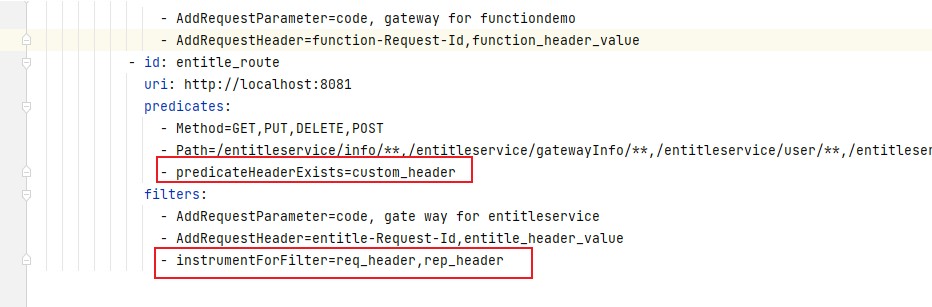
配置文件方式:格式"静态方法名(首字母大写小写都可)=参数值"
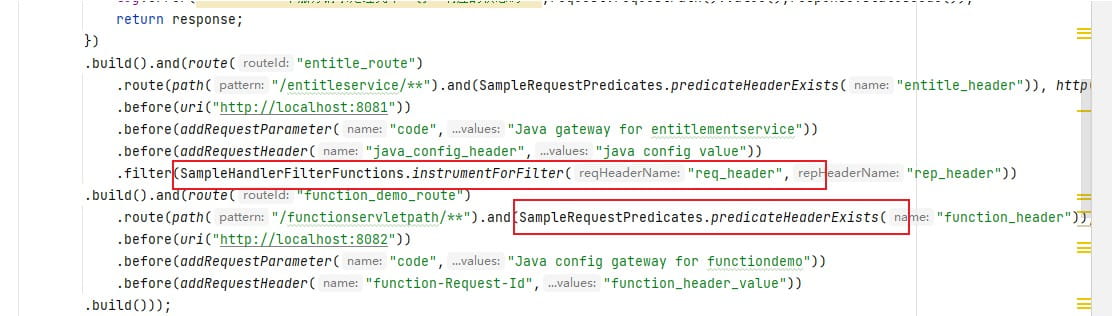
java编程方式:直接调用过滤器或谓词方法即可
十、效果验证(配置文件方式的路由效果)
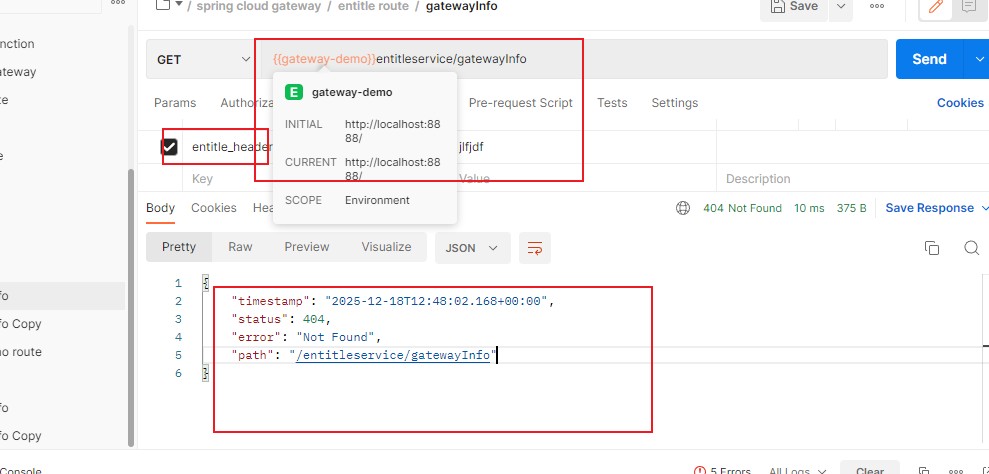
未配置指定请求头:访问404
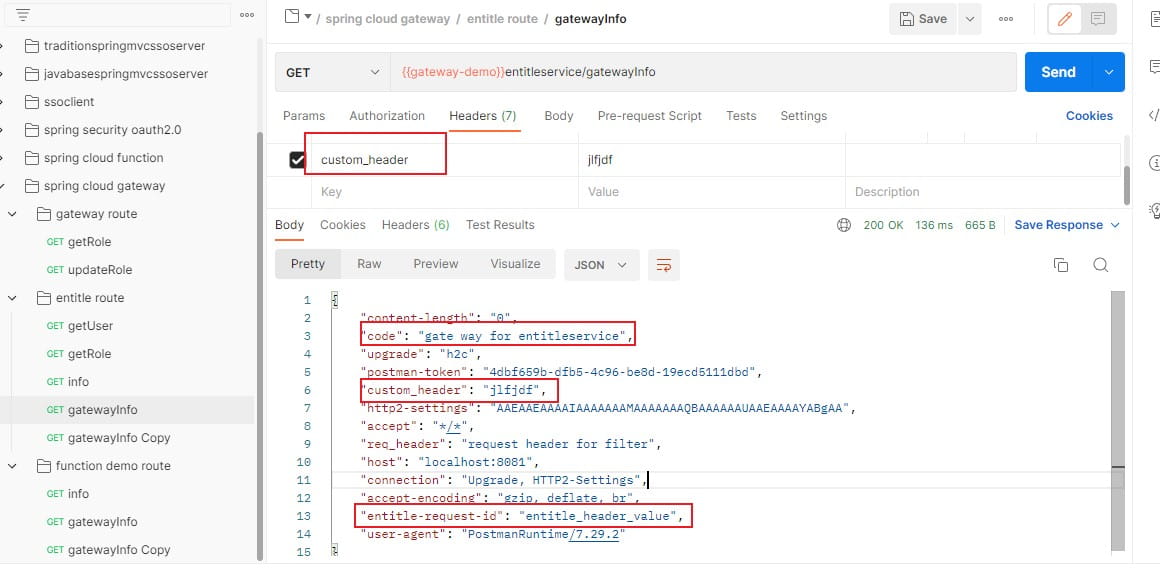
配置指定请求头:验证自定义的过滤器,谓词等效果
十一、一些疑问、困惑的解释
- 配置中的uri是干嘛的?
解释:处理转发过来的请求的服务器地址 - 怎么理解网关?
解释:将匹配(含你定义的请求路径、携带了某个请求头、请求参数等)你谓词(predicate)的请求经过一系列处理(过滤器的路径重写、添加请求头、参数等)后转给你指定的处理器(可能是访问的服务地址,可能是你指定处理该请求的一个方法)做处理,是请求访问的守门员。
总结
到此这篇关于spring cloud gateway(web mvc)的使用全集的文章就介绍到这了,更多相关spring cloud gateway使用内容请搜索代码网以前的文章或继续浏览下面的相关文章希望大家以后多多支持代码网!






发表评论