
 我要评论
我要评论前言
在工业自动化、物联网和嵌入式系统中,串口通信仍然扮演着不可替代的角色。尽管网络通信技术发展迅速,但在一些对稳定性、实时性要求较高的场景中,串口通信依然具有广泛的应用基础。
c# 语言通过 system.io.ports 命名空间中的 serialport 类,为开发者提供了便捷的串口编程接口。本文将从基础使用出发,深入讲解 serialport 类的属性、事件处理、异常捕获及 winform 中的实际应用,帮助开发开发稳定、安全的串口通信程序。
一、serialport 类
1、serialport 类的基本属性与构造函数
c# 提供了 serialport 类用于串口通信,它支持多种构造函数。一个完整的构造函数如下:
public serialport(
    string portname,
    int baudrate,
    parity parity,
    int databits,
    stopbits stopbits
)
例如,设置串口为 com1、波特率 9600、无奇偶校验、数据位 8 和停止位 1 的代码如下:
serialport serialport = new serialport("com1", 9600, parity.none, 8, stopbits.one);
2、属性说明
| 属性名称 | 描述 | 常用取值 |
|---|---|---|
| portname | 串口号,如 "com1"、"com2" | 具体的系统端口号 |
| baudrate | 数据传输速率 | 9600、115200 等 |
| parity | 奇偶校验 | none、even、odd |
| databits | 每个数据帧的位数 | 8 |
| stopbits | 数据帧结束标志 | one、two |
| handshake | 数据传输时的流控制措施 | none、xonxoff、requesttosend |
| readtimeout | 读取数据的超时时间 | 毫秒数,如 500 |
| writetimeout | 写入数据的超时时间 | 毫秒数,如 500 |
| ctsholding | true 表示对方设备已准备好接收数据 | true、false,需硬件 cts 支持 |
| cdholding | true 表示检测到载波信号 | true、false,需硬件 cd 支持 |
二、串口事件:数据接收与 ui 更新
在串口通信中,数据接收是核心环节。serialport 类通过 datareceived 事件实现异步接收。在 winform 应用中,事件处理函数运行在后台线程,不能直接更新 ui 控件。为此,应使用 begininvoke 方法进行异步更新,避免阻塞主线程。
public delegate void updateuidelegate(byte[] data);

private void comm_datareceived(object sender, serialdatareceivedeventargs e)
{
    byte[] receiveddata = new byte[8];
    try
    {
        serialport.read(receiveddata, 0, 6);
        this.begininvoke(new updateuidelegate(updateui), receiveddata);
    }
    catch (timeoutexception ex)
    {
        messagebox.show("超时:" + ex.message);
    }
}

private void updateui(byte[] data)
{
    string receivedstr = system.text.encoding.default.getstring(data);
    this.textboxdata.text = receivedstr;
}
三、串口的打开、关闭与参数配置
1、打开串口
打开串口前应确保参数配置完成,并进行异常捕获:
try
{
    serialport.open();
}
catch (unauthorizedaccessexception ex)
{
    messagebox.show("权限不足或串口正在使用:" + ex.message);
}
catch (ioexception ex)
{
    messagebox.show("i/o错误:" + ex.message);
}
2、关闭串口与安全退出
关闭串口时,若存在未完成的线程操作,可能导致死锁。
建议使用标志变量控制流程:
private bool isreceiving = false;
private bool istryingtoclose = false;

public void safecloseserialport()
{
    istryingtoclose = true;
    while (isreceiving)
    {
        system.windows.forms.application.doevents();
    }
    serialport.close();
}
3、参数配置示例
serialport serialport = new serialport();
serialport.portname = "com5";
serialport.baudrate = 115200;
serialport.parity = parity.none;
serialport.databits = 8;
serialport.stopbits = stopbits.one;
serialport.handshake = handshake.none;
serialport.readtimeout = 500;
serialport.writetimeout = 500;
四、常见异常处理策略
1、端口占用与权限问题
try
{
    serialport.open();
}
catch (unauthorizedaccessexception ex)
{
    messagebox.show("串口访问权限不足:" + ex.message);
}
catch (ioexception ex)
{
    messagebox.show("串口可能不存在或被占用:" + ex.message);
}
2、超时异常处理
try
{
    byte[] buffer = new byte[serialport.bytestoread];
    int bytesread = serialport.read(buffer, 0, buffer.length);
}
catch (timeoutexception ex)
{
    messagebox.show("数据读取超时:" + ex.message);
}
3、未打开串口的操作
if (!serialport.isopen)
{
    messagebox.show("串口尚未打开,请先调用 open() 方法。");
    return;
}
4、ctsholding 与 cdholding 支持
public static bool ishardwareflowcontrolsupported(serialport port)
{
    try
    {
        bool originalrts = port.rtsenable;
        bool originaldtr = port.dtrenable;

        port.rtsenable = false;
        thread.sleep(10);
        bool ctslow = port.ctsholding;

        port.rtsenable = true;
        thread.sleep(10);
        bool ctshigh = port.ctsholding;

        port.rtsenable = originalrts;
        port.dtrenable = originaldtr;

        return ctslow != ctshigh;
    }
    catch
    {
        return false;
    }
}
五、winform 环境下串口通信的实现示例
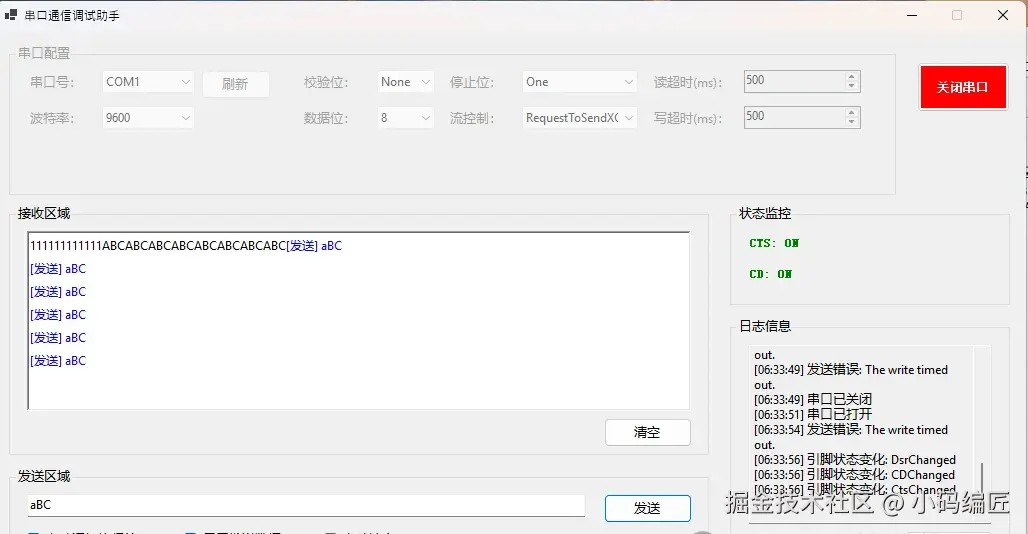
以下是一个完整的 winform 示例界面和核心代码结构:
using system.io.ports;
using timer = system.windows.forms.timer;

namespace appserialportexplained
{
    public partial class form1 : form
    {
        private serialport serialport = new serialport();
        private timer statustimer = new timer();

        public form1()
        {
            initializecomponent();
            refreshportlist();
            comboboxbaud.items.addrange(new object[] { "1200", "2400", "4800", "9600", "19200", "38400", "57600", "115200" });
            comboboxbaud.selectedindex = 3;
            comboboxparity.items.addrange(new object[] { "none", "even", "odd", "mark", "space" });
            comboboxparity.selectedindex = 0;
            comboboxdatabits.items.addrange(new object[] { "5", "6", "7", "8" });
            comboboxdatabits.selectedindex = 3;
            comboboxstopbits.items.addrange(new object[] { "one", "two", "onepointfive" });
            comboboxstopbits.selectedindex = 0;
            comboboxhandshake.items.addrange(new object[] { "none", "xonxoff", "requesttosend", "requesttosendxonxoff" });
            comboboxhandshake.selectedindex = 0;
            numericupdownreadtimeout.value = 500;
            numericupdownwritetimeout.value = 500;
            serialport.datareceived += serialport_datareceived;
            serialport.errorreceived += serialport_errorreceived;
            serialport.pinchanged += serialport_pinchanged;
            initializetimer();
        }

        private void initializetimer()
        {
            statustimer.interval = 100;
            statustimer.tick += statustimer_tick;
        }

        private void refreshportlist()
        {
            string selectedport = comboboxport.text;
            comboboxport.items.clear();
            comboboxport.items.addrange(serialport.getportnames());
            if (comboboxport.items.count > 0)
            {
                if (comboboxport.items.contains(selectedport))
                    comboboxport.text = selectedport;
                else
                    comboboxport.selectedindex = 0;
            }
        }

        private void buttonrefresh_click(object sender, eventargs e)
        {
            refreshportlist();
        }

        private void buttonopen_click(object sender, eventargs e)
        {
            if (!serialport.isopen)
            {
                try
                {
                    serialport.portname = comboboxport.text;
                    serialport.baudrate = int.parse(comboboxbaud.text);
                    switch (comboboxparity.text)
                    {
                        case "none": serialport.parity = parity.none; break;
                        case "even": serialport.parity = parity.even; break;
                        case "odd": serialport.parity = parity.odd; break;
                        case "mark": serialport.parity = parity.mark; break;
                        case "space": serialport.parity = parity.space; break;
                    }
                    serialport.databits = int.parse(comboboxdatabits.text);
                    switch (comboboxstopbits.text)
                    {
                        case "one": serialport.stopbits = stopbits.one; break;
                        case "two": serialport.stopbits = stopbits.two; break;
                        case "onepointfive": serialport.stopbits = stopbits.onepointfive; break;
                    }
                    serialport.handshake = (handshake)enum.parse(typeof(handshake), comboboxhandshake.text.replace("xonxoff", "xonxoff"));
                    serialport.readtimeout = (int)numericupdownreadtimeout.value;
                    serialport.writetimeout = (int)numericupdownwritetimeout.value;
                    serialport.open();
                }
                catch (exception ex)
                {
                    messagebox.show("打开串口失败:" + ex.message);
                }
            }
        }
    }
}
效果预览
六、常见问题与解决方案
在实际开发过程中,使用 serialport 类时会遇到许多常见问题,下面列举并详细介绍解决方案:
死锁问题与 ui 更新阻塞
在调用 serialport.close() 时,如果数据接收线程仍在运行,采用 invoke 调用 ui 更新方法会导致同步等待,最终引起死锁问题。解决这一问题的方法是改为使用 begininvoke 进行异步调用,以避免线程阻塞。
串口线程安全性问题
在多线程环境下,数据接收线程与 ui 主线程可能同时访问共享资源,若不加保护,容易引起数据竞争问题。通常的解决办法是采用标志控制(如 isreceiving 和 istryingtoclose)以及使用 application.doevents() 循环确保所有后台线程结束后再关闭串口。
异常捕获不足
许多开发在编写串口通信代码时,往往忽略了对各种异常(超时、i/o 错误、未打开串口等)的充分捕获。应在关键操作(如 open、read、write)处使用 try-catch 结构,将异常信息反馈给用户,并记录日志以便后续分析。
串口数据粘包或格式不正确
在数据连续传输的场景中,串口可能会因为数据粘包的问题导致解析错误。为解决这一问题,建议在数据传输协议中明确数据边界,如采用特定的分隔符,或者在数据头部增加包长度信息,然后在接收时进行数据拆包解析。
总结
通过对 serialport 类的详细解析,本文展示了如何在 winform 环境下正确设置串口参数、打开关闭串口以及处理常见的异常情况。合理的异常捕获、线程安全机制以及 ui 数据更新策略,不仅提高了应用的稳定性,也为编写高质量串口通信程序提供了有效的技术支持。
在工业自动化、嵌入式设备通信等领域,串口通信依然是不可替代的技术手段。随着国产软硬件生态的不断完善,开发在串口通信方面的实践经验也日益丰富。面对未来不断变化的硬件通信需求,开发应继续关注异常自愈和智能数据解析技术的进步,为行业应用提供更全面、可靠的解决方案。
以上就是c# serialport类实现串口通信的实战指南的详细内容,更多关于c# serialport串口通信的资料请关注代码网其它相关文章!





发表评论