
 我要评论
我要评论websocket 在 spring boot 中的实战解析:实时通信的技术利器
一、引言:为什么我们需要 websocket?
在传统的 web 应用中,客户端(浏览器)与服务器之间的通信是 请求-响应 模式:客户端发起请求,服务器处理后返回结果。这种模式适用于大多数场景,但在需要 实时双向通信 的场景下(如聊天室、股票行情、在线协作、游戏等),频繁轮询(polling)或长轮询(long polling)会带来高延迟、高开销的问题。
websocket 协议应运而生——它提供了一种全双工、低延迟、持久化的通信通道,允许服务器主动向客户端推送数据,彻底改变了 web 实时交互的格局。
在 spring boot 生态中,通过 spring-boot-starter-websocket 模块,我们可以轻松集成 websocket,并结合 stomp(simple text-oriented messaging protocol)实现更高级的消息路由与订阅机制。
1.1 从“轮询”到“长连接”的进化史
在websocket出现之前,实现实时通信主要靠这些“土办法”:
| 技术方案 | 工作原理 | 缺点 |
|---|---|---|
| 短轮询 | 客户端每隔几秒问一次:“有新消息吗?” | 浪费带宽,实时性差 |
| 长轮询 | 客户端问“有新消息吗?”,服务器hold住,有消息才回复 | 连接占用时间长,服务器压力大 |
| sse | 服务器单向推送,客户端只能接收 | 单向通信,功能有限 |
websocket的登场改变了游戏规则:
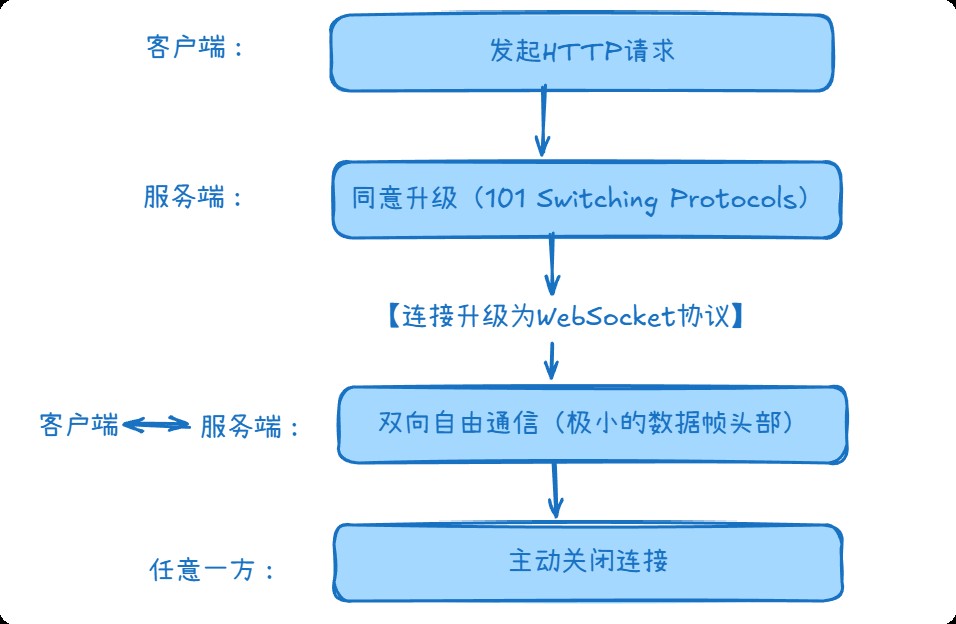
- 一次握手,持久连接:建立连接后,双向通道一直打开
- 服务端主动推送:服务器想什么时候发就什么时候发
- 极低的通信开销:没有http头部的重复传输
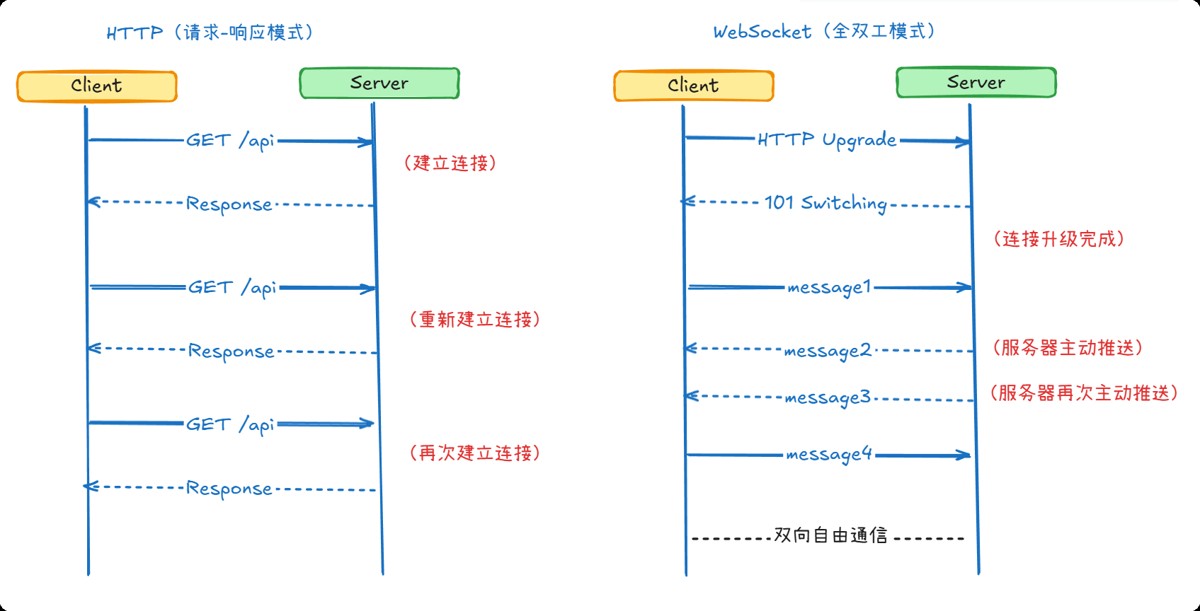
1.2 websocket vs http:本质区别
http交互流程(像发短信):
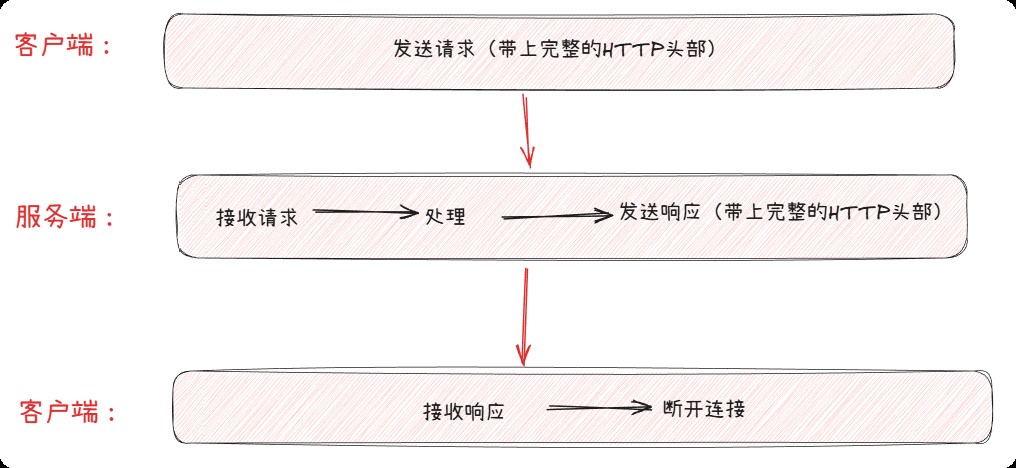
每次请求都要重复:建立tcp连接 → tls握手 → 发送http头部 → 传输数据 → 断开连接
websocket交互流程(像打电话):
二者的关键区别:
二、spring boot 中的 websocket 技术栈
spring 对 websocket 的支持分为两个层次:
| 层级 | 技术 | 说明 |
|---|---|---|
| 底层 | javax.websocket 或 spring 原生 websocket | 直接处理原始 websocket 消息 |
| 高层 | stomp over websocket | 基于消息代理的发布/订阅模型,更易开发 |
✅ 推荐使用 stomp:它提供了类似 jms 的语义(目的地、订阅、广播),适合复杂业务场景。
2.1 核心注解与类
| 组件 | 作用 |
|---|---|
@enablewebsocketmessagebroker | 启用 websocket 消息代理 |
websocketmessagebrokerconfigurer | 配置 stomp 端点与消息代理 |
@messagemapping | 映射客户端发送到特定路径的消息 |
simpmessagingtemplate | 服务端主动向客户端推送消息 |
2.2 三步快速集成
第一步:添加依赖
<dependency>
    <groupid>org.springframework.boot</groupid>
    <artifactid>spring-boot-starter-websocket</artifactid>
</dependency>
第二步:配置websocket
@configuration
@enablewebsocket
public class websocketconfig implements websocketconfigurer {
    @override
    public void registerwebsockethandlers(websockethandlerregistry registry) {
        // 注册处理器,指定连接路径
        registry.addhandler(mywebsockethandler(), "/ws")
                .setallowedorigins("*")  // 生产环境要限制具体域名
                .withsockjs();  // 为不支持websocket的浏览器提供降级方案
    }
    @bean
    public websockethandler mywebsockethandler() {
        return new mywebsockethandler();
    }
}
第三步:实现核心处理器
@component
public class mywebsockethandler extends textwebsockethandler {
    // 保存所有活跃连接
    private static final map<string, websocketsession> sessions =
        new concurrenthashmap<>();
    @override
    public void afterconnectionestablished(websocketsession session) {
        // 连接建立时调用
        string userid = extractuserid(session);
        sessions.put(userid, session);
        log.info("用户 {} 连接成功,当前在线: {} 人", userid, sessions.size());
        // 发送欢迎消息
        session.sendmessage(new textmessage("连接成功!"));
    }
    @override
    protected void handletextmessage(websocketsession session,
                                     textmessage message) {
        // 处理客户端发送的消息
        string payload = message.getpayload();
        log.info("收到消息: {}", payload);
        // 处理业务逻辑,比如广播或定向回复
        handlemessage(session, payload);
    }
    @override
    public void afterconnectionclosed(websocketsession session,
                                      closestatus status) {
        // 连接关闭时调用
        string userid = extractuserid(session);
        sessions.remove(userid);
        log.info("用户 {} 断开连接,原因: {}", userid, status);
    }
}
2.3 进阶:使用stomp协议
2.3.1 什么是stomp?
stomp(simple text oriented messaging protocol)是一个简单的文本协议,它为websocket提供了更高级的消息模式。如果说原始的websocket是"裸奔",那么stomp就是给它穿上了"协议的外衣"。
stomp的核心概念:
- destination(目的地):消息发送的目标地址
- subscribe(订阅):客户端订阅某个目的地
- send(发送):客户端向目的地发送消息
- message(消息):服务器向客户端推送消息
2.3.2 stomp协议结构
一个简单的stomp帧示例:
send
destination:/app/chat
content-type:application/json
content-length:23
{"text":"hello world!"}
响应帧:
message
destination:/topic/chat
content-type:application/json
content-length:45
subscription:sub-0
message-id:msg-123
{"user":"tom","text":"hello world!"}
2.3.3 springboot中的stomp配置
@configuration
@enablewebsocketmessagebroker  // 启用stomp消息代理
public class websocketstompconfig implements websocketmessagebrokerconfigurer {
    @override
    public void registerstompendpoints(stompendpointregistry registry) {
        // 注册stomp端点
        registry.addendpoint("/ws-stomp")
                .setallowedorigins("*")
                .withsockjs();  // sockjs支持
    }
    @override
    public void configuremessagebroker(messagebrokerregistry registry) {
        // 配置消息代理
        registry.enablesimplebroker("/topic", "/queue");  // 客户端订阅的前缀
        registry.setapplicationdestinationprefixes("/app");  // 客户端发送消息的前缀
        registry.setuserdestinationprefix("/user");  // 用户私信前缀
    }
}
2.3.4 stomp控制器示例
@controller
public class chatcontroller {
    // 处理发送到/app/chat的消息
    @messagemapping("/chat")
    @sendto("/topic/chat")  // 广播给所有订阅/topic/chat的客户端
    public chatmessage handlechatmessage(chatmessage message) {
        message.settimestamp(localdatetime.now());
        log.info("收到聊天消息: {}", message);
        return message;
    }
    // 处理私信
    @messagemapping("/private")
    public void sendprivatemessage(@payload privatemessage message,
                                   simpmessageheaderaccessor headeraccessor) {
        // 获取发送者
        string sender = headeraccessor.getuser().getname();
        // 使用convertandsendtouser发送给特定用户
        simpmessagingtemplate.convertandsendtouser(
            message.getrecipient(),  // 接收者用户名
            "/queue/private",        // 用户私信队列
            new privatemessage(sender, message.getrecipient(), message.getcontent())
        );
    }
    // 处理订阅通知
    @eventlistener
    public void handlesessionsubscribe(sessionsubscribeevent event) {
        stompheaderaccessor headers = stompheaderaccessor.wrap(event.getmessage());
        string destination = headers.getdestination();
        string sessionid = headers.getsessionid();
        log.info("session {} 订阅了 {}", sessionid, destination);
    }
}
2.4.5 前端stomp客户端示例
// 连接stomp服务器
const socket = new sockjs('/ws-stomp');
const stompclient = stomp.over(socket);
// 连接成功回调
stompclient.connect({}, function(frame) {
    console.log('connected: ' + frame);
    // 订阅公共聊天频道
    stompclient.subscribe('/topic/chat', function(message) {
        const chatmsg = json.parse(message.body);
        showmessage(chatmsg);
    });
    // 订阅个人私信队列
    stompclient.subscribe('/user/queue/private', function(message) {
        const privatemsg = json.parse(message.body);
        showprivatemessage(privatemsg);
    });
});
// 发送聊天消息
function sendmessage() {
    const message = {
        content: document.getelementbyid('message').value,
        sender: currentuser
    };
    stompclient.send("/app/chat", {}, json.stringify(message));
}
// 发送私信
function sendprivatemessage(touser, content) {
    const message = {
        recipient: touser,
        content: content
    };
    stompclient.send("/app/private", {}, json.stringify(message));
}
三、websocket的核心技术要点
3.1 连接生命周期管理
连接生命周期包括四个关键阶段,每个阶段需要处理不同的业务逻辑:
建立连接时(afterconnectionestablished)需要处理:
- 验证用户身份 - 检查token或session,确保连接合法性
- 初始化会话状态 - 创建用户会话上下文,保存必要信息
- 通知相关服务用户上线 - 更新用户在线状态,通知好友
- 发送未读消息 - 推送离线期间积累的消息
@component
public class websocketlifecyclemanager {
    public void onopen(string sessionid, string userid) {
        // 1. 验证用户身份
        if (!userservice.validatetoken(userid, gettoken(sessionid))) {
            closeconnection(sessionid, closestatus.not_acceptable);
            return;
        }
        // 2. 初始化会话状态
        sessioncontext context = new sessioncontext(userid, sessionid);
        sessionstore.save(sessionid, context);
        // 3. 通知相关服务用户上线
        presenceservice.useronline(userid);
        notifyfriends(userid, true); // 通知好友用户上线
        // 4. 发送未读消息
        list<message> unreadmessages = messageservice.getunreadmessages(userid);
        unreadmessages.foreach(msg -> sendmessage(sessionid, msg));
    }
}
消息处理时(handletextmessage)需要处理:
- 消息格式验证 - 检查json格式、必要字段
- 业务逻辑处理 - 根据消息类型执行不同业务
- 消息持久化 - 保存到数据库,确保不丢失
- 响应或转发 - 回复发送者或转发给其他用户
public void onmessage(string sessionid, string rawmessage) {
    // 1. 消息格式验证
    message message;
    try {
        message = jsonmapper.readvalue(rawmessage, message.class);
        validatemessage(message);
    } catch (exception e) {
        senderror(sessionid, "消息格式错误");
        return;
    }
    // 2. 业务逻辑处理
    switch (message.gettype()) {
        case "chat":
            handlechatmessage(sessionid, message);
            break;
        case "command":
            handlecommand(sessionid, message);
            break;
        // ... 其他消息类型
    }
    // 3. 消息持久化
    messageservice.savemessage(message);
    // 4. 响应或转发
    if (message.needresponse()) {
        sendresponse(sessionid, createresponse(message));
    }
    if (message.needforward()) {
        forwardmessage(message.gettarget(), message);
    }
}
连接关闭时(afterconnectionclosed)需要处理:
- 清理会话资源 - 释放内存,关闭相关资源
- 更新用户状态为离线 - 标记用户下线时间
- 记录断开原因 - 用于分析连接稳定性
- 通知相关服务 - 通知好友用户下线
public void onclose(string sessionid, closestatus status) {
    // 1. 清理会话资源
    sessioncontext context = sessionstore.remove(sessionid);
    if (context != null) {
        context.cleanup();
    }
    // 2. 更新用户状态为离线
    string userid = getuseridfromsession(sessionid);
    presenceservice.useroffline(userid);
    // 3. 记录断开原因
    connectionlogservice.logdisconnect(sessionid, userid, status.getcode(), status.getreason());
    // 4. 通知相关服务
    notifyfriends(userid, false); // 通知好友用户下线
    cleanupusersubscriptions(userid); // 清理用户的所有订阅
}
错误时(handletransporterror)需要处理:
- 记录错误日志 - 详细记录异常信息
- 尝试恢复连接 - 对于可恢复错误尝试重连
- 通知监控系统 - 触发告警,人工干预
- 优雅降级 - 切换到备用通信方式
public void onerror(string sessionid, throwable error) {
    // 1. 记录错误日志
    log.error("websocket连接错误 sessionid: {}", sessionid, error);
    // 2. 尝试恢复连接(如果是网络波动等临时错误)
    if (isrecoverableerror(error)) {
        schedulereconnection(sessionid);
    } else {
        // 3. 通知监控系统
        alertservice.sendalert("websocket连接异常",
            "session: " + sessionid + ", error: " + error.getmessage());
        // 4. 优雅降级
        fallbacktohttp(sessionid, getuseridfromsession(sessionid));
        closeconnection(sessionid, closestatus.server_error);
    }
}
3.2 心跳机制与健康检查
@configuration
public class heartbeatconfig {
    @bean
    public servletservercontainerfactorybean createwebsocketcontainer() {
        servletservercontainerfactorybean container =
            new servletservercontainerfactorybean();
        // 重要配置
        container.setmaxsessionidletimeout(300000l);     // 5分钟无活动断开
        container.setmaxtextmessagebuffersize(8192);     // 最大消息大小
        container.setmaxbinarymessagebuffersize(8192);
        container.setasyncsendtimeout(5000l);           // 异步发送超时
        return container;
    }
}
// 心跳检测实现
@component
public class heartbeatservice {
    private final scheduledexecutorservice scheduler =
        executors.newscheduledthreadpool(1);
    @postconstruct
    public void startheartbeat() {
        scheduler.scheduleatfixedrate(() -> {
            checkconnections();
            sendping();
        }, 30, 30, timeunit.seconds);  // 每30秒检测一次
    }
    private void checkconnections() {
        // 检查所有连接的健康状态
        // 移除僵尸连接
        // 记录连接统计信息
    }
    private void sendping() {
        // 向所有活跃连接发送ping消息
        // 处理未响应pong的连接
    }
}
3.3 消息可靠性与重连机制
public class reliablemessageservice {
    // 消息确认机制
    public void sendwithack(string sessionid, string message) {
        string msgid = generatemsgid();
        // 发送消息
        websockethandler.send(sessionid, wrapmessage(msgid, message));
        // 启动确认计时器
        scheduler.schedule(() -> {
            if (!isacked(msgid)) {
                log.warn("消息 {} 未确认,尝试重发", msgid);
                retrysend(sessionid, msgid, message);
            }
        }, 5, timeunit.seconds);
    }
    // 客户端重连处理
    public void handlereconnect(string oldsessionid, string newsessionid) {
        // 1. 转移会话状态
        // 2. 重发未确认消息
        // 3. 恢复订阅关系
        // 4. 更新会话映射
    }
    // 消息去重
    public boolean isduplicate(string msgid) {
        // 基于redis或本地缓存实现
        // 防止重复处理消息
        return false;
    }
}
四、实战:写一个监控springboot应用的实时监控告警系统
spring insight 是我的一个开源项目,目前正在紧张的开发中。项目地址:https://github.com/iweidujiang/spring-insight,欢迎关注,顺便求个 star,哈哈。
在监控诊断类工具中,websocket 可以:
- 实时告警:第一时间发现问题
- 动态拓扑:实时展示微服务依赖变化
- 性能监控:实时推送指标数据
- 在线诊断:实时查看日志和跟踪信息
例,实时统计当前监控信息:
/**
 * 广播实时统计信息(每5秒一次)
 */
@scheduled(fixeddelay = 5000)
public void broadcaststats() {
    if (connectioncount.get() == 0) return;
    try {
        // 获取最新数据
        var collectorstats = datacollectorservice.getcollectorstats();
        var servicestats = datacollectorservice.getservicestats();
        var erroranalysis = datacollectorservice.geterroranalysis(1); // 最近1小时
        // 构建消息
        map<string, object> data = new hashmap<>();
        data.put("collectorstats", collectorstats);
        data.put("servicestats", servicestats.sublist(0, math.min(5, servicestats.size())));
        data.put("erroranalysis", erroranalysis.sublist(0, math.min(5, erroranalysis.size())));
        data.put("timestamp", instant.now().tostring());
        data.put("cachesize", datacollectorservice.getcachesize());
        websocketmessage message = new websocketmessage();
        message.settype("stats_update");
        message.setdata(data);
        // 广播消息
        messagingtemplate.convertandsend("/topic/stats", message);
        log.debug("广播实时统计信息");
    } catch (exception e) {
        log.error("广播实时统计信息失败", e);
    }
}
五、其他典型使用场景
| 场景 | 说明 | websocket 优势 |
|---|---|---|
| 在线客服/聊天系统 | 用户与客服实时对话 | 低延迟、支持多房间 |
| 股票/金融行情推送 | 实时价格更新 | 减少服务器压力,避免轮询 |
| 协同编辑 | 多人同时编辑文档 | 实时同步操作,冲突检测 |
| 游戏状态同步 | 多人在线小游戏 | 高频消息传递,毫秒级响应 |
| iot 设备监控 | 传感器数据上报 | 长连接节省资源 |
✅ 用websocket:
- 实时双向通信需求(聊天、协作)
- 高频数据推送(监控、行情)
- 低延迟要求(游戏、实时控制)
- 服务端主动通知(告警、状态更新)
❌ 不用websocket:
- 简单的请求-响应模式(rest api足够)
- 客户端偶尔拉取数据(用http轮询)
- 单向信息流(考虑sse)
- 移动端弱网络环境(可能连接不稳定)
六、总结
websocket 是构建现代实时 web 应用的基石。spring boot 通过简洁的配置和强大的 stomp 支持,让开发者能够快速实现高性能、可扩展的双向通信系统。
记住:不是所有场景都需要 websocket。对于低频更新(如每分钟一次),传统 rest + 定时轮询可能更简单。但在高频、低延迟、事件驱动的场景下,websocket 几乎是唯一选择。
到此这篇关于websocket 在 spring boot 中的实战解析:实时通信的技术利器的文章就介绍到这了,更多相关spring boot websocket 实时通信内容请搜索代码网以前的文章或继续浏览下面的相关文章希望大家以后多多支持代码网!



发表评论