
 我要评论
我要评论一、设计思路
在wpf中创建元旦祝福动画,我们将结合多种动画元素,打造一个生动、喜庆的节日效果。主要设计思路包括:
节日主题色彩:以红色、金色为主色调,象征新年的喜庆与希望
核心动画元素:
- 渐变显示的新年祝福文字
- 飘落的雪花/彩屑动画
- 绽放的烟花效果
- 3d旋转的"2026"年份数字
交互体验:支持用户点击触发特定动画效果
二、完整wpf实现
下面是完整的xaml和c#代码实现:
<window
    x:class="yd_animal.mainwindow"
    xmlns="http://schemas.microsoft.com/winfx/2006/xaml/presentation"
    xmlns:x="http://schemas.microsoft.com/winfx/2006/xaml"
    xmlns:d="http://schemas.microsoft.com/expression/blend/2008"
    xmlns:local="clr-namespace:yd_animal"
    xmlns:mc="http://schemas.openxmlformats.org/markup-compatibility/2006"
    title="元旦快乐 2026"
    width="1000"
    height="700"
    background="black"
    windowstartuplocation="centerscreen"
    mc:ignorable="d">
    <window.resources>
        <!--  雪花样式  -->
        <style x:key="snowflakestyle" targettype="ellipse">
            <setter property="width" value="8" />
            <setter property="height" value="8" />
            <setter property="fill" value="white" />
            <setter property="opacity" value="0.8" />
        </style>

        <!--  烟花粒子样式  -->
        <style x:key="fireworkparticlestyle" targettype="ellipse">
            <setter property="width" value="6" />
            <setter property="height" value="6" />
            <setter property="opacity" value="0.9" />
        </style>
    </window.resources>

    <grid>
        <!--  背景渐变  -->
        <rectangle>
            <rectangle.fill>
                <lineargradientbrush startpoint="0,0" endpoint="1,1">
                    <gradientstop offset="0" color="#0c0032" />
                    <gradientstop offset="0.5" color="#190061" />
                    <gradientstop offset="1" color="#240090" />
                </lineargradientbrush>
            </rectangle.fill>
        </rectangle>

        <!--  星星背景  -->
        <canvas x:name="starscanvas" />

        <!--  雪花容器  -->
        <canvas x:name="snowcanvas" />

        <!--  烟花容器  -->
        <canvas x:name="fireworkscanvas" />

        <!--  主内容区域  -->
        <grid>
            <grid.rowdefinitions>
                <rowdefinition height="*" />
                <rowdefinition height="auto" />
                <rowdefinition height="*" />
            </grid.rowdefinitions>

            <!--  顶部祝福语  -->
            <viewport3d x:name="year3dviewport" grid.row="0">
                <!--  3d年份动画  -->
            </viewport3d>

            <!--  中央祝福文字  -->
            <stackpanel
                grid.row="1"
                horizontalalignment="center"
                verticalalignment="center">
                <textblock
                    x:name="maingreeting"
                    margin="0,20"
                    horizontalalignment="center"
                    fontsize="72"
                    fontweight="bold"
                    foreground="transparent"
                    text="元旦快乐">
                    <textblock.effect>
                        <dropshadoweffect
                            blurradius="20"
                            shadowdepth="0"
                            color="gold" />
                    </textblock.effect>
                </textblock>

                <textblock
                    x:name="subgreeting"
                    margin="0,10"
                    horizontalalignment="center"
                    fontsize="36"
                    foreground="transparent"
                    text="新年新气象,好运常相伴">
                    <textblock.effect>
                        <dropshadoweffect
                            blurradius="15"
                            shadowdepth="0"
                            color="lightcoral" />
                    </textblock.effect>
                </textblock>
            </stackpanel>

            <!--  底部交互区域  -->
            <stackpanel
                grid.row="2"
                margin="0,0,0,50"
                horizontalalignment="center"
                verticalalignment="bottom"
                orientation="horizontal">
                <button
                    x:name="fireworksbutton"
                    width="120"
                    height="40"
                    margin="10"
                    background="#ff4081"
                    click="fireworksbutton_click"
                    content="绽放烟花"
                    fontweight="bold"
                    foreground="white" />

                <button
                    x:name="snowbutton"
                    width="120"
                    height="40"
                    margin="10"
                    background="#2196f3"
                    click="snowbutton_click"
                    content="飘落雪花"
                    fontweight="bold"
                    foreground="white" />

                <button
                    x:name="resetbutton"
                    width="120"
                    height="40"
                    margin="10"
                    background="#4caf50"
                    click="resetbutton_click"
                    content="重置动画"
                    fontweight="bold"
                    foreground="white" />
            </stackpanel>
        </grid>

        <!--  倒计时显示  -->
        <border
            x:name="countdownpanel"
            margin="0,20,0,0"
            padding="20,10"
            horizontalalignment="center"
            verticalalignment="top"
            background="#80000000"
            cornerradius="10"
            visibility="collapsed">
            <textblock
                x:name="countdowntext"
                fontsize="48"
                fontweight="bold"
                foreground="white"
                text="3" />
        </border>
    </grid>
</window>
后台代码:
using system.text;
using system.windows;
using system.windows.controls;
using system.windows.data;
using system.windows.documents;
using system.windows.input;
using system.windows.media;
using system.windows.media.animation;
using system.windows.media.imaging;
using system.windows.media.media3d;
using system.windows.navigation;
using system.windows.shapes;
using system.windows.threading;

namespace yd_animal;

/// <summary>
/// interaction logic for mainwindow.xaml
/// </summary>
public partial class mainwindow : window
{
    private random random = new random();
    private list<ellipse> snowflakes = new list<ellipse>();
    private list<ellipse> fireworks = new list<ellipse>();
    private storyboard mainstoryboard = new storyboard();

    public mainwindow()
    {
        initializecomponent();
        loaded += mainwindow_loaded;
    }

    private void mainwindow_loaded(object sender, routedeventargs e)
    {
        createstarsbackground();
        initializeanimations();
        startmainanimation();
    }

    // 创建星空背景
    private void createstarsbackground()
    {
        for (int i = 0; i < 150; i++)
        {
            ellipse star = new ellipse
            {
                width = random.next(1, 4),
                height = random.next(1, 4),
                fill = brushes.white,
                opacity = random.nextdouble() * 0.5 + 0.3
            };

            canvas.setleft(star, random.nextdouble() * this.width);
            canvas.settop(star, random.nextdouble() * this.height);
            starscanvas.children.add(star);

            // 添加星星闪烁动画
            doubleanimation opacityanim = new doubleanimation
            {
                from = star.opacity * 0.5,
                to = star.opacity,
                duration = timespan.fromseconds(random.nextdouble() * 2 + 1),
                autoreverse = true,
                repeatbehavior = repeatbehavior.forever
            };
            star.beginanimation(ellipse.opacityproperty, opacityanim);
        }
    }

    // 初始化主动画
    private void initializeanimations()
    {
        // 主祝福文字渐变显示
        coloranimation maintextcoloranim = new coloranimation
        {
            from = colors.transparent,
            to = colors.gold,
            duration = timespan.fromseconds(2),
            begintime = timespan.fromseconds(0.5)
        };

        coloranimation subtextcoloranim = new coloranimation
        {
            from = colors.transparent,
            to = color.fromrgb(255, 105, 180), // 粉色
            duration = timespan.fromseconds(2),
            begintime = timespan.fromseconds(1.5)
        };

        // 创建3d年份动画
        create3dyearanimation();

        // 添加到故事板
        storyboard.settarget(maintextcoloranim, maingreeting);
        storyboard.settargetproperty(maintextcoloranim,
            new propertypath("(textblock.foreground).(solidcolorbrush.color)"));

        storyboard.settarget(subtextcoloranim, subgreeting);
        storyboard.settargetproperty(subtextcoloranim,
            new propertypath("(textblock.foreground).(solidcolorbrush.color)"));

        mainstoryboard.children.add(maintextcoloranim);
        mainstoryboard.children.add(subtextcoloranim);

        // 添加文字抖动效果
        addtextjitteranimation();
    }

    // 创建3d年份旋转动画
    private void create3dyearanimation()
    {
        // 创建3d模型
        model3dgroup yearmodel = new model3dgroup();

        // 创建数字"2026"的3d文本
        for (int i = 0; i < 4; i++)
        {
            string digit = "2026"[i].tostring();

            geometrymodel3d digitmodel = create3dtext(digit,
                new diffusematerial(new solidcolorbrush(
                    color.fromrgb((byte)(255 - i * 30), (byte)(200 - i * 20), 50))),
                new point3d(i * 2.5 - 3.75, 0, 0));

            yearmodel.children.add(digitmodel);
        }

        // 设置3d相机
        perspectivecamera camera = new perspectivecamera(
            new point3d(0, 0, 10),
            new vector3d(0, 0, -1),
            new vector3d(0, 1, 0), 45);

        // 创建光源
        ambientlight ambientlight = new ambientlight(colors.white);
        directionallight directionallight = new directionallight(colors.white,
            new vector3d(-1, -1, -1));

        yearmodel.children.add(ambientlight);
        yearmodel.children.add(directionallight);

        // 创建modelvisual3d
        modelvisual3d modelvisual = new modelvisual3d();
        modelvisual.content = yearmodel;

        // 添加到viewport3d
        year3dviewport.children.add(modelvisual);
        year3dviewport.camera = camera;

        // 添加3d旋转动画
        axisanglerotation3d rotation = new axisanglerotation3d(
            new vector3d(0, 1, 0), 0);

        rotatetransform3d rotatetransform = new rotatetransform3d(rotation);
        yearmodel.transform = rotatetransform;

        doubleanimation rotateanim = new doubleanimation
        {
            from = 0,
            to = 360,
            duration = timespan.fromseconds(20),
            repeatbehavior = repeatbehavior.forever
        };

        rotation.beginanimation(axisanglerotation3d.angleproperty, rotateanim);
    }

    // 创建3d文字
    private geometrymodel3d create3dtext(string text, material material, point3d position)
    {
        // 简化版:创建长方体代替真正的3d文字
        meshgeometry3d mesh = new meshgeometry3d();

        // 创建立方体的8个顶点
        double size = 1.0;
        point3d[] points = new point3d[]
        {
                new point3d(-size, -size, -size),
                new point3d(size, -size, -size),
                new point3d(size, size, -size),
                new point3d(-size, size, -size),
                new point3d(-size, -size, size),
                new point3d(size, -size, size),
                new point3d(size, size, size),
                new point3d(-size, size, size)
        };

        // 添加顶点
        foreach (var point in points)
        {
            mesh.positions.add(new point3d(
                point.x + position.x,
                point.y + position.y,
                point.z + position.z));
        }

        // 添加三角形面
        int[][] triangles = new int[][]
        {
                new int[] {0, 1, 2}, new int[] {2, 3, 0}, // 前面
                new int[] {1, 5, 6}, new int[] {6, 2, 1}, // 右面
                new int[] {5, 4, 7}, new int[] {7, 6, 5}, // 后面
                new int[] {4, 0, 3}, new int[] {3, 7, 4}, // 左面
                new int[] {3, 2, 6}, new int[] {6, 7, 3}, // 上面
                new int[] {4, 5, 1}, new int[] {1, 0, 4}  // 下面
        };

        foreach (var triangle in triangles)
        {
            mesh.triangleindices.add(triangle[0]);
            mesh.triangleindices.add(triangle[1]);
            mesh.triangleindices.add(triangle[2]);
        }

        return new geometrymodel3d(mesh, material);
    }

    // 添加文字抖动动画
    private void addtextjitteranimation()
    {
        doubleanimationusingkeyframes jitteranim = new doubleanimationusingkeyframes();
        jitteranim.duration = timespan.fromseconds(10);
        jitteranim.repeatbehavior = repeatbehavior.forever;

        double basey = 0;
        for (int i = 0; i <= 100; i++)
        {
            double time = i * 0.1;
            double offset = math.sin(time * 3) * 2 +
                           math.sin(time * 7) * 1;

            jitteranim.keyframes.add(
                new lineardoublekeyframe(basey + offset,
                keytime.fromtimespan(timespan.fromseconds(time))));
        }

        storyboard.settarget(jitteranim, maingreeting);
        storyboard.settargetproperty(jitteranim,
            new propertypath("(uielement.rendertransform).(translatetransform.y)"));

        // 初始化变换
        maingreeting.rendertransform = new translatetransform();
        mainstoryboard.children.add(jitteranim);
    }

    // 开始主动画
    private void startmainanimation()
    {
        // 开始倒计时
        startcountdown();

        // 延迟开始主动画
        dispatchertimer timer = new dispatchertimer
        {
            interval = timespan.fromseconds(3.2)
        };
        timer.tick += (s, e) =>
        {
            timer.stop();
            mainstoryboard.begin();
            startsnowanimation();
        };
        timer.start();
    }

    // 开始倒计时
    private void startcountdown()
    {
        countdownpanel.visibility = visibility.visible;

        int count = 3;
        dispatchertimer countdowntimer = new dispatchertimer
        {
            interval = timespan.fromseconds(1)
        };

        countdowntimer.tick += (s, e) =>
        {
            if (count > 0)
            {
                countdowntext.text = count.tostring();

                // 添加缩放动画
                scaletransform scale = new scaletransform(1, 1);
                countdowntext.rendertransform = scale;

                doubleanimation scaleanim = new doubleanimation
                {
                    from = 3,
                    to = 1,
                    duration = timespan.fromseconds(0.3)
                };
                scale.beginanimation(scaletransform.scalexproperty, scaleanim);
                scale.beginanimation(scaletransform.scaleyproperty, scaleanim);

                count--;
            }
            else
            {
                countdowntimer.stop();
                countdownpanel.visibility = visibility.collapsed;
            }
        };
        countdowntimer.start();
    }

    // 雪花动画
    private void startsnowanimation()
    {
        for (int i = 0; i < 100; i++)
        {
            createsnowflake();
        }
    }

    private void createsnowflake()
    {
        ellipse snowflake = new ellipse
        {
            width = random.next(5, 15),
            height = random.next(5, 15),
            fill = new radialgradientbrush(
                colors.white,
                color.fromargb(150, 255, 255, 255)),
            opacity = random.nextdouble() * 0.7 + 0.3
        };

        // 随机位置
        double startx = random.nextdouble() * this.width;
        canvas.setleft(snowflake, startx);
        canvas.settop(snowflake, -20);

        snowcanvas.children.add(snowflake);
        snowflakes.add(snowflake);

        // 创建动画
        doubleanimation fallanim = new doubleanimation
        {
            to = this.height + 20,
            duration = timespan.fromseconds(random.nextdouble() * 5 + 5)
        };

        doubleanimation xanim = new doubleanimation
        {
            from = startx,
            to = startx + random.nextdouble() * 100 - 50,
            duration = fallanim.duration,
            autoreverse = true
        };

        doubleanimation opacityanim = new doubleanimation
        {
            from = snowflake.opacity,
            to = 0,
            duration = fallanim.duration
        };

        // 动画完成事件
        fallanim.completed += (s, e) =>
        {
            snowcanvas.children.remove(snowflake);
            snowflakes.remove(snowflake);
            createsnowflake();
        };

        // 开始动画
        snowflake.beginanimation(canvas.topproperty, fallanim);
        snowflake.beginanimation(canvas.leftproperty, xanim);
        snowflake.beginanimation(ellipse.opacityproperty, opacityanim);
    }

    // 烟花按钮事件
    private void fireworksbutton_click(object sender, routedeventargs e)
    {
        launchfirework(random.next(100, (int)this.width - 100),
                      this.height - 100);
    }

    // 发射烟花
    private void launchfirework(double x, double y)
    {
        // 创建上升的火花
        ellipse spark = new ellipse
        {
            width = 8,
            height = 8,
            fill = brushes.white,
            opacity = 1
        };

        canvas.setleft(spark, x);
        canvas.settop(spark, this.height);
        fireworkscanvas.children.add(spark);

        // 上升动画
        doubleanimation riseanim = new doubleanimation
        {
            to = y,
            duration = timespan.fromseconds(1)
        };

        riseanim.completed += (s, e) =>
        {
            fireworkscanvas.children.remove(spark);
            createfireworkexplosion(x, y);
        };

        spark.beginanimation(canvas.topproperty, riseanim);
    }

    // 创建烟花爆炸效果
    private void createfireworkexplosion(double x, double y)
    {
        int particles = 30;
        color[] colors = { colors.red, colors.gold, colors.orange,
                              colors.pink, colors.cyan };

        for (int i = 0; i < particles; i++)
        {
            ellipse particle = new ellipse
            {
                width = 6,
                height = 6,
                fill = new solidcolorbrush(colors[random.next(colors.length)]),
                opacity = 0.9
            };

            canvas.setleft(particle, x);
            canvas.settop(particle, y);
            fireworkscanvas.children.add(particle);
            fireworks.add(particle);

            // 计算随机方向
            double angle = random.nextdouble() * math.pi * 2;
            double distance = random.nextdouble() * 100 + 50;
            double endx = x + math.cos(angle) * distance;
            double endy = y + math.sin(angle) * distance;

            // 创建动画
            doubleanimation xanim = new doubleanimation
            {
                to = endx,
                duration = timespan.fromseconds(1)
            };

            doubleanimation yanim = new doubleanimation
            {
                to = endy,
                duration = timespan.fromseconds(1)
            };

            doubleanimation opacityanim = new doubleanimation
            {
                to = 0,
                duration = timespan.fromseconds(1)
            };

            // 动画完成事件
            opacityanim.completed += (s, e) =>
            {
                fireworkscanvas.children.remove(particle);
                fireworks.remove(particle);
            };

            // 开始动画
            particle.beginanimation(canvas.leftproperty, xanim);
            particle.beginanimation(canvas.topproperty, yanim);
            particle.beginanimation(ellipse.opacityproperty, opacityanim);
        }
    }

    // 雪花按钮事件
    private void snowbutton_click(object sender, routedeventargs e)
    {
        for (int i = 0; i < 50; i++)
        {
            createsnowflake();
        }
    }

    // 重置动画
    private void resetbutton_click(object sender, routedeventargs e)
    {
        // 清除所有动画
        mainstoryboard.stop();

        // 清除所有雪花
        foreach (var snowflake in snowflakes.tolist())
        {
            snowcanvas.children.remove(snowflake);
        }
        snowflakes.clear();

        // 清除所有烟花
        foreach (var firework in fireworks.tolist())
        {
            fireworkscanvas.children.remove(firework);
        }
        fireworks.clear();

        // 重置文字颜色
        maingreeting.foreground = new solidcolorbrush(colors.transparent);
        subgreeting.foreground = new solidcolorbrush(colors.transparent);

        // 重新开始动画
        initializeanimations();
        startmainanimation();
    }
}
运行效果:
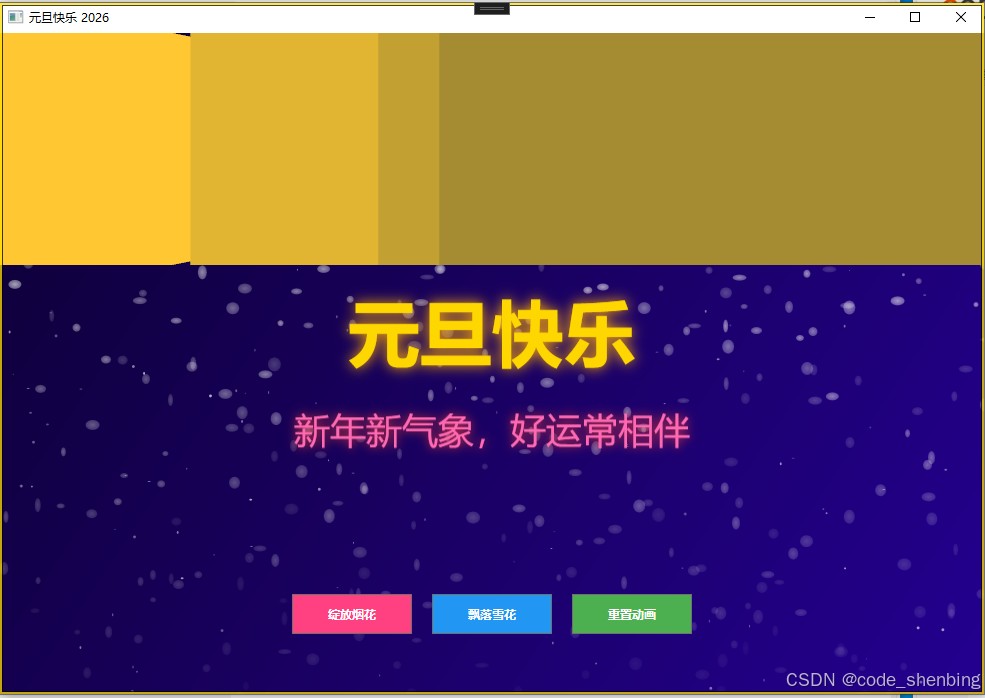
三、动画效果说明
1. 主要动画效果
- 3d年份旋转:数字"2026"在3d空间中持续旋转
- 祝福文字渐变:"元旦快乐"和"新年新气象"文字从透明逐渐显现
- 文字抖动效果:主标题有轻微的上下抖动,增加生动感
- 星空背景:随机生成的星星带有闪烁效果
- 雪花飘落:点击按钮可触发雪花飘落效果
- 烟花绽放:点击按钮可在指定位置发射烟花
2. 交互功能
- 绽放烟花按钮:在随机位置发射烟花
- 飘落雪花按钮:增加雪花飘落数量
- 重置动画按钮:重置所有动画到初始状态
四、技术要点
1. wpf动画系统
- 使用
storyboard管理复杂动画序列 - 利用
doubleanimation实现属性值动画 - 通过
keyframe动画创建更复杂的运动轨迹
2. 3d图形
- 使用wpf 3d功能创建旋转的年份数字
- 通过
viewport3d、modelvisual3d和geometrymodel3d构建3d场景
3. 视觉效果
- 利用
dropshadoweffect创建文字发光效果 - 通过渐变画刷创建丰富的色彩过渡
- 使用透明度动画实现淡入淡出效果
五、扩展建议
- 添加音效:可以为烟花和倒计时添加音效
- 更多祝福语:可以随机显示不同的元旦祝福语
- 用户自定义:允许用户输入自己的祝福语
- 导出功能:添加导出为视频或gif的功能
- 响应式设计:适配不同窗口大小的布局
这个元旦祝福动画展示了wpf强大的动画和图形功能,通过代码和设计的结合,创造出既美观又有节日氛围的动画效果。您可以根据需要调整颜色、动画速度和其他参数,创建出独一无二的元旦祝福动画。
以上就是基于wpf实现元旦祝福动画效果的详细内容,更多关于wpf元旦祝福动画的资料请关注代码网其它相关文章!


发表评论