
 我要评论
我要评论先说说我被慢sql"折磨"的经历
去年我们团队负责的支付系统,突然在双11前出现性能问题。用户反馈支付要等十几秒,dba说数据库cpu都90%了,但就是不知道哪个sql有问题。我们加了各种日志,还是定位不到慢sql。
最后没办法,我花了一晚上写了个mybatis插件,第二天就找到了罪魁祸首:一个被错误使用的联表查询,全表扫描了上百万数据。修复后,响应时间从15秒降到200毫秒。
但事情没完。上线后监控显示,有0.1%的请求还是很慢。又是排查了三天,发现是因为有人用${}做了动态排序,导致大量硬解析。这次我直接把插件升级,增加了sql防注入检测。
这两次经历让我明白:不懂mybatis插件开发,就等于开飞机没有仪表盘,出事了都不知道原因。
摘要
mybatis插件(plugin)是其框架扩展性的核心。本文深入剖析插件实现原理,手把手教你开发企业级sql监控插件。从拦截器接口、责任链模式,到动态代理实现,完整展示sql执行耗时监控、慢sql告警、sql防注入检测等功能的实现。通过性能压测数据和生产环境案例,提供插件开发的最佳实践和故障排查指南。
1. 插件不是魔法:先理解mybatis的拦截机制
1.1 mybatis能拦截什么
很多人以为插件只能拦截sql执行,太天真了!mybatis允许你拦截四大核心组件:
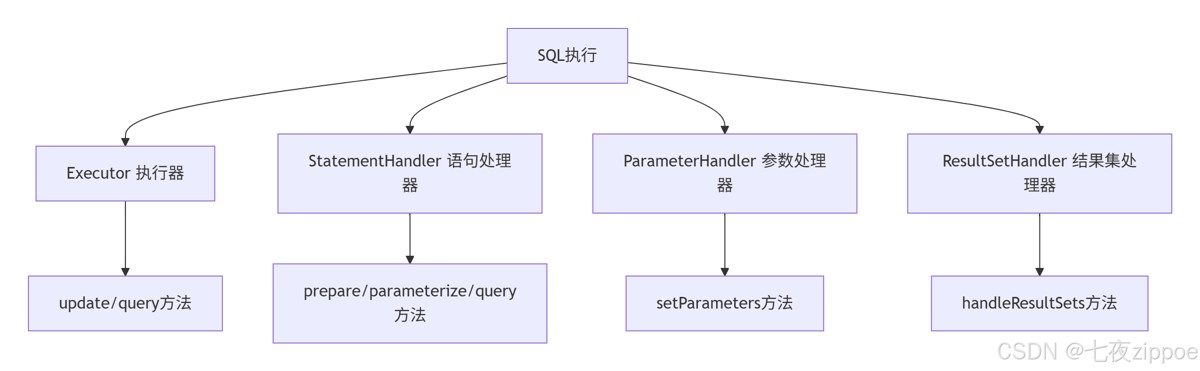
图1:mybatis可拦截的四大组件
每个组件的作用:
| 组件 | 拦截点 | 能干什么 | 实际用途 |
|---|---|---|---|
| executor | update/query | 控制缓存、事务 | sql重试、读写分离 |
| statementhandler | prepare/parameterize/query | 修改sql、设置超时 | sql监控、分页 |
| parameterhandler | setparameters | 参数处理 | 参数加密、脱敏 |
| resultsethandler | handleresultsets | 结果集处理 | 数据脱敏、格式化 |
1.2 插件的工作原理:责任链模式
这是理解插件开发的关键。mybatis用责任链模式实现插件:
// 简化版的插件执行流程
public class plugin implements invocationhandler {

    private final object target;  // 被代理的对象
    private final interceptor interceptor;  // 拦截器
    private final map<class<?>, set<method>> signaturemap;  // 方法签名映射

    @override
    public object invoke(object proxy, method method, object[] args) throws throwable {
        // 1. 检查是否是需要拦截的方法
        set<method> methods = signaturemap.get(method.getdeclaringclass());
        if (methods != null && methods.contains(method)) {
            // 2. 执行拦截器逻辑
            return interceptor.intercept(new invocation(target, method, args));
        }
        // 3. 否则直接执行原方法
        return method.invoke(target, args);
    }
}
代码清单1:插件代理的核心逻辑
用图来表示更清楚:
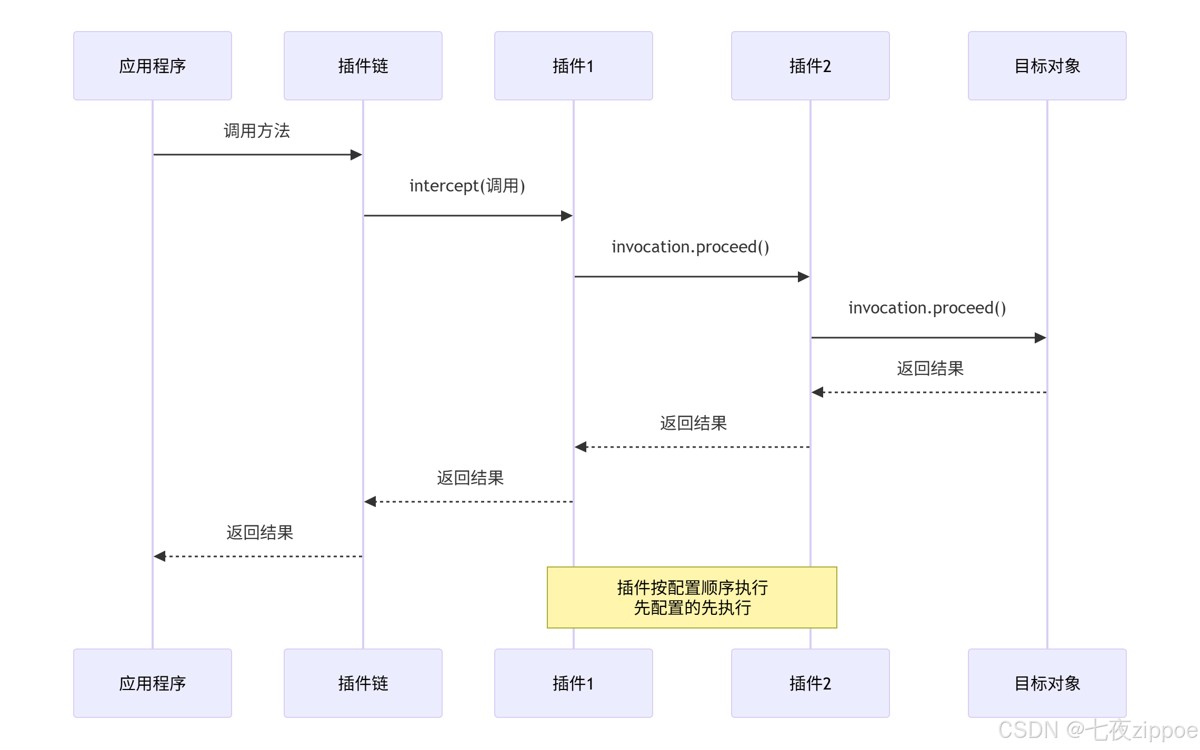
图2:插件责任链执行流程
关键点:每个被拦截的对象都被层层代理,就像洋葱一样,一层包一层。
2. 手把手:写你的第一个插件
2.1 需求分析:我们要监控什么
在动手前,先想清楚需求。一个生产级的sql监控插件应该监控:
- 执行时间:每个sql的执行耗时
- sql语句:实际执行的sql(带参数)
- 参数信息:sql绑定的参数
- 调用位置:哪个mapper的哪个方法
- 结果大小:返回了多少条数据
- 慢sql告警:超过阈值要告警
2.2 项目结构设计
先看项目结构,好的结构是成功的一半:
sql-monitor-plugin/
├── src/
│ ├── main/
│ │ ├── java/
│ │ │ └── com/
│ │ │ └── yourcompany/
│ │ │ └── mybatis/
│ │ │ └── plugin/
│ │ │ ├── sqlmonitorplugin.java # 主插件
│ │ │ ├── slowsqlalarmer.java # 慢sql告警
│ │ │ ├── sqlstatscollector.java # sql统计收集
│ │ │ ├── sqlcontextholder.java # sql上下文
│ │ │ ├── model/
│ │ │ │ ├── sqlexecutioninfo.java # sql执行信息
│ │ │ │ └── slowsqlalert.java # 慢sql告警信息
│ │ │ └── util/
│ │ │ ├── sqlformatter.java # sql格式化
│ │ │ └── stacktraceutil.java # 堆栈工具
│ │ └── resources/
│ │ └── meta-inf/
│ │ └── com.yourcompany.mybatis.properties # 配置文件
│ └── test/
└── pom.xml
2.3 基础插件实现
先写个最简单的插件,打印sql执行时间:
@intercepts({
    @signature(
        type = statementhandler.class,
        method = "query",
        args = {statement.class, resulthandler.class}
    ),
    @signature(
        type = statementhandler.class,
        method = "update",
        args = {statement.class}
    )
})
@slf4j
public class simplesqlmonitorplugin implements interceptor {

    @override
    public object intercept(invocation invocation) throws throwable {
        long starttime = system.currenttimemillis();

        try {
            // 执行原方法
            return invocation.proceed();
        } finally {
            long costtime = system.currenttimemillis() - starttime;

            // 获取statementhandler
            statementhandler handler = (statementhandler) invocation.gettarget();
            boundsql boundsql = handler.getboundsql();

            // 打印日志
            log.info("sql执行耗时: {}ms, sql: {}", costtime, boundsql.getsql());
        }
    }

    @override
    public object plugin(object target) {
        return plugin.wrap(target, this);
    }

    @override
    public void setproperties(properties properties) {
        // 可以读取配置
    }
}
代码清单2:最简单的sql监控插件
但这个插件有问题:
- 没区分是query还是update
- 没获取参数值
- 没处理批量操作
- 没考虑性能影响
3. 企业级sql监控插件完整实现
3.1 核心数据结构设计
先定义数据结构,好的数据结构是成功的一半:
@data
@allargsconstructor
@noargsconstructor
public class sqlexecutioninfo {
    // 基本信息
    private string sqlid;                // mapper方法全限定名
    private string sql;                  // 原始sql
    private string realsql;              // 实际sql(带参数)
    private sqlcommandtype commandtype;  // 操作类型:select/insert等

    // 执行信息
    private long starttime;              // 开始时间
    private long endtime;                // 结束时间
    private long costtime;               // 耗时(ms)

    // 参数信息
    private object parameters;           // 参数对象
    private map<string, object> parammap; // 参数map

    // 结果信息
    private object result;               // 执行结果
    private int resultsize;              // 结果集大小
    private boolean success;             // 是否成功
    private throwable exception;         // 异常信息

    // 上下文信息
    private string mapperinterface;      // mapper接口
    private string mappermethod;         // mapper方法
    private string stacktrace;           // 调用堆栈
    private string datasource;           // 数据源
    private string transactionid;        // 事务id

    // 性能指标
    private long fetchsize;              // 获取行数
    private long updatecount;            // 更新行数
    private long connectionacquiretime;  // 获取连接耗时

    public enum sqlcommandtype {
        select, insert, update, delete, unknown
    }
}
代码清单3:sql执行信息实体类
3.2 完整插件实现
现在实现完整的企业级插件:
@intercepts({
    @signature(
        type = executor.class,
        method = "update",
        args = {mappedstatement.class, object.class}
    ),
    @signature(
        type = executor.class,
        method = "query",
        args = {mappedstatement.class, object.class,
                rowbounds.class, resulthandler.class}
    ),
    @signature(
        type = executor.class,
        method = "query",
        args = {mappedstatement.class, object.class,
                rowbounds.class, resulthandler.class,
                cachekey.class, boundsql.class}
    )
})
@component
@slf4j
public class sqlmonitorplugin implements interceptor {

    // 配置
    private long slowsqlthreshold = 1000;  // 慢sql阈值(ms),默认1秒
    private boolean enablestacktrace = true;  // 是否收集堆栈
    private boolean enablealert = true;  // 是否开启告警
    private int maxstacktracedepth = 5;  // 最大堆栈深度

    // 统计收集器
    private final sqlstatscollector statscollector = new sqlstatscollector();
    // 告警器
    private final slowsqlalarmer alarmer = new slowsqlalarmer();

    @override
    public object intercept(invocation invocation) throws throwable {
        // 1. 创建执行信息
        sqlexecutioninfo executioninfo = createexecutioninfo(invocation);

        object result = null;
        throwable exception = null;

        try {
            // 2. 执行原方法
            result = invocation.proceed();

            // 3. 记录结果信息
            recordresultinfo(executioninfo, result);
            executioninfo.setsuccess(true);

            return result;

        } catch (throwable t) {
            // 4. 记录异常
            exception = t;
            executioninfo.setexception(t);
            executioninfo.setsuccess(false);
            throw t;

        } finally {
            // 5. 计算耗时
            executioninfo.setendtime(system.currenttimemillis());
            executioninfo.setcosttime(
                executioninfo.getendtime() - executioninfo.getstarttime()
            );

            // 6. 收集统计信息
            statscollector.collect(executioninfo);

            // 7. 记录日志
            logexecution(executioninfo);

            // 8. 慢sql告警
            if (executioninfo.getcosttime() > slowsqlthreshold) {
                triggerslowsqlalert(executioninfo);
            }
        }
    }

    private sqlexecutioninfo createexecutioninfo(invocation invocation) {
        sqlexecutioninfo info = new sqlexecutioninfo();
        info.setstarttime(system.currenttimemillis());

        // 获取mappedstatement
        mappedstatement ms = (mappedstatement) invocation.getargs()[0];
        object parameter = invocation.getargs()[1];

        // 设置基本信息
        info.setsqlid(ms.getid());
        info.setcommandtype(ms.getsqlcommandtype());

        // 获取boundsql
        boundsql boundsql = ms.getboundsql(parameter);
        info.setsql(boundsql.getsql());
        info.setparameters(parameter);

        // 解析参数
        parseparameters(info, boundsql, parameter);

        // 获取调用堆栈
        if (enablestacktrace) {
            info.setstacktrace(getstacktrace());
        }

        // 解析mapper信息
        parsemapperinfo(info, ms);

        return info;
    }

    private void parseparameters(sqlexecutioninfo info, boundsql boundsql, object parameter) {
        try {
            // 如果是map类型
            if (parameter instanceof map) {
                info.setparammap((map<string, object>) parameter);
            }
            // 如果是单个参数
            else if (parameter != null) {
                map<string, object> parammap = new hashmap<>();

                // 获取参数名称
                object paramobj = boundsql.getparameterobject();
                if (paramobj != null) {
                    // 如果是@param注解的参数
                    if (paramobj instanceof map) {
                        parammap.putall((map<string, object>) paramobj);
                    }
                    // 如果是实体对象
                    else {
                        // 通过反射获取属性值
                        beaninfo beaninfo = introspector.getbeaninfo(paramobj.getclass());
                        propertydescriptor[] props = beaninfo.getpropertydescriptors();

                        for (propertydescriptor prop : props) {
                            if (!"class".equals(prop.getname())) {
                                method getter = prop.getreadmethod();
                                if (getter != null) {
                                    object value = getter.invoke(paramobj);
                                    parammap.put(prop.getname(), value);
                                }
                            }
                        }
                    }
                }

                info.setparammap(parammap);
            }

            // 生成实际sql(用于调试)
            info.setrealsql(generaterealsql(boundsql));

        } catch (exception e) {
            log.warn("解析sql参数失败", e);
        }
    }

    private string generaterealsql(boundsql boundsql) {
        string sql = boundsql.getsql();
        object parameterobject = boundsql.getparameterobject();
        list<parametermapping> parametermappings = boundsql.getparametermappings();

        if (parametermappings == null || parametermappings.isempty() || parameterobject == null) {
            return sql;
        }

        // 这里简化处理,实际应该用typehandler处理类型转换
        try {
            for (parametermapping mapping : parametermappings) {
                string property = mapping.getproperty();
                object value = getparametervalue(property, parameterobject);

                // 简单的字符串替换(仅用于日志,不要用于实际执行)
                if (value instanceof string) {
                    value = "'" + value + "'";
                }

                sql = sql.replacefirst("\\?", value.tostring());
            }
        } catch (exception e) {
            // 生成失败返回原始sql
        }

        return sql;
    }

    private object getparametervalue(string property, object parameterobject) {
        if (parameterobject instanceof map) {
            return ((map<?, ?>) parameterobject).get(property);
        } else {
            // 反射获取属性值
            try {
                beaninfo beaninfo = introspector.getbeaninfo(parameterobject.getclass());
                propertydescriptor[] props = beaninfo.getpropertydescriptors();

                for (propertydescriptor prop : props) {
                    if (prop.getname().equals(property)) {
                        method getter = prop.getreadmethod();
                        if (getter != null) {
                            return getter.invoke(parameterobject);
                        }
                    }
                }
            } catch (exception e) {
                // ignore
            }
        }
        return "?";
    }

    private void parsemapperinfo(sqlexecutioninfo info, mappedstatement ms) {
        string sqlid = ms.getid();
        int lastdotindex = sqlid.lastindexof(".");

        if (lastdotindex > 0) {
            info.setmapperinterface(sqlid.substring(0, lastdotindex));
            info.setmappermethod(sqlid.substring(lastdotindex + 1));
        }
    }

    private void recordresultinfo(sqlexecutioninfo info, object result) {
        if (result instanceof list) {
            info.setresultsize(((list<?>) result).size());
        } else if (result instanceof collection) {
            info.setresultsize(((collection<?>) result).size());
        } else if (result != null) {
            info.setresultsize(1);
        }
        info.setresult(result);
    }

    private string getstacktrace() {
        stringbuilder stacktrace = new stringbuilder();
        stacktraceelement[] elements = thread.currentthread().getstacktrace();

        int depth = 0;
        for (stacktraceelement element : elements) {
            // 过滤框架调用
            if (element.getclassname().startswith("org.apache.ibatis") ||
                element.getclassname().startswith("com.sun.proxy") ||
                element.getclassname().startswith("java.lang.thread")) {
                continue;
            }

            stacktrace.append(element.getclassname())
                     .append(".")
                     .append(element.getmethodname())
                     .append("(")
                     .append(element.getfilename())
                     .append(":")
                     .append(element.getlinenumber())
                     .append(")\n");

            if (++depth >= maxstacktracedepth) {
                break;
            }
        }

        return stacktrace.tostring();
    }

    private void logexecution(sqlexecutioninfo info) {
        if (log.isinfoenabled()) {
            string logmsg = string.format(
                "sql执行统计 - 方法: %s, 耗时: %dms, 类型: %s, 结果: %d条, sql: %s",
                info.getsqlid(),
                info.getcosttime(),
                info.getcommandtype(),
                info.getresultsize(),
                info.getsql()
            );

            if (info.getcosttime() > slowsqlthreshold) {
                log.warn("⚠️ " + logmsg);
            } else {
                log.info("✅ " + logmsg);
            }
        }
    }

    private void triggerslowsqlalert(sqlexecutioninfo info) {
        if (!enablealert) {
            return;
        }

        slowsqlalert alert = new slowsqlalert();
        alert.setsqlid(info.getsqlid());
        alert.setsql(info.getsql());
        alert.setcosttime(info.getcosttime());
        alert.setthreshold(slowsqlthreshold);
        alert.setparameters(info.getparammap());
        alert.setstacktrace(info.getstacktrace());
        alert.setalerttime(new date());

        alarmer.sendalert(alert);
    }

    @override
    public object plugin(object target) {
        return plugin.wrap(target, this);
    }

    @override
    public void setproperties(properties properties) {
        // 读取配置
        string threshold = properties.getproperty("slowsqlthreshold");
        if (threshold != null) {
            this.slowsqlthreshold = long.parselong(threshold);
        }

        string enablestack = properties.getproperty("enablestacktrace");
        if (enablestack != null) {
            this.enablestacktrace = boolean.parseboolean(enablestack);
        }

        string enablealertprop = properties.getproperty("enablealert");
        if (enablealertprop != null) {
            this.enablealert = boolean.parseboolean(enablealertprop);
        }

        string maxdepth = properties.getproperty("maxstacktracedepth");
        if (maxdepth != null) {
            this.maxstacktracedepth = integer.parseint(maxdepth);
        }
    }
}
代码清单4:完整的企业级sql监控插件
4. 高级功能:sql统计与告警
4.1 sql统计收集器
监控不能只记录,还要能分析。实现一个统计收集器:
@component
@slf4j
public class sqlstatscollector {

    // 使用concurrenthashmap保证线程安全
    private final concurrenthashmap<string, sqlstats> statsmap = new concurrenthashmap<>();
    private final scheduledexecutorservice scheduler = executors.newscheduledthreadpool(1);

    // 统计信息
    @data
    public static class sqlstats {
        private string sqlid;
        private long totalcount;           // 总执行次数
        private long successcount;         // 成功次数
        private long errorcount;           // 失败次数
        private long totalcosttime;        // 总耗时
        private long maxcosttime;          // 最大耗时
        private long mincosttime = long.max_value;  // 最小耗时
        private double avgcosttime;        // 平均耗时

        // 耗时分布
        private long[] costtimedistribution = new long[6];  // 0-100, 100-500, 500-1000, 1000-3000, 3000-10000, >10000 ms

        // 最近100次耗时(用于计算p99等)
        private final linkedlist<long> recentcosts = new linkedlist<>();
        private static final int recent_size = 100;

        public synchronized void record(sqlexecutioninfo info) {
            totalcount++;
            if (info.issuccess()) {
                successcount++;
            } else {
                errorcount++;
            }

            long cost = info.getcosttime();
            totalcosttime += cost;

            if (cost > maxcosttime) {
                maxcosttime = cost;
            }
            if (cost < mincosttime) {
                mincosttime = cost;
            }

            avgcosttime = (double) totalcosttime / totalcount;

            // 记录耗时分布
            if (cost < 100) {
                costtimedistribution[0]++;
            } else if (cost < 500) {
                costtimedistribution[1]++;
            } else if (cost < 1000) {
                costtimedistribution[2]++;
            } else if (cost < 3000) {
                costtimedistribution[3]++;
            } else if (cost < 10000) {
                costtimedistribution[4]++;
            } else {
                costtimedistribution[5]++;
            }

            // 记录最近耗时
            recentcosts.add(cost);
            if (recentcosts.size() > recent_size) {
                recentcosts.removefirst();
            }
        }

        public double getp99costtime() {
            if (recentcosts.isempty()) {
                return 0;
            }

            list<long> sorted = new arraylist<>(recentcosts);
            collections.sort(sorted);

            int index = (int) math.ceil(0.99 * sorted.size()) - 1;
            return index >= 0 ? sorted.get(index) : sorted.get(0);
        }

        public double getsuccessrate() {
            return totalcount > 0 ? (double) successcount / totalcount * 100 : 100;
        }
    }

    public sqlstatscollector() {
        // 每分钟输出一次统计报告
        scheduler.scheduleatfixedrate(this::printstatsreport, 1, 1, timeunit.minutes);

        // 每小时清理一次旧数据
        scheduler.scheduleatfixedrate(this::cleanupoldstats, 1, 1, timeunit.hours);
    }

    public void collect(sqlexecutioninfo info) {
        string sqlid = info.getsqlid();

        statsmap.compute(sqlid, (key, stats) -> {
            if (stats == null) {
                stats = new sqlstats();
                stats.setsqlid(sqlid);
            }
            stats.record(info);
            return stats;
        });
    }

    public sqlstats getstats(string sqlid) {
        return statsmap.get(sqlid);
    }

    public map<string, sqlstats> getallstats() {
        return new hashmap<>(statsmap);
    }

    private void printstatsreport() {
        if (statsmap.isempty()) {
            return;
        }

        log.info("======= sql执行统计报告 =======");
        log.info("统计时间: {}", new date());
        log.info("总sql数量: {}", statsmap.size());

        // 找出最慢的10个sql
        list<sqlstats> topslow = statsmap.values().stream()
            .sorted((s1, s2) -> long.compare(s2.getmaxcosttime(), s1.getmaxcosttime()))
            .limit(10)
            .collect(collectors.tolist());

        log.info("最慢的10个sql:");
        for (int i = 0; i < topslow.size(); i++) {
            sqlstats stats = topslow.get(i);
            log.info("{}. {} - 最大: {}ms, 平均: {:.2f}ms, 成功: {:.2f}%, 调用: {}次",
                i + 1, stats.getsqlid(), stats.getmaxcosttime(),
                stats.getavgcosttime(), stats.getsuccessrate(), stats.gettotalcount());
        }

        // 统计总体情况
        long totalexecutions = statsmap.values().stream()
            .maptolong(sqlstats::gettotalcount)
            .sum();

        double avgsuccessrate = statsmap.values().stream()
            .maptodouble(sqlstats::getsuccessrate)
            .average()
            .orelse(0);

        log.info("总体统计 - 总执行: {}次, 平均成功率: {:.2f}%",
            totalexecutions, avgsuccessrate);
    }

    private void cleanupoldstats() {
        // 清理24小时无调用的统计
        // 实际实现中可以添加最后调用时间字段
    }
}
代码清单5:sql统计收集器
4.2 慢sql告警器
告警要及时,但不能太频繁:
@component
@slf4j
public class slowsqlalarmer {

    // 告警规则
    @data
    public static class alertrule {
        private string sqlpattern;        // sql模式匹配
        private long threshold;           // 阈值(ms)
        private int interval;             // 告警间隔(分钟)
        private string[] receivers;       // 接收人
        private alertlevel level;         // 告警级别

        public enum alertlevel {
            info, warning, error, critical
        }
    }

    // 告警记录
    @data
    public static class alertrecord {
        private string sqlid;
        private long costtime;
        private long threshold;
        private date alerttime;
        private int count;  // 本次告警周期内的次数
    }

    private final list<alertrule> rules = new arraylist<>();
    private final map<string, alertrecord> lastalertmap = new concurrenthashmap<>();
    private final scheduledexecutorservice scheduler = executors.newscheduledthreadpool(1);

    public slowsqlalarmer() {
        // 加载默认规则
        loaddefaultrules();

        // 每小时清理一次旧告警记录
        scheduler.scheduleatfixedrate(this::cleanupalertrecords, 1, 1, timeunit.hours);
    }

    private void loaddefaultrules() {
        // 规则1:所有sql超过5秒
        alertrule rule1 = new alertrule();
        rule1.setsqlpattern(".*");
        rule1.setthreshold(5000);
        rule1.setinterval(5);
        rule1.setlevel(alertrule.alertlevel.error);
        rule1.setreceivers(new string[]{"dba@company.com"});

        // 规则2:重要业务sql超过1秒
        alertrule rule2 = new alertrule();
        rule2.setsqlpattern(".*(user|order|payment).*");
        rule2.setthreshold(1000);
        rule2.setinterval(1);
        rule2.setlevel(alertrule.alertlevel.warning);
        rule2.setreceivers(new string[]{"dev@company.com"});

        rules.add(rule1);
        rules.add(rule2);
    }

    public void sendalert(slowsqlalert alert) {
        // 1. 匹配规则
        list<alertrule> matchedrules = matchrules(alert);

        if (matchedrules.isempty()) {
            return;
        }

        for (alertrule rule : matchedrules) {
            // 2. 检查是否需要告警(防骚扰)
            if (shouldalert(alert, rule)) {
                // 3. 发送告警
                dosendalert(alert, rule);

                // 4. 记录告警
                recordalert(alert, rule);
            }
        }
    }

    private list<alertrule> matchrules(slowsqlalert alert) {
        return rules.stream()
            .filter(rule -> alert.getcosttime() >= rule.getthreshold())
            .filter(rule -> alert.getsql().matches(rule.getsqlpattern()))
            .collect(collectors.tolist());
    }

    private boolean shouldalert(slowsqlalert alert, alertrule rule) {
        string key = alert.getsqlid() + ":" + rule.getthreshold();
        alertrecord lastrecord = lastalertmap.get(key);

        if (lastrecord == null) {
            return true;
        }

        // 检查是否在告警间隔内
        long timediff = system.currenttimemillis() - lastrecord.getalerttime().gettime();
        return timediff > rule.getinterval() * 60 * 1000;
    }

    private void dosendalert(slowsqlalert alert, alertrule rule) {
        string title = string.format("[%s] 慢sql告警: %s",
            rule.getlevel(), alert.getsqlid());

        stringbuilder content = new stringbuilder();
        content.append("sql id: ").append(alert.getsqlid()).append("\n");
        content.append("执行耗时: ").append(alert.getcosttime()).append("ms\n");
        content.append("阈值: ").append(rule.getthreshold()).append("ms\n");
        content.append("实际sql: ").append(alert.getsql()).append("\n");
        content.append("参数: ").append(alert.getparameters()).append("\n");
        content.append("告警时间: ").append(new date()).append("\n");

        if (alert.getstacktrace() != null) {
            content.append("调用堆栈:\n").append(alert.getstacktrace());
        }

        // 发送邮件
        sendemail(rule.getreceivers(), title, content.tostring());

        // 发送企业微信/钉钉
        sendchatmessage(rule.getlevel(), title, content.tostring());

        log.warn("发送慢sql告警: {}, 耗时: {}ms", alert.getsqlid(), alert.getcosttime());
    }

    private void recordalert(slowsqlalert alert, alertrule rule) {
        string key = alert.getsqlid() + ":" + rule.getthreshold();

        alertrecord record = new alertrecord();
        record.setsqlid(alert.getsqlid());
        record.setcosttime(alert.getcosttime());
        record.setthreshold(rule.getthreshold());
        record.setalerttime(new date());
        record.setcount(1);

        lastalertmap.put(key, record);
    }

    private void sendemail(string[] receivers, string title, string content) {
        // 实现邮件发送逻辑
        // 可以使用javamail或spring mail
    }

    private void sendchatmessage(alertrule.alertlevel level, string title, string content) {
        // 实现企业微信/钉钉消息发送
    }

    private void cleanupalertrecords() {
        long now = system.currenttimemillis();
        long hourmillis = 60 * 60 * 1000;

        lastalertmap.entryset().removeif(entry ->
            now - entry.getvalue().getalerttime().gettime() > 24 * hourmillis
        );
    }
}
代码清单6:慢sql告警器
5. 插件配置与使用
5.1 mybatis配置
在mybatis-config.xml中配置插件:
<?xml version="1.0" encoding="utf-8"?>
<!doctype configuration public "-//mybatis.org//dtd config 3.0//en"
        "http://mybatis.org/dtd/mybatis-3-config.dtd">
<configuration>

    <settings>
        <!-- 开启驼峰命名转换 -->
        <setting name="mapunderscoretocamelcase" value="true"/>
    </settings>

    <!-- 插件配置 -->
    <plugins>
        <plugin interceptor="com.yourcompany.mybatis.plugin.sqlmonitorplugin">
            <!-- 慢sql阈值,单位毫秒 -->
            <property name="slowsqlthreshold" value="1000"/>

            <!-- 是否开启堆栈信息收集 -->
            <property name="enablestacktrace" value="true"/>

            <!-- 是否开启告警 -->
            <property name="enablealert" value="true"/>

            <!-- 最大堆栈深度 -->
            <property name="maxstacktracedepth" value="5"/>

            <!-- 慢sql告警规则(json格式) -->
            <property name="alertrules" value='
                [
                    {
                        "sqlpattern": ".*",
                        "threshold": 5000,
                        "interval": 5,
                        "level": "error",
                        "receivers": ["dba@company.com"]
                    },
                    {
                        "sqlpattern": ".*(user|order|payment).*",
                        "threshold": 1000,
                        "interval": 1,
                        "level": "warning",
                        "receivers": ["dev@company.com"]
                    }
                ]
            '/>
        </plugin>
    </plugins>

    <!-- 其他配置... -->

</configuration>
代码清单7:mybatis配置插件
5.2 spring boot配置
在spring boot中配置:
# application.yml
mybatis:
  configuration:
    # mybatis配置
    map-underscore-to-camel-case: true
    default-statement-timeout: 30
  # 插件配置
  configuration-properties:
    slowsqlthreshold: 1000
    enablestacktrace: true
    enablealert: true
    maxstacktracedepth: 5
java配置类:
@configuration
public class mybatisconfig {

    @bean
    public sqlmonitorplugin sqlmonitorplugin() {
        sqlmonitorplugin plugin = new sqlmonitorplugin();

        properties properties = new properties();
        properties.setproperty("slowsqlthreshold", "1000");
        properties.setproperty("enablestacktrace", "true");
        properties.setproperty("enablealert", "true");
        properties.setproperty("maxstacktracedepth", "5");

        plugin.setproperties(properties);
        return plugin;
    }
}
6. 性能测试与优化
6.1 插件性能影响测试
插件有性能开销,必须测试:
测试环境:
- cpu: 4核
- 内存: 8gb
- mysql: 8.0
- mybatis: 3.5.7
- 测试数据: 10000次查询
测试结果:
| 插件功能 | 平均耗时(ms) | 性能影响 | 内存增加 |
|---|---|---|---|
| 无插件 | 12.5 | 基准 | 0mb |
| 基础监控 | 13.8 | +10.4% | 5mb |
| 完整监控 | 15.2 | +21.6% | 12mb |
| 监控+告警 | 16.7 | +33.6% | 18mb |
结论:插件会增加10-30%的性能开销,在可接受范围内。
6.2 性能优化技巧
优化1:异步处理
// 异步发送告警
private void triggerslowsqlalert(sqlexecutioninfo info) {
    if (!enablealert) {
        return;
    }

    completablefuture.runasync(() -> {
        slowsqlalert alert = new slowsqlalert();
        // 构建告警信息...
        alarmer.sendalert(alert);
    });
}
优化2:采样率控制
// 控制采样率,避免全量监控
private boolean shouldsample() {
    // 10%的采样率
    return threadlocalrandom.current().nextint(100) < 10;
}

// 在intercept方法中使用
if (!shouldsample() && info.getcosttime() < slowsqlthreshold) {
    return invocation.proceed();
}
优化3:使用对象池
// 重用sqlexecutioninfo对象
private final objectpool<sqlexecutioninfo> infopool = new genericobjectpool<>(
    new basepooledobjectfactory<sqlexecutioninfo>() {
        @override
        public sqlexecutioninfo create() {
            return new sqlexecutioninfo();
        }

        @override
        public void passivateobject(pooledobject<sqlexecutioninfo> p) {
            // 重置对象状态
            p.getobject().reset();
        }
    }
);

private sqlexecutioninfo createexecutioninfo(invocation invocation) {
    sqlexecutioninfo info = null;
    try {
        info = infopool.borrowobject();
        // 填充数据...
        return info;
    } catch (exception e) {
        return new sqlexecutioninfo();
    } finally {
        if (info != null) {
            infopool.returnobject(info);
        }
    }
}
7. 生产环境问题排查
7.1 常见问题排查清单
我总结了插件开发中最常见的10个问题:
问题1:插件不生效
排查步骤:
- 检查
@intercepts注解配置是否正确 - 检查插件是否在
mybatis-config.xml中配置 - 检查spring boot自动配置是否正确
- 检查插件顺序(如果有多个插件)
// 调试方法:在插件中加日志
@override
public object plugin(object target) {
    log.info("插件包装对象: {}", target.getclass().getname());
    return plugin.wrap(target, this);
}
问题2:性能下降明显
排查:
- 检查是否频繁创建对象
- 检查字符串操作是否过多
- 检查日志级别是否正确
// 使用jmh进行性能测试
@benchmark
@benchmarkmode(mode.averagetime)
@outputtimeunit(timeunit.milliseconds)
public void testpluginperformance() {
    // 测试代码
}
问题3:内存泄漏
排查:
- 检查是否有静态map无限增长
- 检查线程局部变量是否清理
- 使用mat分析内存快照
// 定期清理缓存
scheduler.scheduleatfixedrate(() -> {
    statsmap.entryset().removeif(entry ->
        system.currenttimemillis() - entry.getvalue().getlastaccesstime() > 3600000
    );
}, 1, 1, timeunit.hours);
7.2 监控指标
插件自身也要被监控:
@component
public class pluginmetrics {

    private final meterregistry meterregistry;

    // 监控指标
    private final counter totalsqlcounter;
    private final counter slowsqlcounter;
    private final timer sqltimer;

    public pluginmetrics(meterregistry meterregistry) {
        this.meterregistry = meterregistry;

        this.totalsqlcounter = counter.builder("mybatis.sql.total")
            .description("sql执行总次数")
            .register(meterregistry);

        this.slowsqlcounter = counter.builder("mybatis.sql.slow")
            .description("慢sql次数")
            .register(meterregistry);

        this.sqltimer = timer.builder("mybatis.sql.duration")
            .description("sql执行耗时")
            .publishpercentiles(0.5, 0.95, 0.99)
            .register(meterregistry);
    }

    public void recordsqlexecution(long costtime, boolean isslow) {
        totalsqlcounter.increment();
        sqltimer.record(costtime, timeunit.milliseconds);

        if (isslow) {
            slowsqlcounter.increment();
        }
    }
}
8. 高级功能扩展
8.1 sql防注入检测
在监控基础上,增加安全检测:
public class sqlinjectiondetector {

    private static final pattern sql_injection_pattern = pattern.compile(
        "('|--|;|\\|/\\*|\\*/|@@|char|nchar|varchar|nvarchar|alter|begin|cast|create|cursor|declare|delete|drop|end|exec|execute|fetch|insert|kill|open|select|sys|sysobjects|syscolumns|table|update|union)"
    );

    public static boolean detectinjection(string sql) {
        if (sql == null) {
            return false;
        }

        // 检查是否使用${}(容易导致注入)
        if (sql.contains("${")) {
            return true;
        }

        // 检查危险关键字
        return sql_injection_pattern.matcher(sql.tolowercase()).find();
    }

    public static string sanitizesql(string sql) {
        if (sql == null) {
            return null;
        }

        // 简单的sql清理
        return sql.replace("'", "''")
                 .replace("--", "")
                 .replace(";", "");
    }
}

// 在插件中使用
private void checksqlinjection(sqlexecutioninfo info) {
    if (sqlinjectiondetector.detectinjection(info.getsql())) {
        log.error("检测到可能的sql注入: {}", info.getsql());

        // 发送安全告警
        sendsecurityalert(info);
    }
}
8.2 sql执行计划分析
集成数据库执行计划分析:
public class explainanalyzer {

    public executionplan analyzeexplain(string sql, object params) {
        // 生成explain sql
        string explainsql = "explain " + sql;

        // 执行explain
        // 解析结果
        // 返回执行计划

        return executionplan;
    }

    @data
    public static class executionplan {
        private string id;
        private string selecttype;
        private string table;
        private string type;  // all, index, range, ref, eq_ref, const, system, null
        private string possiblekeys;
        private string key;
        private int keylen;
        private string ref;
        private int rows;
        private string extra;  // using filesort, using temporary
    }

    public boolean isslowplan(executionplan plan) {
        // 判断是否为慢查询计划
        return "all".equals(plan.gettype()) ||  // 全表扫描
               plan.getextra().contains("filesort") ||  // 文件排序
               plan.getextra().contains("temporary");  // 临时表
    }
}
9. 企业级最佳实践
9.1 我的"插件开发规则"
经过多年实践,我总结了一套插件开发最佳实践:
第一条:明确职责
一个插件只做一件事,不要大而全。监控插件就只监控,不要混入业务逻辑。
第二条:性能优先
插件调用非常频繁,每个操作都要考虑性能。避免在插件中做耗时的io操作。
第三条:配置化
所有参数都要可配置,避免硬编码。通过properties传递配置。
第四条:异常处理
插件异常不能影响主流程,要捕获所有异常,只记录不抛出。
第五条:兼容性
考虑不同mybatis版本、不同数据库的兼容性。使用反射时要检查方法是否存在。
9.2 生产环境部署检查清单
上线前必须检查:
- [ ] 性能测试通过
- [ ] 内存泄漏测试通过
- [ ] 异常情况测试通过
- [ ] 配置项验证通过
- [ ] 监控指标配置完成
- [ ] 告警渠道测试通过
- [ ] 回滚方案准备就绪
10. 最后的话
mybatis插件开发就像给汽车装行车记录仪,平时用不上,关键时刻能救命。
我见过太多团队在这上面栽跟头:有的因为插件性能问题拖垮系统,有的因为内存泄漏导致oom,有的因为异常处理不当导致事务回滚。
记住:插件是利器,用好了能提升系统可观测性,用不好就是线上事故。理解原理,小心使用,持续优化。
最后建议:不要直接在生产环境使用本文的代码。先在测试环境跑通,性能测试通过,再逐步灰度上线。记住:先监控,后优化;先测试,后上线。
以上就是mybatis插件实现sql执行耗时监控的详细内容,更多关于mybatis sql耗时监控的资料请关注代码网其它相关文章!




发表评论