
 我要评论
我要评论mysql组成与常用工具
mysql作为一款广泛使用的关系型数据库管理系统,其高效稳定的服务离不开完善的程序组件和丰富的管理工具。本文将深入解析mysql的组成结构,并详细介绍常用客户端工具的使用方法,帮助读者更好地管理和操作mysql数据库。
一、mysql主要组成
mysql采用经典的客户端/服务器(c/s)架构,主要包含服务端程序、客户端程序以及一系列管理工具。
服务端主要组件
| 程序 | 功能 |
|---|---|
| mysqld_safe | 安全启动脚本 |
| mysqld | 服务端核心程序 |
| mysqld_multi | 多实例管理工具 |
客户端主要组件
| 程序 | 功能 |
|---|---|
| mysql | 交互式命令行工具 |
| mysqldump | 数据库备份工具 |
| mysqladmin | 服务端管理工具 |
| mysqlimport | 数据导入工具 |
myisam存储引擎管理工具
| 程序 | 功能 |
|---|---|
| myisamchk | myisam表检测工具 |
| myisampack | myisam表压缩工具 |
配置文件结构
mysql配置文件采用分层结构,不同版本略有差异:
[root@localhost ~]# cat /etc/my.cnf
#
# this group is read both both by the client and the server
# use it for options that affect everything
#
[client-server]
#
# include all files from the config directory
#
!includedir /etc/my.cnf.d
[root@localhost ~]# tree /etc/my.cnf.d/
/etc/my.cnf.d/
├── client.cnf                  # 客户端配置
├── mysql-default-authentication-plugin.cnf
└── mysql-server.cnf           # 服务器端配置
0 directories, 3 files
配置文件的生效顺序可通过以下命令查看:
[root@localhost ~]# mysql --help | grep my.cnf
                      order of preference, my.cnf, $mysql_tcp_port,
/etc/my.cnf /etc/mysql/my.cnf ~/.my.cnf
二、mysql命令类型
mysql命令分为两类:客户端命令和服务端命令。客户端命令在本地执行,服务端命令发送到服务端执行后返回结果。
查看所有客户端命令
mysql> ?
list of all mysql commands:
note that all text commands must be first on line and end with ';'
?         (\?) synonym for `help'.
clear     (\c) clear the current input statement.
connect   (\r) reconnect to the server. optional arguments are db and host.
delimiter (\d) set statement delimiter.
edit      (\e) edit command with $editor.
ego       (\g) send command to mysql server, display result vertically.
exit      (\q) exit mysql. same as quit.
go        (\g) send command to mysql server.
help      (\h) display this help.
...
查看服务端命令分类
mysql> help contents
you asked for help about help category: "contents"
for more information, type 'help <item>', where <item> is one of the following
categories:
   account management
   administration
   components
   compound statements
   contents
   data definition
   data manipulation
   data types
   functions
   ...
查看详细命令帮助
mysql> help binlog
name: 'binlog'
description:
syntax:
binlog 'str'
binlog is an internal-use statement. it is generated by the mysqlbinlog
program as the printable representation of certain events in binary log
files...
三、mysql客户端使用
客户端常用选项
# 常用连接选项
-v|--version                # 显示客户端版本
-u|--user=name              # 指定用户名
-p|--password[=name]        # 指定密码
-h|--host=host              # 指定服务器主机
-p|--port=port              # 指定端口,默认3306
-d|--database=db            # 指定数据库
# 输出格式选项
-h|--html                   # html格式输出
-x|--xml                    # xml格式输出
-t|--table                  # 表格格式输出(默认)
-e|--vertical               # 垂直显示结果
# 其他实用选项
-e|--execute=sql            # 执行sql后退出(非交互式)
-prompt=name                # 修改命令提示符
--connect-timeout=n         # 连接超时时长(秒)
--max-allowed-packet=n      # 数据包大小限制
实用范例
基本连接示例:
# 显示版本信息
[root@localhost ~]# mysql -v
mysql  ver 8.0.26 for linux on x86_64 (source distribution)
# 标准连接
[root@localhost ~]# mysql -uroot -h127.0.0.1 -p3306
# 指定数据库连接
[root@localhost ~]# mysql information_schema
非交互式执行:
# 执行sql文件
[root@localhost ~]# mysql -e "source /root/test.sql"
# 管道方式执行
[root@localhost ~]# cat test.sql | mysql
# 垂直显示结果
[root@localhost ~]# mysql -e "show databases;" -e
*************************** 1. row ***************************
database: information_schema
*************************** 2. row ***************************
database: mysql
自定义提示符:
[root@localhost ~]# mysql --prompt=[test]
welcome to the mysql monitor...
[test]
客户端常用命令
查看服务器状态:
mysql> \s
--------------
mysql  ver 8.0.26 for linux on x86_64 (source distribution)
connection id:          8
current database:
current user:           root@localhost
ssl:                    not in use
server version:         8.0.26 source distribution
...
切换数据库:
mysql> use mysql;
reading table information for completion of table and column names
database changed
执行系统命令:
mysql> \! hostname
localhost.localdomain
mysql> \! clear
修改提示符变量:
mysql> prompt [\h--\d]
prompt set to '[\h--\d]'
[localhost--mon sep 15 22:09:09 2025]
提示符可用变量包括:
\d    # 当前数据库
\h    # 服务器主机名
\u    # 客户端用户名
\v    # 服务端版本
\d    # 完整日期时间
...
执行sql脚本:
mysql> \. /root/test.sql
+--------------------+
| database           |
+--------------------+
| information_schema |
| mysql              |
| performance_schema |
| sys                |
+--------------------+
结果输出到文件:
mysql> tee db.txt
logging to file 'db.txt'
mysql> select version();
+-----------+
| version() |
+-----------+
| 8.0.26    |
+-----------+
四、mysqladmin工具
mysqladmin是专门用于管理mysql服务的命令行工具。
常用命令功能
create databasename     # 创建数据库
drop databasename       # 删除数据库
extended-status        # 显示扩展状态
flush-logs             # 刷新日志文件
flush-privileges       # 刷新权限
kill id,id,...         # 终止线程
password new-password  # 修改密码
ping                   # 心跳检测
processlist            # 显示活动线程
shutdown               # 关闭服务
status                 # 简短状态信息
variables              # 显示系统变量
version                # 版本信息
实用范例
版本与状态检查:
# 显示版本信息
[root@localhost ~]# mysqladmin -v
mysqladmin  ver 8.0.26 for linux on x86_64 (source distribution)
# 显示服务器状态
[root@localhost ~]# mysqladmin status
uptime: 6352  threads: 4  questions: 191 ...
连接测试:
# 带超时的连接测试
[root@localhost ~]# mysqladmin -h1.2.3.4 --connect-timeout=2 ping
# 静默模式
[root@localhost ~]# mysqladmin -h1.2.3.4 --connect-timeout=2 -s ping
持续监控:
# 每秒执行一次,持续监控
[root@localhost ~]# mysqladmin -i 1 ping
mysqld is alive
mysqld is alive
...
# 指定执行次数
[root@localhost ~]# mysqladmin -i 1 -c 3 ping
数据库管理:
# 创建数据库
[root@localhost ~]# mysqladmin create mysqladmin-db1
# 删除数据库(需要确认)
[root@localhost ~]# mysqladmin drop mysqladmin-db1
# 强制删除(无需确认)
[root@localhost ~]# mysqladmin -f drop mysqladmin-db2
密码管理:
# 设置密码
[root@localhost ~]# mysqladmin password 123456
# 修改密码
[root@localhost ~]# mysqladmin -uroot -p123456 password abcde
五、mycli增强工具
mycli是基于python开发的mysql命令行增强工具,提供自动补全和语法高亮功能。
安装与使用:
# 安装python和mycli
[root@localhost ~]# yum install -y python39
[root@localhost ~]# pip-3.9 install mycli
# 连接使用
[root@localhost ~]# mycli -uroot -pabcde
mysql root@(none):(none)>
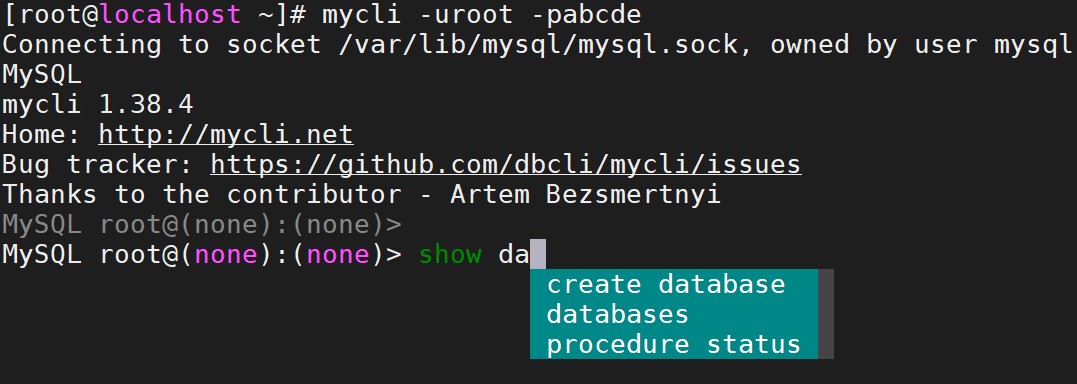
mycli提供了比原生mysql客户端更友好的交互体验,特别适合需要频繁操作数据库的开发和管理人员。
小结
mysql的完整生态系统包含服务端核心、客户端工具和管理程序。熟练掌握这些工具的使用方法,能够显著提升数据库管理和维护的效率。从基础的mysql客户端到功能丰富的mysqladmin,再到增强型的mycli,每种工具都有其特定的适用场景。在实际工作中,根据具体需求选择合适的工具,可以更加高效地完成数据库相关工作。
到此这篇关于mysql组成与常用工具详解的文章就介绍到这了,更多相关mysql常用工具内容请搜索代码网以前的文章或继续浏览下面的相关文章希望大家以后多多支持代码网!





发表评论