
 我要评论
我要评论大家在开发中有没有遇到过这样的场景:需要同时调用好几个接口,等所有接口都返回结果后再进行下一步处理?或者某个操作依赖另一个操作的结果,但又不想让程序一直等着?
如果还用传统的多线程或者 future 来处理,代码往往写得又复杂又难维护。今天就来给大家介绍一个 java 8 引入的异步编程神器 ——completablefuture,它能让这些复杂的异步操作变得简单优雅。
一、什么是 completablefuture?
简单说,completablefuture 是一个「可以手动完成的 future」。它不仅能像普通 future 那样执行异步任务,还提供了一堆实用的方法,让我们可以轻松实现:
- 链式调用(上一个任务完成后自动执行下一个)
- 组合多个任务(不管是有依赖关系还是完全独立)
- 优雅处理异常(不用担心异步任务的异常被悄悄吃掉)
形象点说,普通 future 就像寄快递,只能等快递到了自己去取;而 completablefuture 更像「快递上门」,不仅能自动通知你,还能帮你把快递拆开、分类,甚至直接送到指定位置。
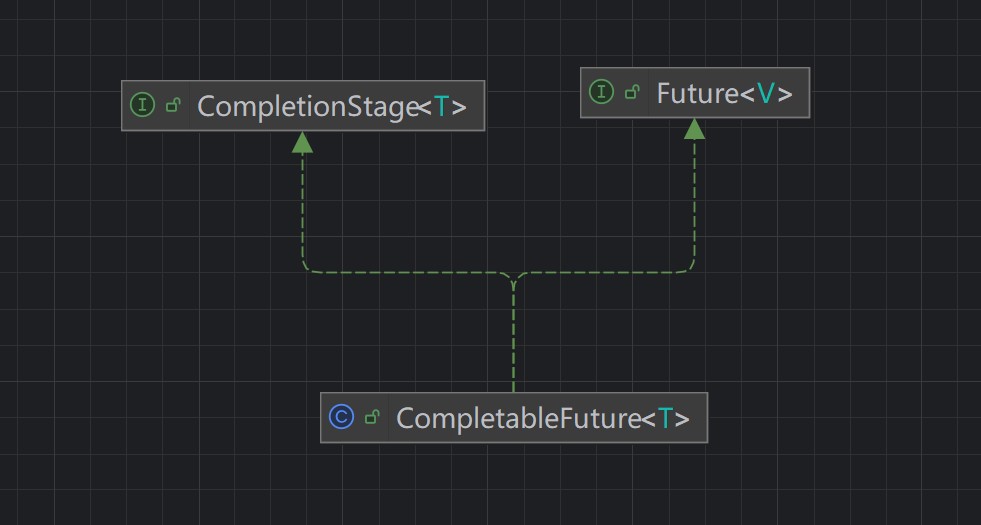
completablefuture 同时实现了 future 和 completionstage 接口
public class completablefuture<t> implements future<t>, completionstage<t> {
}
二、入门:创建第一个 completablefuture
创建 completablefuture 主要靠两个静态方法,先看个简单例子:
import java.util.concurrent.completablefuture;
import java.util.concurrent.executionexception;
public class firstcompletablefuture {
    public static void main(string[] args) throws executionexception, interruptedexception {
        // 1. 有返回值的异步任务:supplyasync
        completablefuture<string> foodfuture = completablefuture.supplyasync(() -> {
            // 模拟耗时操作(比如调用接口查外卖)
            try { thread.sleep(1000); } catch (interruptedexception e) { e.printstacktrace(); }
            return "麻辣烫"; // 任务结果
        });
        // 2. 无返回值的异步任务:runasync
        completablefuture<void> noticefuture = completablefuture.runasync(() -> {
            // 模拟耗时操作(比如发送通知)
            try { thread.sleep(500); } catch (interruptedexception e) { e.printstacktrace(); }
            system.out.println("已通知用户:外卖正在配送中");
        });
        // 获取第一个任务的结果(会等任务完成)
        string food = foodfuture.get();
        system.out.println("用户点的是:" + food);
        // 等待第二个任务完成(虽然它没返回值,但我们需要它执行完)
        noticefuture.get();
    }
}
运行结果:

关键点:
1.supplyasync(带async表示是异步):适合有返回结果的任务(比如查数据、算结果),参数是一个 supplier(带返回值的函数)。
    public static <u> completablefuture<u> supplyasync(supplier<u> supplier) {
        return asyncsupplystage(asyncpool, supplier);
    }
    //使用自定义线程池,比较推荐
    public static <u> completablefuture<u> supplyasync(supplier<u> supplier,
                                                       executor executor) {
        return asyncsupplystage(screenexecutor(executor), supplier);
}2.runasync:适合无返回结果的任务(比如发日志、发通知),参数是一个 runnable(无返回值的函数)。
    public static completablefuture<void> runasync(runnable runnable) {
        return asyncrunstage(asyncpool, runnable);
    }
    //使用自定义线程池,比较推荐
    public static completablefuture<void> runasync(runnable runnable,
                                                   executor executor) {
        return asyncrunstage(screenexecutor(executor), runnable);
}3.两个任务是并行执行的,所以通知先完成(只等了 500ms),外卖查询后完成(等了 1000ms)。
三、进阶:链式操作,让任务像流水线一样执行
最能体现 completablefuture 强大的,就是它的链式操作。不用手动等待上一个任务完成,直接指定「下一个要做什么」。
比如我们要完成这样一个流程:
- 查用户 id(耗时 1s)
- 用 id 查用户名(耗时 0.5s)
- 打印用户名(耗时忽略)
用链式操作实现,代码会非常清爽:
import java.util.concurrent.completablefuture;
public class completablefuturechain {
    public static void main(string[] args) throws exception {
        // 链式操作:一步接一步执行
        completablefuture<void> pipeline = completablefuture.supplyasync(() -> {
            // 第一步:查用户id
            try { thread.sleep(1000); } catch (interruptedexception e) { e.printstacktrace(); }
            system.out.println("第一步:查到用户id = 10086");
            return 10086; // 把结果传给下一步
        }).thenapply(userid -> {
            // 第二步:用id查用户名(接收上一步的结果)
            try { thread.sleep(500); } catch (interruptedexception e) { e.printstacktrace(); }
            system.out.println("第二步:用id " + userid + " 查到用户名 = 小明");
            return "小明"; // 再把结果传给下一步
        }).thenaccept(username -> {
            // 第三步:打印用户名(接收上一步的结果,无返回值)
            system.out.println("第三步:最终用户名是 " + username);
        });
        // 等待整个流水线完成
        pipeline.get();
    }
}
运行结果:
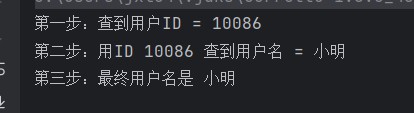
常用链式方法:
thenapply:接收上一步结果,处理后返回新结果(比如「id→用户名」的转换)。thenaccept:接收上一步结果,只处理不返回(比如打印、保存)。thenrun:不关心上一步结果,只在完成后执行(比如「不管结果如何,都记录日志」)。
就像流水线一样,上一个工序的产品自动传到下一个工序,全程无需人工干预。
四、高手篇:组合多个任务,效率翻倍
实际开发中,我们经常需要处理多个任务,有的任务之间有依赖(比如先登录才能下单),有的则完全独立(比如同时加载商品信息和用户信息)。completablefuture 提供了专门的方法来处理这些场景。
1. 处理依赖任务:thencompose
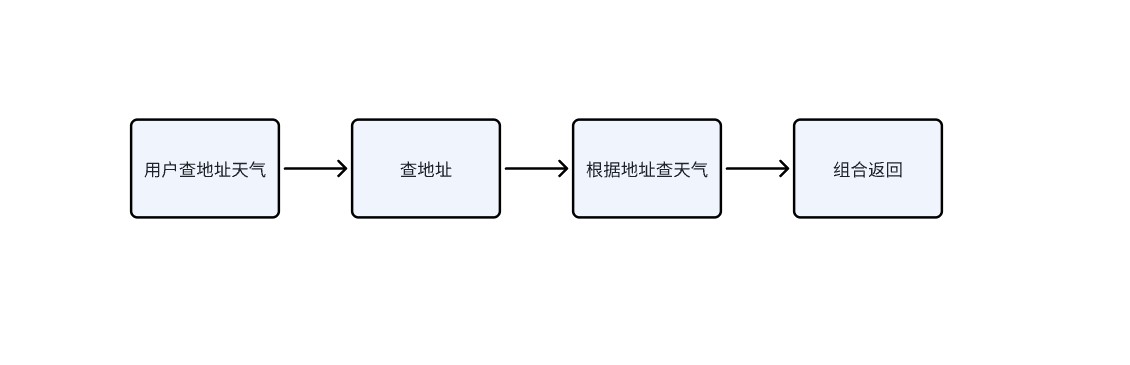
比如「先查用户地址,再根据地址查天气」,第二个任务依赖第一个的结果:
import java.util.concurrent.completablefuture;
public class thencomposedemo {
    // 模拟:查用户地址
    public static completablefuture<string> getaddress(string username) {
        return completablefuture.supplyasync(() -> {
            try { thread.sleep(800); } catch (interruptedexception e) { e.printstacktrace(); }
            return username + "的地址是:北京市海淀区";
        });
    }
    // 模拟:根据地址查天气
    public static completablefuture<string> getweather(string address) {
        return completablefuture.supplyasync(() -> {
            try { thread.sleep(600); } catch (interruptedexception e) { e.printstacktrace(); }
            return address + ",今天天气:晴,25℃";
        });
    }
    public static void main(string[] args) throws exception {
        // 组合两个依赖任务
        completablefuture<string> result = completablefuture.supplyasync(() -> "小明")
                .thencompose(username -> getaddress(username)) // 先查地址
                .thencompose(address -> getweather(address)); // 再查天气
        system.out.println(result.get());
    }
}
运行流程如下:
运行结果:

thencompose 就像「接力赛」,第一棒跑完了,把接力棒交给第二棒,确保任务按顺序执行。
2. 处理独立任务:thencombine
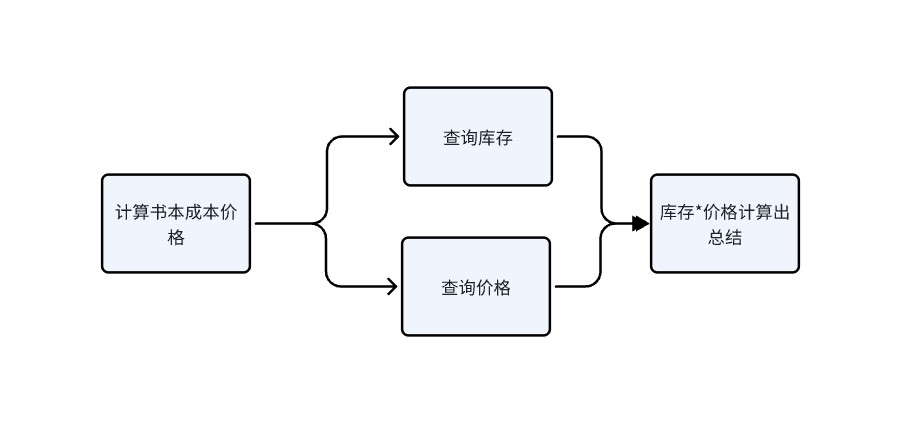
如果两个任务毫无关系,可以并行执行,最后合并结果。比如「同时查商品价格和库存,计算总价」:
import java.util.concurrent.completablefuture;
public class thencombinedemo {
    // 查价格
    public static completablefuture<double> getprice(string product) {
        return completablefuture.supplyasync(() -> {
            try { thread.sleep(1000); } catch (interruptedexception e) { e.printstacktrace(); }
            system.out.println(product + "的价格是:99.9元");
            return 99.9;
        });
    }
    // 查库存
    public static completablefuture<integer> getstock(string product) {
        return completablefuture.supplyasync(() -> {
            try { thread.sleep(800); } catch (interruptedexception e) { e.printstacktrace(); }
            system.out.println(product + "的库存是:5件");
            return 5;
        });
    }
    public static void main(string[] args) throws exception {
        string product = "java编程思想";
        // 并行执行两个任务,然后合并结果
        completablefuture<double> total = getprice(product)
                .thencombine(getstock(product), (price, stock) -> price * stock);
        system.out.println("总价:" + total.get() + "元");
    }
}
执行流程:
执行结果:
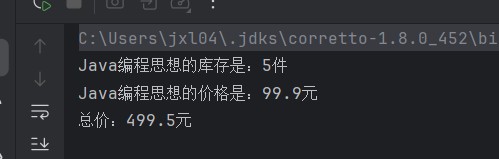
两个任务并行执行,效率大大提高!
3. 等待所有任务:allof
如果有一堆任务,需要全部完成后再做处理(比如批量下载多个文件,全部下完后打包):
package com.itheima.future;
import java.util.concurrent.completablefuture;
public class allofdemo {
    public static void main(string[] args) throws exception {
        //计时开始
        long start = system.currenttimemillis();
        // 3个下载任务
        completablefuture<void> download1 = completablefuture.runasync(() -> {
            try { thread.sleep(1000); } catch (interruptedexception e) { e.printstacktrace(); }
            system.out.println("文件1下载完成");
        });
        completablefuture<void> download2 = completablefuture.runasync(() -> {
            try { thread.sleep(1500); } catch (interruptedexception e) { e.printstacktrace(); }
            system.out.println("文件2下载完成");
        });
        completablefuture<void> download3 = completablefuture.runasync(() -> {
            try { thread.sleep(800); } catch (interruptedexception e) { e.printstacktrace(); }
            system.out.println("文件3下载完成");
        });
        // 等待所有任务完成
        completablefuture.allof(download1, download2, download3).get();
        system.out.println("所有文件下载完成,开始打包...");
        system.out.println("打包完成,耗时:" + (system.currenttimemillis() - start) + "毫秒");
    }
}
执行流程如下:
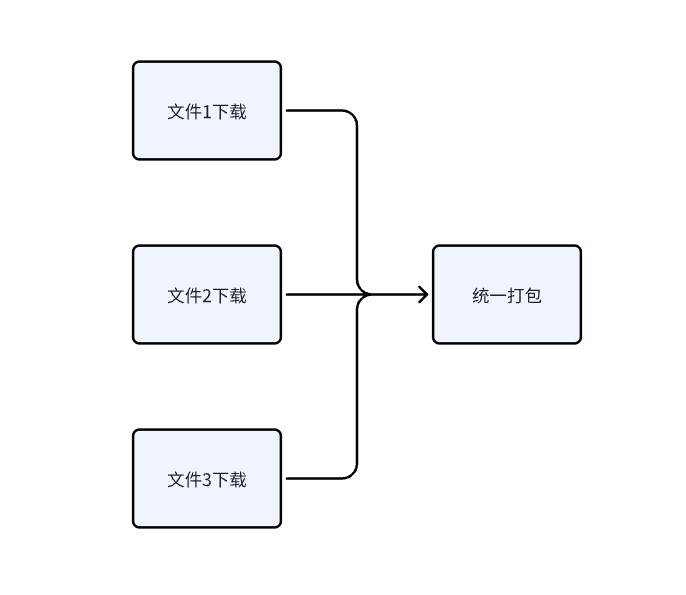
运行结果:
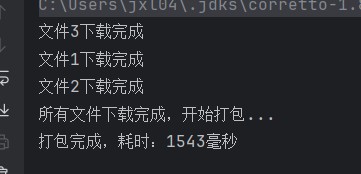
4. 等待任意任务:anyof
如果多个任务中,只要有一个完成就可以继续(比如查多个数据源,哪个快用哪个):
import java.util.concurrent.completablefuture;
public class anyofdemo {
    public static void main(string[] args) throws exception {
        // 3个查询任务(不同数据源)
        completablefuture<string> fromcache = completablefuture.supplyasync(() -> {
            try { thread.sleep(300); } catch (interruptedexception e) { e.printstacktrace(); }
            return "从缓存查到数据:java入门";
        });
        completablefuture<string> fromdb = completablefuture.supplyasync(() -> {
            try { thread.sleep(800); } catch (interruptedexception e) { e.printstacktrace(); }
            return "从数据库查到数据:java入门";
        });
        completablefuture<string> fromapi = completablefuture.supplyasync(() -> {
            try { thread.sleep(1200); } catch (interruptedexception e) { e.printstacktrace(); }
            return "从api查到数据:java入门";
        });
        // 只要有一个任务完成就返回
        completablefuture<object> result = completablefuture.anyof(fromcache, fromdb, fromapi);
        system.out.println("最快的结果:" + result.get());
    }
}
运行结果:
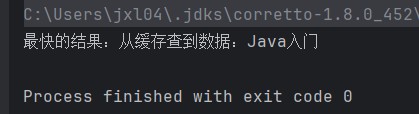
五、异常处理:别让异步任务的错误悄悄溜走
异步任务的异常很容易被忽略(比如线程池悄悄吃掉异常),completablefuture 提供了贴心的异常处理方法。
1. exceptionally:捕获异常并返回默认值
import java.util.concurrent.completablefuture;
public class exceptiondemo1 {
    public static void main(string[] args) throws exception {
        completablefuture<integer> future = completablefuture.supplyasync(() -> {
            // 模拟任务失败
            if (true) {
                throw new runtimeexception("查询失败:数据库连接超时");
            }
            return 100;
        }).exceptionally(ex -> {
            // 捕获异常,返回默认值
            system.out.println("出错了:" + ex.getmessage());
            return 0; // 默认值
        });
        system.out.println("最终结果:" + future.get()); // 输出 0
    }
}
执行结果:

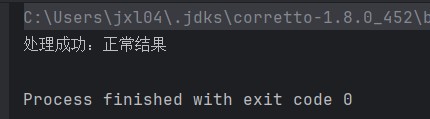
2. handle:同时处理正常结果和异常
import java.util.concurrent.completablefuture;
public class exceptiondemo2 {
    public static void main(string[] args) throws exception {
        completablefuture<string> future = completablefuture.supplyasync(() -> {
            // 这里可以故意抛出异常测试
            return "正常结果";
        }).handle((result, ex) -> {
            if (ex != null) {
                return "处理异常:" + ex.getmessage();
            } else {
                return "处理成功:" + result;
            }
        });
        system.out.println(future.get()); // 输出 处理成功:正常结果
    }
}
执行结果:
六、completablefuture 的线程池:默认还是自定义?
使用 completablefuture 时,线程池的选择非常关键,它直接影响程序的性能和稳定性。
1. 默认线程池:forkjoinpool.commonpool ()
当我们使用无参的supplyasync()或runasync()时,completablefuture 会默认使用forkjoinpool.commonpool()作为线程池:
// 使用默认线程池
completablefuture.supplyasync(() -> {
    // 任务逻辑
    return "result";
});默认线程池的特点:
- 线程数量:默认等于 cpu 核心数(可以通过
-djava.util.concurrent.forkjoinpool.common.parallelism参数调整)- 适用场景:cpu 密集型任务(如计算)
- 优点:无需手动管理线程池,简单方便
潜在问题:
- 所有使用默认线程池的任务会共享这一组线程,高并发下可能出现资源竞争
- 对于 io 密集型任务(如网络请求、文件读写),固定的线程数可能导致效率低下
- 当有大量任务时,可能会拖慢所有依赖此线程池的任务
2. 自定义线程池:更灵活的控制
实际项目中,强烈建议使用自定义线程池,尤其是在生产环境。我们可以通过带线程池参数的方法来指定:
package com.itheima.future;
import java.util.concurrent.completablefuture;
import java.util.concurrent.executorservice;
import java.util.concurrent.executors;
import java.util.concurrent.threadpoolexecutor;
public class customthreadpooldemo {
    // 自定义线程池(这里我暂时使用线程池包里的线程池,一般情况下要使用自定义线程池threadpoolexecutor)
    private static final executorservice customexecutor = executors.newfixedthreadpool(10);
    public static void main(string[] args) {
        // 使用自定义线程池
        completablefuture.supplyasync(() -> {
            system.out.println("任务在自定义线程池执行:" + thread.currentthread().getname());
            return "处理完成";
        }, customexecutor)
        .thenaccept(result -> {
            system.out.println("结果:" + result);
        });
        // 记得在程序结束时关闭线程池
        customexecutor.shutdown();
    }
}
执行结果:

自定义线程池的优势:
- 隔离不同类型的任务(例如:查询数据库的任务用一个线程池,发送消息的任务用另一个)
- 可以根据任务类型(cpu 密集 / io 密集)调整线程数量
- 避免默认线程池被某个耗时任务占满导致的整体阻塞
线程池配置建议:
- cpu 密集型任务:线程数 = cpu 核心数 + 1
- io 密集型任务:线程数 = cpu 核心数 × 2(或更多,根据实际测试调整)
- 为线程池起一个有意义的名字,方便问题排查(可以通过自定义 threadfactory 实现)
七、completablefuture vs future:到底有什么不同?
很多人会疑惑,java 已经有了 future,为什么还需要 completablefuture?它们的核心区别在哪里?
| 特性 | future | completablefuture |
|---|---|---|
| 实现接口 | 仅实现 future 接口 | 实现 future 和 completionstage 接口 |
| 链式操作 | 不支持,必须阻塞获取结果后再处理 | 支持,可通过 thenapply 等方法串联多个任务 |
| 异常处理 | 无专门的 api,需要在任务内部捕获 | 提供 exceptionally、handle 等专门的异常处理方法 |
| 任务组合 | 不支持,需要手动编写同步逻辑 | 支持 thencompose、thencombine 等多种组合方式 |
| 手动完成 | 不支持 | 支持 complete ()、completeexceptionally () 手动设置结果或异常 |
| 阻塞获取 | 只能通过 get () 阻塞获取 | 可以阻塞获取,也可以通过回调非阻塞处理 |
具体区别举例
1. 处理结果的方式
future 的方式(繁琐且必须阻塞):
executorservice executor = executors.newsinglethreadexecutor();
future<string> future = executor.submit(() -> {
    thread.sleep(1000);
    return "任务结果";
});
// 必须阻塞等待结果
string result = future.get();
// 处理结果
system.out.println("处理:" + result);
executor.shutdown();
completablefuture 的方式(非阻塞,链式处理):
completablefuture.supplyasync(() -> {
    try { thread.sleep(1000); } catch (interruptedexception e) { e.printstacktrace(); }
    return "任务结果";
}).thenapply(result -> {
    return "处理后:" + result;
}).thenaccept(processedresult -> {
    system.out.println(processedresult);
});
2. 异常处理能力
future 的方式(异常处理麻烦):
executorservice executor = executors.newsinglethreadexecutor();
future<integer> future = executor.submit(() -> {
    if (true) {
        throw new runtimeexception("计算失败");
    }
    return 100;
});
try {
    integer result = future.get(); // 异常会在这里抛出
} catch (exception e) {
    // 处理异常
    e.printstacktrace();
}
executor.shutdown();
completablefuture 的方式(专门的异常处理 api):
completablefuture.supplyasync(() -> {
    if (true) {
        throw new runtimeexception("计算失败");
    }
    return 100;
}).exceptionally(ex -> {
    system.out.println("捕获异常:" + ex.getmessage());
    return 0; // 返回默认值
}).thenaccept(result -> {
    system.out.println("结果:" + result); // 输出0
});
3. 多任务组合能力
future 几乎无法优雅地组合多个任务,而 completablefuture 提供了丰富的组合方式,这也是它最核心的优势。
到此这篇关于java 中的 completablefuture:让异步编程变得简单的文章就介绍到这了,更多相关java completablefuture异步编程内容请搜索代码网以前的文章或继续浏览下面的相关文章希望大家以后多多支持代码网!






发表评论