
 我要评论
我要评论需求:
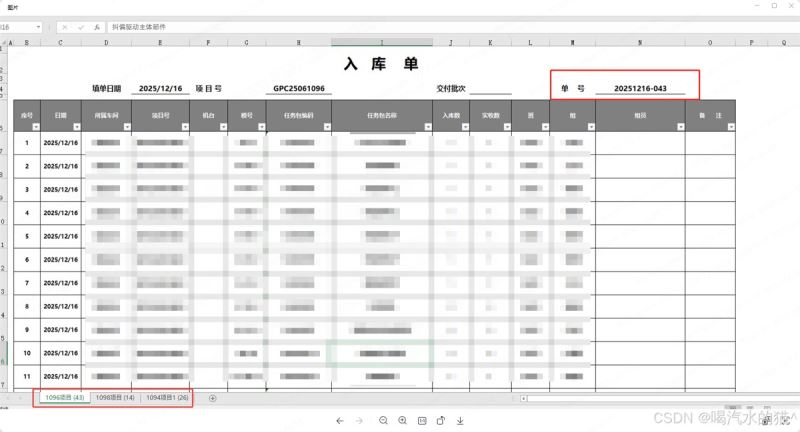
1、根据如下图片,导出同样格式的excel文件。
2、并且list实体集合有项目号,根据项目号区分导出不同sheet页。项目号格式:g10086b1,g10087b1,去掉最后两位b1或b2在区分,比如g10086,g10086为一个sheet页。g10087又为一个新的sheet页。
一、依赖引入(maven)
<dependency>
    <groupid>org.apache.poi</groupid>
    <artifactid>poi</artifactid>
    <version>5.2.5</version>
</dependency>
<dependency>
    <groupid>org.apache.poi</groupid>
    <artifactid>poi-ooxml</artifactid>
    <version>5.2.5</version>
</dependency>
二、完整的实体类定义
import lombok.data;
import java.io.serializable;

/**
 - 入库单实体类(完全对应excel表格字段)
 */
@data
public class warehousein implements serializable {
    private static final long serialversionuid = 1l;

    // 1. 序号(excel第1列,导出时自动生成,无需手动设置)
    private integer serialno;

    // 2. 日期(excel第2列)
    private string date;

    // 3. 所属车间(excel第3列)
    private string workshop;

    // 4. 项目号(excel第4列,格式如gpc25061095b2,用于分组sheet)
    private string projectno;

    // 5. 机台(excel第5列)
    private string machine;

    // 6. 模号(excel第6列)
    private string modelno;

    // 7. 任务包编码(excel第7列)
    private string taskpackagecode;

    // 8. 任务包名称(excel第8列)
    private string taskpackagename;

    // 9. 入库数量(excel第9列)
    private integer instockqty;

    // 10. 实收数(excel第10列)
    private integer actualreceivedqty;

    // 11. 班(excel第11列,如:早班/中班/晚班)
    private string workshift;

    // 12. 组(excel第12列,如:1组/2组)
    private string workgroup;

    // 13. 组员(excel第13列,如:张三/李四)
    private string groupmember;

    // 14. 备注(excel第14列)
    private string remarks;

    // 扩展字段(excel中隐藏的辅助字段,用于填充表头信息)
    // 填单日期(excel表头-填单日期)
    private string filldate;

    // 交付批次(excel表头-交付批次,如:第二批(2+2))
    private string deliverybatch;

    // 单号(excel表头-单号,如:gen2025131)
    private string orderno;
}
实体类说明:
- 字段对应关系:每个字段与 excel 表格列完全对齐,字段名采用「业务语义 + 字段类型」命名,便于理解和维护。
- 扩展字段:filldate(填单日期)、deliverybatch(交付批次)、orderno(单号)是 excel 表头的动态信息,实体类中新增这些字段用于填充,避免硬编码。
- 序列化:实现serializable接口,支持分布式场景下的数据传输(如 redis 缓存、rpc 调用)。
- lombok 注解:使用@data自动生成getter/setter/tostring等方法,简化代码。
三、代码实现
1、导出工具
import org.apache.poi.ss.usermodel.*;
import org.apache.poi.ss.util.cellrangeaddress;
import org.apache.poi.xssf.usermodel.xssfworkbook;

import java.io.outputstream;
import java.util.list;
import java.util.map;
import java.util.stream.collectors;

public class excelexportutil {

			/**
	     * 生产入库单导出
	     */
	    @override
	    public void exportwarehouseinexcel(outputstream outputstream, list<stockinentity> list) throws ioexception {
	        // 按项目号分组(去掉最后两位,如gpc25061095b2 → gpc25061095)
	        map<string, list<stockinentity>> groupbyproject = list.stream()
	                .filter(item -> isvalidprojectnumber(item.getprojectnumber()))
	                .collect(collectors.groupingby(item -> truncateprojectnumber(item.getprojectnumber())));

	        // 创建workbook并自动关闭
	        try (workbook workbook = new xssfworkbook()) {

	            // 为每个分组创建sheet
	            for (map.entry<string, list<stockinentity>> entry : groupbyproject.entryset()) {
	                string sheetname = entry.getkey() + "项目"; // sheet名(如gpc25061095项目)
	                sheet sheet = workbook.createsheet(sheetname);
	                list<stockinentity> sheetdata = entry.getvalue();

	                // 构建当前sheet的入库单内容
	                buildstockinentitysheet(sheet, sheetdata);
	            }

	            // 写出excel
	            workbook.write(outputstream);
	        }
	    }

	    // 判断项目编号是否合法
	    private boolean isvalidprojectnumber(string projectno) {
	        return projectno != null && projectno.length() >= 2;
	    }


	    // 截取项目编号(去掉最后两位)
	    private string truncateprojectnumber(string projectno) {
	        if (!isvalidprojectnumber(projectno)) {
	            throw new illegalargumentexception("invalid project number: " + projectno);
	        }
	        return projectno.substring(0, projectno.length() - 2);
	    }

	    /**
	     * 构建单个sheet的入库单格式
	     */
	    private static void buildstockinentitysheet(sheet sheet, list<stockinentity> data) {
	        // 指定时区
	        zoneid zoneid = zoneid.of("asia/shanghai");
	        // 获取指定时区的当前日期
	        datetimeformatter formatter = datetimeformatter.ofpattern("yyyy/mm/dd");
	        string formatteddate = localdate.now(zoneid).format(formatter);

	        // ========== 设置列宽 ==========
	        int[] columnwidths = {2500, 3500, 5000, 6000, 4000, 4500, 5500, 6500, 3000, 3000, 3000, 3000, 7000, 3000};
	        for (int i = 0; i < columnwidths.length; i++) {
	            sheet.setcolumnwidth(i, columnwidths[i]);
	        }

	        // ==========  创建样式 ==========
	        workbook workbook = sheet.getworkbook();
	        // 标题样式(居中、加粗)
	        cellstyle titlestyle = workbook.createcellstyle();
	        font titlefont = workbook.createfont();
	        titlefont.setbold(true);
	        titlefont.setfontheightinpoints((short) 16);
	        titlestyle.setfont(titlefont);
	        titlestyle.setalignment(horizontalalignment.center);
	        titlestyle.setverticalalignment(verticalalignment.center);

	        // 表头样式(灰色背景、居中)
	        cellstyle headerstyle = workbook.createcellstyle();
	        font headerfont = workbook.createfont();
	        headerfont.setbold(true);
	        headerfont.setcolor(indexedcolors.white.getindex());
	        headerstyle.setfont(headerfont);
	        headerstyle.setfillforegroundcolor(indexedcolors.grey_25_percent.getindex());
	        headerstyle.setfillpattern(fillpatterntype.solid_foreground);
	        headerstyle.setalignment(horizontalalignment.center);
	        headerstyle.setverticalalignment(verticalalignment.center);
	        headerstyle.setbordertop(borderstyle.thin);
	        headerstyle.setborderbottom(borderstyle.thin);
	        headerstyle.setborderleft(borderstyle.thin);
	        headerstyle.setborderright(borderstyle.thin);

	        // 内容样式(居中、边框)
	        cellstyle contentstyle = workbook.createcellstyle();
	        font row4font = workbook.createfont();
	        row4font.setbold(true);
	        contentstyle.setfont(row4font);
	        contentstyle.setalignment(horizontalalignment.center);
	        contentstyle.setverticalalignment(verticalalignment.center);
	        contentstyle.setbordertop(borderstyle.thin);
	        contentstyle.setborderbottom(borderstyle.thin);
	        contentstyle.setborderleft(borderstyle.thin);
	        contentstyle.setborderright(borderstyle.thin);

	        // ==========  构建sheet内容 ==========
	        // 第1行:入库单标题(合并单元格)
	        row row1 = sheet.createrow(0);
	        cell cell1 = row1.createcell(0);
	        cell1.setcellvalue("入库单");
	        cell1.setcellstyle(titlestyle);
	        sheet.addmergedregion(new cellrangeaddress(0, 0, 0, 13)); // 合并a1-n1

	        // 第2行:填单日期、项目号等信息(合并单元格)
	        cellstyle row2style = workbook.createcellstyle();
	        font row2font = workbook.createfont();
	        row2font.setunderline(font.u_single); // 单下划线(也可以用u_double表示双下划线)
	        row2font.setbold(true);
	        row2style.setfont(row2font);
	        row2style.setfillforegroundcolor(indexedcolors.white.getindex());
	        row2style.setfillpattern(fillpatterntype.solid_foreground);
	        row2style.setalignment(horizontalalignment.center);
	        row2style.setverticalalignment(verticalalignment.center);
	        // 创建行并设置高度
	        row row2 = sheet.createrow(1);
	        row2.setheightinpoints((short) 35);
	        // 填单日期(a2-b2)
	        cell cell2a = row2.createcell(0);
	        cell2a.setcellvalue("填单日期:" + formatteddate);
	        cell2a.setcellstyle(row2style);
	        sheet.addmergedregion(new cellrangeaddress(1, 1, 0, 1));
	        // 项目号(c2-f2)
	        cell cell2c = row2.createcell(2);
	        cell2c.setcellvalue("项目号:" + data.get(0).getprojectnumber().substring(0, data.get(0).getprojectnumber().length() - 2));
	        cell2c.setcellstyle(row2style);
	        sheet.addmergedregion(new cellrangeaddress(1, 1, 2, 5));
	        // 交付批次(g2-j2)
	        cell cell2g = row2.createcell(6);
	        cell2g.setcellvalue("交付批次:" + data.get(0).getdeliverybatch());
	        cell2g.setcellstyle(row2style);
	        sheet.addmergedregion(new cellrangeaddress(1, 1, 6, 9));
	        // 单号(k2-n2)
	        cell cell2k = row2.createcell(10);
	        cell2k.setcellvalue("单号:" + data.get(0).getinputno());
	        cell2k.setcellstyle(row2style);
	        sheet.addmergedregion(new cellrangeaddress(1, 1, 10, 13));

	        // 第3行:表头(序号、日期、所属车间...)
	        row row3 = sheet.createrow(2);
	        row3.setheightinpoints((short) 50);
	        string[] headers = {"序号", "日期", "所属车间", "项目号", "机台", "模号", "任务包编码", "任务包名称", "入库数量", "实收数", "班", "组", "组员", "备注"};
	        for (int i = 0; i < headers.length; i++) {
	            cell cell = row3.createcell(i);
	            cell.setcellvalue(headers[i]);
	            cell.setcellstyle(headerstyle);
	        }

	        // 第4行及以后:数据行
	        for (int i = 0; i < data.size(); i++) {
	            stockinentity item = data.get(i);
	            row row = sheet.createrow(3 + i);
	            row.setheightinpoints((short) 45);

	            // 序号
	            cell cell0 = row.createcell(0);
	            cell0.setcellvalue(i + 1);
	            cell0.setcellstyle(contentstyle);

	            // 日期
	            cell cell11 = row.createcell(1);
	            cell11.setcellvalue(item.getcreatetime().format(formatter));
	            cell11.setcellstyle(contentstyle);

	            // 所属车间
	            cell cell2 = row.createcell(2);
	            cell2.setcellvalue(item.getreceivedeptname());
	            cell2.setcellstyle(contentstyle);

	            // 项目号
	            cell cell3 = row.createcell(3);
	            cell3.setcellvalue(item.getprojectnumber());
	            cell3.setcellstyle(contentstyle);

	            // 机台
	            cell cell4 = row.createcell(4);
	            cell4.setcellvalue(item.getmachine());
	            cell4.setcellstyle(contentstyle);

	            // 模号
	            cell cell5 = row.createcell(5);
	            cell5.setcellvalue(item.getmodelno());
	            cell5.setcellstyle(contentstyle);

	            // 任务包编码
	            cell cell6 = row.createcell(6);
	            cell6.setcellvalue(item.getmaterialcode());
	            cell6.setcellstyle(contentstyle);

	            // 任务包名称
	            cell cell7 = row.createcell(7);
	            cell7.setcellvalue(item.getmaterialname());
	            cell7.setcellstyle(contentstyle);

	            // 入库数量
	            cell cell8 = row.createcell(8);
	            cell8.setcellvalue(string.valueof(item.getqty()));
	            cell8.setcellstyle(contentstyle);

	            // 实收数
	            cell cell9 = row.createcell(9);
	            cell9.setcellvalue(string.valueof(item.getqty()));
	            cell9.setcellstyle(contentstyle);

	            // 班、组、组员、备注(示例中为空,可根据实际数据填充)
	            for (int j = 10; j < 14; j++) {
	                cell cell = row.createcell(j);
	                cell.setcellstyle(contentstyle);
	            }
	        }
	    }
    }
2、使用示例(web 场景)
在 controller 中调用工具类,导出 excel:
import org.springframework.web.bind.annotation.getmapping;
import org.springframework.web.bind.annotation.restcontroller;

import javax.servlet.http.httpservletresponse;
import java.io.outputstream;
import java.net.urlencoder;
import java.util.list;

@restcontroller
public class exportcontroller {

    /**
     * 生产入库单导出
     */
    @postmapping("/exportproinput")
    public void exportproinput(httpservletresponse response, inputquerydto input) {
        list<stockinentity> list = baseservice.selectproinput(input);
        paassert.iserror(collutil.isempty(list), "导出数据不能为空");
        try {
            // 设置响应头
            response.setcontenttype("application/vnd.openxmlformats-officedocument.spreadsheetml.sheet");
            string filename = urlencoder.encode("入库单.xlsx", "utf-8");
            response.setheader("content-disposition", "attachment; filename=" + filename);
            // 导出excel
            outputstream outputstream = response.getoutputstream();
            baseservice.exportwarehouseinexcel(outputstream, list);
            outputstream.flush();
        } catch (ioexception e) {
            e.printstacktrace();
            throw new baseexception("导出失败");
        }
    }

    // 模拟数据(实际从数据库查询)
    private list<stockinentity> getwarehouseindata() {
        // 示例数据,实际替换为业务数据
        stockinentity= new stockinentity();
        item1.setprojectno("gpc25061095b2");
        item1.setdate("2025/12/16");
        item1.setworkshop("精密装配");
        item1.setmachine("j20-04");
        item1.setmodel("5400002400");
        item1.settaskcode("导向压销部件2");
        item1.settaskname("导向压销部件2");
        item1.setinqty(2);
        item1.setactualqty(2);

        // 可添加更多数据...
        return list.of(item1, item1); // 示例中重复添加,实际替换为真实数据
    }
}
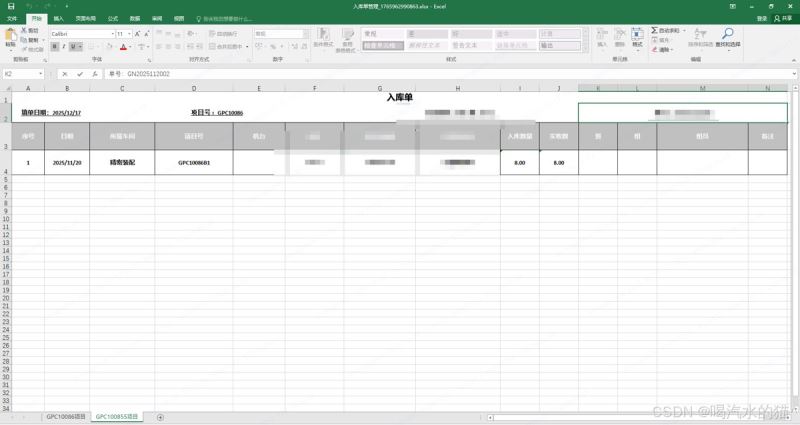
四、导出效果
总结
- sheet 分组逻辑:通过projectno.substring(0, projectno.length() - 2)截取项目号前缀,实现同一前缀的记录分到同一个 sheet。
- 格式还原:通过单元格合并、样式设置(背景色、边框、对齐方式)还原示例中的excel 格式。
- 动态数据:代码中 “填单日期、交付批次、单号” 为固定值,实际应从业务数据中动态获取(可在实体类中添加对应字段)。
到此这篇关于java实现excel导出的全部流程(多sheet、复杂格式)的文章就介绍到这了,更多相关java实现excel导出内容请搜索代码网以前的文章或继续浏览下面的相关文章希望大家以后多多支持代码网!



发表评论