
 我要评论
我要评论问题描述
在使用eclipse进行spring开发时,很多开发者都会遇到这样的xml验证错误:
cvc-elt.1.a: cannot find the declaration of element 'beans'. [cvc-elt.1.a]
downloading external resources is disabled. [downloadresourcedisabled]
尽管配置文件内容完全正确,但ide就是报错,严重影响开发体验。本文将全面总结各种解决方案。
错误场景重现
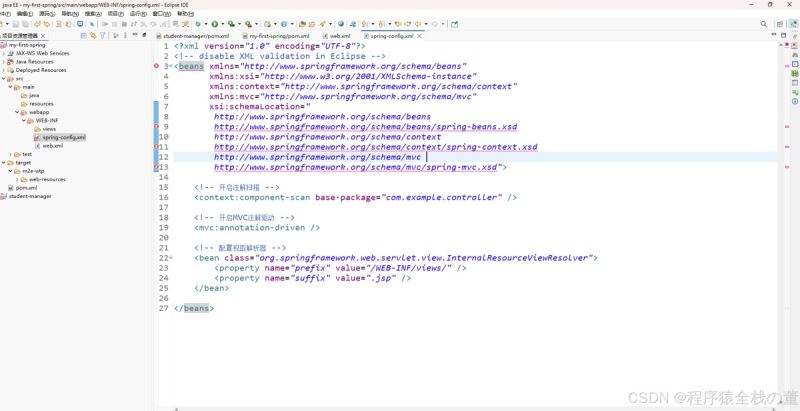
配置文件示例(完全正确但报错)
<?xml version="1.0" encoding="utf-8"?>
<beans xmlns="http://www.springframework.org/schema/beans"
       xmlns:xsi="http://www.w3.org/2001/xmlschema-instance"
       xmlns:context="http://www.springframework.org/schema/context"
       xmlns:mvc="http://www.springframework.org/schema/mvc"
       xsi:schemalocation="
        http://www.springframework.org/schema/beans
        http://www.springframework.org/schema/beans/spring-beans.xsd
        http://www.springframework.org/schema/context
        http://www.springframework.org/schema/context/spring-context.xsd
        http://www.springframework.org/schema/mvc
        http://www.springframework.org/schema/mvc/spring-mvc.xsd">

    <context:component-scan base-package="com.example.controller" />
    <mvc:annotation-driven />

    <bean class="org.springframework.web.servlet.view.internalresourceviewresolver">
        <property name="prefix" value="/web-inf/views/" />
        <property name="suffix" value=".jsp" />
    </bean>
</beans>
解决方案大全
方案一:检查eclipse wild web developer设置(最新发现!)
适用于:eclipse ide for enterprise java and web developers 等新版eclipse
- 打开 window → preferences
- 找到 xml (wild web developer)
- 勾选 “download external resources”
- 应用设置
效果:立即生效,无需刷新!
方案二:传统eclipse xml验证设置
window → preferences → xml → xml files → validation
关键设置:
- honour all xml schema locations
- resolve external entities
- process xml inclusions
验证规则调整:
- “no grammar specified” → 忽略
- “referenced file contains errors” → 警告
- “cannot find the declaration of element” → 忽略
方案三:项目级验证设置
- 右键项目 → properties → validation
- 启用项目特定设置
- 根据需要调整验证级别
- 或添加文件排除规则
方案四:网络问题解决方案
如果因网络无法下载schema文件:
方法a:使用本地catalog
xsi:schemalocation="
    http://www.springframework.org/schema/beans
    file:///path/to/local/spring-beans.xsd"
方法b:禁用网络依赖的验证
- 在文件开头添加:
<!-- disable xml validation in eclipse --> - 或添加:
<?eclipse version="3.4"?>
方案五:ide缓存清理
- project → clean
- 右键项目 → validate
- 重启eclipse
根本原因分析
为什么会出现这个问题
- 双重验证系统:新版eclipse同时存在wild web developer和传统wtp验证
- 网络依赖:xml验证需要从spring官网下载xsd schema文件
- 默认设置限制:某些版本默认禁用外部资源下载
- 代理/防火墙:阻止访问schema文件服务器
重要发现
eclipse不同发行版的差异:
- eclipse ide for enterprise java:预装wild web developer,设置位置不同
- 标准eclipse:主要使用传统xml验证设置
- spring tool suite:有专门的spring配置支持
验证配置文件正确性的方法
即使ide报错,也可以通过以下方式确认配置正确:
- 部署测试:部署到tomcat等服务器,观察启动日志
- 单元测试:编写配置加载测试
- 依赖检查:确保spring相关jar包完整
预防措施
新工作区设置检查清单:
- wild web developer下载设置
- 传统xml验证设置
- 网络连接测试
团队开发建议:
- 统一eclipse版本和配置
- 分享正确的首选项设置
- 建立项目初始化检查清单
总结
这个看似简单的xml验证问题,实际上涉及到:
- eclipse插件架构的理解
- xml schema验证机制
- 网络访问配置
- 不同eclipse发行版的差异
通过本文的全面总结,希望开发者能够快速定位并解决这类问题,把精力集中在真正的业务开发上。
经验分享:笔者就是在eclipse 2025-09企业版中,通过发现wild web developer的设置项,一举解决了困扰已久的问题。有时候解决方案就在不那么显眼的地方!
到此这篇关于spring中配置文件xml验证错误全面解决指南的文章就介绍到这了,更多相关spring配置文件xml验证错误解决内容请搜索代码网以前的文章或继续浏览下面的相关文章希望大家以后多多支持代码网!




发表评论