
 我要评论
我要评论mybatis 数据封装全攻略:告别空值与映射混乱
在日常开发中,使用 mybatis 进行数据库操作时,你是否经常遇到以下问题?
- 查询结果部分字段为
null,导致前端显示异常? - 多表联查时对象嵌套关系映射失败?
- 字段名和属性名不一致,结果集无法正确赋值?
- 集合类型(如 list)属性始终为空?
- 使用
resulttype返回 map 时结构混乱、不易维护?
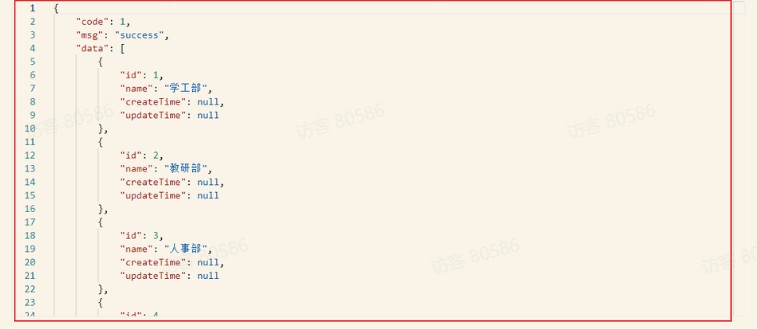
这些问题本质上都是 数据封装(result mapping) 的问题。本文将系统性地为你梳理 mybatis 中数据封装的核心机制,并提供最佳实践方案,助你彻底解决封装难题!
一、mybatis 数据封装的两种方式
1. resulttype —— 简单粗暴
适用于字段名与 java 属性名完全匹配的情况。
<select id="getuserbyid" resulttype="com.example.user">
    select id, username, email from user where id = #{id}
</select>
✅ 优点:简洁、易用
❌ 缺点:无法处理驼峰命名、多表关联、嵌套对象等复杂场景
⚠️ 注意:若数据库字段是
user_name,而 java 属性是username,则不会自动映射!
二、开启驼峰命名转换(推荐基础配置)
在 mybatis-config.xml 或 spring boot 配置中开启:
# application.yml (spring boot)
mybatis:
  configuration:
    map-underscore-to-camel-case: true
或 xml 配置:
<settings>
    <setting name="mapunderscoretocamelcase" value="true"/>
</settings>开启后,user_name → username,create_time → createtime 自动映射。
三、resultmap —— 精准控制映射关系
当 resulttype 无法满足需求时,必须使用 <resultmap>。
基础字段映射
<resultmap id="userresultmap" type="com.example.user">
    <id property="id" column="user_id"/> <!-- 主键建议用 id 标签 -->
    <result property="username" column="user_name"/>
    <result property="email" column="email_addr"/>
    <result property="createtime" column="gmt_create"/>
</resultmap>
<select id="getuserbyid" resultmap="userresultmap">
    select user_id, user_name, email_addr, gmt_create
    from user_info
    where user_id = #{id}
</select>
💡
id标签用于主键,有助于性能优化(缓存、嵌套查询去重)
四、处理对象嵌套 —— association
当 user 包含一个 profile 对象:
public class user {
    private long id;
    private string username;
    private profile profile; // 嵌套对象
}
public class profile {
    private string avatar;
    private string bio;
}
xml 映射:
<resultmap id="userwithprofileresultmap" type="user">
    <id property="id" column="user_id"/>
    <result property="username" column="username"/>
    <!-- 嵌套对象映射 -->
    <association property="profile" javatype="profile">
        <result property="avatar" column="avatar_url"/>
        <result property="bio" column="user_bio"/>
    </association>
</resultmap>
<select id="getuserwithprofile" resultmap="userwithprofileresultmap">
    select u.id as user_id, u.username,
           p.avatar as avatar_url, p.bio as user_bio
    from user u
    left join profile p on u.id = p.user_id
    where u.id = #{id}
</select>
五、处理集合嵌套 —— collection
当 user 包含多个 role:
public class user {
    private long id;
    private string username;
    private list<role> roles; // 集合
}
public class role {
    private long id;
    private string rolename;
}
xml 映射:
<resultmap id="userwithrolesresultmap" type="user">
    <id property="id" column="user_id"/>
    <result property="username" column="username"/>
    <!-- 集合映射 -->
    <collection property="roles" oftype="role">
        <id property="id" column="role_id"/>
        <result property="rolename" column="role_name"/>
    </collection>
</resultmap>
<select id="getuserwithroles" resultmap="userwithrolesresultmap">
    select u.id as user_id, u.username,
           r.id as role_id, r.name as role_name
    from user u
    left join user_role ur on u.id = ur.user_id
    left join role r on ur.role_id = r.id
    where u.id = #{id}
</select>
📌 注意:使用
oftype指定集合元素类型,而不是javatype
六、避免 n+1 查询问题
上面的写法虽然能正确封装,但可能引发 n+1 查询。推荐使用 join 查询 + 分组封装 或 分步查询(懒加载)
方案一:分步查询(推荐用于懒加载)
<resultmap id="userlazyloadresultmap" type="user">
    <id property="id" column="id"/>
    <result property="username" column="username"/>
    <collection property="roles"
                select="selectrolesbyuserid"
                column="id"
                fetchtype="lazy"/>
</resultmap>
<select id="selectuserbyid" resultmap="userlazyloadresultmap">
    select id, username from user where id = #{id}
</select>
<select id="selectrolesbyuserid" resulttype="role">
    select id, name as rolename from role
    where id in (select role_id from user_role where user_id = #{userid})
</select>
在配置中开启懒加载:
mybatis:
  configuration:
    lazy-loading-enabled: true
    aggressive-lazy-loading: false
七、使用注解简化映射(可选)
对于简单场景,也可使用注解:
@results(id = "userresult", value = {
    @result(property = "id", column = "user_id"),
    @result(property = "username", column = "user_name"),
    @result(property = "profile", column = "user_id",
            one = @one(select = "selectprofilebyuserid"))
})
@select("select user_id, user_name from user where id = #{id}")
user getuserbyid(long id);
八、实战技巧 & 避坑指南
✅ 技巧 1:统一别名规范
在 sql 中使用 as 给字段起别名,避免列名冲突:
select u.id as user_id, r.id as role_id, ...
✅ 技巧 2:复用 resultmap
使用 <extend> 继承已有的 resultmap:
<resultmap id="baseusermap" type="user">
    <id property="id" column="id"/>
    <result property="username" column="username"/>
</resultmap>
<resultmap id="userwithprofilemap" extends="baseusermap">
    <association property="profile" ... />
</resultmap>
✅ 技巧 3:自动映射策略
<resultmap automapping="true" ...>
开启后,未明确指定的匹配字段也会自动映射(需配合驼峰转换)。
❌ 避坑 1:不要混用 resulttype 和 resultmap
在一个 select 标签内只能使用其一。
❌ 避坑 2:集合属性未初始化
确保 java 实体中的 list 属性已初始化:
private list<role> roles = new arraylist<>(); // 避免 null
九、终极解决方案:mybatis-plus(可选进阶)
如果你觉得原生 mybatis 配置繁琐,可以考虑 mybatis-plus:
- 无需 xml,注解/条件构造器即可完成复杂查询
- 内置 resultmap 自动构建
- 支持连表查询插件(如
@tablefield(select = false)+querywrapper联查) - 分页、乐观锁、代码生成器一应俱全
示例:
// mp 自动处理字段映射 + 驼峰
list<user> users = usermapper.selectlist(
    wrappers.<user>lambdaquery()
        .eq(user::getusername, "admin")
);
总结
| 问题类型 | 解决方案 |
|---|---|
| 字段名不匹配 | 开启驼峰 / 使用 <result> |
| 对象嵌套 | <association> |
| 集合嵌套 | <collection> |
| 性能优化 | 分步查询 + 懒加载 |
| 复杂联查 | resultmap + sql 别名 |
| 快速开发 | mybatis-plus |
掌握以上方法,你将能从容应对 mybatis 中 99% 的数据封装问题!记得收藏本文,下次遇到映射失败时,按图索骥,轻松解决!
到此这篇关于mybatis 数据封装全攻略(告别空值与映射混乱问题)的文章就介绍到这了,更多相关mybatis 数据封装内容请搜索代码网以前的文章或继续浏览下面的相关文章希望大家以后多多支持代码网!




发表评论