
 我要评论
我要评论1、elasticsearch的java客户端选择
elasticsearch官方支持的客户端
| 客户端名称 | 简介 | 使用建议 |
|---|---|---|
| elasticsearch java api client(新客户端) | 官方推荐的新客户端,基于 json mapping(如 elasticsearchclient 类),从 elasticsearch 7.15 开始推出。 | ✅推荐用于 spring boot 3+,elasticsearch 8+ |
| resthighlevelclient(已废弃) | 基于 rest 的高级客户端,是 es 6 ~ 7 的主力客户端,es 8 中已标记为 deprecated。 | ❌不推荐新项目使用 |
| low level rest client | 底层客户端,只提供 http 封装,不解析 json。 | 🔧适合自定义协议或处理特殊 json 请求场景 |
spring官方对elasticsearch的封装
| 客户端名称 | 简介 | 特点 |
|---|---|---|
| spring data elasticsearch | spring 官方对 elasticsearch 的数据访问封装,支持 repository 风格的接口编程。 | 👍开发效率高、和 jpa 风格一致,但功能不如原生客户端全 |
easy-es(dromara团队),国人之光!
| 客户端名称 | 简介 | 特点 |
|---|---|---|
| easy-es | 风格类似 mybatis-plus,一致的 api 和分页查询方式,java 开发者易于理解。 | 👍开发效率高、但是是对resthighlevelclient的深层封装,容易受版本影响,小团队维护 |
总结:
resthighlevelclient 是es7中使用最多的客户端,但是在es8中已经废弃。
easy-es 是基于resthighlevelclient封装的,会比较重,代码风格类似 mybatis-plus,熟悉mp的同学容易上手,但是容易受resthighlevelclient和elasticsearch版本的限制,并且目前社区虽然活跃,但项目主要靠小团队维护,不如官方客户端那样稳定长期。
elasticsearch java api client 是 elasticsearch 7.15 开始推出最新的客户端,能使用elasticsearch中所有功能,首选首选!!!!!!
spring data elasticsearch 是spring 官方对 elasticsearch的封装,springboot3中已经弃用了resthighlevelclient,选择引用了elasticsearch java api client,直接解决了依赖版本冲突的问题,spring社区强大,所以...不用我说了吧....选我!!!!!
2、spring data elasticsearch 官方文档
elasticsearch clients :: spring data elasticsearch
3、springboot3整合spring data elasticsearch
tips:我使用的是springboot3.3.4版本
3.1 maven引入
        <dependency>
            <groupid>org.springframework.boot</groupid>
            <artifactid>spring-boot-starter-data-elasticsearch</artifactid>
        </dependency>
引入成功之后可以看到:
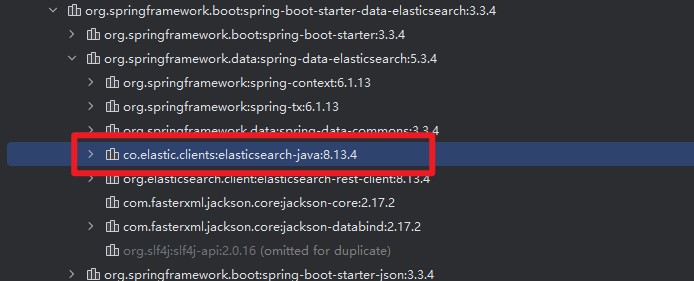
elasticsearch的新客户端elasticsearch-java也被引入了进来。
3.2 配置
yml配置文件
spring:
  application:
    name: cloud-elasticsearch
  elasticsearch:
    uris: http://127.0.0.1:9200 #  这里还要注意是https还是http协议
#    username: elastic #如果有账号密码就要配置账号密码,否则可以不配置
#    password: 123456
server:
  port: 20000
4、【简单使用】spring data elasticsearch
4.1 创建es实体类
创建完实体类后,启动项目spring会自动根据注解,来创建es的索引(index)和映射(mapping)
@data
@document(indexname = "news")
public class esnews {
    @id
    private string id;
    @field(type = fieldtype.text, analyzer = "ik_max_word",searchanalyzer = "ik_smart")
    private string title;//标题
    @field(type = fieldtype.text, analyzer = "ik_max_word",searchanalyzer = "ik_smart")
    private string content;//内容
    @field(type = fieldtype.keyword)
    private string author;//作者
    @field(type = fieldtype.keyword)
    private list<string> tags;//标签
    @field(type = fieldtype.date,pattern = "yyyy-mm-dd hh:mm:ss||yyyy-mm-dd")
    @jsonproperty("publish_date")
    private date publishdate;//发布时间
    @field(type = fieldtype.date,pattern = "yyyy-mm-dd hh:mm:ss||yyyy-mm-dd")
    @jsonproperty("create_time")
    private date createtime;//创建时间
    @field(type = fieldtype.long)
    @jsonproperty("view_count")
    private long viewcount;//阅读量
}
注解解析:
@document(indexname = "news")
该实体对应的索引名称为:news
@id
es的唯一标识
@field
@field(type = fieldtype.text, analyzer = "ik_max_word",searchanalyzer = "ik_smart")
field(字段名) , type = fieldtype.text(字段类型为text) ,analyzer = "ik_max_word"(存入时的分词器为ik_max_word),searchanalyzer = "ik_smart"(搜索时的分词器为ik_smart)
@jsonproperty("publish_date")
es中json字段,迎来进行序列化映射
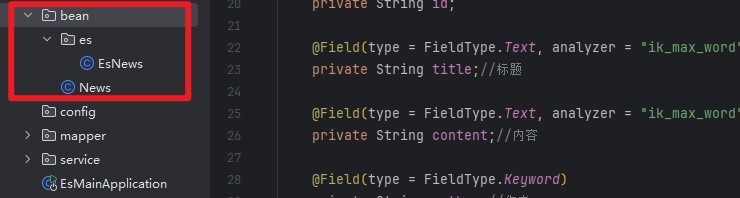
tips:实际开发中业务实体类和es实体类最好是分开的,业务实体类主要用来做数据库操作,es实体类只用来做es检索
4.2 继承elasticsearchrepository接口
public interface esnewsrepository extends elasticsearchrepository<esnews,string> {
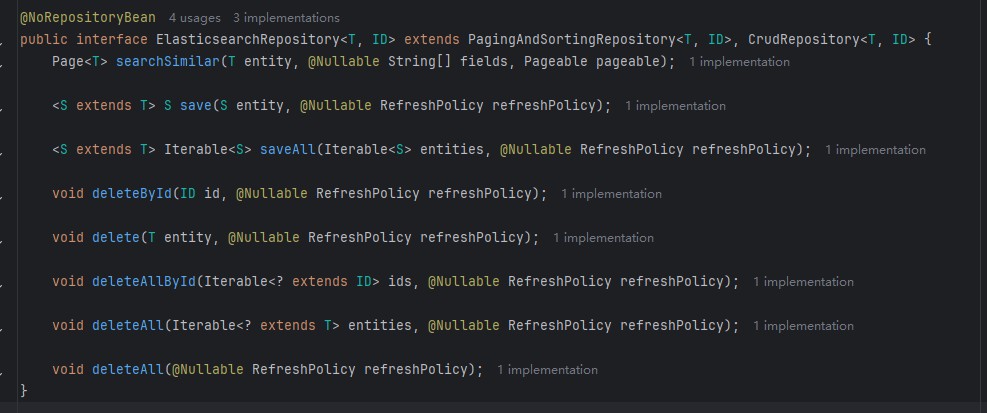
}查看elasticsearchrepository源码可以看到
elasticsearchrepository也继承了pagingandsortingrepository(分页和排序接口)、crudrepository(常用基础crud接口)
当你的类接口继承了elasticsearchrepository后,你输入find,你会看到spring帮你生成的所有常用简单的查询语句。
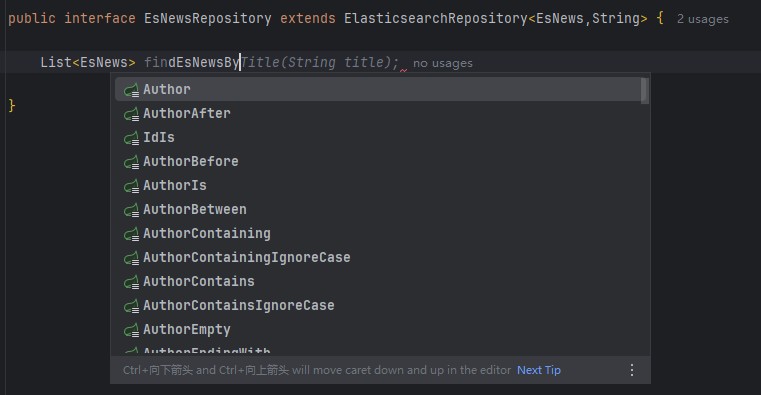
大部分关键词用法:
| 关键词 | 说明 | 等价 elasticsearch 查询类型 |
|---|---|---|
findby | 查询开始(必须) | - |
and / or | 条件连接符 | bool 查询 |
is / equals | 等于 | term |
between | 在两个值之间 | range |
lessthan | 小于 | range |
lessthanequal | 小于等于 | range |
greaterthan | 大于 | range |
greaterthanequal | 大于等于 | range |
after | 大于(时间) | range |
before | 小于(时间) | range |
isnull | 字段为 null | must_not exists |
isnotnull / notnull | 字段非 null | exists |
like | 类似(不建议用,elasticsearch 中更推荐 containing) | match (部分分词匹配) |
notlike | 不类似 | bool + must_not |
startingwith | 以…开头(需要 keyword 类型字段,match 不支持) | prefix / wildcard |
endingwith | 以…结尾(需 keyword 类型字段) | wildcard |
containing / contains | 包含(常用于全文检索) | match |
notcontaining | 不包含 | bool + must_not |
in | 包含在列表中 | terms |
notin | 不包含在列表中 | bool + must_not terms |
true / false | 布尔值判断 | term |
orderby | 排序 | sort |
4.3 crud接口使用
使用springboot单元测试
4.3.1 新增
文档单个新增(save):
    @test
    @displayname("新增单个文档")
    void savedoc(){
        esnews news = new esnews();
        news.setid("1");//如果不设置id,spring则会帮你生成一个es风格的随机id
        news.settitle("电影《不能说的秘密》热映");
        news.setcontent("内容:不能说的秘密............牛x..");
        news.setauthor("周杰伦");
        news.settags(arrays.aslist("电影", "国产"));
        news.setpublishdate(new date());
        news.setcreatetime(new date());
        news.setviewcount(100l);
        esnewsrepository.save(news);
    }
文档批量新增(saveall):
    @test
    @displayname("批量新增文档")
    void savebatchdoc(){
        list<esnews> newslist = new arraylist<>();
        for (int i = 1; i <= 11; i++) {
            esnews news = new esnews();
            news.setid(string.valueof(i));
            news.settitle("电影《cpw的奇幻世界 " + i + "》");
            news.setcontent("内容 " + i);
            news.setauthor("作者" + i);
            news.settags(arrays.aslist("电影", "奇幻"));
            news.setpublishdate(new date());
            news.setcreatetime(new date());
            news.setviewcount(100l + i);
            newslist.add(news);
        }
        esnewsrepository.saveall(newslist);
    }
4.3.3 修改
!!!elasticsearchrepository!!!的修改跟新增是同一个接口,如果你的对象携带id,那么es会先查询文档库里是有存在这么一个id,如果存在的话则进行 先删除 然后 覆盖!!
    @test
    @displayname("新增单个文档")
    void savedoc(){
        esnews news = new esnews();
        news.setid("1");//es会先找文档库里是否存在改id,先删除再覆盖
        news.settitle("电影《不能说的秘密》热映");
        news.setcontent("内容:不能说的秘密........牛x..更新覆盖操作");
        news.setauthor("周杰伦");
        news.settags(arrays.aslist("电影", "国产"));
        news.setpublishdate(new date());
        news.setcreatetime(new date());
        news.setviewcount(100l);
        esnewsrepository.save(news);
}如果你想做到只修改文档中其中一条数据,比如只把作者周杰伦修改成cpw,那就需要用到第五节【高阶用法】elasticsearch java api client
4.3.3 查询
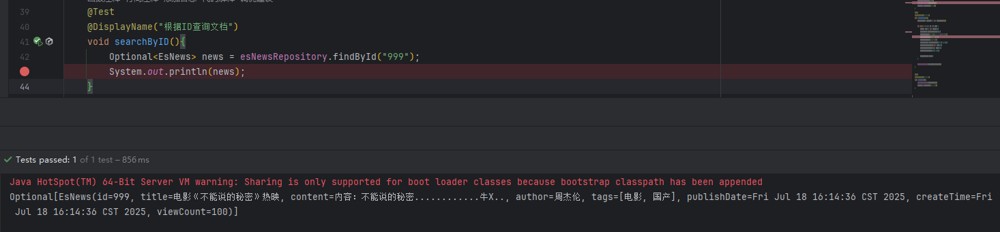
需求:我要查询文档编号为999的文档
tips:简单的查询,比如根据id查询文档,elasticsearchrepository已经自己封装好了,不用另外写。(findbyid)
    @test
    @displayname("根据id查询文档")
    void searchbyid(){
        optional<esnews> news = esnewsrepository.findbyid("999");
        system.out.println(news);
    }
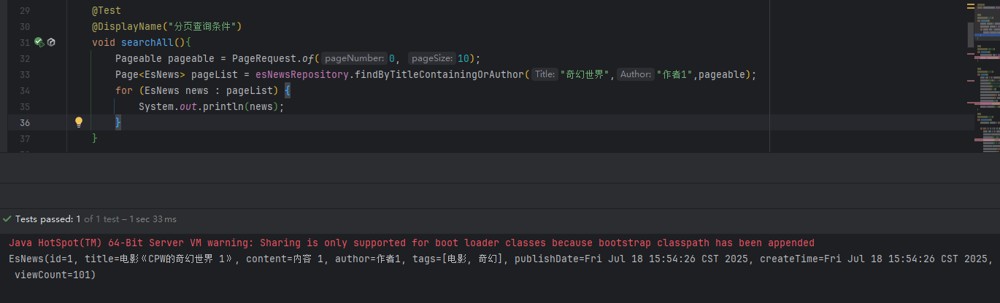
需求:我要分页查询,标题包含【奇幻世界】,作者精准是【作者1】的文档
tips:这种复杂多条件的就需要我们自己写,如果是模糊查询的则用containing
1、esnewsrepository新增接口findbytitlecontainingorauthor:
public interface esnewsrepository extends elasticsearchrepository<esnews,string> {
    page<esnews> findbytitlecontainingorauthor(string title, string author,pageable pageable);
}
2、使用
    @test
    @displayname("分页查询条件")
    void searchall(){
        pageable pageable = pagerequest.of(0, 10);
        page<esnews> pagelist = esnewsrepository.findbytitlecontainingorauthor("奇幻世界","作者1",pageable);
        for (esnews news : pagelist) {
            system.out.println(news);
        }
    }
根据4.2中的关键词,还有更多的用法例如过滤、排序
4.3.4 删除
删除就没什么好说的了,直接上代码!
    @test
    @displayname("根据id删除文档")
    void deletedocbyid(){
        esnewsrepository.deletebyid("1");
        system.out.println("id为1的文档删除成功");
    }
    @test
    @displayname("批量删除文档")
    void deletebatchdoc(){
        esnewsrepository.deleteall();
        system.out.println("文档批量删除成功");
    }
    @test
    @displayname("根据id批量删除文档")
    void deletebatchdocbyids(){
        list<string> idlist = arrays.aslist("1", "2");
        esnewsrepository.deleteallbyid(idlist);
        system.out.println("根据id批量删除文档删除成功");
    }
5、【高阶用法】elasticsearch java api client
1、修改文档中的某一条数据
2、高级聚合查询
6、【最佳实践】elasticsearch+消息队列(rabbitmq)+数据库(mysql)
实际应用
到此这篇关于springboot3整合elasticsearch8(elasticsearch-java)最佳实践的文章就介绍到这了,更多相关springboot3整合elasticsearch内容请搜索代码网以前的文章或继续浏览下面的相关文章希望大家以后多多支持代码网!





发表评论