
 我要评论
我要评论前言
最近看见csdn有rss订阅这个功能,但发现这个接口响应的数据格式不是常用的json格式而是xml,即下图的格式。
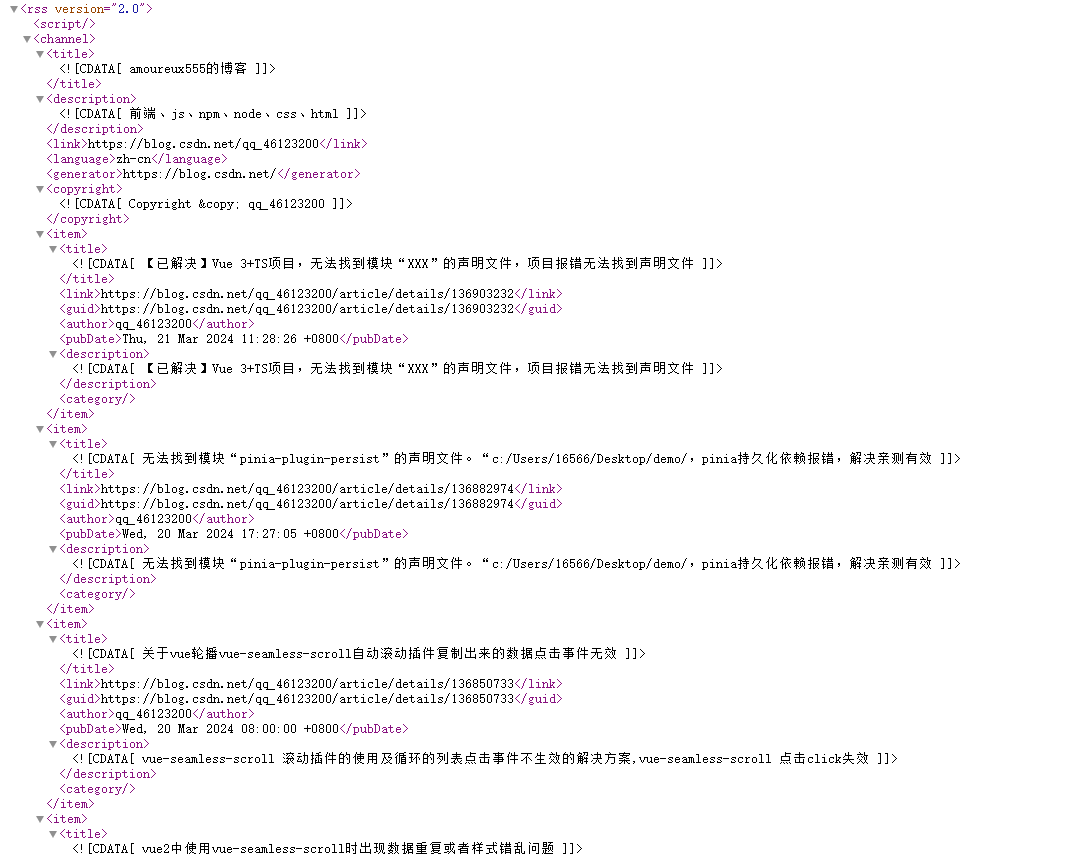
附响应的代码
<?xml version="1.0" encoding="utf-8" ?><rss version="2.0"><channel><title><![cdata[amoureux555的博客]]></title><description><![cdata[前端、js、npm、node、css、html]]></description><link>https://blog.csdn.net/qq_46123200</link><language>zh-cn</language><generator>https://blog.csdn.net/</generator><copyright><![cdata[copyright © qq_46123200]]></copyright><item><title><![cdata[【已解决】vue 3+ts项目,无法找到模块“xxx”的声明文件,项目报错无法找到声明文件]]></title><link>https://blog.csdn.net/qq_46123200/article/details/136903232</link><guid>https://blog.csdn.net/qq_46123200/article/details/136903232</guid><author>qq_46123200</author><pubdate>thu, 21 mar 2024 11:28:26 +0800</pubdate><description><![cdata[【已解决】vue 3+ts项目,无法找到模块“xxx”的声明文件,项目报错无法找到声明文件]]></description><category></category></item><item><title><![cdata[无法找到模块“pinia-plugin-persist”的声明文件。“c:/users/16566/desktop/demo/,pinia持久化依赖报错,解决亲测有效]]></title><link>https://blog.csdn.net/qq_46123200/article/details/136882974</link><guid>https://blog.csdn.net/qq_46123200/article/details/136882974</guid><author>qq_46123200</author><pubdate>wed, 20 mar 2024 17:27:05 +0800</pubdate><description><![cdata[无法找到模块“pinia-plugin-persist”的声明文件。“c:/users/16566/desktop/demo/,pinia持久化依赖报错,解决亲测有效]]></description><category></category></item><item><title><![cdata[关于vue轮播vue-seamless-scroll自动滚动插件复制出来的数据点击事件无效]]></title><link>https://blog.csdn.net/qq_46123200/article/details/136850733</link><guid>https://blog.csdn.net/qq_46123200/article/details/136850733</guid><author>qq_46123200</author><pubdate>wed, 20 mar 2024 08:00:00 +0800</pubdate><description><![cdata[vue-seamless-scroll 滚动插件的使用及循环的列表点击事件不生效的解决方案,vue-seamless-scroll 点击click失效]]></description><category></category></item><item><title><![cdata[vue2中使用vue-seamless-scroll时出现数据重复或者样式错乱问题]]></title><link>https://blog.csdn.net/qq_46123200/article/details/136841560</link><guid>https://blog.csdn.net/qq_46123200/article/details/136841560</guid><author>qq_46123200</author><pubdate>tue, 19 mar 2024 14:19:21 +0800</pubdate><description><![cdata[vue2中使用vue-seamless-scroll时出现数据重复或者样式错乱问题,前端使用vue-seamless-scroll出现数据重复或者样式错乱问题,部分没样式,上下样式不一样]]></description><category></category></item><item><title><![cdata[vue2 实现数字滚动效果,翻页效果]]></title><link>https://blog.csdn.net/qq_46123200/article/details/136821291</link><guid>https://blog.csdn.net/qq_46123200/article/details/136821291</guid><author>qq_46123200</author><pubdate>tue, 19 mar 2024 08:00:00 +0800</pubdate><description><![cdata[vue2 实现数字,数值自动滚动效果,翻页效果,引入直接使用]]></description><category></category></item><item><title><![cdata[vscode中chinese (simplified)汉化无效解决方法]]></title><link>https://blog.csdn.net/qq_46123200/article/details/136738457</link><guid>https://blog.csdn.net/qq_46123200/article/details/136738457</guid><author>qq_46123200</author><pubdate>fri, 15 mar 2024 14:23:15 +0800</pubdate><description><![cdata[vscode中chinese (simplified)汉化无效解决方法]]></description><category></category></item><item><title><![cdata[vue项目如何禁止屏幕缩放,vue项目进行浏览器进行缩放]]></title><link>https://blog.csdn.net/qq_46123200/article/details/136507090</link><guid>https://blog.csdn.net/qq_46123200/article/details/136507090</guid><author>qq_46123200</author><pubdate>wed, 06 mar 2024 15:13:45 +0800</pubdate><description><![cdata[vue项目如何禁止屏幕缩放,vue项目进行浏览器进行缩放]]></description><category></category></item><item><title><![cdata[windows系统下,如何给文件夹添加备注?文件夹查看备注]]></title><link>https://blog.csdn.net/qq_46123200/article/details/136484529</link><guid>https://blog.csdn.net/qq_46123200/article/details/136484529</guid><author>qq_46123200</author><pubdate>wed, 06 mar 2024 10:07:43 +0800</pubdate><description><![cdata[windows系统下,如何给文件夹添加备注?文件夹查看备注]]></description><category></category></item><item><title><![cdata[failed to load module script: expected a javascript module script but the server responded with a mi]]></title><link>https://blog.csdn.net/qq_46123200/article/details/136483060</link><guid>https://blog.csdn.net/qq_46123200/article/details/136483060</guid><author>qq_46123200</author><pubdate>tue, 05 mar 2024 16:43:12 +0800</pubdate><description><![cdata[项目打包报错`failed to load module script: expected a javascript module script but the server responded with a mime type of "text/html". strict mime type checking is enforced for module scripts per html spec.` ]]></description><category></category></item><item><title><![cdata[vscode 使用ssh进行远程开发 (remote-ssh),首次连接及后续使用,详细介绍]]></title><link>https://blog.csdn.net/qq_46123200/article/details/136193576</link><guid>https://blog.csdn.net/qq_46123200/article/details/136193576</guid><author>qq_46123200</author><pubdate>mon, 04 mar 2024 16:47:20 +0800</pubdate><description><![cdata[vscode 使用ssh进行远程开发 (remote-ssh),首次连接及后续使用,详细介绍]]></description><category></category></item><item><title><![cdata[前端 vue启动本地(.exe)文件]]></title><link>https://blog.csdn.net/qq_46123200/article/details/136191265</link><guid>https://blog.csdn.net/qq_46123200/article/details/136191265</guid><author>qq_46123200</author><pubdate>tue, 20 feb 2024 15:41:10 +0800</pubdate><description><![cdata[前端 vue启动本地(.exe)文件]]></description><category></category></item><item><title><![cdata[ubuntu 20.04系统,桌面有个文件夹名为0.7.0,每次系统启动后都需要打开终端,进入0.7.0文件夹,然后执行命令./webrtc-streamer命令,如何设置开机自动打开终端执行]]></title><link>https://blog.csdn.net/qq_46123200/article/details/135869527</link><guid>https://blog.csdn.net/qq_46123200/article/details/135869527</guid><author>qq_46123200</author><pubdate>fri, 26 jan 2024 16:29:24 +0800</pubdate><description><![cdata[ubuntu 20.04系统,桌面有个文件夹名为0.7.0,每次系统启动后都需要打开终端,进入0.7.0文件夹,然后执行命令./webrtc-streamer命令,如何设置开机自动打开终端执行]]></description><category></category></item><item><title><![cdata[vmware 17 中 安装 ubuntu 系统,系统中安装todesk与向日葵。其他设备无法通过todesk和向日葵远控问题]]></title><link>https://blog.csdn.net/qq_46123200/article/details/135840220</link><guid>https://blog.csdn.net/qq_46123200/article/details/135840220</guid><author>qq_46123200</author><pubdate>thu, 25 jan 2024 11:30:02 +0800</pubdate><description><![cdata[todesk连接ubuntu显示当前系统并无桌面环境,或无显示器,无法显示远程桌面,您需要自行安装x11桌面环境,或者使用终端文件功能]]></description><category></category></item><item><title><![cdata[ubuntu 20.04 使用 webrtc-streamer自动退出,报错glibc 问题解决方法]]></title><link>https://blog.csdn.net/qq_46123200/article/details/135780846</link><guid>https://blog.csdn.net/qq_46123200/article/details/135780846</guid><author>qq_46123200</author><pubdate>tue, 23 jan 2024 19:21:40 +0800</pubdate><description><![cdata[ubuntu 20.04 部署webrtc-streamer视频流遇到的问题,及解决方法。webrtc-streamer报错、启动不起来。rtsp视频流播放失败问题。亲测有效]]></description><category></category></item><item><title><![cdata[ubuntu 常用命令、docker 常用命令、unzip常用命令、tar常用命令]]></title><link>https://blog.csdn.net/qq_46123200/article/details/135755440</link><guid>https://blog.csdn.net/qq_46123200/article/details/135755440</guid><author>qq_46123200</author><pubdate>tue, 23 jan 2024 09:04:56 +0800</pubdate><description><![cdata[ubuntu 复制文件夹下文件到其他文件夹下。查看容器的命令(无论运行还是停止)查看正在运行容器的命令。]]></description><category></category></item><item><title><![cdata[windows 11安装vmware 17 ,vmware安装ubuntu 20.4,ssh传文件]]></title><link>https://blog.csdn.net/qq_46123200/article/details/135749655</link><guid>https://blog.csdn.net/qq_46123200/article/details/135749655</guid><author>qq_46123200</author><pubdate>mon, 22 jan 2024 16:18:35 +0800</pubdate><description><![cdata[小白都能学会的,在windows 11安装vmware 17 ,vmware安装ubuntu 20.4,ssh传文件手把手教你]]></description><category></category></item><item><title><![cdata[【ubuntu】ubuntu 20.04安装docker,使用nginx部署前端项目,nginx.conf文件配置]]></title><link>https://blog.csdn.net/qq_46123200/article/details/135615589</link><guid>https://blog.csdn.net/qq_46123200/article/details/135615589</guid><author>qq_46123200</author><pubdate>tue, 16 jan 2024 10:24:39 +0800</pubdate><description><![cdata[ubuntu 20.04安装docker,使用nginx部署前端项目]]></description><category></category></item><item><title><![cdata[【ubuntu】docker中如何ping其他ip或外网]]></title><link>https://blog.csdn.net/qq_46123200/article/details/135608274</link><guid>https://blog.csdn.net/qq_46123200/article/details/135608274</guid><author>qq_46123200</author><pubdate>mon, 15 jan 2024 18:39:41 +0800</pubdate><description><![cdata[docker中如何ping其他ip或外网]]></description><category></category></item><item><title><![cdata[级联选择器el-cascader根据下拉数据的id获取所对应的文字]]></title><link>https://blog.csdn.net/qq_46123200/article/details/135193901</link><guid>https://blog.csdn.net/qq_46123200/article/details/135193901</guid><author>qq_46123200</author><pubdate>mon, 25 dec 2023 10:39:23 +0800</pubdate><description><![cdata[级联选择器el-cascader根据下拉数据的id获取所对应的文字]]></description><category></category></item><item><title><![cdata[【datav】datav组件库——更新数据视图不更新]]></title><link>https://blog.csdn.net/qq_46123200/article/details/135192425</link><guid>https://blog.csdn.net/qq_46123200/article/details/135192425</guid><author>qq_46123200</author><pubdate>mon, 25 dec 2023 10:00:01 +0800</pubdate><description><![cdata[大屏datav组件库——更新数据视图不更新]]></description><category></category></item></channel></rss>
解决
那么在项目中怎么处理这种数据格式,变成我们好处理的数据呢,通过rss-parser,以vue2 项目为例
下载依赖
npm i rss-parser
处理代码:
<template>
  <div class="other-item">
    <div class="inner">
      <ul class="hot-list-article">
        <li v-for="(item, i) in data.items" :key="i" @click="jumpfn(item)">
          {{ item.title }}
        </li>
      </ul>
    </div>
  </div>
</template>
<script>
// 导入依赖
import rssparser from 'rss-parser';

export default {
  data() {
    return {
      data: {},
    };
  },
  created() {
    this.searchbtn()
  },
  methods: {
    // 点击跳转事件
    jumpfn(item) {
      console.log("🚀 ~ jumpfn ~ item:", item)
      // 打开一个新的页面
      window.open(item.link, '_blank');
    },
    // rss 事件
    searchbtn() {
      this.searchlist = [];
      const xhr = new xmlhttprequest();
      xhr.onreadystatechange = () => {
        // 引入并new一个新的parser
        const parser = new rssparser();
        // 判断是否返回
        if (xhr.readystate === 4) {
          // 判断返回的状态
          if (xhr.status === 200) {
            const data = xhr.responsetext
            parser.parsestring(data).then((res) => {
              this.data = res
            })
          } else {
			console.log("请求接口失败")
          }
        }
      };
      xhr.open("get", process.env.vue_app_base_api);
      // vue_app_base_api 是请求接口的地址,我这里请求的地址是https://rss.csdn.net/qq_46123200/rss/map?spm=1001.2014.3001.5494
      xhr.send(null);
    },
  },
}
</script>
<style lang="scss" scoped>
ul {
  li {
    text-align: left;
    font-size: 16px;
    cursor: pointer;

    &:hover {
      color: #2ea7e0;
    }
  }
}

.other-item-title {
  margin: 10px 20px;
  padding: 5px;
  line-height: 30px;
  font-weight: 400;
  border-bottom: 1px solid #e8e9e7;
  color: #383937;
  position: relative;
  font-size: 18px
}

.other-item .inner {
  margin: 0 20px;
  padding-bottom: 10px
}

.inner .hot-list-article li {
  display: block;
  line-height: 32px;
  position: relative;
  margin: 3px 0;
  counter-increment: nums;
  padding-left: 30px;
  overflow: hidden;
  word-wrap: normal !important;
  white-space: nowrap;
  text-overflow: ellipsis
}

.hot-list-article li a {
  color: #787977
}

.hot-list-article li:before {
  color: #000;
  width: 22px;
  height: 22px;
  line-height: 22px;
  text-align: center;
  content: counter(nums, decimal);
  position: absolute;
  left: 0;
  top: 5px;
  border-radius: 100%;
  background-color: #edefee;
  text-shadow: 0 1px 0 rgba(255, 255, 255, .5);
  font-family: sourcecodeproregular, menlo, monaco, consolas, "courier new", monospace, 'helvetica neue', arial, sans-serif
}

/*以上就是一个稍微好看的有编号的li列表 */
/*加上以下之后,排名前三的数据编号就添加了编号颜色,更好看*/
.hot-list-article li:first-child:before,
.hot-list-article li:nth-child(2):before,
.hot-list-article li:nth-child(3):before {
  color: #fff;
  text-shadow: none
}

.hot-list-article li:first-child:before {
  background-color: #e24d46
}

/*第1行的行号样式*/
.hot-list-article li:nth-child(2):before {
  background-color: #2ea7e0
}

/*第2行的行号样式*/
.hot-list-article li:nth-child(3):before {
  background-color: #6bc30d
}

/*第3行的行号样式*/
.hot-list-article li a:hover {
  text-decoration: underline;
  color: #6bc30d
}

/*鼠标移过更好看*/
</style>
上面附上了处理的源码,如果接口请求不通,可以直接复制最上面的响应体进行测试。
到此这篇关于详解vue2如何处理xml格式的数据的文章就介绍到这了,更多相关vue2处理xml数据内容请搜索代码网以前的文章或继续浏览下面的相关文章希望大家以后多多支持代码网!


发表评论