
 我要评论
我要评论easypoi介绍
easypoi是一个java的excel和word处理库,主要用于将java对象转换为excel或word文档,并且可以从excel或word文档中读取数据到java对象。本文将重点介绍如何使用easypoi写word文档。
1.引入easypoi依赖
<dependency>
    <groupid>cn.afterturn</groupid>
    <artifactid>easypoi-base</artifactid>
    <version>4.1.3</version>
</dependency>
2.创建word模板
可以使用microsoft word或其他能够创建word模板的软件来设计word文档的模板文件。模板文件中可以使用占位符来标记需要替换的内容。例如,在word文档中可以插入占位符${name}表示需要替换的内容。
3.创建java对象
使用java对象来存放需要写入word文档的数据。
@data
public class user {
    private string name;
    private int age;
}
4.使用easypoi写入word文档
创建一个wordexportutil对象,利用模板和java对象生成word文档。
import cn.afterturn.easypoi.word.wordexportutil;
import org.apache.poi.xwpf.usermodel.xwpfdocument;

import java.io.fileoutputstream;
import java.util.hashmap;
import java.util.map;

public class writeworddemo {

    public static void main(string[] args) throws exception {
        // 创建模板和数据对象
        user user = new user("tom", 18);
        map<string, object> map = new hashmap<>();
        map.put("name", user.getname());
        map.put("age", user.getage());

        // 加载模板文件
        xwpfdocument doc = wordexportutil.exportword07(
                "user_template.docx", map);

        // 输出文件
        fileoutputstream fos = new fileoutputstream("user.docx");
        doc.write(fos);
        fos.close();
        doc.close();
    }

}
使用wordexportutil.exportword07方法可以生成.docx格式的word文档,第一个参数为word模板文件名,第二个参数是一个map对象,其中包含了模板中所有的占位符和对应的数据。
基于easypoi实现段落循环
easypoi写word模版导出比较方便。但是如果你希望在写word模版的时候将段落进行循环,那就实现不了。
下面的方法基于easypoi实现了word段落的循环。
import cn.afterturn.easypoi.cache.wordcache;
import cn.afterturn.easypoi.entity.imageentity;
import cn.afterturn.easypoi.util.poielutil;
import cn.afterturn.easypoi.util.poipublicutil;
import cn.afterturn.easypoi.word.entity.myxwpfdocument;
import cn.afterturn.easypoi.word.entity.params.excellistentity;
import cn.afterturn.easypoi.word.parse.excel.excelmapparse;
import cn.hutool.core.bean.beanutil;
import org.apache.commons.io.fileutils;
import org.apache.commons.lang3.stringutils;
import org.apache.poi.xwpf.usermodel.*;
import org.apache.xmlbeans.xmlcursor;
import org.apache.xmlbeans.xmlobject;
import org.slf4j.logger;
import org.slf4j.loggerfactory;

import java.io.file;
import java.io.fileoutputstream;
import java.util.*;
public class wordparagraphholder {
    private static final logger logger = loggerfactory.getlogger(wordparagraphholder1.class);

    private xwpfdocument sourcedocument;
    private string targetfilename;
    private map<string, object> data;

    public wordparagraphholder(xwpfdocument sourcedocument, string targetfilename, map<string, object> data) {
        this.sourcedocument = sourcedocument;
        this.targetfilename = targetfilename;
        this.data = data;
    }

    public string execute() throws exception {
        myxwpfdocument second = null;
        fileoutputstream fos2 = null;
        try {

            // 循环生成段落
            map<string, object> data = this.data;
            this.parseallparagraphic(sourcedocument.getparagraphs(), data);
            file targetfile = new file(targetfilename);
            fileoutputstream fos = fileutils.openoutputstream(targetfile);

            sourcedocument.write(fos);
            // 关闭流

            fos.close();
            sourcedocument.close();

            // 循环段落赋值
            second = wordcache.getxwpfdocument(targetfile.getpath());
            this.evalallparagraphic(second.getparagraphs(), data);
            fos2 = fileutils.openoutputstream(targetfile);
            second.write(fos2);
        } catch (exception e) {
            logger.error("生成word段落失败:", e);
            return "";
        } finally {
            // 关闭流
            fos2.close();
            second.close();
        }
        return targetfilename;
    }

    private void evalallparagraphic(list<xwpfparagraph> paragraphs, map<string, object> map) throws exception {
        int size = paragraphs.size();
        map<string, integer> indexmap = new hashmap<>();
        for (int i = 0; i < size; ++i) {
            xwpfparagraph paragraph = (xwpfparagraph) paragraphs.get(i);
            logger.info("段落内容:{}", paragraph.gettext());
            if (paragraph.gettext().indexof("(") != -1) {
                object obj = checkthisparagraphneediterator(paragraph, map);
                string listkey = getparagraphlistkey(paragraph);
                integer index = indexmap.getordefault(listkey, 0);
                if (objects.nonnull(obj) && obj instanceof list && index < ((list) obj).size()) {
                    object o = ((list) obj).get(index);
                    parseparagraph(paragraph, o, listkey);
                    index++;
                    indexmap.put(listkey, index);
                }
            }
        }
    }

    private void parseallparagraphic(list<xwpfparagraph> paragraphs, map<string, object> map) throws exception {
        int size = paragraphs.size();
        list<xwpfparagraph> paragraphlist = new arraylist<>();
        // 循环找出需要复制的段落
        for (int i = 0; i < size; ++i) {
            xwpfparagraph paragraph = (xwpfparagraph) paragraphs.get(i);
            if (paragraph.gettext().indexof("(") != -1) {
                object obj = checkthisparagraphneediterator(paragraph, map);
                if (objects.nonnull(obj) && obj instanceof list) {
                    paragraphlist.add(paragraph);
                }
            }
        }
        // 复制段落
        for (xwpfparagraph paragraph : paragraphlist) {
            system.out.println(paragraph.gettext());
            object obj = checkthisparagraphneediterator(paragraph, map);
            addparagraph(paragraph, (list) obj);
            // 删除模板段落
            xwpfdocument document = paragraph.getdocument();
            document.removebodyelement(document.getposofparagraph(paragraph));
        }
    }

    /**
     * 复制段落
     *
     * @param source 原段落
     * @param doc
     */
    public xwpfparagraph createparagraph(xwpfparagraph source, xwpfdocument doc) {

        // 使用游标创建一个新行
        xmlcursor cursor = source.getctp().newcursor();
        xwpfparagraph newparagraph = doc.insertnewparagraph(cursor);
        newparagraph.getctp().set(source.getctp().copy());

        return newparagraph;
    }

    private object checkthisparagraphneediterator(xwpfparagraph paragraph, map<string, object> map) throws exception {
        string text = paragraph.gettext().trim();
        if (text != null && text.contains("fe:") && text.startswith("(")) {
            text = text.replace("!fe:", "").replace("$fe:", "").replace("fe:", "").replace("(", "");
            string[] keys = text.replaceall("\\s{1,}", " ").trim().split(" ");
            object result = poipublicutil.getparamsvalue(keys[0], map);
            return objects.nonnull(result) ? result : new arraylist(0);
        } else {
            return null;
        }
    }

    private string getparagraphlistkey(xwpfparagraph paragraph) throws exception {
        string text = paragraph.gettext().trim();
        if (text != null && text.contains("fe:") && text.startswith("(")) {
            text = text.replace("!fe:", "").replace("$fe:", "").replace("fe:", "").replace("(", "");
            string[] keys = text.replaceall("\\s{1,}", " ").trim().split(" ");
            return keys[0];
        } else {
            return null;
        }
    }

    /**
     * 赋值段落
     *
     * @param paragraph
     * @param obj
     * @throws exception
     */
    public void parseparagraph(xwpfparagraph paragraph, object obj, string listkey) throws exception {
        string listname = paragraph.gettext().trim();
        boolean contains = listname.contains("fe:");
        if (!contains) {
            return;
        }
        map<string, object> objectmap = beanutil.beantomap(obj);
        parsethisparagraph(paragraph, objectmap, listkey);
    }

    /**
     * 增加段落
     *
     * @param paragraph
     * @param list
     * @throws exception
     */
    public void addparagraph(xwpfparagraph paragraph, list<object> list) throws exception {
        xwpfparagraph currentparagraph = paragraph;

        system.out.println("start for each data list :" + list.size());
        iterator var11 = list.iterator();

        while (var11.hasnext()) {
            object obj = var11.next();
            this.createparagraph(currentparagraph, currentparagraph.getdocument());
        }
    }

    /**
     * 遍历段落赋值
     *
     * @param paragraph
     * @param map
     * @throws exception
     */
    private void parsethisparagraph(xwpfparagraph paragraph, map<string, object> map, string listkey) throws exception {
        xwpfrun currentrun = null;
        string currenttext = "";
        boolean isfinde = false;
        list<integer> runindex = new arraylist();
        xwpfrun prerun = null;

        for (int i = 0; i < paragraph.getruns().size(); ++i) {
            xwpfrun run = (xwpfrun) paragraph.getruns().get(i);
            string text = run.gettext(0);
            if (!stringutils.isempty(text)) {
                if (isfinde) {
                    currenttext = currenttext + text;
                    if (currenttext.indexof("[") == -1) {
                        isfinde = false;
                        runindex.clear();
                    } else {
                        runindex.add(i);
                    }

                    if (currenttext.indexof("]") != -1) {
                        this.changevalues(paragraph, currentrun, currenttext, runindex, map);
                        currenttext = "";
                        isfinde = false;
                    }
                } else if (text.indexof("[") >= 0) {
                    currenttext = text;
                    isfinde = true;
                    currentrun = run;
                } else {
                    currenttext = "";
                }

                if (currenttext.indexof("]") != -1) {
                    this.changevalues(paragraph, currentrun, currenttext, runindex, map);
                    isfinde = false;
                }
            }

            // 去除多余的字符串
            if (!stringutils.isempty(text)) {
                if (text.indexof("(") != -1) {
                    prerun = run;
                } else if (text.indexof("$fe") != -1) {
//                    run.settext("", 0);
                    // 清除第一个(
                    prerun.settext("", 0);
                    // 防止自定义前缀未被拆分为多个run,根据自定义关键字删除多余前缀。例如($fe:resultlist
                    if (text.indexof(listkey) != -1) {
                        string lasttext = run.gettext(0);
                        if (stringutils.isnotblank(lasttext) && text.indexof(listkey) != -1) {
                            string replace = lasttext.substring(text.indexof(listkey) + listkey.length());
                            run.settext(replace, 0);
                        }
                    }
                }
                // 清除最后一个)
                if (i == paragraph.getruns().size() - 1) {
                    if (text.indexof(")") != -1) {
                        if (text.length() >= 1) {
                            string lasttext = run.gettext(0);
                            string replace = lasttext.replace(")", "");
                            run.settext(replace, 0);
                        }
                    }
                }
            }
        }
    }

    private void changevalues(xwpfparagraph paragraph, xwpfrun currentrun, string currenttext, list<integer> runindex, map<string, object> map) throws exception {
        object obj = getrealvalue(currenttext, map);
        if (obj instanceof imageentity) {
            currentrun.settext("", 0);
            excelmapparse.addanimage((imageentity) obj, currentrun);
        } else {
            currenttext = obj.tostring();
            poipublicutil.setwordtext(currentrun, currenttext);
        }

        for (int k = 0; k < runindex.size(); ++k) {
            ((xwpfrun) paragraph.getruns().get((integer) runindex.get(k))).settext("", 0);
        }

        runindex.clear();
    }

    public static object getrealvalue(string currenttext, map<string, object> map) throws exception {
        string params = "";

        while (currenttext.indexof("[") != -1) {
            params = currenttext.substring(currenttext.indexof("[") + 1, currenttext.indexof("]"));
            object obj = poielutil.eval(params.trim(), map);
            if (obj instanceof imageentity || obj instanceof list || obj instanceof excellistentity) {
                return obj;
            }

            if (obj != null) {
                currenttext = currenttext.replace("[" + params + "]", obj.tostring());
            } else {
                currenttext = currenttext.replace("[" + params + "]", "");
            }
        }

        return currenttext;
    }
    /**
     * 复制表格段落
     *
     * @param source 原段落
     * @param cell
     */
    public xwpfparagraph copytableparagraph(xwpfparagraph source, xwpftablecell cell) {

        // 使用游标创建一个新行
        xmlcursor cursor = source.getctp().newcursor();

        // 在游标位置插入新段落
        xwpfparagraph newparagraph = cell.insertnewparagraph(cursor);

        // 复制底层 xml 对象
        xmlobject copy = source.getctp().copy();
        newparagraph.getctp().set(copy);

        // 关闭游标
        cursor.dispose();
        return newparagraph;
    }

    /**
     * 表格段落复制
     *
     * @param document
     * @param data
     */
    private void createtableparagraph(xwpfdocument document, map<string, object> data) {
        object resultlist = data.get("resultlist");
        if (objects.isnull(resultlist)) {
            return;
        }
        list list = (list) resultlist;
        list<xwpftable> tables = document.gettables();
        for (xwpftable table : tables) {
            for (xwpftablerow row : table.getrows()) {
                for (xwpftablecell cell : row.gettablecells()) {
                    xwpfparagraph xwpfparagraph = null;
                    list<xwpfparagraph> paragraphs = cell.getparagraphs();
                    for (int i = 0; i < paragraphs.size(); i++) {
                        xwpfparagraph paragraph = paragraphs.get(i);
                        string listname = paragraph.gettext().trim();
                        if (listname.startswith("($fe")) {
                            xwpfparagraph = paragraph;
                        }
                    }
                    if (objects.nonnull(xwpfparagraph)) {
                        for (int i = 0; i < list.size() - 1; i++) {
                            copytableparagraph(xwpfparagraph, cell);
                        }
                    }
                }
            }
        }
    }

    /**
     * 表格段落赋值
     *
     * @param document
     * @param date
     */
    private void evaltableparagraph(xwpfdocument document, map<string, object> date) {
        list<xwpftable> tables = document.gettables();
        for (xwpftable table : tables) {
            for (xwpftablerow row : table.getrows()) {
                for (xwpftablecell cell : row.gettablecells()) {
                    list<xwpfparagraph> paragraphs = cell.getparagraphs();
                    list<xwpfparagraph> addlist = new arraylist<>();
                    for (int i = 0; i < paragraphs.size(); i++) {
                        xwpfparagraph paragraph = paragraphs.get(i);
                        string listname = paragraph.gettext().trim();
                        if (listname.startswith("($fe")) {
                            addlist.add(paragraph);
                        }
                    }
                    try {
                        evalallparagraphic(addlist, date);
                    } catch (exception e) {
                        logger.error("单元格{}段落赋值异常", cell.gettext(), e);
                    }
                }
            }
        }
    }

}
具体的调用逻辑是先执行一次常规占位符的替换,然后再进行段落的替换。wordparagraphholder 中也是先生成段落,再进行段落赋值。
代码如下
public static file exportword(map<string, object> params, file templatefile, file writefile) {
        fileoutputstream fos = null;
        fileoutputstream outputstream = null;
        try {
            long start = system.currenttimemillis();

            logger.info("开始写入word文件");
            //获取模板文档
            logger.info("开始写入word模板文件路径:{}", templatefile.getpath());
            // 写入word常规替换
            xwpfdocument doc = wordexportutil.exportword07(templatefile.getpath(), params);
            // 循环写段落
            wordparagraphholder paragraphholder = new wordparagraphholder(doc, writefile.getpath(), params);
            string targetfilename = paragraphholder.execute();

            logger.info("写入word文件完成,耗时{}", (system.currenttimemillis() - start));

            return new file(targetfilename);
        } catch (exception e) {
            logger.error("写入word文件异常:", e);
        } finally {
            ioutils.closequietly(fos);
            ioutils.closequietly(outputstream);
        }
        return null;
    }
使用方法
新建word插入如下内容:
($fe:resultlist [createdate],我使用[number]元,购买苹果[amount]个,截止日期[enddate],使用支付方式[type])
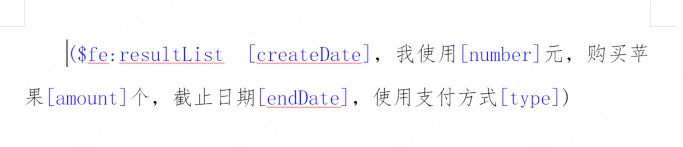
其中resultlist 为入参list的名称,可以自由更换但是要和代码里的对应上,因为我们要生成多个段落,所以参数要构造为list的形式。
**[createdate]**内createdate为list中实体的字段名称,其他的为固定格式,不要修改,生成完成后会自动删除多余的字符串。
执行下面的测试代码:
 public static void main(string[] args) throws exception {
        map<string, object> date = createdate();
        string sourcefile = "d:/temp/模版word.docx";
        string targetfile = "d:/temp/输出结果.docx";
        myxwpfdocument first = wordcache.getxwpfdocument(sourcefile);

        wordparagraphholder test = new wordparagraphholder(first, targetfile, date);
        test.execute();
    }
    private static map<string, object> createdate() {

        //填充数据
        list<wordexportbatch> resultlist = new arraylist<>();
        wordexportbatch wordexport = new wordexportbatch();
        wordexportbatch wordexport1 = new wordexportbatch();
        wordexport.setcreatedate("2022/9/30");
        wordexport1.setcreatedate("2022/9/28");
        wordexport.setnumber("11");
        wordexport1.setnumber("15");
        wordexport.setamount("1234.5");
        wordexport1.setamount("2345.77");
        wordexport.setenddate("2022/12/31");
        wordexport1.setenddate("2022/11/30");
        wordexport.settype("支付宝");
        wordexport1.settype("微信");
        resultlist.add(wordexport);
        resultlist.add(wordexport1);
        //准备数据
        map<string, object> params = new hashmap<>();
        params.put("resultlist", resultlist);

        return params;
    }
看到输出如下就大功告成了。
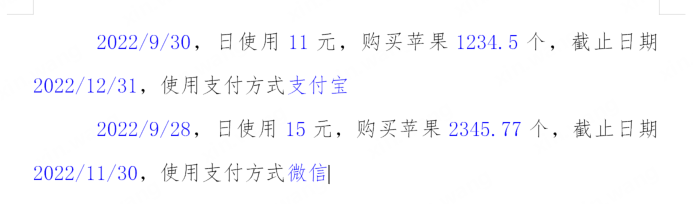
补充pom依赖
有时候项目里poi的版本与easypoi李的poi会冲突,需要解决一下冲突。
<dependency>
			<groupid>cn.afterturn</groupid>
			<artifactid>easypoi-base</artifactid>
			<version>4.1.3</version>
		</dependency>
		<dependency>
			<groupid>org.apache.poi</groupid>
			<artifactid>poi-ooxml-schemas</artifactid>
			<version>4.1.2</version>
		</dependency>
		<dependency>
			<groupid>commons-io</groupid>
			<artifactid>commons-io</artifactid>
			<version>2.11.0</version>
		</dependency>
		<dependency>
			<groupid>org.apache.commons</groupid>
			<artifactid>commons-lang3</artifactid>
		</dependency>
		<dependency>
			<groupid>cn.hutool</groupid>
			<artifactid>hutool-all</artifactid>
			<version>5.7.20</version>
		</dependency>
		<dependency>
			<groupid>commons-io</groupid>
			<artifactid>commons-io</artifactid>
			<version>2.16.1</version>
		</dependency>
word表格里段落复制
奇怪的需求千千万,遇到了需要在单元格内进行段落的循环复制。需要在生产段落的基础上做一下调整。增加创建表格段落的方法,并修改execute()执行方法。
 public string execute() throws exception {
        myxwpfdocument second = null;
        fileoutputstream fos2 = null;
        try {


            map<string, object> data = this.data;
            // 循环生成段落
            this.parseallparagraphic(sourcedocument.getparagraphs(), data);
            // 循环生成表格段落
            this.createtableparagraph(sourcedocument, data);
            file targetfile = new file(targetfilename);
            fileoutputstream fos = fileutils.openoutputstream(targetfile);

            sourcedocument.write(fos);
            // 关闭流

            fos.close();
            sourcedocument.close();


            second = wordcache.getxwpfdocument(targetfile.getpath());
            // 循环段落赋值
            this.evalallparagraphic(second.getparagraphs(), data);
            // 循环表格段落赋值
            this.evaltableparagraph(second, data);
            fos2 = fileutils.openoutputstream(targetfile);
            second.write(fos2);
        } catch (exception e) {
            logger.error("生成word段落失败:", e);
            return "";
        } finally {
            // 关闭流
            fos2.close();
            second.close();
        }
        return targetfilename;
    }
/**
     * 复制表格段落
     *
     * @param source 原段落
     * @param cell
     */
    public xwpfparagraph copytableparagraph(xwpfparagraph source, xwpftablecell cell) {

        // 使用游标创建一个新行
        xmlcursor cursor = source.getctp().newcursor();

        // 在游标位置插入新段落
        xwpfparagraph newparagraph = cell.insertnewparagraph(cursor);

        // 复制底层 xml 对象
        xmlobject copy = source.getctp().copy();
        newparagraph.getctp().set(copy);

        // 关闭游标
        cursor.dispose();
        return newparagraph;
    }

    /**
     * 表格段落复制
     *
     * @param document
     * @param data
     */
    private void createtableparagraph(xwpfdocument document, map<string, object> data) {
        object resultlist = data.get("resultlist");
        if (objects.isnull(resultlist)) {
            return;
        }
        list list = (list) resultlist;
        list<xwpftable> tables = document.gettables();
        for (xwpftable table : tables) {
            for (xwpftablerow row : table.getrows()) {
                for (xwpftablecell cell : row.gettablecells()) {
                    xwpfparagraph xwpfparagraph = null;
                    list<xwpfparagraph> paragraphs = cell.getparagraphs();
                    for (int i = 0; i < paragraphs.size(); i++) {
                        xwpfparagraph paragraph = paragraphs.get(i);
                        string listname = paragraph.gettext().trim();
                        if (listname.startswith("($fe")) {
                            xwpfparagraph = paragraph;
                        }
                    }
                    if (objects.nonnull(xwpfparagraph)) {
                        for (int i = 0; i < list.size() - 1; i++) {
                            copytableparagraph(xwpfparagraph, cell);
                        }
                    }
                }
            }
        }
    }

    /**
     * 表格段落赋值
     *
     * @param document
     * @param date
     */
    private void evaltableparagraph(xwpfdocument document, map<string, object> date) {
        list<xwpftable> tables = document.gettables();
        for (xwpftable table : tables) {
            for (xwpftablerow row : table.getrows()) {
                for (xwpftablecell cell : row.gettablecells()) {
                    list<xwpfparagraph> paragraphs = cell.getparagraphs();
                    list<xwpfparagraph> addlist = new arraylist<>();
                    for (int i = 0; i < paragraphs.size(); i++) {
                        xwpfparagraph paragraph = paragraphs.get(i);
                        string listname = paragraph.gettext().trim();
                        if (listname.startswith("($fe")) {
                            addlist.add(paragraph);
                        }
                    }
                    try {
                        evalallparagraphic(addlist, date);
                    } catch (exception e) {
                        logger.error("单元格{}段落赋值异常", cell.gettext(), e);
                    }
                }
            }
        }
    }

    public static void main(string[] args) throws exception {
        map<string, object> date = createdate();
        string sourcefile = "d:/temp/模版word1.docx";
        string targetfile = "d:/temp/输出结果1.docx";
        myxwpfdocument first = wordcache.getxwpfdocument(sourcefile);

        wordparagraphholder1 test = new wordparagraphholder1(first, targetfile, date);
        test.execute();
    }

    private static map<string, object> createdate() {

        //填充数据
        list<wordexportbatch> resultlist = new arraylist<>();
        wordexportbatch wordexport = new wordexportbatch();
        wordexportbatch wordexport1 = new wordexportbatch();
        wordexport.setcreatedate("2022/9/30");
        wordexport1.setcreatedate("2022/9/28");
        wordexport.setnumber("11");
        wordexport1.setnumber("15");
        wordexport.setamount("1234.5");
        wordexport1.setamount("2345.77");
        wordexport.setenddate("2022/12/31");
        wordexport1.setenddate("2022/11/30");
        wordexport.settype("支付宝");
        wordexport1.settype("微信");
        resultlist.add(wordexport);
        resultlist.add(wordexport1);
        //准备数据
        map<string, object> params = new hashmap<>();
        params.put("resultlist", resultlist);

        return params;
    }
($fe:resultlist [createdate],我使用[number]元,购买苹果[amount]个,截止日期[enddate],使用支付方式[type])
在word中新建表格,在对应的单元格里写入上面需要循环的内容。执行测试代码就可以看到输出结果。
以上就是使用easypoi实现word文档生成和段落循环的详细内容,更多关于easypoi word操作的资料请关注代码网其它相关文章!




发表评论