
 我要评论
我要评论1.httpclient类使用存在的问题
httpclient类的使用所存在的问题,百度搜索的文章一大堆,好多都是单纯文字描述,让人感觉不太好理解,为了更好理解httpclient使用存在的问题,下面让我们通过代码跟示例来描述。
using(var client = new httpclient())
传统关闭连接方法如上述代码所示,但当使用using语句释放httpclient对象的时候,套接字(socket)也不会立即释放,下面我们通过请求aspnetmonsters站点的示例来验证下:
class program
{
    static void main(string[] args)
    {
        console.writeline("starting connections");
        var g = getasync();
        g.wait();
        console.writeline("connections done");
        console.readkey();
    }
    static async task getasync()
    {
        for (int i = 0; i < 5; i++)
        {
            using (var client = new httpclient())
            {
                var result = await client.getasync("http://aspnetmonsters.com/");
                console.writeline(result.statuscode);
            }
        }
    }
}
输出结果:
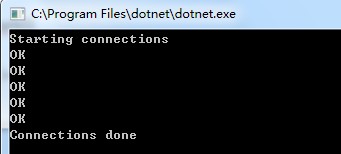
控制台打印出五条请求站点返回状态的信息,下面我们通过netstat工具打印出五个请求连接套接字状态:

应用程序已经运行结束了(结束连接),但是打印结果显示连接状态仍然是time_wait,也就是说在此状态期间仍然在观察是否有数据包进入连接(如果连接等待中有任何数据包仍然会通过),因为它们可能在某个地方被网络延迟。
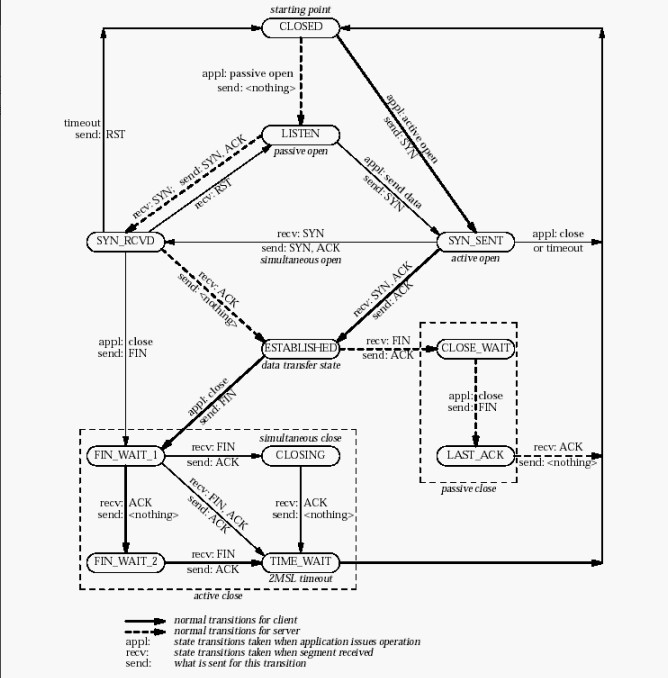
windows将在此状态下保持连接240秒(由其设置[hkey_local_machine\system\currentcontrolset\services\tcpip\parameters\tcptimedwaitdelay])。windows可以快速打开新套接字的速度有限,因此如果您耗尽连接池,那么您可能会看到如下错误:

而怎么做才可以减少套接字的浪费呢?我们在上述代码中把每次循环中创建的httpclient对象拉到main外定义为一个共享的静态实例:
class program
{
    private static httpclient client = new httpclient();
    static void main(string[] args)
    {
        console.writeline("starting connections");
        var g = getasync();
        g.wait();
        console.writeline("connections done");
        console.readkey();
    }
    static async task getasync()
    {
        for (int i = 0; i < 5; i++)
        {
            var result = await client.getasync("http://aspnetmonsters.com/");
            console.writeline(result.statuscode);
        }
    }
}
应用程序运动完毕之后,我们再通过netstat工具打印出五个请求连接套接字状态,这时候会看到信息如下:

通过共享一个实例,减少了套接字的浪费,实际上由于套接字重用而传输快一点。
总结:
- 在创建httpclient实例的时候,最好是静态(static )实例。
- 不要用using包装httpclient对象。
在.net core 2.1版本之后引入的 httpclientfactory解决了httpclient的所有痛点。有了 httpclientfactory,我们不需要关心如何创建httpclient,又如何释放它。通过它可以创建具有特定业务的httpclient,而且可以很友好的和 di 容器结合使用,更为灵活。下面以 asp.net core为例介绍httpclientfactory的四种使用方式。
2.httpclientfactory 的多种使用方式
可以通过多种使用方式在应用程序中使用httpclientfactory。
2.1使用基本用法
在startup.configureservices方法中,通过在iservicecollection上调用addhttpclient扩展方法可以注册ihttpclientfactory服务。
services.addhttpclient();
注册服务后,我们新建basicusagemodel类使用ihttpclientfactory创建httpclient实例:
public class basicusagemodel
{
    private readonly ihttpclientfactory _clientfactory;
    public ienumerable<githubbranch> branches { get; private set; }
    public bool getbrancheserror { get; private set; }
    public basicusagemodel(ihttpclientfactory clientfactory)
    {
        _clientfactory = clientfactory;
    }
    public async task onget()
    {
        var request = new httprequestmessage(httpmethod.get,
            "https://api.github.com/repos/aspnet/aspnetcore.docs/branches");
        request.headers.add("accept", "application/vnd.github.v3+json");
        request.headers.add("user-agent", "httpclientfactory-sample");
        var client = _clientfactory.createclient();
        var response = await client.sendasync(request);
        if (response.issuccessstatuscode)
        {
            branches = await response.content
                .readasasync<ienumerable<githubbranch>>();
        }
        else
        {
            getbrancheserror = true;
            branches = array.empty<githubbranch>();
        }
    }
}
public class githubbranch
{
    public string name { get; set; }
}
以这种方式直接在使用ihttpclientfactory的类中调用createclient方法创建httpclient实例。然后在controller中调用basicusagemodel类:
public class homecontroller : controller
{
    private readonly ihttpclientfactory _clientfactory;
    public homecontroller(ihttpclientfactory clientfactory)
    {
        _clientfactory = clientfactory;
    }
    public iactionresult index()
    {
        basicusagemodel model = new basicusagemodel(_clientfactory);
        var task = model.onget();
        task.wait();
        list<githubbranch> list = model.branches.tolist();
        return view(list);
    }
}
2.2使用命名客户端
如果应用程序需要有许多不同的httpclient用法(每种用法的服务配置都不同),可以视情况使用命名客户端。可以在httpclient中注册时指定命名startup.configureservices的配置。
services.addhttpclient("github", c =>
{
    c.baseaddress = new uri("https://api.github.com/");
    // github api versioning
    c.defaultrequestheaders.add("accept", "application/vnd.github.v3+json");
    // github requires a user-agent
    c.defaultrequestheaders.add("user-agent", "httpclientfactory-sample");
});
上面的代码调用addhttpclient,同时提供名称“github”。此客户端应用了一些默认配置,也就是需要基址和两个标头来使用github api。每次调用createclient时,都会创建httpclient 的新实例,并调用配置操作。要使用命名客户端,可将字符串参数传递到createclient。指定要创建的客户端的名称:
public class namedclientmodel : pagemodel
{
    private readonly ihttpclientfactory _clientfactory;
    public ienumerable<githubpullrequest> pullrequests { get; private set; }
    public bool getpullrequestserror { get; private set; }
    public bool haspullrequests => pullrequests.any();
    public namedclientmodel(ihttpclientfactory clientfactory)
    {
        _clientfactory = clientfactory;
    }
    public async task onget()
    {
        var request = new httprequestmessage(httpmethod.get,
            "repos/aspnet/aspnetcore.docs/pulls");
        var client = _clientfactory.createclient("github");
        var response = await client.sendasync(request);
        if (response.issuccessstatuscode)
        {
            pullrequests = await response.content
                .readasasync<ienumerable<githubpullrequest>>();
        }
        else
        {
            getpullrequestserror = true;
            pullrequests = array.empty<githubpullrequest>();
        }
    }
}
public class githubpullrequest
{
    public string url { get; set; }
    public int? id { get; set; }
    public string node_id { get; set; }
}
在上述代码中,请求不需要指定主机名。可以仅传递路径,因为采用了为客户端配置的基址。在controller中调用方法如上个示例。
2.3使用类型化客户端
什么是“类型化客户端”?它只是defaulthttpclientfactory注入时配置的httpclient。
下图显示了如何将类型化客户端与httpclientfactory结合使用:
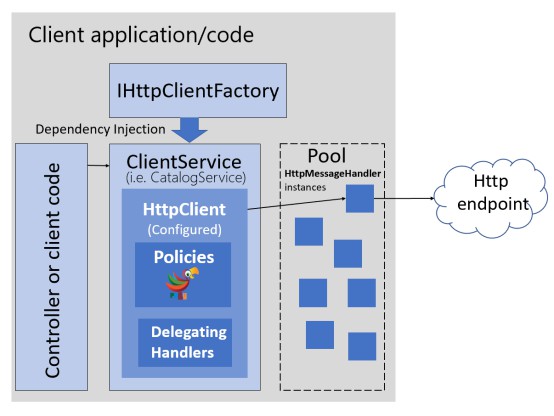
类型化客户端提供与命名客户端一样的功能,不需要将字符串用作密钥。它们提供单个地址来配置特定httpclient并与其进行交互。例如,单个类型化客户端可能用于单个后端终结点,并封装此终结点的所有处理逻辑。另一个优势是它们使用 di 且可以被注入到应用中需要的位置。
类型化客户端在构造函数中接收httpclient参数:
public class githubservice
{
    public httpclient client { get; }
    public githubservice(httpclient client)
    {
        client.baseaddress = new uri("https://api.github.com/");
        // github api versioning
        client.defaultrequestheaders.add("accept",
            "application/vnd.github.v3+json");
        // github requires a user-agent
        client.defaultrequestheaders.add("user-agent",
            "httpclientfactory-sample");
        client = client;
    }
    public async task<ienumerable<githubissue>> getaspnetdocsissues()
    {
        var response = await client.getasync(
"/repos/aspnet/aspnetcore.docs/issues?state=open&sort=created&direction=desc");
        response.ensuresuccessstatuscode();
        var result = await response.content
            .readasasync<ienumerable<githubissue>>();
        return result;
    }
}
public class githubissue
{
    public string url { get; set; }
    public int? id { get; set; }
    public string node_id { get; set; }
}
在上述代码中,配置转移到了类型化客户端中。httpclient对象公开为公共属性。可以定义公开httpclient功能的特定于api的方法。getaspnetdocsissues方法从github存储库封装查询和分析最新待解决问题所需的代码。
要注册类型化客户端,可在startup.configureservices中使用通用的addhttpclient扩展方法,指定类型化客户端类:
services.addhttpclient<githubservice>();
使用di将类型客户端注册为暂时客户端。可以直接插入或使用类型化客户端:
public class typedclientmodel : pagemodel
{
    private readonly githubservice _githubservice;
    public ienumerable<githubissue> latestissues { get; private set; }
    public bool hasissue => latestissues.any();
    public bool getissueserror { get; private set; }
    public typedclientmodel(githubservice githubservice)
    {
        _githubservice = githubservice;
    }
    public async task onget()
    {
        try
        {
            latestissues = await _githubservice.getaspnetdocsissues();
        }
        catch (httprequestexception)
        {
            getissueserror = true;
            latestissues = array.empty<githubissue>();
        }
    }
}
到此这篇关于asp.net core使用ihttpclientfactory发出http请求的文章就介绍到这了。希望对大家的学习有所帮助,也希望大家多多支持代码网。





发表评论