
 我要评论
我要评论一、准备
1.介绍
阿里云是阿里巴巴集团旗下全球领先的云计算公司,也是国内最大的云服务提供商 。

云服务指的就是通过互联网对外提供的各种各样的服务,比如像:语音服务、短信服务、邮件服务、视频直播服务、文字识别服务、对象存储服务等等。
当我们在项目开发时需要用到某个或某些服务,就不需要自己来开发了,可以直接使用阿里云提供好的这些现成服务就可以了。比如:在项目开发当中,我们要实现一个短信发送的功能,如果我们项目组自己实现,将会非常繁琐,因为你需要和各个运营商进行对接。而此时阿里云完成了和三大运营商对接,并对外提供了一个短信服务。我们项目组只需要调用阿里云提供的短信服务,就可以很方便的来发送短信了。这样就降低了我们项目的开发难度,同时也提高了项目的开发效率。(大白话:别人帮我们实现好了功能,我们只要调用即可)
云服务提供商给我们提供的软件服务通常是需要收取一部分费用的。
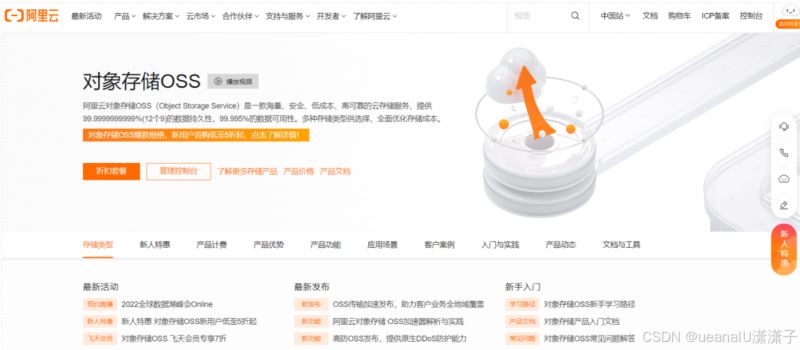
阿里云对象存储oss(object storage service),是一款海量、安全、低成本、高可靠的云存储服务。使用oss,您可以通过网络随时存储和调用包括文本、图片、音频和视频等在内的各种文件。
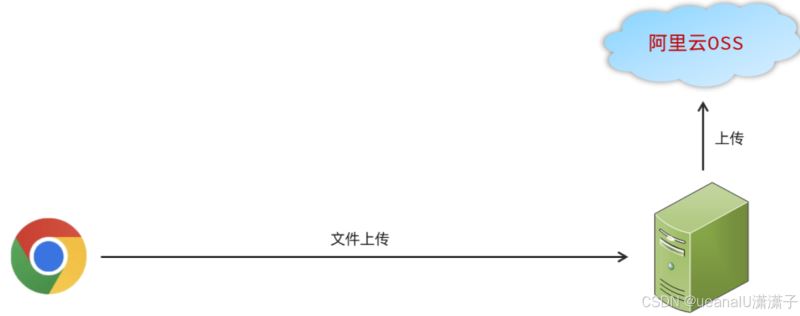
在我们使用了阿里云oss对象存储服务之后,我们的项目当中如果涉及到文件上传这样的业务,在前端进行文件上传并请求到服务端时,在服务器本地磁盘当中就不需要再来存储文件了。我们直接将接收到的文件上传到oss,由 oss帮我们存储和管理,同时阿里云的oss存储服务还保障了我们所存储内容的安全可靠。
2.开通云服务
在开通云服务前,我们需要自己注册并登录阿里云。
2.1.通过控制台找到对象存储oss服务
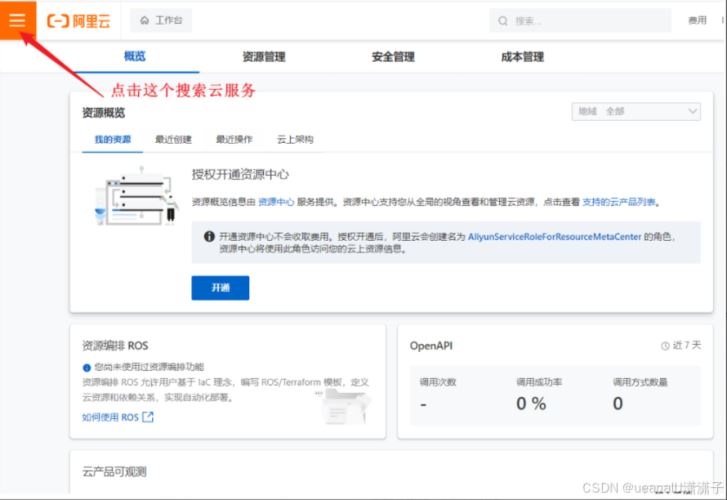
选择要开通的服务
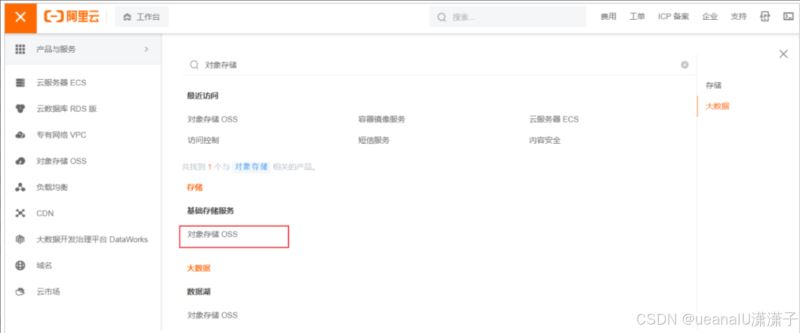
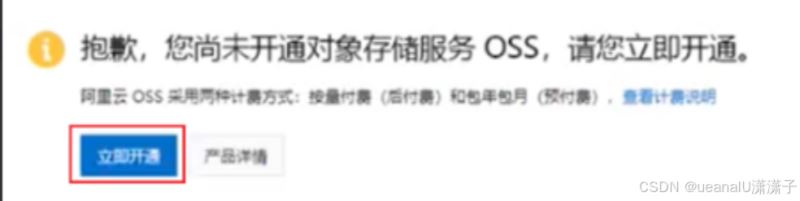
如果是第一次访问,还需要开通对象存储服务oss
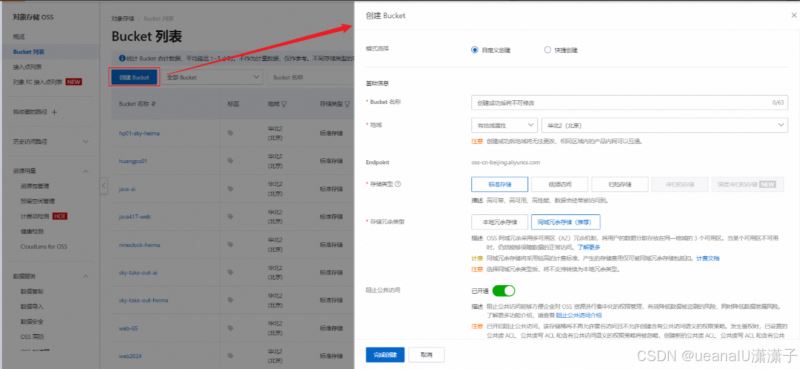
2.2.创建一个bucket
开通oss服务之后,就可以进入到阿里云对象存储的控制台,开通oss服务之后,就可以进入到阿里云对象存储的控制台
输入bucket的相关信息
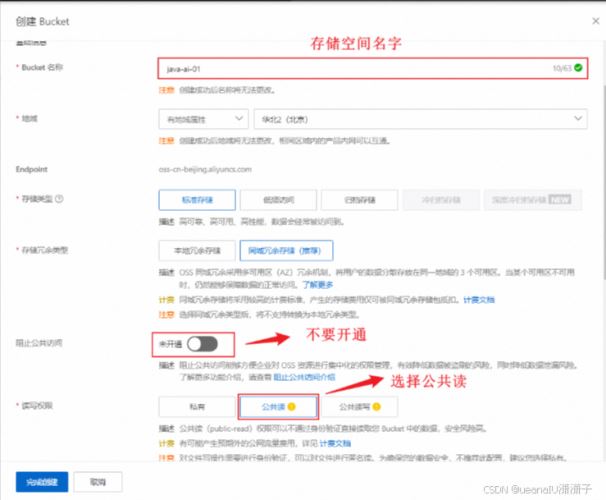
其他的信息,配置项使用默认的即可。
2.3. 配置accesskey
2.3.1 创建
点击 "accesskey管理",进入到管理页面。
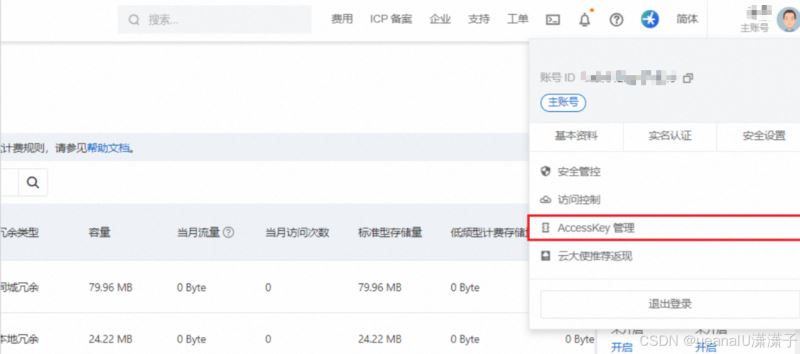
点击 "创建accesskey"

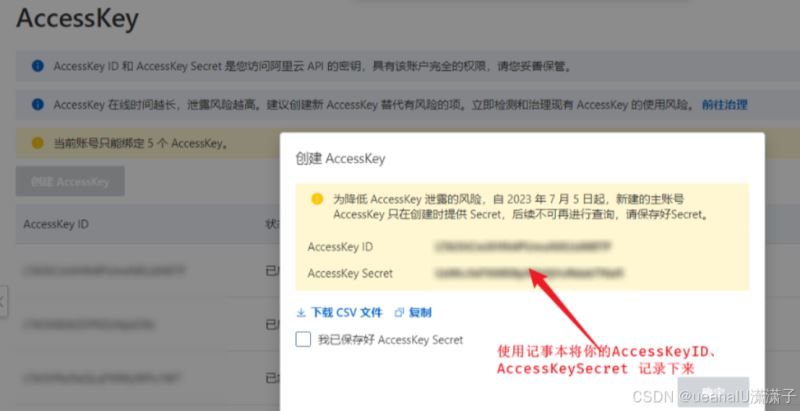
2.3.2. 配置
以管理员身份打开cmd命令行,执行如下命令,配置系统的环境变量。
set oss_access_key_id=xxxxxxxxxxxxxxxxxxxxxxxxxxxxxxxxxxxxxxxxxxxx
set oss_access_key_secret=xxxxxxxxxxxxxxxxxxxxxxxxxxxxxxxxxxxxxxxxxx
注意:将上述的access_key_id 与 access_key_secret 的值一定要替换成自己的 。
执行如下命令,让更改生效。
setx oss_access_key_id "%oss_access_key_id%"
setx oss_access_key_secret "%oss_access_key_secret%"
执行如下命令,验证环境变量是否生效。
echo %oss_access_key_id%
echo %oss_access_key_secret%
二、项目实现
1、导入依赖
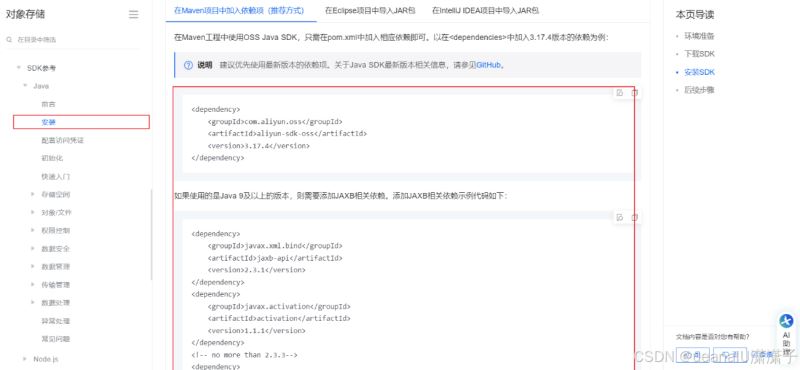
具体导入依赖包 可以去官网查看:oss java sdk兼容性和示例代码_对象存储(oss)-阿里云帮助中心
<!--阿里云oss依赖-->
<dependency>
    <groupid>com.aliyun.oss</groupid>
    <artifactid>aliyun-sdk-oss</artifactid>
    <version>3.17.4</version>
</dependency>

<dependency>
    <groupid>javax.xml.bind</groupid>
    <artifactid>jaxb-api</artifactid>
    <version>2.3.1</version>
</dependency>
<dependency>
    <groupid>javax.activation</groupid>
    <artifactid>activation</artifactid>
    <version>1.1.1</version>
</dependency>
<!-- no more than 2.3.3-->
<dependency>
    <groupid>org.glassfish.jaxb</groupid>
    <artifactid>jaxb-runtime</artifactid>
    <version>2.3.3</version>
</dependency>
2、使用案例
将官方提供的入门程序,复制过来,将里面的参数值改造成我们自己的即可。代码如下:
import com.aliyun.oss.*;
import com.aliyun.oss.common.auth.credentialsproviderfactory;
import com.aliyun.oss.common.auth.environmentvariablecredentialsprovider;
import com.aliyun.oss.common.comm.signversion;
import java.io.bytearrayinputstream;
import java.io.file;
import java.nio.file.files;

public class demo {

    public static void main(string[] args) throws exception {
        // endpoint以华东1(杭州)为例,其它region请按实际情况填写。
        string endpoint = "https://oss-cn-beijing.aliyuncs.com";
        // 从环境变量中获取访问凭证。运行本代码示例之前,请确保已设置环境变量oss_access_key_id和oss_access_key_secret。
        environmentvariablecredentialsprovider credentialsprovider = credentialsproviderfactory.newenvironmentvariablecredentialsprovider();
        // 填写bucket名称,例如examplebucket。
        string bucketname = "java-ai";
        // 填写object完整路径,例如exampledir/exampleobject.txt。object完整路径中不能包含bucket名称。
        string objectname = "001.jpg";
        // 填写bucket所在地域。以华东1(杭州)为例,region填写为cn-hangzhou。
        string region = "cn-beijing";

        // 创建ossclient实例。
        clientbuilderconfiguration clientbuilderconfiguration = new clientbuilderconfiguration();
        clientbuilderconfiguration.setsignatureversion(signversion.v4);
        oss ossclient = ossclientbuilder.create()
            .endpoint(endpoint)
            .credentialsprovider(credentialsprovider)
            .clientconfiguration(clientbuilderconfiguration)
            .region(region)
            .build();

        try {
            file file = new file("c:\\users\\deng\\pictures\\1.jpg");
            byte[] content = files.readallbytes(file.topath());

            ossclient.putobject(bucketname, objectname, new bytearrayinputstream(content));
        } catch (ossexception oe) {
            system.out.println("caught an ossexception, which means your request made it to oss, "
                    + "but was rejected with an error response for some reason.");
            system.out.println("error message:" + oe.geterrormessage());
            system.out.println("error code:" + oe.geterrorcode());
            system.out.println("request id:" + oe.getrequestid());
            system.out.println("host id:" + oe.gethostid());
        } catch (clientexception ce) {
            system.out.println("caught an clientexception, which means the client encountered "
                    + "a serious internal problem while trying to communicate with oss, "
                    + "such as not being able to access the network.");
            system.out.println("error message:" + ce.getmessage());
        } finally {
            if (ossclient != null) {
                ossclient.shutdown();
            }
        }
    }
}
需要将上面的 endpoint ,bucketname,objectname,file 都需要改成自己的。
- endpoint:阿里云oss中的bucket对应的域名
- bucketname:bucket名称
- objectname:对象名称,在bucket中存储的对象的名称
- region:bucket所属区域
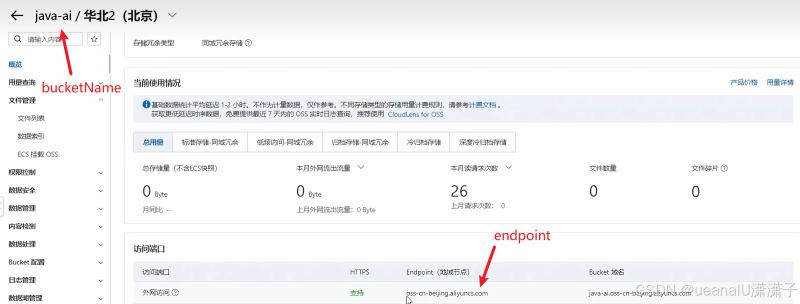
运行demo,没有报错。我们就可以去对应的bucket下查看文件是否上传成功

3、实际使用
3.1.编写阿里云oss上传文件工具类(由官方的示例代码改造而来)
官网上文件的操作还有很多的案例代码,感兴趣的可以自己去看一下

import com.aliyun.oss.*;
import com.aliyun.oss.common.auth.credentialsproviderfactory;
import com.aliyun.oss.common.auth.environmentvariablecredentialsprovider;
import com.aliyun.oss.common.comm.signversion;
import org.springframework.stereotype.component;
import java.io.bytearrayinputstream;
import java.time.localdate;
import java.time.format.datetimeformatter;
import java.util.uuid;

@component
public class aliyunossoperator {

    private string endpoint = "https://oss-cn-beijing.aliyuncs.com";
    private string bucketname = "java-ai";
    private string region = "cn-beijing";

    public string upload(byte[] content, string originalfilename) throws exception {
        // 从环境变量中获取访问凭证。运行本代码示例之前,请确保已设置环境变量oss_access_key_id和oss_access_key_secret。
        environmentvariablecredentialsprovider credentialsprovider = credentialsproviderfactory.newenvironmentvariablecredentialsprovider();

        // 填写object完整路径,例如202406/1.png。object完整路径中不能包含bucket名称。
        //获取当前系统日期的字符串,格式为 yyyy/mm
        string dir = localdate.now().format(datetimeformatter.ofpattern("yyyy/mm"));
        //生成一个新的不重复的文件名
        string newfilename = uuid.randomuuid() + originalfilename.substring(originalfilename.lastindexof("."));
        string objectname = dir + "/" + newfilename;

        // 创建ossclient实例。
        clientbuilderconfiguration clientbuilderconfiguration = new clientbuilderconfiguration();
        clientbuilderconfiguration.setsignatureversion(signversion.v4);
        oss ossclient = ossclientbuilder.create()
                .endpoint(endpoint)
                .credentialsprovider(credentialsprovider)
                .clientconfiguration(clientbuilderconfiguration)
                .region(region)
                .build();

        try {
            ossclient.putobject(bucketname, objectname, new bytearrayinputstream(content));
        } finally {
            ossclient.shutdown();
        }

        return endpoint.split("//")[0] + "//" + bucketname + "." + endpoint.split("//")[1] + "/" + objectname;
    }

}
3.2. 实现uploadcontroller代码
import com.itheima.pojo.result;
import com.itheima.utils.aliyunossoperator;
import lombok.extern.slf4j.slf4j;
import org.springframework.beans.factory.annotation.autowired;
import org.springframework.web.bind.annotation.postmapping;
import org.springframework.web.bind.annotation.restcontroller;
import org.springframework.web.multipart.multipartfile;
import java.io.file;
import java.util.uuid;

@slf4j
@restcontroller
public class uploadcontroller {

    @autowired
    private aliyunossoperator aliyunossoperator;

    @postmapping("/upload")
    public result upload(multipartfile file) throws exception {
        log.info("上传文件:{}", file);
        if (!file.isempty()) {
            // 生成唯一文件名
            string originalfilename = file.getoriginalfilename();
            string extname = originalfilename.substring(originalfilename.lastindexof("."));
            string uniquefilename = uuid.randomuuid().tostring().replace("-", "") + extname;
            // 上传文件
            string url = aliyunossoperator.upload(file.getbytes(), uniquefilename);
            return result.success(url);
        }
        return result.error("上传失败");
    }

}
3.3.3 配置阿里云oss(可选)
在aliyunoss操作的工具类中,我们直接将 endpoint、bucketname参数直接在java文件中写死了。对于这些容易变动的参数,我们可以将其配置在配置文件中,然后通过从yml文件中读取外部配置的属性。
具体实现代码如下:
1.添加aliyunoss配置到application.yml
#阿里云oss
aliyun:
  oss:
    endpoint: https://oss-cn-beijing.aliyuncs.com
    bucketname: java-ai
    region: cn-beijing
2.修改aliyunossoperator代码
方式一:@value注解
import com.aliyun.oss.*;
import com.aliyun.oss.common.auth.credentialsproviderfactory;
import com.aliyun.oss.common.auth.environmentvariablecredentialsprovider;
import com.aliyun.oss.common.comm.signversion;
import org.springframework.beans.factory.annotation.autowired;
import org.springframework.beans.factory.annotation.value;
import org.springframework.stereotype.component;
import java.io.bytearrayinputstream;
import java.time.localdate;
import java.time.format.datetimeformatter;
import java.util.uuid;

@component
public class aliyunossoperator {

    //方式一: 通过@value注解一个属性一个属性的注入
    @value("${aliyun.oss.endpoint}")
    private string endpoint;

    @value("${aliyun.oss.bucketname}")
    private string bucketname;

    @value("${aliyun.oss.region}")
    private string region;

    public string upload(byte[] content, string originalfilename) throws exception {
        // 从环境变量中获取访问凭证。运行本代码示例之前,请确保已设置环境变量oss_access_key_id和oss_access_key_secret。
        environmentvariablecredentialsprovider credentialsprovider = credentialsproviderfactory.newenvironmentvariablecredentialsprovider();

        // 填写object完整路径,例如2024/06/1.png。object完整路径中不能包含bucket名称。
        //获取当前系统日期的字符串,格式为 yyyy/mm
        string dir = localdate.now().format(datetimeformatter.ofpattern("yyyy/mm"));
        //生成一个新的不重复的文件名
        string newfilename = uuid.randomuuid() + originalfilename.substring(originalfilename.lastindexof("."));
        string objectname = dir + "/" + newfilename;

        // 创建ossclient实例。
        clientbuilderconfiguration clientbuilderconfiguration = new clientbuilderconfiguration();
        clientbuilderconfiguration.setsignatureversion(signversion.v4);
        oss ossclient = ossclientbuilder.create()
                .endpoint(endpoint)
                .credentialsprovider(credentialsprovider)
                .clientconfiguration(clientbuilderconfiguration)
                .region(region)
                .build();

        try {
            ossclient.putobject(bucketname, objectname, new bytearrayinputstream(content));
        } finally {
            ossclient.shutdown();
        }

        return endpoint.split("//")[0] + "//" + bucketname + "." + endpoint.split("//")[1] + "/" + objectname;
    }

}
方式二: 编写对应配置类
如果只有一两个属性需要注入,而且不需要考虑复用性,使用@value注解就可以了。
但是使用@value注解注入配置文件的配置项,如果配置项多,注入繁琐,不便于维护管理 和 复用。我们可以直接将配置文件中配置项的值自动的注入到对象的属性中简化这些配置参数的注入。
实现步骤:
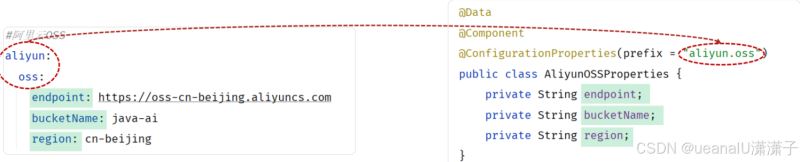
1). 需要创建一个实现类,且实体类中的属性名和配置文件当中key的名字必须要一致
比如:配置文件当中叫endpoint,实体类当中的属性也得叫endpoint,另外实体类当中的属性还需要提供 getter / setter方法
2). 需要将实体类交给spring的ioc容器管理,成为ioc容器当中的bean对象
3). 在实体类上添加@configurationproperties注解,并通过perfect属性来指定配置参数项的前缀
具体实现步骤:
1). 定义实体类aliyunossproperties ,并交给ioc容器管理
配置类中的属性名相同,spring会帮我们自动映射。yml中属性的命名如果两个单词之间采用横线连接spring也会映射到对应驼峰命名的字段上。比如:yml中的属性为bucket-name或bucketname会映射到对应配置类中的bucketname上。
import lombok.data;
import org.springframework.boot.context.properties.configurationproperties;
import org.springframework.stereotype.component;

@data
@component
@configurationproperties(prefix = "aliyun.oss")
public class aliyunossproperties {
    private string endpoint;
    private string bucketname;
    private string region;
}
2). 修改aliyunossoperator
import com.aliyun.oss.*;
import com.aliyun.oss.common.auth.credentialsproviderfactory;
import com.aliyun.oss.common.auth.environmentvariablecredentialsprovider;
import com.aliyun.oss.common.comm.signversion;
import org.springframework.beans.factory.annotation.autowired;
import org.springframework.beans.factory.annotation.value;
import org.springframework.stereotype.component;
import java.io.bytearrayinputstream;
import java.time.localdate;
import java.time.format.datetimeformatter;
import java.util.uuid;

@component
public class aliyunossoperator {

    //方式一: 通过@value注解一个属性一个属性的注入
    //@value("${aliyun.oss.endpoint}")
    //private string endpoint;
    //@value("${aliyun.oss.bucketname}")
    //private string bucketname;
    //@value("${aliyun.oss.region}")
    //private string region;

    @autowired
    private aliyunossproperties aliyunossproperties;

    public string upload(byte[] content, string originalfilename) throws exception {
        string endpoint = aliyunossproperties.getendpoint();
        string bucketname = aliyunossproperties.getbucketname();
        string region = aliyunossproperties.getregion();

        // 从环境变量中获取访问凭证。运行本代码示例之前,请确保已设置环境变量oss_access_key_id和oss_access_key_secret。
        environmentvariablecredentialsprovider credentialsprovider = credentialsproviderfactory.newenvironmentvariablecredentialsprovider();

        // 填写object完整路径,例如2024/06/1.png。object完整路径中不能包含bucket名称。
        //获取当前系统日期的字符串,格式为 yyyy/mm
        string dir = localdate.now().format(datetimeformatter.ofpattern("yyyy/mm"));
        //生成一个新的不重复的文件名
        string newfilename = uuid.randomuuid() + originalfilename.substring(originalfilename.lastindexof("."));
        string objectname = dir + "/" + newfilename;

        // 创建ossclient实例。
        clientbuilderconfiguration clientbuilderconfiguration = new clientbuilderconfiguration();
        clientbuilderconfiguration.setsignatureversion(signversion.v4);
        oss ossclient = ossclientbuilder.create()
                .endpoint(endpoint)
                .credentialsprovider(credentialsprovider)
                .clientconfiguration(clientbuilderconfiguration)
                .region(region)
                .build();

        try {
            ossclient.putobject(bucketname, objectname, new bytearrayinputstream(content));
        } finally {
            ossclient.shutdown();
        }

        return endpoint.split("//")[0] + "//" + bucketname + "." + endpoint.split("//")[1] + "/" + objectname;
    }

}
以上就是springboot使用阿里oss实现文件上传的流程步骤的详细内容,更多关于springboot 阿里oss文件上传的资料请关注代码网其它相关文章!





发表评论