
 我要评论
我要评论生命游戏介绍
生命游戏,是英国数学家约翰·何顿·康威在1970年发明的细胞自动机。
一个方格游戏棋盘上,每个方格中都可放置一个生命细胞,每个生命细胞只有两种状态:“生”或“死”(状态往往随机决定)。然后细胞根据某些规则,计算出下一代每个细胞的状态,并且不停迭代。
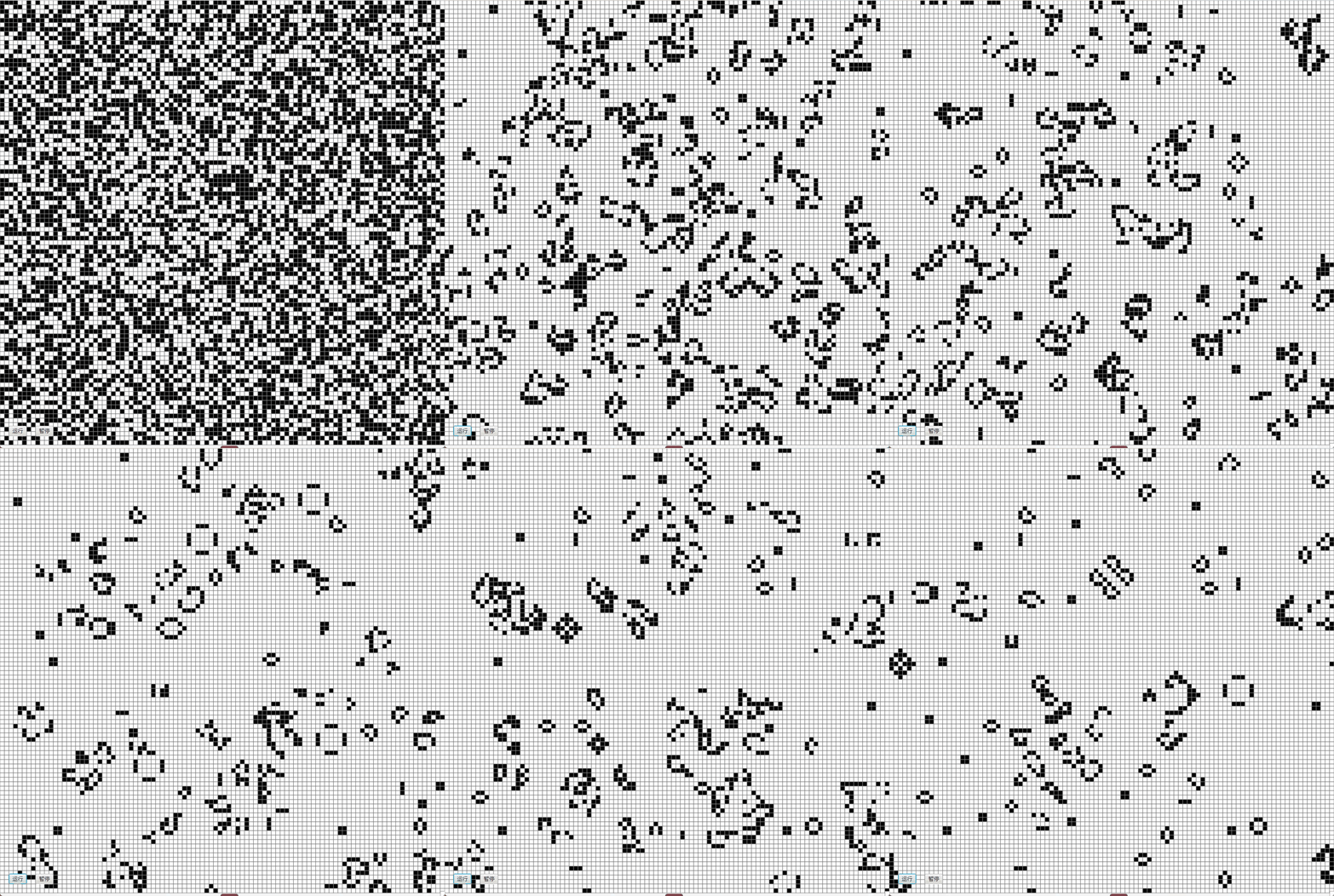
在游戏的进行中,杂乱无序的细胞会逐渐演化出各种精致、有形的结构;这些结构往往有很好的对称性,而且每一代都在变化形状。一些形状已经锁定,不会逐代变化。有时,一些已经成形的结构会因为一些无序细胞的“入侵”而被破坏。但是形状和秩序经常能从杂乱中产生出来。
现设定其规则是:
- 如果一个细胞周围有3个细胞为生(一个细胞周围共有8个细胞),则该细胞为生(即该细胞若原先为死,则转为生,若原先为生,则保持不变) 。
- 如果一个细胞周围有2个细胞为生,则该细胞的生死状态保持不变;
- 在其它情况下,该细胞为死(即该细胞若原先为生,则转为死,若原先为死,则保持不变)
下面就此规则,使用java来编写100*100的棋盘,并使用简单的javafx来实现简易图形化来观察游戏的迭代过程。
一、效果展示
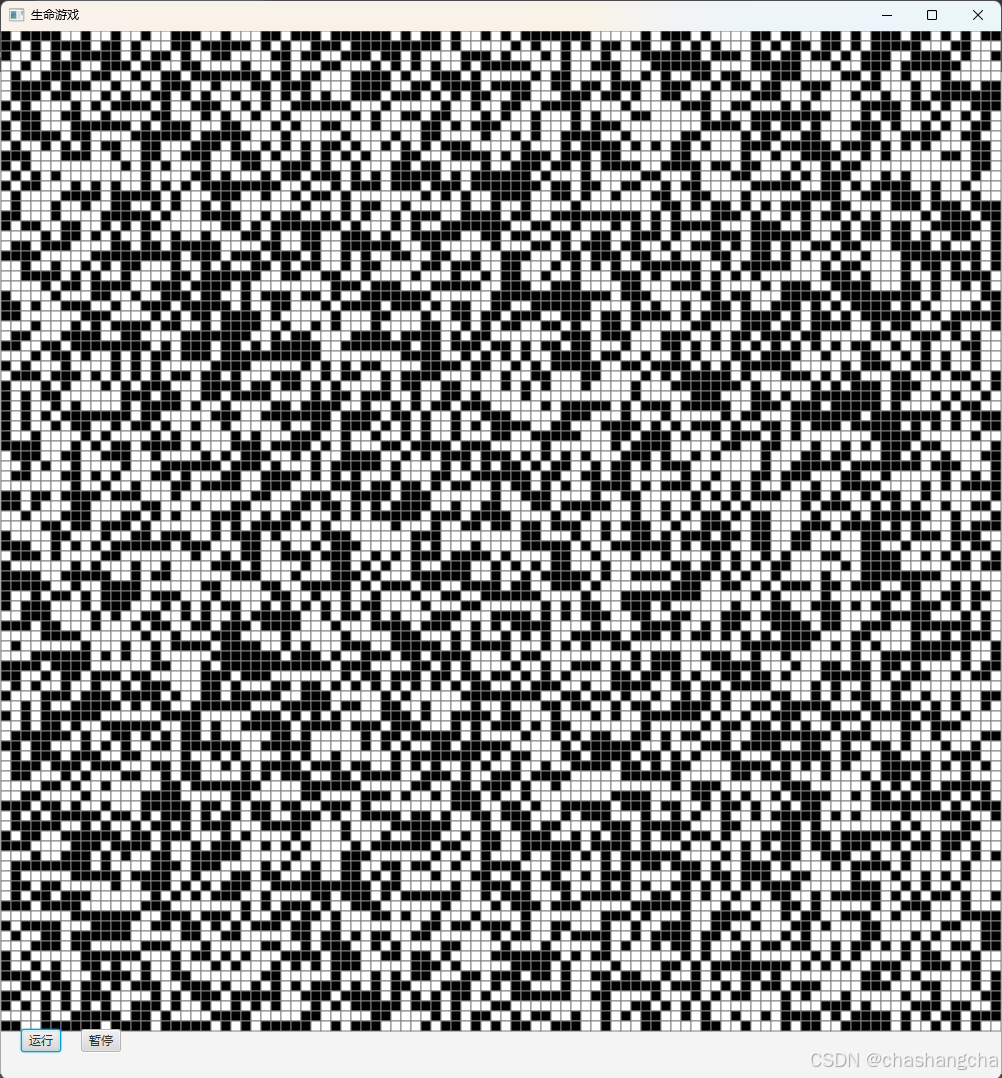
1.初始界面
100*100的棋盘上随机生成“生”和“死”细胞(黑为生,白为死)。底部有“运行”和“暂停”按钮。
2.启动游戏
二、代码实现
package com.itheima.gameoflife;
import javafx.animation.animationtimer;
import javafx.application.application;
import javafx.scene.scene;
import javafx.scene.control.button;
import javafx.scene.layout.borderpane;
import javafx.scene.layout.pane;
import javafx.scene.paint.color;
import javafx.scene.shape.rectangle;
import javafx.stage.stage;

import java.util.random;

public class gameoflife extends application {
    private static final int grid_size = 100;
    private static final int cell_size = 10; // 每个细胞的像素大小
    private static final int generations = 1000; // 演化代数
    private int[][] grid = new int[grid_size][grid_size]; // 当前代棋盘
    private int[][] nextgrid = new int[grid_size][grid_size]; // 下一代棋盘
    private pane pane = new pane();
    private animationtimer timer;
    private boolean isrunning = false; // 运行状态标志

    public static void main(string[] args) {
        launch(args);
    }

    @override
    public void start(stage primarystage) {
        initializegrid(); // 随机初始化棋盘

        // 创建javafx界面
        borderpane root = new borderpane();
        scene scene = new scene(root, grid_size * cell_size, grid_size * cell_size + 50);
        primarystage.settitle("生命游戏");
        primarystage.setscene(scene);

        // 创建按钮,便于停止观察当前棋盘状态
        button startbutton = new button("运行");
        button pausebutton = new button("暂停");

        startbutton.setonaction(e -> startgame());
        pausebutton.setonaction(e -> pausegame());

        // 设置按钮位置
        root.setbottom(new pane(startbutton, pausebutton));
        pane buttonpane = new pane();
        buttonpane.getchildren().addall(startbutton, pausebutton);
        buttonpane.setprefsize(grid_size * cell_size, 50);
        buttonpane.setlayouty(grid_size * cell_size);
        startbutton.setlayoutx(20);
        pausebutton.setlayoutx(80);
        root.setcenter(pane);
        root.setbottom(buttonpane);

        primarystage.show();

        drawgrid(); // 绘制初始棋盘

        // 使用animationtimer更新棋盘
        timer = new animationtimer() {
            private int generationcount = 0;

            @override
            public void handle(long now) {
                if (isrunning && generationcount < generations) {
                    rungeneration(); // 运行一代
                    drawgrid(); // 更新绘制
                    generationcount++;
                } else if (generationcount >= generations) {
                    stop(); // 结束动画
                }
            }
        };
    }

    // 随机初始化棋盘
    private void initializegrid() {
        random random = new random();
        for (int i = 0; i < grid_size; i++) {
            for (int j = 0; j < grid_size; j++) {
                grid[i][j] = random.nextint(2); // 随机生成0或1
            }
        }
    }

    // 启动
    private void startgame() {
        if (!isrunning) {
            isrunning = true; // 设置为运行状态
            timer.start(); // 启动计时器
        }
    }

    // 暂停
    private void pausegame() {
        isrunning = false; // 设置为暂停状态
        timer.stop(); // 停止计时器
    }

    // 运行一代
    private void rungeneration() {
        for (int i = 0; i < grid_size; i++) {
            for (int j = 0; j < grid_size; j++) {
                int liveneighbors = countliveneighbors(i, j);
                if (grid[i][j] == 1) { // 当前细胞是活的
                    nextgrid[i][j] = (liveneighbors == 2 || liveneighbors == 3) ? 1 : 0;
                } else { // 当前细胞是死的
                    nextgrid[i][j] = (liveneighbors == 3) ? 1 : 0;
                }
            }
        }
        copynextgridtocurrent();
    }

    // 计算邻居活细胞数量
    private int countliveneighbors(int row, int col) {
        int liveneighbors = 0;
        for (int i = -1; i <= 1; i++) {
            for (int j = -1; j <= 1; j++) {
                if (i == 0 && j == 0) continue; // 跳过自身
                int newrow = (row + i + grid_size) % grid_size; // 考虑边界
                int newcol = (col + j + grid_size) % grid_size;
                liveneighbors += grid[newrow][newcol];
            }
        }
        return liveneighbors;
    }

    // 将nextgrid复制到grid
    private void copynextgridtocurrent() {
        for (int i = 0; i < grid_size; i++) {
            system.arraycopy(nextgrid[i], 0, grid[i], 0, grid_size);
        }
    }

    // 绘制当前棋盘状态
    private void drawgrid() {
        pane.getchildren().clear(); // 清除旧的图形
        for (int i = 0; i < grid_size; i++) {
            for (int j = 0; j < grid_size; j++) {
                rectangle cell = new rectangle(j * cell_size, i * cell_size, cell_size, cell_size);
                cell.setfill(grid[i][j] == 1 ? color.black : color.white); // 黑色表示活细胞,白色表示死细胞
                cell.setstroke(color.gray); //细胞之间的边框
                pane.getchildren().add(cell); // 将细胞添加到面板
            }
        }
    }
}
三、代码解释
1.常量设置
private static final int grid_size = 100;
private static final int cell_size = 10; // 每个细胞的像素大小
private static final int generations = 1000; // 演化代数
private int[][] grid = new int[grid_size][grid_size]; // 当前代棋盘
private int[][] nextgrid = new int[grid_size][grid_size]; // 下一代棋盘
private pane pane = new pane();
private animationtimer timer;
private boolean isrunning = false; // 运行状态标志
grid_size: 定义了棋盘的大小,当前设置为 100。即棋盘是一个 100 x 100 的格子。
cell_size: 定义了每个细胞的像素大小,当前设置为 10。因此,每个细胞在界面上将显示为一个 10 x 10 像素的正方形。
棋盘总大小: 因此,整个棋盘的实际像素大小为:
- 宽度:
grid_size * cell_size = 100 * 10 = 1000像素 - 高度:
grid_size * cell_size = 100 * 10 = 1000像素
2.图形化
// 创建javafx界面
    borderpane root = new borderpane();
    scene scene = new scene(root, grid_size * cell_size, grid_size * cell_size + 50);
    primarystage.settitle("生命游戏");
    primarystage.setscene(scene);

    // 创建按钮
    button startbutton = new button("运行");
    button pausebutton = new button("暂停");

    startbutton.setonaction(e -> startgame());
    pausebutton.setonaction(e -> pausegame());

    // 将按钮放置在界面底部
    root.setbottom(new pane(startbutton, pausebutton));
    pane buttonpane = new pane();
    buttonpane.getchildren().addall(startbutton, pausebutton);
    buttonpane.setprefsize(grid_size * cell_size, 50);
    buttonpane.setlayouty(grid_size * cell_size);
    startbutton.setlayoutx(20);
    pausebutton.setlayoutx(80);
    root.setcenter(pane);
    root.setbottom(buttonpane);

    primarystage.show();

    drawgrid(); // 绘制初始棋盘

    // 使用animationtimer更新棋盘
    timer = new animationtimer() {
        private int generationcount = 0;

        @override
        public void handle(long now) {
            if (isrunning && generationcount < generations) {
                rungeneration(); // 运行一代
                drawgrid(); // 更新绘制
                generationcount++;
            } else if (generationcount >= generations) {
                stop(); // 结束动画
            }
        }
    };
}
上面这段代码是javafx的核心部分,创建棋盘界面和处理游戏逻辑。部分解释已经在代码中注释出来。
在“使用animationtimer更新棋盘”这部分中,创建了一个 animationtimer 对象,并重写其handle方法,用于定时更新棋盘状态。
3.计算“生死”情况与统计邻居细胞数量
//根据规则判断生死
private void rungeneration() {
    for (int i = 0; i < grid_size; i++) {
        for (int j = 0; j < grid_size; j++) {
            int liveneighbors = countliveneighbors(i, j);
            if (grid[i][j] == 1) { // 当前细胞是活的
                nextgrid[i][j] = (liveneighbors == 2 || liveneighbors == 3) ? 1 : 0;
            } else { // 当前细胞是死的
                nextgrid[i][j] = (liveneighbors == 3) ? 1 : 0;
            }
        }
    }
    copynextgridtocurrent();
}

// 计算邻居活细胞数量
private int countliveneighbors(int row, int col) {
    int liveneighbors = 0;
    for (int i = -1; i <= 1; i++) {
        for (int j = -1; j <= 1; j++) {
            if (i == 0 && j == 0) continue; // 跳过自身
            int newrow = (row + i + grid_size) % grid_size; // 考虑边界
            int newcol = (col + j + grid_size) % grid_size;
            liveneighbors += grid[newrow][newcol];
        }
    }
    return liveneighbors;
}
比较简单的代码,使用最基本的双重循环来遍历整个棋盘的细胞,得到其邻居的数量用于判断下一次迭代的状态。
在“计算邻居活细胞数量”中,用取模运算来处理边界情况,使得棋盘具有环绕效果。例如,如果当前细胞在第一行,且要检查上方的细胞,则通过取模确保索引循环回到棋盘的底部。
四、结语
以上主要浅显的实现了生命游戏的基本逻辑,并用简单的图形可视化来创建一个直观的界面来观察细胞的迭代,更直接的观察到由简单规则产生的复杂动态行为。在这个串行的生命游戏基础上,后续可以改写为多线程的生命游戏,并通过一些方法来比对串行与并行代码的效率。
到此这篇关于使用java实现生命游戏串行的文章就介绍到这了,更多相关java生命游戏串行代码内容请搜索代码网以前的文章或继续浏览下面的相关文章希望大家以后多多支持代码网!




发表评论