
 我要评论
我要评论一、创建聚合父工程
(1) eclipse -> file -> new -> other… -> maven -> maven project
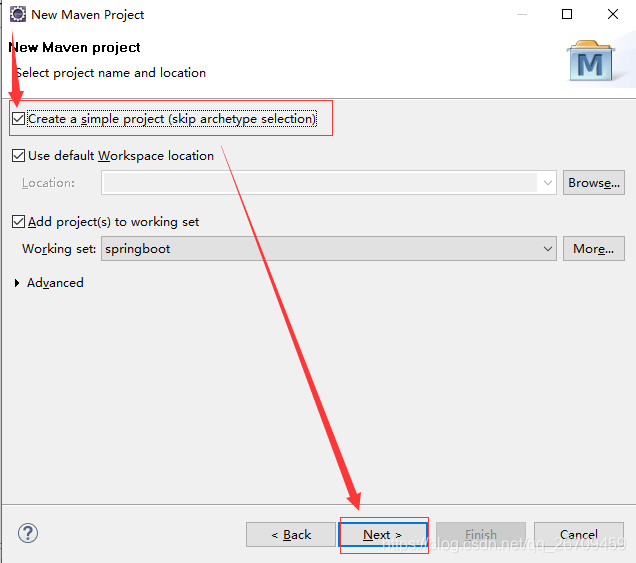
(2) configure project
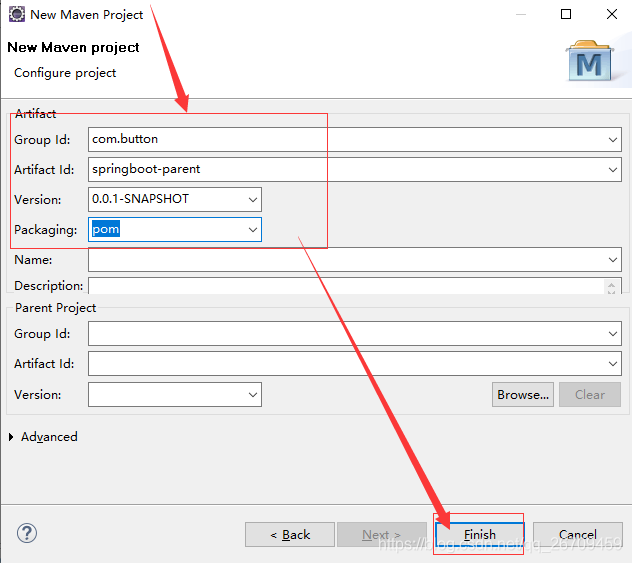
(3) pom.xml配置
<project xmlns="http://maven.apache.org/pom/4.0.0" xmlns:xsi="http://www.w3.org/2001/xmlschema-instance"
	xsi:schemalocation="http://maven.apache.org/pom/4.0.0 http://maven.apache.org/xsd/maven-4.0.0.xsd">
	<description>springboot分模块</description>
	<modelversion>4.0.0</modelversion>
	<groupid>com.button</groupid>
	<artifactid>springboot-parent</artifactid>
	<version>0.0.1-snapshot</version>
	<packaging>pom</packaging>

	<properties>
		<project.build.sourceencoding>utf-8</project.build.sourceencoding>
		<project.reporting.outputencoding>utf-8</project.reporting.outputencoding>
		<java.version>1.8</java.version>
		<springboot-web.version>0.0.1-snapshot</springboot-web.version>
		<springboot-service.version>0.0.1-snapshot</springboot-service.version>
		<springboot-dao.version>0.0.1-snapshot</springboot-dao.version>
		<springboot-entity.version>0.0.1-snapshot</springboot-entity.version>
		<mybatis-spring-boot-starter.version>1.1.1</mybatis-spring-boot-starter.version>
		<hikaricp.version>2.4.13</hikaricp.version>
		<pagehelper.version>5.0.0</pagehelper.version>
		<pagehelper-spring-boot-autoconfigure.version>1.2.3</pagehelper-spring-boot-autoconfigure.version>
		<pagehelper-spring-boot-starter.version>1.2.3</pagehelper-spring-boot-starter.version>
		<json-lib.version>2.2.2</json-lib.version>
	</properties>

	<!-- 这里继承springboot提供的父工程 -->
	<parent>
		<groupid>org.springframework.boot</groupid>
		<artifactid>spring-boot-starter-parent</artifactid>
		<version>2.0.1.release</version>
		<relativepath />
	</parent>
	<!-- 这里声明多个子模块 -->
	<modules>
		<module>springboot-web</module>
		<module>springboot-service</module>
		<module>springboot-dao</module>
		<module>springboot-entity</module>
	</modules>

	<!-- 这里统一管理依赖的版本号 -->
	<dependencymanagement>
		<dependencies>
			<dependency>
				<groupid>com.button</groupid>
				<artifactid>springboot-web</artifactid>
				<version>${springboot-web.version}</version>
			</dependency>
			<dependency>
				<groupid>com.button</groupid>
				<artifactid>springboot-service</artifactid>
				<version>${springboot-service.version}</version>
			</dependency>
			<dependency>
				<groupid>com.button</groupid>
				<artifactid>springboot-dao</artifactid>
				<version>${springboot-dao.version}</version>
			</dependency>
			<dependency>
				<groupid>com.button</groupid>
				<artifactid>springboot-entity</artifactid>
				<version>${springboot-entity.version}</version>
			</dependency>
			<dependency>
				<groupid>org.mybatis.spring.boot</groupid>
				<artifactid>mybatis-spring-boot-starter</artifactid>
				<version>${mybatis-spring-boot-starter.version}</version>
			</dependency>
			<!--mysql链接依赖 -->
			<dependency>
				<groupid>com.zaxxer</groupid>
				<artifactid>hikaricp-java7</artifactid>
				<version>${hikaricp.version}</version>
			</dependency>
			<!-- 分页插件pagehelper -->
			<dependency>
				<groupid>com.github.pagehelper</groupid>
				<artifactid>pagehelper</artifactid>
				<version>${pagehelper.version}</version>
			</dependency>
			<dependency>
				<groupid>com.github.pagehelper</groupid>
				<artifactid>pagehelper-spring-boot-autoconfigure</artifactid>
				<version>${pagehelper-spring-boot-autoconfigure.version}</version>
			</dependency>
			<dependency>
				<groupid>com.github.pagehelper</groupid>
				<artifactid>pagehelper-spring-boot-starter</artifactid>
				<version>${pagehelper-spring-boot-starter.version}</version>
			</dependency>
			<!-- json -->
			<dependency>
				<groupid>net.sf.json-lib</groupid>
				<artifactid>json-lib</artifactid>
				<version>${json-lib.version}</version>
				<classifier>jdk15</classifier>
			</dependency>
		</dependencies>
	</dependencymanagement>

	<build>
		<plugins>
			<!-- java编译插件 -->
			<plugin>
				<groupid>org.apache.maven.plugins</groupid>
				<artifactid>maven-compiler-plugin</artifactid>
				<configuration>
					<source>1.8</source>
					<target>1.8</target>
					<encoding>utf-8</encoding>
				</configuration>
			</plugin>
		</plugins>
	</build>
</project>
二、创建springboot-web
(1) 右键点击父工程 -> new -> other… -> maven -> maven module
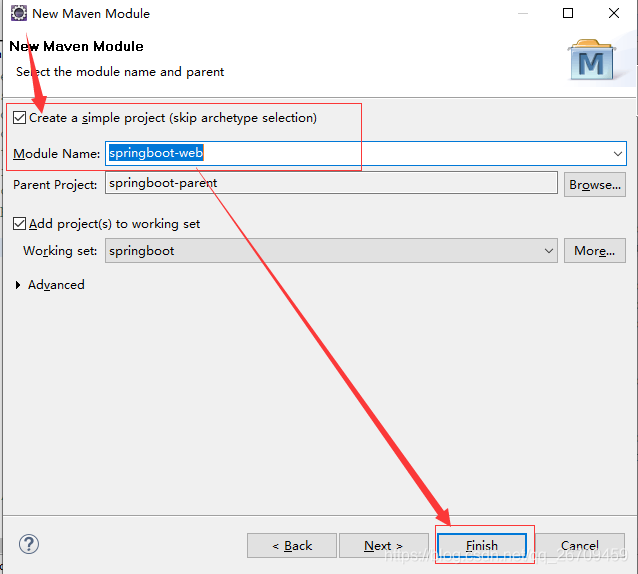
(2) pom.xml
<project xmlns="http://maven.apache.org/pom/4.0.0" xmlns:xsi="http://www.w3.org/2001/xmlschema-instance"
	xsi:schemalocation="http://maven.apache.org/pom/4.0.0 http://maven.apache.org/xsd/maven-4.0.0.xsd">
	<modelversion>4.0.0</modelversion>
	<artifactid>springboot-web</artifactid>
	<packaging>jar</packaging>
	<name>springboot-web</name>
	<parent>
		<groupid>com.button</groupid>
		<artifactid>springboot-parent</artifactid>
		<version>0.0.1-snapshot</version>
	</parent>
	<!-- web模块相关依赖 -->
	<dependencies>
		<dependency>
			<groupid>com.button</groupid>
			<artifactid>springboot-service</artifactid>
		</dependency>
		<dependency>
			<groupid>org.springframework.boot</groupid>
			<artifactid>spring-boot-starter-web</artifactid>
		</dependency>
		<dependency>
			<groupid>org.springframework.boot</groupid>
			<artifactid>spring-boot-starter-test</artifactid>
			<scope>test</scope>
		</dependency>
		<dependency>
			<groupid>org.springframework.boot</groupid>
			<artifactid>spring-boot-devtools</artifactid>
			<optional>true</optional>
			<scope>true</scope>
		</dependency>
	</dependencies>
	<!--只需在启动类所在模块的pom文件:指定打包插件 -->
	<build>
		<plugins>
			<plugin>
				<groupid>org.apache.maven.plugins</groupid>
				<artifactid>maven-compiler-plugin</artifactid>
				<configuration>
					<source>1.8</source>
					<target>1.8</target>
				</configuration>
			</plugin>
			<plugin>
				<groupid>org.springframework.boot</groupid>
				<artifactid>spring-boot-maven-plugin</artifactid>
				<configuration>
					<jvmarguments>-dfile.encoding=utf-8</jvmarguments>
					<fork>true</fork><!-- 没有该配置,devtools 不生效 -->
				</configuration>
			</plugin>
		</plugins>
	</build>
</project>
解释:
pom文件中的如下配置:
<dependency>
	<groupid>org.springframework.boot</groupid>
	<artifactid>spring-boot-devtools</artifactid>
	<optional>true</optional>
	<scope>true</scope>
</dependency>

<build>
    <plugins>
        <plugin>
            <groupid>org.springframework.boot</groupid>
            <artifactid>spring-boot-maven-plugin</artifactid>
            <configuration>
                <!-- 没有该配置,devtools 不生效 -->
                <fork>true</fork>
            </configuration>
        </plugin>
    </plugins>
</build>
如上的两项配置,添加之后会打开springboot的热部署,这样每次修改文件之后,不用手动重新启动项目。配置热部署可以让项目自动加载变化的文件,省去的手动操作。(项目搭建好之后,启动项目,随便创建/修改一个文件并保存,会发现控制台打印 springboot 重新加载文件的log。)
三、创建springboot-service
参照如上创建方式
pom.xml
<project xmlns="http://maven.apache.org/pom/4.0.0" xmlns:xsi="http://www.w3.org/2001/xmlschema-instance"
	xsi:schemalocation="http://maven.apache.org/pom/4.0.0 http://maven.apache.org/xsd/maven-4.0.0.xsd">
	<modelversion>4.0.0</modelversion>
	<artifactid>springboot-service</artifactid>
	<packaging>jar</packaging>
	<name>springboot-service</name>
	<parent>
		<groupid>com.button</groupid>
		<artifactid>springboot-parent</artifactid>
		<version>0.0.1-snapshot</version>
	</parent>

	<dependencies>
		<dependency>
			<groupid>com.button</groupid>
			<artifactid>springboot-dao</artifactid>
		</dependency>
		<dependency>
			<groupid>org.springframework</groupid>
			<artifactid>spring-context-support</artifactid>
		</dependency>
	</dependencies>
</project>
四、创建springboot-dao
参照如上创建方式
pom.xml
<project xmlns="http://maven.apache.org/pom/4.0.0" xmlns:xsi="http://www.w3.org/2001/xmlschema-instance"
	xsi:schemalocation="http://maven.apache.org/pom/4.0.0 http://maven.apache.org/xsd/maven-4.0.0.xsd">
	<modelversion>4.0.0</modelversion>
	<artifactid>springboot-dao</artifactid>
	<packaging>jar</packaging>
	<name>springboot-dao</name>
	<parent>
		<groupid>com.button</groupid>
		<artifactid>springboot-parent</artifactid>
		<version>0.0.1-snapshot</version>
	</parent>

	<dependencies>
		<dependency>
			<groupid>com.button</groupid>
			<artifactid>springboot-entity</artifactid>
		</dependency>
		<dependency>
			<groupid>org.springframework.boot</groupid>
			<artifactid>spring-boot-starter-aop</artifactid>
		</dependency>
		<!--数据库连接jdbc依赖 -->
		<!-- jdbc连接数据库,因为要用hikaricp,所以需要将springboot中的tomcat-jdbc排除 -->
		<dependency>
			<groupid>org.springframework.boot</groupid>
			<artifactid>spring-boot-starter-jdbc</artifactid>
			<exclusions>
				<exclusion>
					<groupid>org.apache.tomcat</groupid>
					<artifactid>tomcat-jdbc</artifactid>
				</exclusion>
			</exclusions>
		</dependency>
		<!-- mybatis -->
		<dependency>
			<groupid>org.mybatis.spring.boot</groupid>
			<artifactid>mybatis-spring-boot-starter</artifactid>
		</dependency>
		<!--mysql链接依赖 -->
		<dependency>
			<groupid>mysql</groupid>
			<artifactid>mysql-connector-java</artifactid>
		</dependency>
		<dependency>
			<groupid>com.zaxxer</groupid>
			<artifactid>hikaricp-java7</artifactid>
		</dependency>

		<!-- 分页插件pagehelper -->
		<dependency>
			<groupid>com.github.pagehelper</groupid>
			<artifactid>pagehelper</artifactid>
		</dependency>
		<dependency>
			<groupid>com.github.pagehelper</groupid>
			<artifactid>pagehelper-spring-boot-autoconfigure</artifactid>
		</dependency>
		<dependency>
			<groupid>com.github.pagehelper</groupid>
			<artifactid>pagehelper-spring-boot-starter</artifactid>
		</dependency>
	</dependencies>
	<build>
		<!-- 一定要声明如下配置 -->
		<resources>
			<resource>
				<directory>src/main/resources</directory>
				<includes>
					<include>**/*.xml</include>
				</includes>
			</resource>
		</resources>
	</build>
</project>
五、创建springboot-entity
参照如上创建方式
pom.xml
<project xmlns="http://maven.apache.org/pom/4.0.0" xmlns:xsi="http://www.w3.org/2001/xmlschema-instance"
	xsi:schemalocation="http://maven.apache.org/pom/4.0.0 http://maven.apache.org/xsd/maven-4.0.0.xsd">
	<modelversion>4.0.0</modelversion>
	<artifactid>springboot-entity</artifactid>
	<packaging>jar</packaging>
	<name>springboot-entity</name>

	<parent>
		<groupid>com.button</groupid>
		<artifactid>springboot-parent</artifactid>
		<version>0.0.1-snapshot</version>
	</parent>
</project>
六、项目代码
1、springboot-dao
①usermapper.java
package com.button.project.dao;

import java.util.list;

import org.apache.ibatis.annotations.mapper;

import com.button.project.pojo.usermodel;

@mapper
public interface usermapper {
	list<usermodel> getuser();
}
②mapper/usermapper.xml
<?xml version="1.0" encoding="utf-8" ?>
<!doctype mapper public "-//mybatis.org//dtd mapper 3.0//en" "http://mybatis.org/dtd/mybatis-3-mapper.dtd" >
<mapper namespace="com.button.project.dao.usermapper">

    <resultmap id="user" type="map">
        <result column="id" property="id" javatype="integer"/>
        <result column="name" property="name" javatype="string"/>
        <result column="age" property="age" javatype="integer"/>
    </resultmap>

	<select id="getuser" resulttype="com.button.project.pojo.usermodel">
	   select
	       *
	   from
	       tb_user
	</select>
</mapper>
③config/application-mybatis.xml
<beans xmlns="http://www.springframework.org/schema/beans"
	xmlns:xsi="http://www.w3.org/2001/xmlschema-instance" xmlns:aop="http://www.springframework.org/schema/aop"
	xmlns:tx="http://www.springframework.org/schema/tx"
	xsi:schemalocation="
        http://www.springframework.org/schema/beans
        http://www.springframework.org/schema/beans/spring-beans.xsd
        http://www.springframework.org/schema/tx
        http://www.springframework.org/schema/tx/spring-tx.xsd
        http://www.springframework.org/schema/aop
        http://www.springframework.org/schema/aop/spring-aop.xsd ">
	<bean id="txmanager"
		class="org.springframework.jdbc.datasource.datasourcetransactionmanager">
		<property name="datasource" ref="datasource"></property>
	</bean>
	<tx:annotation-driven transaction-manager="transactionmanager" />
</beans>
2、springboot-entity
usermodel.java
package com.button.project.pojo;

import java.io.serializable;

public class usermodel implements serializable{
	private static final long serialversionuid = 1l;
	private integer id;
	private string name;
	private integer age;
	public integer getid() {
		return id;
	}
	public void setid(integer id) {
		this.id = id;
	}
	public string getname() {
		return name;
	}
	public void setname(string name) {
		this.name = name;
	}
	public integer getage() {
		return age;
	}
	public void setage(integer age) {
		this.age = age;
	}
	@override
	public string tostring() {
		return "usermodel [id=" + id + ", name=" + name + ", age=" + age + "]";
	}
}
3、springboot-service
①userservice.java
package com.button.project.service;

import java.util.list;

import com.button.project.pojo.usermodel;

public interface userservice {
	list<usermodel> getuser();
}
②userserviceimpl.java
package com.button.project.service.impl;

import java.util.list;

import org.springframework.beans.factory.annotation.autowired;
import org.springframework.stereotype.service;

import com.button.project.dao.usermapper;
import com.button.project.pojo.usermodel;
import com.button.project.service.userservice;

@service
public class userserviceimpl implements userservice {

	@autowired
	private usermapper usermapper;

	@override
	public list<usermodel> getuser() {
		return usermapper.getuser();
	}

}
4、springboot-web
①usercontroller.java
package com.button.project.controller;

import java.util.list;

import org.springframework.web.bind.annotation.requestmapping;
import org.springframework.web.bind.annotation.requestmethod;

import com.button.project.pojo.usermodel;

@requestmapping(value = "/user", produces = "application/json;charset=utf-8")
public interface usercontroller {

	@requestmapping(value = "/getuser", method={requestmethod.post, requestmethod.get})
    list<usermodel> getuser();
}
②usercontrollerimpl.java
package com.button.project.controller.impl;

import java.util.list;

import org.springframework.beans.factory.annotation.autowired;
import org.springframework.web.bind.annotation.restcontroller;

import com.button.project.controller.usercontroller;
import com.button.project.pojo.usermodel;
import com.button.project.service.userservice;

@restcontroller
public class usercontrollerimpl implements usercontroller {

	@autowired
	private userservice userservice;

	@override
	public list<usermodel> getuser() {
		return userservice.getuser();
	}

}
③springbootapplicationservice
package com.button.project;

import org.springframework.boot.springapplication;
import org.springframework.boot.autoconfigure.springbootapplication;
import org.springframework.boot.web.servlet.servletcomponentscan;
import org.springframework.cache.annotation.enablecaching;
import org.springframework.context.annotation.importresource;
import org.springframework.transaction.annotation.enabletransactionmanagement;

@importresource("classpath:config/application-mybatis.xml")
@servletcomponentscan
@enablecaching
@enabletransactionmanagement
@springbootapplication
public class springbootapplicationservice {
	//项目启动入口
	public static void main(string[] args) {
		springapplication.run(springbootapplicationservice.class, args);
	}
}
④initconstantlistener.java
package com.button.project.init;

import javax.servlet.servletcontextevent;
import javax.servlet.servletcontextlistener;
import javax.servlet.annotation.weblistener;

import org.slf4j.logger;
import org.slf4j.loggerfactory;

@weblistener
public class initconstantlistener implements servletcontextlistener {
	private static final logger logger = loggerfactory.getlogger(initconstantlistener.class);

	@override
	public void contextinitialized(servletcontextevent sce) {
		logger.info("初始化数据.");
	}

	@override
	public void contextdestroyed(servletcontextevent sce) {
		logger.info("销毁数据.");
	}
}
⑤application.yml
server:
    servlet:
        context-path: /button
    port: 8080
    uri-encoding: utf-8

logging:
    config: classpath:logback.xml

spring:
    datasource:
        url: jdbc:mysql://*********:3306/button-pro?useunicode=true&characterencoding=utf-8&autoreconnect=true&allowmultiqueries=true&usessl=true
        username: *****
        password: ******
        driver-class-name: com.mysql.jdbc.driver
        type: com.zaxxer.hikari.hikaridatasource
        hikari:
            minimum-idle: 5
            maximum-pool-size: 15
            idle-timeout: 30000
            pool-name: datebookhikaricp
            max-lifetime: 1800000
            connection-timeout: 30000
            connection-test-query: 'select 1'

mybatis:
    # 加载mapper
    mapper-locations: "classpath:mapper/*.xml"

mapper:
    not-empty: false
    identity: mysql

pagehelper:
    helperdialect: mysql
    reasonable: true
    supportmethodsarguments: true
    params: count=countsql
⑥logback.xml
<?xml version="1.0" encoding="utf-8"?>
<configuration scan="true" scanperiod="30 seconds">
    <property name="log_home" value="/com/button/" />

	<appender name="stdout" class="ch.qos.logback.core.consoleappender">
		<encoder class="ch.qos.logback.classic.encoder.patternlayoutencoder">
			<pattern>%d{yyyy-mm-dd hh:mm:ss.sss} [%thread] %-5level %logger{50} -%msg%n</pattern>
		</encoder>
	</appender>
	<appender name="file"
		class="ch.qos.logback.core.rolling.rollingfileappender">
		<file>${log_home}/springboot.log</file>
		<rollingpolicy class="ch.qos.logback.core.rolling.timebasedrollingpolicy">
			<filenamepattern>
				${log_home}/springboot.log.%d{yyyy-mm-dd}.%i.log
			</filenamepattern>
			<timebasedfilenamingandtriggeringpolicy class="ch.qos.logback.core.rolling.sizeandtimebasedfnatp">
                <maxfilesize>100mb</maxfilesize>
            </timebasedfilenamingandtriggeringpolicy>
		</rollingpolicy>
		<encoder class="ch.qos.logback.classic.encoder.patternlayoutencoder">
			<pattern>%d{hh:mm:ss.sss} [%thread] %-5level %logger{50} -%msg%n</pattern>
		</encoder>
	</appender>

	<root level="debug">
		<appender-ref ref="stdout" />
		<appender-ref ref="file" />
	</root>
</configuration>
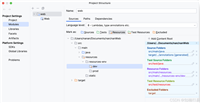
七、完整项目结构如下:
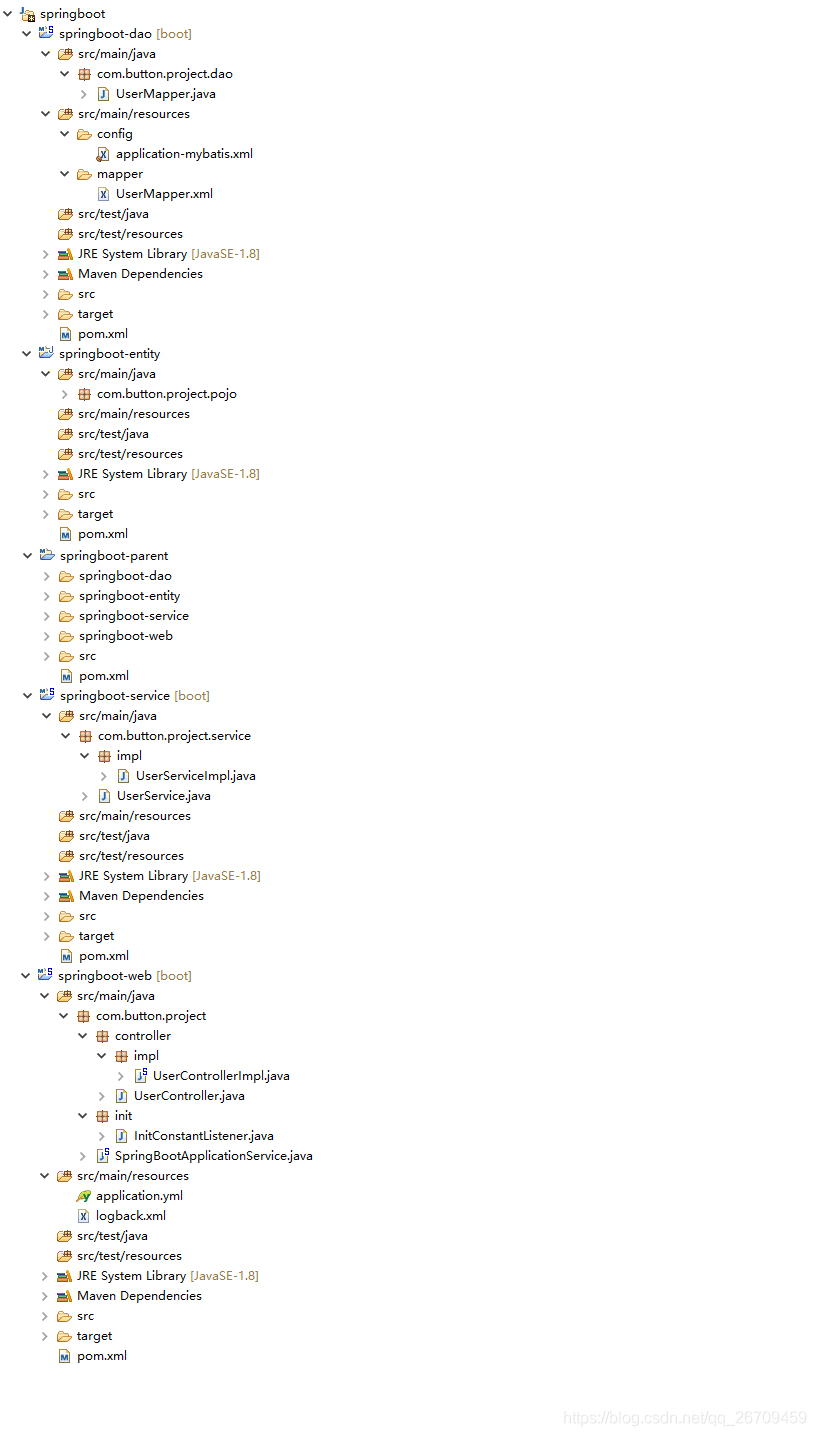
注:一个项目从开发,测试再到生产,可能会使用到不同的配置信息,每次去修改application.yml文件中的信息就显得特别麻烦,可以使用如下方式解决。
比如项目运行环境开发(dev),测试(test),生产(prod),我们可以在src/main/resources文件夹下创建如下四个文件:
application-dev.yml
server:
    servlet:
        context-path: /button-dev
    port: 8080
    uri-encoding: utf-8
application-test.yml
server:
    servlet:
        context-path: /button-test
    port: 8081
    uri-encoding: utf-8
application-prod.yml
server:
    servlet:
        context-path: /button-prod
    port: 8082
    uri-encoding: utf-8
这三个文件配置好项目不同环境的配置信息
application.yml文件配置如下:
spring:
    profiles:
        active: dev
解释:active后可以配置dev、test、prod,不同的配置会去加载不同的配置信息,这样就不用来回修改配置信息了。
更多springboot内容,请查询官方文档
https://docs.spring.io/spring-boot/docs/1.5.8.release/reference/html/
源码地址:https://gitee.com/superbutton/springboot-components/tree/develop/springboot-moudle
到此这篇关于springboot分模块项目搭建的实现的文章就介绍到这了,更多相关springboot分模块搭建内容请搜索代码网以前的文章或继续浏览下面的相关文章希望大家以后多多支持代码网!



发表评论