
 我要评论
我要评论效果
安装
npm install sortablejs --save
引入
import sortable from "sortablejs";
 <el-table
        :data="tablebody"
        border
        ref="tableref"
        :stripe="true"
        :key="tablekey"
      >
        <el-table-column type="index" label="排序" width="150" key="index" />
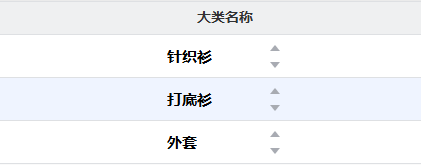
        <el-table-column prop="category" label="大类名称" key="category">
          <template #default="{ row, $index }">
            <div class="title">{{ row.category }}</div>
            <div class="icon">
              <el-icon
                :class="{ active: activebutton === `up-${$index}` }"
                @click="moveitem($index, 'up')"
                ><carettop
              /></el-icon>
              <el-icon
                :class="{ active: activebutton === `down-${$index}` }"
                @click="moveitem($index, 'down')"
                ><caretbottom
              /></el-icon>
            </div>
          </template>
        </el-table-column>
      </el-table>
<script setup>
const activebutton = ref();
//行拖拽
    const rowdrop=()=> {
              const tbody = tableref.value?.$el.queryselector(
      ".el-table__body-wrapper tbody"
    );
              sortable.create(wrappertr, {
      animation: 150,
      ghostclass: "blue-background-class",
      onend: async (evt: any) => {
        handledragend(evt);
      },
    });
            }
const handledragend = async (event: any) => {
  const { oldindex, newindex } = event;
  if (oldindex !== newindex) {
    const moveditem = tablebody.value.splice(oldindex, 1)[0];
    tablebody.value.splice(newindex, 0, moveditem);
    tablekey.value += 1;
    const url = "./?_m=&_a=";
    const formdata = new formdata();
    formdata.append("id", globaldata.id);
    formdata.append("category", moveditem.category);
    formdata.append("xh", newindex + 1);
    const response = await post(url, formdata);
    if (response.code == 0) {
      elmessage({
        showclose: true,
        message: "排序成功",
        type: "success",
      });
    }
  }
};
const moveitem = async (index: any, direction: any) => {
  const newindex = direction == "up" ? index - 1 : index + 1;
  if (newindex >= 0 && newindex < tablebody.value.length) {
    const item = tablebody.value.splice(index, 1)[0];
    tablebody.value.splice(newindex, 0, item);
    activebutton.value = `${direction}-${index}`;
    settimeout(() => (activebutton.value = null), 200);
    const url = "./?_m=&_a=";
    const formdata = new formdata();
    formdata.append("id", globaldata.id);
    formdata.append("category", item.category);
    formdata.append("xh", newindex + 1);
    const response = await post(url, formdata);
    if (response.code == 0) {
      elmessage({
        showclose: true,
        message: "排序成功",
        type: "success",
      });
    }
  }
};
</script>
点击箭头加颜色
.active {
  color: #009688; /* 例如,活动状态的颜色 */
}
到此这篇关于sortable中el-table拖拽及点击箭头上下移动row的文章就介绍到这了,更多相关sortable el-table拖拽内容请搜索代码网以前的文章或继续浏览下面的相关文章希望大家以后多多支持代码网!





发表评论