
 我要评论
我要评论vue中this.$confirm
笔记整理:
之前项目中比较常见的confirm确认框写法,(与this.$router相似)
vue+elementui写法
  onstopclick(row: any) {
    **this.$confirm**('确定停用该条消息吗 ?', '提示', {
      confirmbuttontext: '确定',
      cancelbuttontext: '取消',
      type: 'warning'
    })
      .then(() => {
        this.requestswitchstatus(row)
      })
      .catch(() => {})
  }
换成ant design vue时写法
handledelete(record) {
  this.$confirm({
    title:'确认删除吗?',
    oktext: '是',
    canceltext: '否',
    icon: 'exclamation-circle',
    confirm: this.handleclear()
  })
}
vue+vux 写法:(参考vux文档~)
            this.$vux.confirm.show({
              title: 标题,
              content: content,
              oncancel() {
                let url = window.location.href
                if (url.indexof('isapp') > -1) {
                  _this.gonv({type: ''})
                } else {
                  _this.$router.push('/home')
                }
              },
              onconfirm() {
                _this.crusheggrequest(param)
              }
            })```
vue项目中this.$confirm中,确定和取消执行不同的逻辑
效果图片
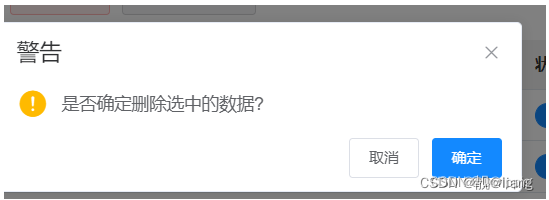
【确定】按钮执行逻辑a,【取消】按钮执行逻辑b。
[x]按钮关闭confirm,和取消按钮执行不同的逻辑
代码如下:
this.$confirm("是否确定删除选中的数据?", "提示", {
    confirmbuttontext: "确定",
    cancelbuttontext: "取消",
    type: "warning",
    distinguishcancelandclose: true,    // 重要,设置为true才会把右上角x和取消区分开来
    closeonclickmodal: false
}).then(function () {
    // todo 确认通过执行逻辑

}).catch(function (e) {
    if (e == 'cancel') {
        // todo 确认不通过执行逻辑

    } else if(e == 'close') {
        // todo 右上角x的执行逻辑

    }
})
总结
以上为个人经验,希望能给大家一个参考,也希望大家多多支持代码网。






发表评论