
 我要评论
我要评论先贴官网 layui官网 ;
再贴一个要使用的 插件官网 : layui-soul-table 示例文档 ;
这个插件功能很多
看到那个下载 后悔没早点知道啊 还自己写了 一个下载
可以到官网看看 很多实用的
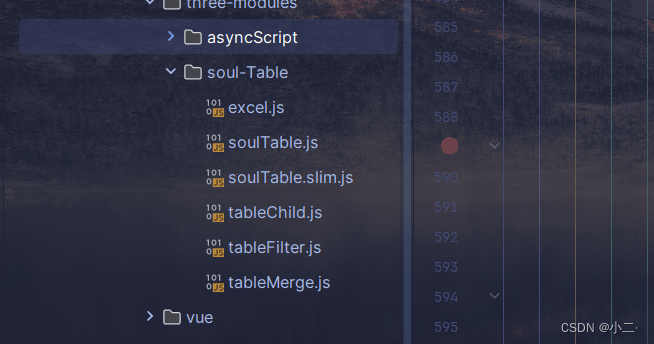
需要引入的 js
layui.config({
    base: rootpath,
    version: true
}).extend({
    //  自定义扩展
    soultable: 'three-modules/soul-table/soultable.slim',   // soultable表格扩展( 要使用soultable必须先引入当前文件)
    tablechild: 'three-modules/soul-table/tablechild',     //  soultable子表扩展
    tablemerge: 'three-modules/soul-table/tablemerge',     // soultable合并单元格扩展
    tablefilter: 'three-modules/soul-table/tablefilter',   // soultable筛选扩展
    excel: 'three-modules/soul-table/excel',               // soultable导出excel扩展
});
官网上也是这样引入的 统一管理的 所以 很友好 能有 直接添加到自己的增加的后面
遇到的问题 就是 排序 因为我的数据表格中 主要是要获取但当前的排序
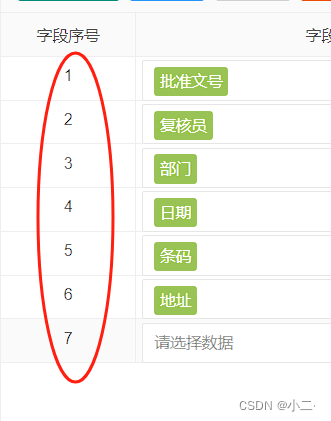
拖动后更改位置 当前的能够显示出来
根据给的获取数据
 let oldindex = obj.oldindex; // 原来的数据索引
                                let newindex = obj.newindex;  // 改动后数据索引
                                let modifiedrow = obj.row;   // 修改行数据
                                let cache = obj.cache; // 改动后全表数据
然后判断移动了多少 进行重载渲染: 我的字段名称是 xlh 能使用的话 换成自己的就行了
 // 首先,找到修改行在全表数据中的索引,以便后续直接操作
                                let modifiedrowindex = cache.findindex(row => row.xlh === modifiedrow.xlh && row.fdname === modifiedrow.fdname);
                                // 确保找到了对应的行
                                if (modifiedrowindex !== -1) {
                                    // 如果移动是向前(oldindex > newindex),则需要减少中间行的xlh
                                    if (oldindex > newindex) {
                                        for (let i = newindex + 1; i < oldindex; i++) {
                                            cache[i].xlh--;
                                        }
                                    }
                                    // 如果是向后移动(oldindex < newindex),则需要增加中间行的xlh
                                    else if (oldindex < newindex) {
                                        for (let i = oldindex; i < newindex; i++) {
                                            cache[i].xlh++;
                                        }
                                    }
                                    // 直接根据新的索引位置更新修改行的xlh
                                    modifiedrow.xlh = newindex + 1;
                                    // 更新 cache 中对应行的数据(虽然实际上可能不需要,因为假设 cache 已经是最新的)
                                    // 但这里为了演示逻辑完整性,我们模拟更新操作
                                    cache[modifiedrowindex] = modifiedrow;
                                    // 重新遍历并确保所有行的xlh正确无误(这一步在大多数情况下可能不需要,因为我们已经针对性调整了受影响的部分)
                                    // 但为了确保逻辑完整性,保留此步骤
                                    cache.foreach((row, index) => {
                                        row.xlh = index + 1; // 确保每个xlh与索引对应
                                    });
                                    // console.log("根据新顺序更新xlh后的全表数据:", cache);
                                } else {
                                    console.error("在全表数据中未找到对应的修改行");
                                }
                                // console.log("根据最终顺序更新xlh后的数据:", cache);
                                table.reloaddata('表id', {
                                    data: cache
                                });
到此这篇关于layui 数据表格拖动 列、行 位置重新排序功能实现的文章就介绍到这了,更多相关layui 数据表格拖动重新排序内容请搜索代码网以前的文章或继续浏览下面的相关文章希望大家以后多多支持代码网!





发表评论