
 我要评论
我要评论项目配置
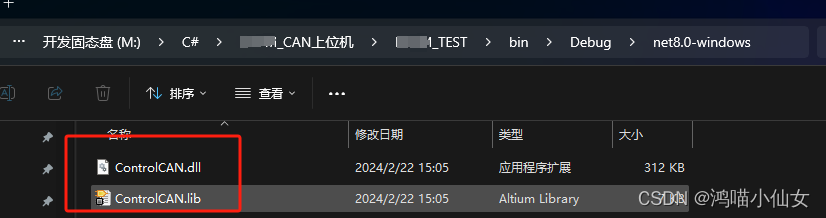
复制dll库文件
文件在上面的资料里面
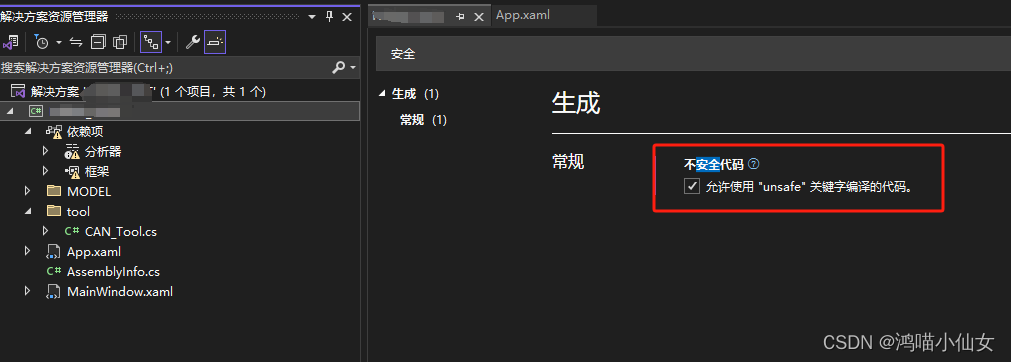
设置不安全代码
can c#工具类
can_tool.cs
using microsoft.visualbasic;
using system;
using system.collections.generic;
using system.linq;
using system.runtime.interopservices;
using system.text;
using system.threading.tasks;
using system.windows;
using system.windows.threading;

namespace can_test.tool
{

    /*------------兼容zlg的数据类型---------------------------------*/

    //1.zlgcan系列接口卡信息的数据类型。
    //public struct vci_board_info
    //{
    //    public uint16 hw_version;
    //    public uint16 fw_version;
    //    public uint16 dr_version;
    //    public uint16 in_version;
    //    public uint16 irq_num;
    //    public byte   can_num;
    //    [marshalas(unmanagedtype.byvalarray, sizeconst=20)] public byte []str_serial_num;
    //    [marshalas(unmanagedtype.byvalarray, sizeconst = 40)]
    //    public byte[] str_hw_type;
    //    [marshalas(unmanagedtype.byvalarray, sizeconst = 4)]
    //    public byte[] reserved;
    //}

    //以下为简易定义与调用方式,在项目属性->生成->勾选使用不安全代码即可
    unsafe public struct vci_board_info//使用不安全代码
    {
        public uint16 hw_version;
        public uint16 fw_version;
        public uint16 dr_version;
        public uint16 in_version;
        public uint16 irq_num;
        public byte can_num;

        public fixed byte str_serial_num[20];
        public fixed byte str_hw_type[40];
        public fixed byte reserved[8];
    }

    /
    //2.定义can信息帧的数据类型。
    unsafe public struct vci_can_obj  //使用不安全代码
    {
        public uint id;
        public uint timestamp;        //时间标识
        public byte timeflag;         //是否使用时间标识
        public byte sendtype;         //发送标志。保留,未用
        public byte remoteflag;       //是否是远程帧
        public byte externflag;       //是否是扩展帧
        public byte datalen;          //数据长度
        public fixed byte data[8];    //数据
        public fixed byte reserved[3];//保留位

    }

    //3.定义初始化can的数据类型
    public struct vci_init_config
    {
        public uint32 acccode;
        public uint32 accmask;
        public uint32 reserved;
        public byte filter;   //0或1接收所有帧。2标准帧滤波,3是扩展帧滤波。
        public byte timing0;  //波特率参数,具体配置,请查看二次开发库函数说明书。
        public byte timing1;
        public byte mode;     //模式,0表示正常模式,1表示只听模式,2自测模式
    }

    /*------------其他数据结构描述---------------------------------*/
    //4.usb-can总线适配器板卡信息的数据类型1,该类型为vci_findusbdevice函数的返回参数。
    public struct vci_board_info1
    {
        public uint16 hw_version;
        public uint16 fw_version;
        public uint16 dr_version;
        public uint16 in_version;
        public uint16 irq_num;
        public byte can_num;
        public byte reserved;
        [marshalas(unmanagedtype.byvalarray, sizeconst = 8)] public byte[] str_serial_num;
        [marshalas(unmanagedtype.byvalarray, sizeconst = 16)]
        public byte[] str_hw_type;
        [marshalas(unmanagedtype.byvalarray, sizeconst = 16)]
        public byte[] str_usb_serial;
    }

    /*------------数据结构描述完成---------------------------------*/

    public struct chgdesipandport
    {
        [marshalas(unmanagedtype.byvalarray, sizeconst = 10)]
        public byte[] szpwd;
        [marshalas(unmanagedtype.byvalarray, sizeconst = 20)]
        public byte[] szdesip;
        public int32 desport;

        public void init()
        {
            szpwd = new byte[10];
            szdesip = new byte[20];
        }
    }


    public class can_tool
    {
        const int dev_usbcan = 3;
        const int dev_usbcan2 = 4;
        /// <summary>
        ///
        /// </summary>
        /// <param name="devicetype"></param>
        /// <param name="deviceind"></param>
        /// <param name="reserved"></param>
        /// <returns></returns>
        /*------------兼容zlg的函数描述---------------------------------*/
        /*------------兼容zlg的函数描述---------------------------------*/
        [dllimport("controlcan.dll")]
        public static extern uint32 vci_opendevice(uint32 devicetype, uint32 deviceind, uint32 reserved);
        [dllimport("controlcan.dll")]
        public static extern uint32 vci_closedevice(uint32 devicetype, uint32 deviceind);
        [dllimport("controlcan.dll")]
        public static extern uint32 vci_initcan(uint32 devicetype, uint32 deviceind, uint32 canind, ref vci_init_config pinitconfig);

        [dllimport("controlcan.dll")]
        public static extern uint32 vci_readboardinfo(uint32 devicetype, uint32 deviceind, ref vci_board_info pinfo);

        [dllimport("controlcan.dll")]
        public static extern uint32 vci_getreceivenum(uint32 devicetype, uint32 deviceind, uint32 canind);
        [dllimport("controlcan.dll")]
        public static extern uint32 vci_clearbuffer(uint32 devicetype, uint32 deviceind, uint32 canind);

        [dllimport("controlcan.dll")]
        public static extern uint32 vci_startcan(uint32 devicetype, uint32 deviceind, uint32 canind);
        [dllimport("controlcan.dll")]
        public static extern uint32 vci_resetcan(uint32 devicetype, uint32 deviceind, uint32 canind);

        [dllimport("controlcan.dll")]
        public static extern uint32 vci_transmit(uint32 devicetype, uint32 deviceind, uint32 canind, ref vci_can_obj psend, uint32 len);

        [dllimport("controlcan.dll")]
        public static extern uint32 vci_receive(uint32 devicetype, uint32 deviceind, uint32 canind, ref vci_can_obj preceive, uint32 len, int32 waittime);

        /*------------其他函数描述---------------------------------*/

        [dllimport("controlcan.dll")]
        public static extern uint32 vci_connectdevice(uint32 devtype, uint32 devindex);
        [dllimport("controlcan.dll")]
        public static extern uint32 vci_usbdevicereset(uint32 devtype, uint32 devindex, uint32 reserved);
        [dllimport("controlcan.dll")]
        public static extern uint32 vci_findusbdevice2(ref vci_board_info pinfo);
        /*------------函数描述结束---------------------------------*/


        static uint32 m_bopen = 0;
        static uint32 m_devind = 0;
        static uint32 m_canind = 0;
        static uint32[] m_arrdevtype = new uint32[20];

        static vci_can_obj[] m_recobj = new vci_can_obj[1000];

        static uint32 m_devtype = 4;//usbcan2

        //this.timer_rec = new system.windows.forms.timer(this.components);

        public static void init()
        {
            m_arrdevtype[2] = 3;
            m_arrdevtype[3] = 4;
        }
        public static void close_can()
        {
            can_tool.vci_closedevice(m_devtype, m_devind);
            m_bopen = 0;
        }

        public static void start_can()
        {
            if (m_bopen == 0)
                return;
            can_tool.vci_startcan(m_devtype, m_devind, m_canind);
        }

        unsafe public static string can_send(string can_data_idtext,string can_send_data)
        {
            if (m_bopen == 0)
            {
                messagebox.show("can断开连接", "错误");
                return null;
            }

            vci_can_obj sendobj = new vci_can_obj();
            //sendobj.init();
            sendobj.remoteflag = (byte)0;
            sendobj.externflag = (byte)0;

            sendobj.id = system.convert.touint32("0x" + can_data_idtext, 16);
            int len = (can_send_data.length + 1) / 3;
            sendobj.datalen = system.convert.tobyte(len);
            string strdata = can_send_data;

            //messagebox.show(strdata);

            int i = -1;
            if (i++ < len - 1)
                sendobj.data[0] = system.convert.tobyte("0x" + strdata.substring(i * 3, 2), 16);
            if (i++ < len - 1)
                sendobj.data[1] = system.convert.tobyte("0x" + strdata.substring(i * 3, 2), 16);
            if (i++ < len - 1)
                sendobj.data[2] = system.convert.tobyte("0x" + strdata.substring(i * 3, 2), 16);
            if (i++ < len - 1)
                sendobj.data[3] = system.convert.tobyte("0x" + strdata.substring(i * 3, 2), 16);
            if (i++ < len - 1)
                sendobj.data[4] = system.convert.tobyte("0x" + strdata.substring(i * 3, 2), 16);
            if (i++ < len - 1)
                sendobj.data[5] = system.convert.tobyte("0x" + strdata.substring(i * 3, 2), 16);
            if (i++ < len - 1)
                sendobj.data[6] = system.convert.tobyte("0x" + strdata.substring(i * 3, 2), 16);
            if (i++ < len - 1)
                sendobj.data[7] = system.convert.tobyte("0x" + strdata.substring(i * 3, 2), 16);

            if (can_tool.vci_transmit(m_devtype, m_devind, m_canind, ref sendobj, 1) == 0)
            {
                messagebox.show("发送失败", "错误");
                return null;
            }
            else
            {
                return "tx   帧id:" + can_data_idtext + " 数据:  " + can_send_data;
            }
        }

        public static string connect_can(int can_type, int can_id,int run_mod)
        {
            //以下两行为多卡同机测试代码,用来获取序列号与对应的设备索引号,单卡可以不使用。
            vci_board_info[] vbi2 = new vci_board_info[50];
            uint num1 = can_tool.vci_findusbdevice2(ref vbi2[0]);

            m_devtype = m_arrdevtype[can_type + 2];
            m_devind = 0;
            m_canind = (uint32)can_id;

            if (can_tool.vci_opendevice(m_devtype, m_devind, 0) == 0)
            {
                messagebox.show("打开设备失败,请检查设备类型和设备索引号是否正确", "错误");
                m_bopen = 0;
                return "";
            }

            m_bopen = 1;

            vci_init_config config = new vci_init_config();
            config.acccode = system.convert.touint32("0x" + "00000000", 16);
            config.accmask = system.convert.touint32("0x" + "ffffffff", 16);
            config.timing0 = system.convert.tobyte("0x" + "00", 16);
            config.timing1 = system.convert.tobyte("0x" + "1c", 16);
            config.filter = (byte)(0 + 1);
            config.mode = (byte)run_mod;

            can_tool.vci_initcan(m_devtype, m_devind, m_canind, ref config);

            return m_bopen == 0 ? "断开" : "连接";

        }


        unsafe public static string timerrectick()
        {
            uint32 res = new uint32();
            res = can_tool.vci_receive(m_devtype, m_devind, m_canind, ref m_recobj[0], 1000, 100);

            /
            //intptr[] ptarray = new intptr[1];
            //ptarray[0] = marshal.allochglobal(marshal.sizeof(typeof(vci_can_obj)) * 50);
            //intptr pt = marshal.allochglobal(marshal.sizeof(typeof(intptr)) * 1);

            //marshal.copy(ptarray, 0, pt, 1);
            //messagebox.show(res+"");

            //res = vci_receive(m_devtype, m_devind, m_canind, pt, 50/*50*/, 100);

            if (res == 0xffffffff) res = 0;//当设备未初始化时,返回0xffffffff,不进行列表显示。
            string str = "";
            for (uint32 i = 0; i < res; i++)
            {
                //vci_can_obj obj = (vci_can_obj)marshal.ptrtostructure((intptr)((uint32)pt + i * marshal.sizeof(typeof(vci_can_obj))), typeof(vci_can_obj));

                str = "rx: ";
                str += "  帧id:0x" + system.convert.tostring(m_recobj[i].id, 16);
                str += "  帧格式:";
                if (m_recobj[i].remoteflag == 0)
                    str += "数据帧 ";
                else
                    str += "远程帧 ";
                if (m_recobj[i].externflag == 0)
                    str += "标准帧 ";
                else
                    str += "扩展帧 ";

                //
                if (m_recobj[i].remoteflag == 0)
                {
                    str += "数据: ";
                    byte len = (byte)(m_recobj[i].datalen % 9);
                    byte j = 0;
                    fixed (vci_can_obj* m_recobj1 = &m_recobj[i])
                    {
                        if (j++ < len)
                            str += " " + system.convert.tostring(m_recobj1->data[0], 16);
                        if (j++ < len)
                            str += " " + system.convert.tostring(m_recobj1->data[1], 16);
                        if (j++ < len)
                            str += " " + system.convert.tostring(m_recobj1->data[2], 16);
                        if (j++ < len)
                            str += " " + system.convert.tostring(m_recobj1->data[3], 16);
                        if (j++ < len)
                            str += " " + system.convert.tostring(m_recobj1->data[4], 16);
                        if (j++ < len)
                            str += " " + system.convert.tostring(m_recobj1->data[5], 16);
                        if (j++ < len)
                            str += " " + system.convert.tostring(m_recobj1->data[6], 16);
                        if (j++ < len)
                            str += " " + system.convert.tostring(m_recobj1->data[7], 16);
                    }
                }
                return str + "\n";
            }
            return null;
        }
    }
}
主界面
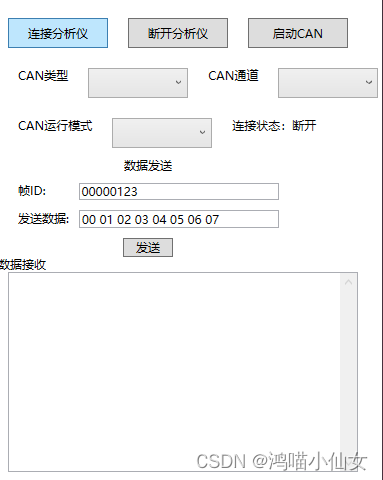
mainwindow.xaml
<window x:class="can_test.mainwindow"
        xmlns="http://schemas.microsoft.com/winfx/2006/xaml/presentation"
        xmlns:x="http://schemas.microsoft.com/winfx/2006/xaml"
        xmlns:d="http://schemas.microsoft.com/expression/blend/2008"
        xmlns:mc="http://schemas.openxmlformats.org/markup-compatibility/2006"
        mc:ignorable="d"
        title="can测试" height="600" width="400">
    <grid>
        <stackpanel>
            <stackpanel orientation="horizontal" height="30" margin="0,20,0,0">
                <button margin="10,0,0,0" click="connect_can" width="100">连接分析仪</button>
                <button margin="20,0,0,0" click="close_can"  width="100">断开分析仪</button>
                <button margin="20,0,0,0" click="start_can"  width="100">启动can</button>
            </stackpanel>

            <stackpanel orientation="horizontal" height="30" margin="0,20,0,0">
                <stackpanel orientation="horizontal" margin="20,0,0,0">
                    <textblock>can类型</textblock>
                    <combobox horizontalalignment="center" width="100" margin="20,0,0,0" x:name="can_type">
                        <comboboxitem>usbcan v1</comboboxitem>
                        <comboboxitem>usbcan v2</comboboxitem>
                    </combobox>
                </stackpanel>

                <stackpanel orientation="horizontal" margin="20,0,0,0">
                    <textblock>can通道</textblock>
                    <combobox horizontalalignment="center" width="100" margin="20,0,0,0"  x:name="can_id">
                        <comboboxitem>can1</comboboxitem>
                        <comboboxitem>can2</comboboxitem>
                    </combobox>
                </stackpanel>
            </stackpanel>


            <stackpanel orientation="horizontal" height="30" margin="0,20,0,0">
                <stackpanel orientation="horizontal" margin="20,0,0,0">
                    <textblock>can运行模式</textblock>
                    <combobox horizontalalignment="center" width="100" margin="20,0,0,0"  x:name="run_mod">
                        <comboboxitem>正常</comboboxitem>
                        <comboboxitem>只听</comboboxitem>
                        <comboboxitem>自测</comboboxitem>
                    </combobox>
                </stackpanel>

                <textblock margin="20,0,0,0">连接状态:</textblock>
                <textblock text="断开" x:name="can_statustext"></textblock>
            </stackpanel>

            <stackpanel orientation="horizontal">

                <stackpanel orientation="vertical"  width="300"  margin="0,10,0,0">
                    <textblock textalignment="center">数据发送</textblock>

                    <stackpanel orientation="horizontal" margin="0,10,0,0">
                        <textblock  textalignment="center" margin="20,0,0,0">帧id:</textblock>
                        <textbox width="200" margin="33,0,0,0"  x:name="can_data_id" text="00000123"></textbox>
                    </stackpanel>

                    <stackpanel orientation="horizontal" margin="0,10,0,0">
                        <textblock  textalignment="center" margin="20,0,0,0">发送数据:</textblock>
                        <textbox width="200" margin="10,0,0,0"  x:name="can_send_data" text="00 01 02 03 04 05 06 07 "></textbox>
                    </stackpanel>

                    <button width="50"  margin="0,10,0,0" click="can_send">发送</button>
                </stackpanel>
            </stackpanel>


            <stackpanel orientation="horizontal">
                <textblock textalignment="center">数据接收</textblock>
            </stackpanel>


            <stackpanel orientation="horizontal">
                <textbox
                         width="350"
                         height="200"
                         margin="10,0,0,0"
                         verticalscrollbarvisibility="visible"
                         maxlines="5"
                         x:name="resdata"
                         textwrapping="wrap">
                  </textbox>
            </stackpanel>
        </stackpanel>
    </grid>
</window>
mainwindow.xaml.cs
using can_test.tool;
using system.collections.objectmodel;
using system.componentmodel;
using system.configuration;
using system.runtime.interopservices;
using system.text;
using system.timers;
using system.windows;
using system.windows.controls;
using system.windows.data;
using system.windows.documents;
using system.windows.input;
using system.windows.media;
using system.windows.media.imaging;
using system.windows.navigation;
using system.windows.shapes;
using system.windows.threading;
using static can_test.mainwindow;

namespace hzfm_test
{
    /// <summary>
    /// interaction logic for mainwindow.xaml
    /// </summary>
    public partial class mainwindow : window
    {
        dispatchertimer m_timer = new dispatchertimer();

        public mainwindow()
        {
            initializecomponent();

            // 初始化can
            can_tool.init();
            // 启动定时器
            m_timer.interval = timespan.fromseconds(0.2);
            m_timer.tick += new system.eventhandler(timer_rec_tick);
        }

        private void close_can(object sender, routedeventargs e)
        {
            // 关闭can
            can_tool.close_can();
        }

        private void start_can(object sender, routedeventargs e)
        {
            // 启动can
            can_tool.start_can();
        }

        private void connect_can(object sender, routedeventargs e)
        {
            // 连接can分析仪
            string outdata = can_tool.connect_can(can_type.selectedindex,  can_id.selectedindex, run_mod.selectedindex);
            if(outdata.length > 0)
            {
                m_timer.start();
            }
            can_statustext.text = outdata;
        }

		// 定时收数据任务
        unsafe private void timer_rec_tick(object sender, eventargs e)
        {
            string res = can_tool.timerrectick();
            if(res != null)
            {
                resdata.appendtext(res + "\r\n");
            }
        }

		// 发送惨数据
        unsafe private void can_send(object sender, routedeventargs e)
        {
            string res = can_tool.can_send(can_data_id.text, can_send_data.text);

            if (res != null)
            {
                resdata.appendtext(res + "\r\n");
            }
        }

        // 读取数据
        private void read_data(object sender, routedeventargs e)
        {
            button btn = sender as button;
            int id = int.parse(btn.commandparameter.tostring()) + 1;

            string res = can_tool.can_send("01800300", can_send_data.text);

            if (res != null)
            {
                resdata.appendtext(res + "\r\n");
            }
        }
    }
}
到此这篇关于c# wpf实现读写can数据的文章就介绍到这了,更多相关c#读写can数据内容请搜索代码网以前的文章或继续浏览下面的相关文章希望大家以后多多支持代码网!

发表评论