
 我要评论
我要评论css实现鼠标悬停在div上出现抬起元素的效果
如图所示,左侧为正常样式,右侧为添加效果后的样式
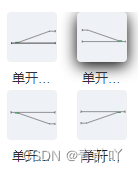
只需要给div添加以下class样式,主要实现效果在&:hover里面
.component-item {
  display: flex;
  align-items: center;
  width: 50px;
  height: 50px;
  border: 1px solid #f0f0f0;
  border-radius: 4px;
  box-sizing: border-box;
  overflow: hidden;
  margin-bottom: 5px;
  margin-left: 15px;
  &:hover {
    cursor: move;
    box-shadow: 0 4px 16px rgb(0, 0, 0);
  }
}
css3:鼠标悬停效果
<!doctype html>
<html>
	<head>
		<meta charset="utf-8">
		<title>hello h5</title>
		<style>
			* {
				margin: 0;
				padding: 0;
				box-sizing: border-box;
			}
			body {
				height: 100vh;
				background: #d6e5e7;
				display: flex;
				align-items: center;
				justify-content: center;
			}
			.nav {
				display: flex;
				align-items: center;
				position: relative;
				z-index: 1;
			}
			.item {
				width: 70px;
				height: 70px;
				display: flex;
				align-items: center;
				justify-content: center;
				flex-direction: column;
				cursor: pointer;
				position: relative;
				z-index: 1;
			}
			img {
				transform: scale(1);
				transition: .5s;
			}
			span {
				position: absolute;
				bottom: 5px;
				font-size: 12px;
				color: #fff;
				opacity: 0;
				transition: .5s;
			}
			.active img {
				transform: scale(.8);
			}
			.active span {
				opacity: 1;
			}
			.bg {
				width: 70px;
				height: 70px;
				border-radius: 10px;
				position: absolute;
				left: 0;
				top: 0;
				z-index: 0;
				transition: .5s;
			}
			.active:nth-child(1)~.bg {
				transform: translatex(calc(70px*0));
				background: #f53b57;
				box-shadow: 0 10px 15px #f53b57;
			}
			.active:nth-child(2)~.bg {
				transform: translatex(calc(70px*1));
				background: #5d62fb;
				box-shadow: 0 10px 15px #5d62fb;
			}
			.active:nth-child(3)~.bg {
				transform: translatex(calc(70px*2));
				background: #05c46b;
				box-shadow: 0 10px 15px #05c46b;
			}
			.active:nth-child(4)~.bg {
				transform: translatex(calc(70px*3));
				background: #0fbcf9;
				box-shadow: 0 10px 15px #0fbcf9;
			}
			.active:nth-child(5)~.bg {
				transform: translatex(calc(70px*4));
				background: #ffa801;
				box-shadow: 0 10px 15px #ffa801;
			}
		</style>
	</head>
	<body>
		<div class="nav">
			<div class="item active">
				<img src="home.png">
				<span>home</span>
			</div>
			<div class="item">
				<img src="goods.png">
				<span>goods</span>
			</div>
			<div class="item">
				<img src="cart.png">
				<span>cart</span>
			</div>
			<div class="item">
				<img src="mine.png">
				<span>mine</span>
			</div>
			<div class="item">
				<img src="setup.png">
				<span>setup</span>
			</div>
			<div class="bg"></div>
		</div>
	</body>
	<script src="http://libs.baidu.com/jquery/2.0.0/jquery.min.js"></script>
	<script type="text/javascript">
		$('.nav').on('click', '.item', function(event) {
			var index = $(this).index(); //获取到点击的.nav下,item的索引
			$(".nav .item").eq(index).addclass("active").siblings().removeclass("active"); //点击项高亮显示
		});
	</script>
</html>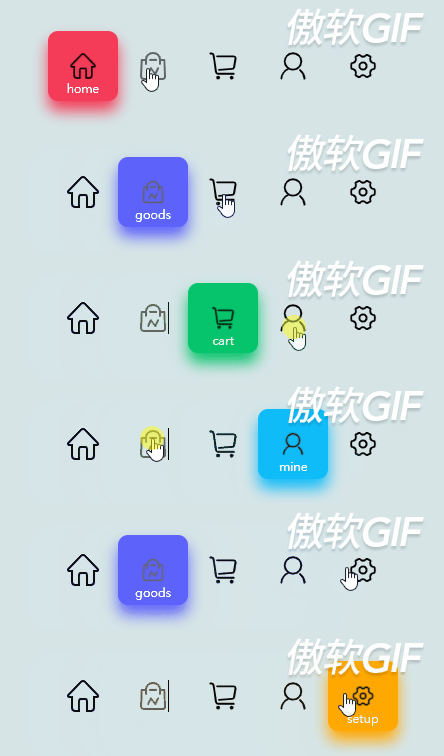
到此这篇关于css实现鼠标悬停在div上出现抬起元素的效果的文章就介绍到这了,更多相关css鼠标悬停抬起元素内容请搜索代码网以前的文章或继续浏览下面的相关文章,希望大家以后多多支持代码网!




发表评论