
 我要评论
我要评论tabbar 红点提醒,很多小程序都需要这个功能比如聊天小程序,电商小程序等
这时候我们需要进行自定义 tabbar
配置信息
更改 custom 为 true 变为自定义 tabbar
{
  "pages": [
    "pages/home/home",
    "pages/index/index",
    "pages/logs/logs"
  ],
  "window": {
    "navigationbartextstyle": "black",
    "navigationbartitletext": "weixin",
    "navigationbarbackgroundcolor": "#ffffff"
  },
  "componentframework": "glass-easel",
  "sitemaplocation": "sitemap.json",
  "lazycodeloading": "requiredcomponents",
  "usingcomponents": {
    "van-button": "@vant/weapp/button/index",
    "my-numbers": "./components/numbers/numbers"
  },
  "tabbar": {
    "custom": true,
    "color": "#000000",
    "selectedcolor": "#000000",
    "backgroundcolor": "#ffffff",
    "list": [{
      "pagepath": "pages/home/home",
      "text": "组件"
    }, {
      "pagepath": "pages/index/index",
      "text": "接口"
    }]
  }
}
配置好后你会发现没有出现 tabbar 这个是正常的
添加代码文件
在跟目录中创建文件夹和组件结构
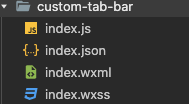
创建完成后可以看到这样的界面效果
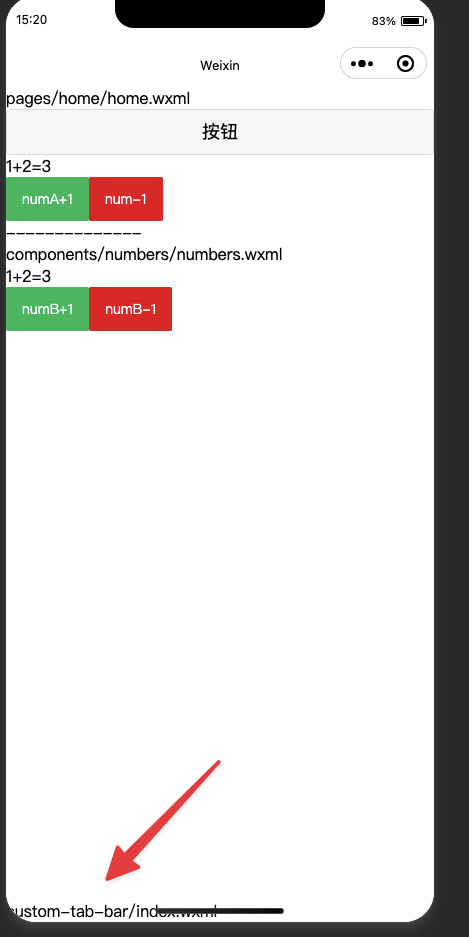
可以看到这块是一个自定义组建,如果不能出现该效果,可能是因为代码基础调试库的问题,通常在设置自定义 tabbar 提示 typeerror,这时候需要在 详情-》本地设置-》修改基础调试库,不要使用灰度测试版本,我这里实用的是 3.4.2 版本没有问题
实用 vant 组建 tabbar
引用
"usingcomponents": {
  "van-tabbar": "@vant/weapp/tabbar/index",
  "van-tabbar-item": "@vant/weapp/tabbar-item/index"
}
设置 tabbar 样式
<!--custom-tab-bar/index.wxml-->
<van-tabbar active="{{ active }}" bind:change="onchange">
  <van-tabbar-item info="3">
    <image
      slot="icon"
      src="{{ icon.normal }}"
      mode="aspectfit"
      style="width: 30px; height: 18px;"
      />
      <image
        slot="icon-active"
        src="{{ icon.active }}"
        mode="aspectfit"
        style="width: 30px; height: 18px;"
        />
        自定义
      </van-tabbar-item>
        <van-tabbar-item icon="search">标签</van-tabbar-item>
        <van-tabbar-item icon="setting-o">标签</van-tabbar-item>
      </van-tabbar>
设置 js
// custom-tab-bar/index.js
component({
  /**
   * 组件的属性列表
   */
  properties: {
  },
  /**
   * 组件的初始数据
   */
  data: {
    active: 0,
    icon: {
      normal: 'https://img.yzcdn.cn/vant/user-inactive.png',
      active: 'https://img.yzcdn.cn/vant/user-active.png',
    },
  },
  /**
   * 组件的方法列表
   */
  methods: {
    onchange(event) {
      this.setdata({ active: event.detail });
    }
  }
})
共享数据给 info 属性
创建 store 文件夹-》创建 storejs 文件
// 在这个 js 文件中专门创建 store 对象
import {observable,action} from 'mobx-miniprogram'
export const store = observable({
  numa:1,
  numb:2,
  info:3,
  //计算属性
  get sum(){
    return this.numa+this.numb
  },
  //action方法用来修改 store 中的值
  updatenum1:action(function(step){
    this.numa+=step
  }),
  updatenum2:action(function(step){
    this.numb+=step
  }),
})
设置 customjs 结构
import { storebindingsbehavior } from 'mobx-miniprogram-bindings';
import { store } from '../store/store';
component({
  behaviors: [storebindingsbehavior],
  properties: {},
  storebindings: {
    store,
    fields: {
      numa: () => store.numa,
      numb: () => store.numb,
      sum: 'sum'
    },
    actions: {
      buttontap: 'update'
    }
  },
  data: {
    info: 0,
    active: 0,
    icon: {
      normal: 'https://img.yzcdn.cn/vant/user-inactive.png',
      active: 'https://img.yzcdn.cn/vant/user-active.png',
    }
  },
  observers: {
    'sum': function(val) {
      this.setdata({
        info: val
      });
    }
  },
  methods: {
    mymethod() {
      this.setdata({
        info: this.data.sum
      });
    }
  }
});
设置 wxml 结构
<!--custom-tab-bar/index.wxml-->
<van-tabbar active="{{ active }}" bind:change="onchange">
  <van-tabbar-item info="{{numa}}">
    <image
      slot="icon"
      src="{{ icon.normal }}"
      mode="aspectfit"
      style="width: 30px; height: 18px;"
    />
    <image
      slot="icon-active"
      src="{{ icon.active }}"
      mode="aspectfit"
      style="width: 30px; height: 18px;"
    />
    自定义
  </van-tabbar-item>
  <van-tabbar-item icon="search">标签</van-tabbar-item>
  <van-tabbar-item icon="setting-o">标签</van-tabbar-item>
</van-tabbar>
这时候就可以进行加载
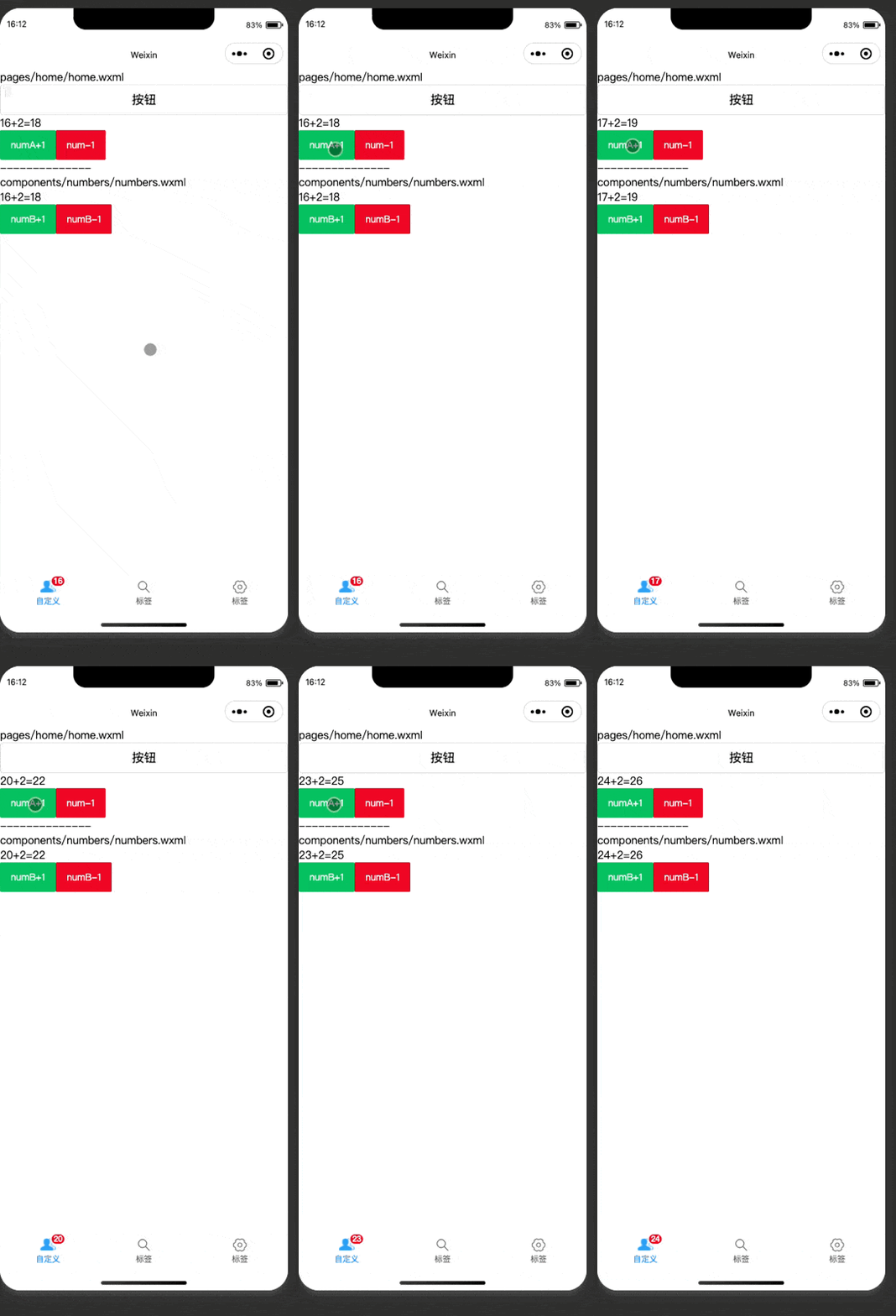
到此这篇关于微信小程序 tabbar 红点提醒解决方案的文章就介绍到这了,更多相关微信小程序 tabbar 红点内容请搜索代码网以前的文章或继续浏览下面的相关文章希望大家以后多多支持代码网!




发表评论