
 我要评论
我要评论前言
快速的体验 oceanbase 的 自动化部署过程,以及了解 oceanbase 集群安装成功后的目录特点和使用方法
⛳️ 1.什么是oceanbase
oceanbase是由蚂蚁集团完全自主研发的国产原生分布式数据库 ,始创于2010年。已连续9年平稳支撑双11, 创新推出“三地五中心”城市级容灾新标准 ,是一个在tpc-c和tpc-h测试上都刷新了世界纪录的国产原生分布式数据库。 产品采用自研的一体化架构,兼顾分布式架构的扩展性与集中式架构的性能优势,用一套引擎同时支持tp和ap的混合负载, 具有数据强一致、高可用、高性能、在线扩展、高度兼容sql标准和主流关系数据库、低成本等特点。

⛳️ 2.硬件要求
1.有笔记本或服务器,内存至少12g 。
2.操作系统不限,能安装 docker 环境即可。
docker 官方镜像:https://hub.docker.com/r/obpilot/oceanbase-ce
⛳️ 3.docker部署oceanbase
✨ 3.1 下载ob docker镜像
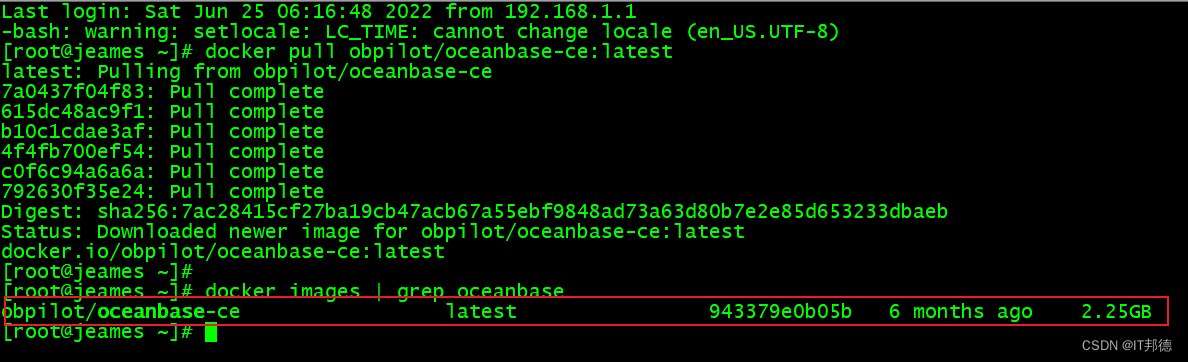
📢📢📢 下载镜像:
docker pull obpilot/oceanbase-ce:latest
✨ 3.2 创建容器
📢📢📢 新容器创建
docker run -itd -m 10g -p 2881:2881 -p 2883:2883
–name oceanbase-ce obpilot/oceanbase-ce:latest
📢📢📢 进入容器
[root@jeames ~]# docker exec -it oceanbase-ce bash
进入容器后,可以看看 readme.md 文档

✨ 3.3 obd工具查看集群及启动
--  查看集群列表
[admin@3ef732cfb95a ~]$ obd cluster list
配置文件:/home/admin/.obd/cluster/obdemo/config.yaml

-- 启动集群
[admin@3ef732cfb95a ~]$  obd cluster start obdemo
如果遇到以下两个报错
[error] (127.0.0.1) open files number must not be less than 20000 (current value: 1024)
[error] (127.0.0.1) not enough memory. (free: 6.7g, need: 8.0g)
一个是用户最大打开文件数不够,一个是可用内存不足8g,解决后成功启动。
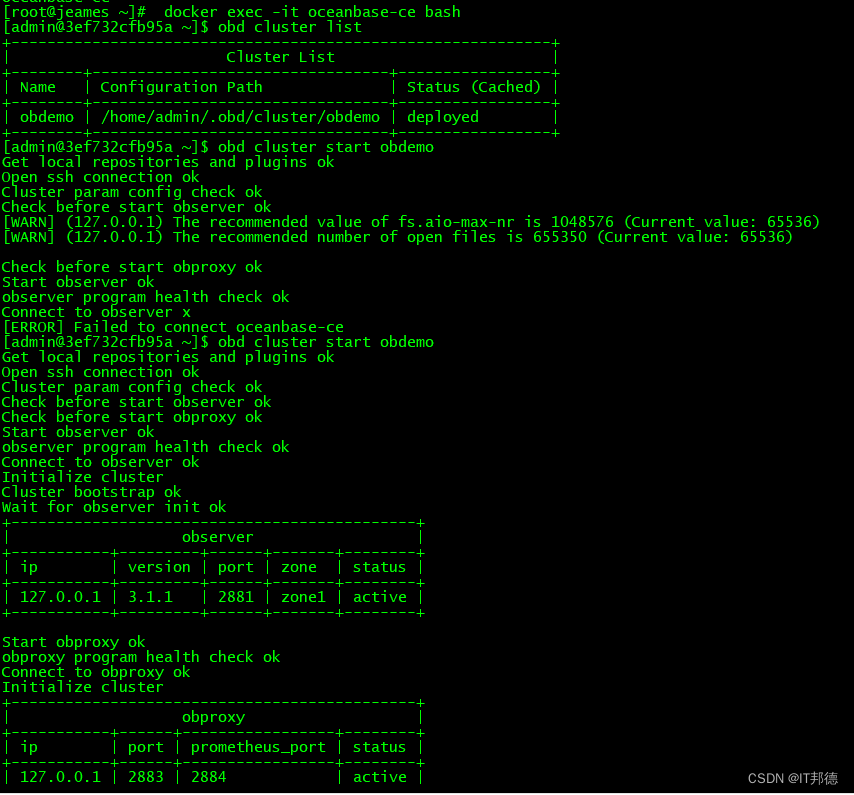
[admin@3ef732cfb95a ~]$ obd cluster list
+------------------------------------------------------------+
|                        cluster list                        |
+--------+---------------------------------+-----------------+
| name   | configuration path              | status (cached) |
+--------+---------------------------------+-----------------+
| obdemo | /home/admin/.obd/cluster/obdemo | running         |
+--------+---------------------------------+-----------------+

[admin@3ef732cfb95a ~]$ netstat -tulnp | grep 88
tcp        0      0 0.0.0.0:2881            0.0.0.0:*               listen      95/observer
tcp        0      0 0.0.0.0:2882            0.0.0.0:*               listen      95/observer
tcp        0      0 0.0.0.0:2883            0.0.0.0:*               listen      714/obproxy
tcp        0      0 0.0.0.0:2884            0.0.0.0:*               listen      714/obproxy
✨ 3.4 登录ob数据库并创建租户
admin 用户的密码是 : adminpwd123
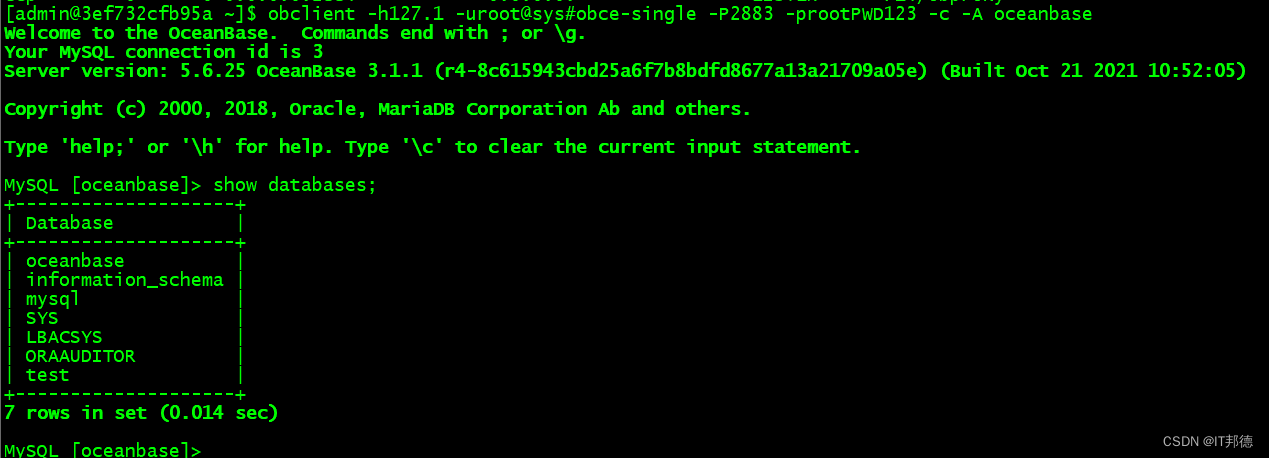
[admin@3ef732cfb95a ~]$ obclient -h127.1 -uroot@sys#obce-single -p2883 -prootpwd123 -c -a oceanbase
welcome to the oceanbase.  commands end with ; or \g.
your mysql connection id is 3
server version: 5.6.25 oceanbase 3.1.1 (r4-8c615943cbd25a6f7b8bdfd8677a13a21709a05e) (built oct 21 2021 10:52:05)

copyright (c) 2000, 2018, oracle, mariadb corporation ab and others.

type 'help;' or '\h' for help. type '\c' to clear the current input statement.

mysql [oceanbase]> show databases;
+--------------------+
| database           |
+--------------------+
| oceanbase          |
| information_schema |
| mysql              |
| sys                |
| lbacsys            |
| oraauditor         |
| test               |
+--------------------+
7 rows in set (0.014 sec)
📢📢📢 创建资源单元、资源池、租户
mysql [oceanbase]> create resource unit s4c1g max_cpu=4, min_cpu=4, max_memory='1g',
min_memory='1g', max_iops=10000, min_iops=1000, max_session_num=1000000, max_disk_size='1024g';

mysql [oceanbase]> create resource pool my_pool unit = 's4c1g', unit_num = 1;

mysql [oceanbase]> create tenant obmysql resource_pool_list=('my_pool'), primary_zone='random',comment 'mysql tenant/instance', charset='utf8' set ob_tcp_invited_nodes='%', ob_compatibility_mode='mysql';
✨ 3.5 登录obmysql tenant并创建数据库及表等
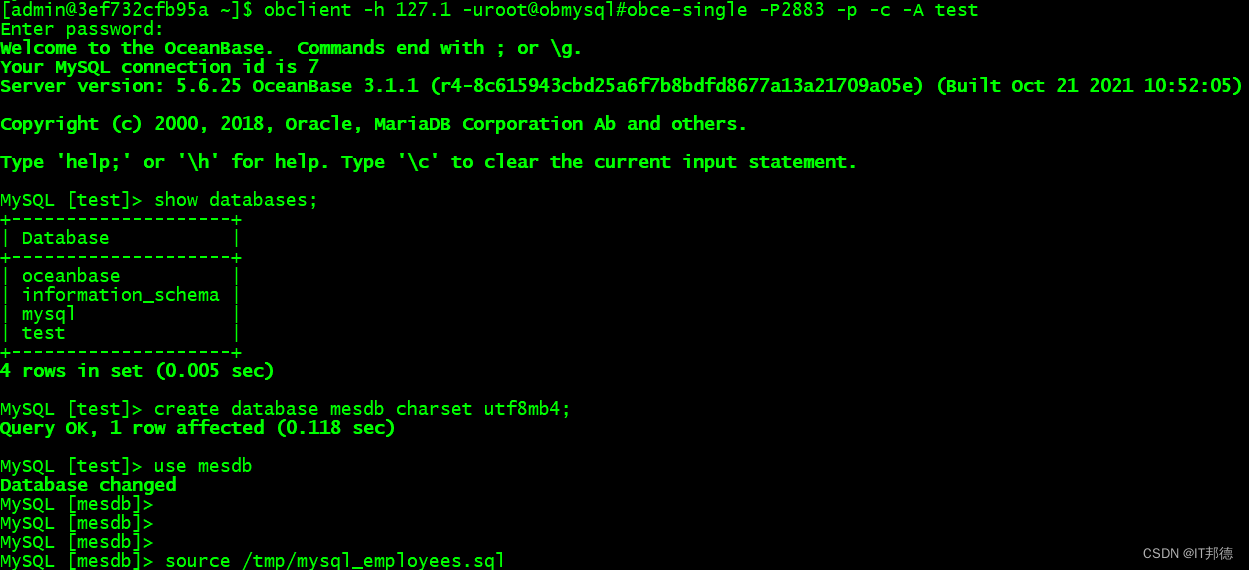
[admin@3ef732cfb95a ~]$ obclient -h 127.1 -uroot@obmysql#obce-single -p2883 -p -c -a test
enter password:
welcome to the oceanbase.  commands end with ; or \g.
your mysql connection id is 7
server version: 5.6.25 oceanbase 3.1.1 (r4-8c615943cbd25a6f7b8bdfd8677a13a21709a05e) (built oct 21 2021 10:52:05)

copyright (c) 2000, 2018, oracle, mariadb corporation ab and others.

type 'help;' or '\h' for help. type '\c' to clear the current input statement.

mysql [test]> show databases;
+--------------------+
| database           |
+--------------------+
| oceanbase          |
| information_schema |
| mysql              |
| test               |
+--------------------+
4 rows in set (0.005 sec)

mysql [test]> create database mesdb charset utf8mb4;
query ok, 1 row affected (0.118 sec)

mysql [test]> use mesdb
database changed
mysql [mesdb]>
mysql [mesdb]>
mysql [mesdb]>
mysql [mesdb]> source /tmp/mysql_employees.sql
到此这篇关于docker安装部署分布式数据库 oceanbase的文章就介绍到这了,更多相关docker安装oceanbase内容请搜索代码网以前的文章或继续浏览下面的相关文章希望大家以后多多支持代码网!


发表评论