
 我要评论
jdbc是什么?

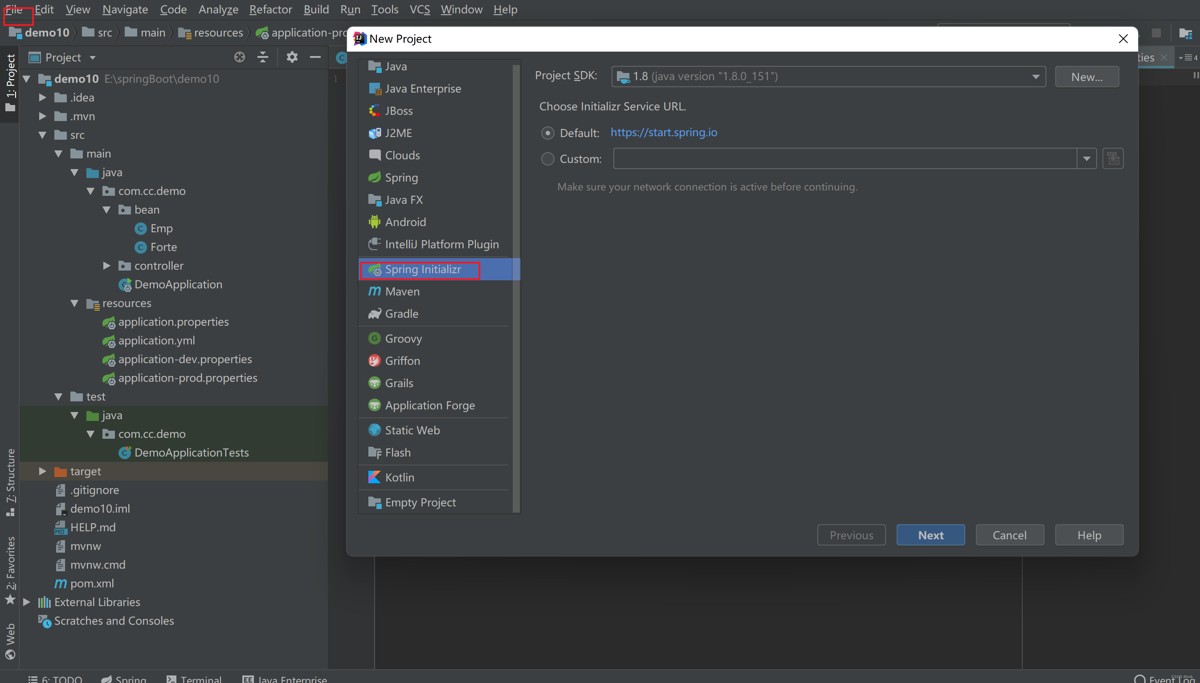
1.创建文件,勾选jdbc和mysql
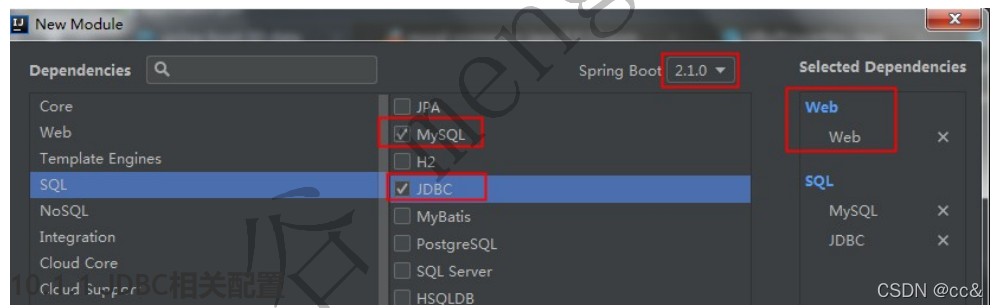
pom.xml中添加了mysql驱动包和jdbc启动器(创建项目勾选就不再需要了,需要自取)
<dependency>
	<groupid>mysql</groupid>
	<artifactid>mysql-connector-java</artifactid>
	<scope>runtime</scope>
	</dependency>
	<dependency>
	<groupid>org.springframework.boot</groupid>
	<artifactid>spring-boot-starter-jdbc</artifactid>
	</dependency>
2.application.yml添加数据库的配置
spring:
  datasource:
    username: root
    password: 123456
#    针对mysql8版本以上的驱动包,需要指定时区
    url: jdbc:mysql://127.0.0.1:3306/jdbc?servertimezong=gmt%2b8
    #    针对mysql8版本以上的驱动包,需要指定新的驱动类
    #driver-class-name: com.mysql.cj.jdbc.driver
mysql 8.x版本驱动包,要使用 com.mysql.cj.jdbc.driver 作为驱动类
3.测试类中进行测试
package com.cc.springboot;

import org.junit.jupiter.api.test;
import org.springframework.beans.factory.annotation.autowired;
import org.springframework.boot.test.context.springboottest;

import javax.sql.datasource;
import java.sql.connection;
import java.sql.sqlexception;

@springboottest
class springboot08datajdbcapplicationtests {
    @autowired
    datasource datasource;
    @test
    void contextloads() throws sqlexception {
        system.out.println("datasource:"+datasource.getclass());
        connection connection = datasource.getconnection();
        system.out.println(connection);
        connection.close();
    }

}
运行结果:
springboot 默认采用的数据源连接池是:com.zaxxer.hikari.hikaridatasource
数据源相关配置都在 datasourceproperties 中;
常见错误
the last packet sent successfully to the server was 0 milliseconds ago. the driver has not received any packets from the server.
说明mysql服务器没有启动,需要启动mysql服务, 你用navicat连接试试看是否可以连接,不可以说明 没有启动 ;
the server time zone value 'öð¹ú±ê׼걼ä' is unrecognized or represents more than one
时区异常:
需要配置文件中指定时区:
jdbc:mysql://127.0.0.1:3306/jdbc?servertimezone=gmt%2b8
总结
以上为个人经验,希望能给大家一个参考,也希望大家多多支持代码网。




发表评论