
 我要评论
我要评论在上述中,我们知道了在mysql中对表的约束的条件之后.但是其实我们现在的知识并不知道怎么在表中插入数据的.
今天我们就来了解一下有关表的操作.
插入数据
在这之前我们先创建出一个表结构
create table test1 ( name varchar(20) not null default ' ', id int primary key auto_increment );
我么你插入数据的语句是
insert [into] table_name
 [(column [, column] ...)]
 values (value_list) [, (value_list)] ...
value_list: value, [, value] ...
插入的时候我们是可以进行单个语句插入和多个语句插入的.
- 单个语句插入
insert test1 values ('张三',1);
- 多个语句插入
insert test1 values
    -> ('李四',2),
    -> ('王五',3);
我们也是可以对特点的列进行插入的.
alter table test1 add class int;
我们给我们的表结构添加一行信息.
insert test1 (name,class) values ('july',101);
至于我们没有进行插入的信息是他是会赋值为他的默认值的.
但是在这里我们省略的是自增的字段.
更新数据
update table_name set 字段=... where...
至于这个where是怎么使用的,后文中会有讲解
替换数据
当我们插入的数据我们想要将他替换,或者我们是想要对我们的数据进行更新的话.
但是有一个我问题就是我们并不知道我们将要插入的新数据是不是已经存在的.
例如:我们需要更新july的班级,但是我们不知道july的数据是否存在于表结构中)
insert test1 values ('july',4,102);
error 1062 (23000): duplicate entry '4' for key 'test1.primary'
我们正常进行插入的话,因为我们设置有主键的,因为主键的唯一性我们的操作一定是不被允许的.
那么我们应该怎么操作呢?
replace into table_name () values ();
- 这个语句如果主键冲突的话会进行直接的替换.
- 如果主键不冲突的话会直接添加的.
replace test1 values ('july',4,102);
查找数据
创建这个表结构
create table exam_result (
 id int unsigned primary key auto_increment,
 name varchar(20) not null comment '同学姓名',
 chinese float default 0.0 comment '语文成绩',
 math float default 0.0 comment '数学成绩',
 english float default 0.0 comment '英语成绩'
);
适当的插入数据
insert into exam_result (name, chinese, math, english) values
 ('唐三藏', 67, 98, 56),
 ('孙悟空', 87, 78, 77),
 ('猪悟能', 88, 98, 90),
 ('曹孟德', 82, 84, 67),
 ('刘玄德', 55, 85, 45),
 ('孙权', 70, 73, 78),
 ('宋公明', 75, 65, 30);
全列查询
也就是对整个表的数据进行查询.
select * from table_name;
select * from exam_result;
指定列查询
select 查询的字段 from table_name;
select id,name from exam_result;
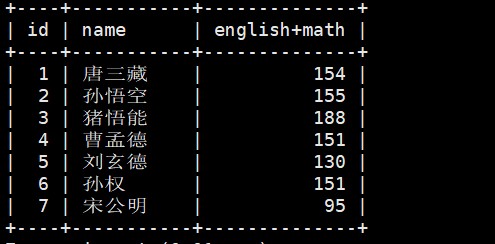
查询字段为表达式
select id,name,666 from exam_result;
当然也是可以这样的.
select id,name,english+math from exam_result;
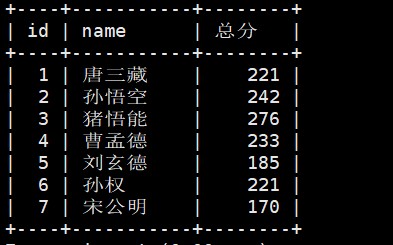
为查询结果指定别名
select id,name,english+math+chinese 总分 from exam_result;
去重查询
在日常进行查询的时候我们难免需要对数据进行去重查询.
select distinct math from exam_result;
where语句条件查询
| 运算符 | 说明 |
|---|---|
| >, >=, <, <= | 大于,大于等于,小于,小于等于 |
| = | 等于,null 不安全,例如 null = null 的结果是 null |
| <=> | 等于,null 安全,例如 null <=> null 的结果是 true (1) |
| !=, <> | 不等于 |
| between a0 and a1 | 范围匹配,[a0, a1],如果 a0 <= value <= a1,返回 true (1) |
| in (option, ...) | 如果是 option 中的任意一个,返回 true (1) |
| is null | 是 null |
| is not null | 不是 null |
| like | 模糊匹配。% 表示任意多个(包括 0 个)任意字符;_ 表示任意一个字符 |
| 运算符 | 说明 |
|---|---|
| and | 多个条件必须都为 true (1),结果才是 true (1) |
| or | 任意一个条件为 true (1),结果为 true (1) |
| not | 条件为 true (1),结果为 false (0) |
具体是怎么使用的我们根据现有的表结构直接实战
英语不及格的同学及英语成绩 ( < 60 )
select * from exam_result where english<60;
语文成绩在 [80, 90] 分的同学及语文成绩
select * from exam_result where chinese between 80 and 90;
数学成绩是 58 或者 59 或者 98 或者 99 分的同学及数学成绩
select * from exam_result where math = 58 or math =59 or math= 98 or math = 99;
select name, math from exam_result where math in (58, 59, 98, 99);
姓孙的同学 即 孙某同学
select name from exam_result where name like ('孙%');
语文成绩好于英语成绩的同学
select * from exam_result where chinese>english;
总分在 200 分以下的同学
select name,english+chinese+math 总分 from exam_result where english+chinese+math<200;
这里我们的where语句中是否可以使用这个别名呢?
select name,english+chinese+math 总分 from exam_result where 总分<200;
error 1054 (42s22): unknown column '总分' in 'where clause'
看起来是不可以的,这是为什么呢?
我们可以这么来理解.
我们在查询数据的时候我们先需要找到对应的表和我们限制的条件,在这之后我们才会关心我们需要查找的字段,
总的来说在上述的语句中where语句的执行优先级是优于建立别名的,所以where不知道别名是什么.
语文成绩 > 80 并且不姓孙的同学
select * from exam_result where chinese >80 and name not like '孙%';
孙某同学,否则要求总成绩 > 200 并且 语文成绩 < 数学成绩 并且 英语成绩 > 80
select * from exam_result where (name like '孙%') or english+math+chinese>200 and chinese < math and english >80;
null 的查询
我们在表中添加一个qq号的字段
alter table exam_result add qq int;
更新我们的数据给其中一个人的qq号不是null.(我们新增字段如果不加约束的话就是null).
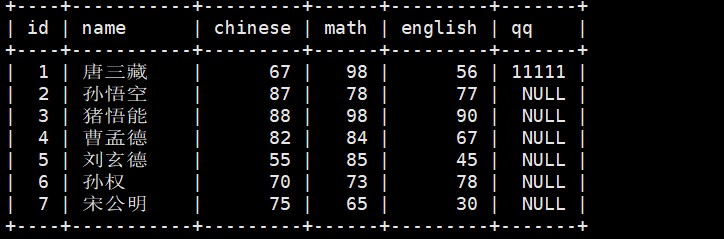
查询 qq 号已知的同学姓名
select * from exam_result where qq is not null;
null 和 null 的比较,= 和<=> 的区别
select null = null, null = 1, null = 0;
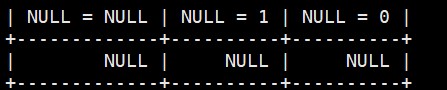
可以看到我们用这个运算符的运算结果都是null
select null <=> null, null <=> 1, null <=> 0;

所以这个运算符才可以计算包含null的式子.
到此这篇关于mysql 系列教程之基本查询入门与详解的文章就介绍到这了,更多相关mysql基本查询内容请搜索代码网以前的文章或继续浏览下面的相关文章希望大家以后多多支持代码网!



发表评论